
 New AI features are available
 Listed in
 If you've ever wanted to back up your DVD or Blu-ray collection, you've probably heard of MakeMKV. It's so popular that many people still use it years after it first appeared.
The problem? The official website has a habit of going offline. Sometimes for hours, sometimes longer. When that happens, downloading the latest version becomes a real headache. You end up searching forums, checking archives, or wondering if the program is even still supported.
That's exactly why this guide exists. As a long-time user, I'll show you every reliable way to download MakeMKV when the official site is down. You'll find direct alternatives, archived links, and command-line options for different operating systems.
I'll also show you a more stable option if you are tired of the constant workarounds. MakeMKV is still useful, but it comes with some ongoing frustrations that not everyone wants to deal with.
Official Website
The first place you should always check is the official MakeMKV website. When it's working, this is the cleanest and safest way to get the program, and it's where the developers post the latest versions. When the site is up and running, the download process is straightforward.
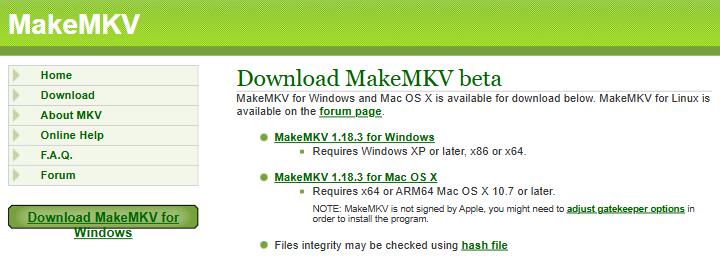
Here are the current download links for version 1.18.4:
- Windows:
https://www.makemkv.com/download/Setup_MakeMKV_v1.18.4.exe - macOS:
https://www.makemkv.com/download/makemkv_v1.18.4_osx.dmg - Linux:
https://www.makemkv.com/download/makemkv-bin-1.18.4.tar.gzhttps://www.makemkv.com/download/makemkv-oss-1.18.4.tar.gz
Right now, though, the website is often unreliable. Many people report Cloudflare 525 errors or pages that simply refuse to load. The download section and the purchase page have both been affected for weeks at a time.
If the links above work for you, great. Download the file, install it, and you are done. If they don't load, don't waste too much time refreshing. There are better options available, and we'll cover them next.
Wayback Machine
When the official site is down, the Internet Archive's Wayback Machine becomes one of the most useful tools available.
The Wayback Machine is a digital archive of the internet. Run by the nonprofit Internet Archive, it has been taking snapshots of web pages for decades. If a page existed at some point in the past, there is a good chance the Wayback Machine saved a copy. That includes software installer files.
Here are two recent snapshots that still work:
- Windows: https://web.archive.org/web/20260725053714/https://www.makemkv.com/download/Setup_MakeMKV_v1.18.4.exe
- macOS: https://web.archive.org/web/20260718193213/https://www.makemkv.com/download/makemkv_v1.18.4_osx.dmg
If these specific links stop working later, you can search for the original download URLs yourself on web.archive.org. Just paste the full MakeMKV download link into the search box and look for a recent capture that includes the file.
This method is free, doesn't require any extra accounts, and often succeeds when everything else fails. It's especially handy for Windows and Mac users who just need the installer quickly.
Reputable Third-Party Site
If the official website and the Wayback Machine both let you down, the next safe option is a long-standing video software site called VideoHelp. It has been around since the early days of DVD ripping, and the community there knows their stuff.
You can find MakeMKV there at: https://www.videohelp.com/software/MakeMKV
VideoHelp has hosted the program for years and is generally trusted in the video community. It usually offers the latest Windows and Mac versions without the extra junk that shows up on random download portals.
A few things to keep in mind. Always double-check the version number, and read user reviews. Avoid any site that asks you to install extra toolbars or download managers. Stick with known names like VideoHelp, and you'll stay out of trouble.
This route is simple and works well when the official servers are having another bad day.
OS Package Managers
On some operating systems, you can install MakeMKV through package managers. These tools let you grab the program with a few commands instead of hunting for installer files.
Linux
Linux is where package managers shine the most. Several of them host MakeMKV independently, which means they often keep working even when the official website is down. Here are some reliable sources:
Method |
Command |
Best for |
|---|---|---|
APT PPA |
|
Ubuntu, Linux Mint, Pop!_OS, etc. |
Flatpak |
|
Almost any Linux distro |
Snap |
|
Ubuntu and Snap-enabled systems |
Windows
Windows has its own package managers too. Microsoft has built a package manager called Winget directly into recent versions of Windows. With winget, you can try:
winget install -e --id GuinpinSoft.MakeMKV
With Chocolatey:
choco install makemkv
These commands are convenient when everything is working. The catch is that they still download the installer from the official MakeMKV website. If that site is offline, the installation will usually fail. So on Windows, package managers are helpful but not a full backup plan.
macOS
On a Mac, the main option is Homebrew. If you spend any time in the Terminal, you probably already have it installed. Once Homebrew is set up, you can try installing MakeMKV with:
brew install --cask makemkv
Note: Homebrew has already marked the MakeMKV package as deprecated because of signing issues with Apple's Gatekeeper. It is scheduled to be disabled on September 1, 2026.
This does not mean the software is unsafe or broken. It just means you might see a warning when you try to install it. You can still install it, but you may need to manually approve the application in System Settings > Privacy & Security after installation. Read our guide about MakeMKV on Mac for detailed steps.
MakeMKV Alternative
All the methods above can get MakeMKV onto your computer when the official site is acting up. Still, many people eventually get tired of the constant workarounds. The website goes down, the beta key expires, and you have to hunt for a new one. For some users that becomes more hassle than it's worth.
If you'd rather skip the ongoing maintenance, a more stable option is VideoProc Converter AI. It handles disc ripping, format conversion, and a range of editing tasks in one program. You don't have to chase rotating keys or wait for a website to come back online.
VideoProc Converter AI also adds features that MakeMKV leaves out. You get built-in conversion tools, AI-powered enhancements, and a clearer interface that works well for both beginners and more experienced users. Updates arrive through a normal software channel instead of depending on a single frequently offline site.

VideoProc Converter AI - MakeMKV Alternative for DVD Ripping
- No rotating keys, no site worries, just stable connections & ease of use
- Convert and compress DVDs to MP4, MKV, MOV, AVI, MP3…
- Rip DVD and 1:1 backup to digital copies: ISO, VOB, Video_TS, MKV…
- Bypass the region restriction and copy protection schemes
- All-in-one: DVD backup, AI enhancer, converter, downloader, quick edits

MakeMKV remains a solid free choice to rip discs to MKV when it cooperates. But if you want something that simply works without the extra steps, VideoProc Converter AI is worth a look. It removes most of the friction that comes with MakeMKV's current setup.
Important Tips
Hash Verification
Whenever possible, check the file's hash after you download it. This is especially important when you are grabbing the program from archives or third-party sites.
A hash is a unique digital fingerprint that confirms the installer has not been altered. MakeMKV provides official hash files on its download page. These files contain SHA-256 checksums for each installer. If even one tiny bit of the file changes, the checksum changes completely.
Here are the official hashes for MakeMKV 1.18.4.
File |
SHA-256 hash |
|---|---|
Setup_MakeMKV_v1.18.4.exe |
a7da42f08765f1186154eb3e2af08c30f0ac66b0a42aa7e4430aa498d0927b77 |
makemkv_v1.18.4_osx.dmg |
b77de54fffe4bd8dfdb498bed15a44cf4ca2002c3f86e9184faf8407b2486166 |
makemkv-bin-1.18.4.tar.gz |
cee56de0baa5531abed16bd862742d308d772b4ab4dae16ee865bf74f04a1608 |
makemkv-oss-1.18.4.tar.gz |
8590063648d42ec2a958b74573d7022f0f4c334e4e4fe7dd53b70c6e748ba453 |
After downloading the file, compare its hash with the value above. If they match exactly, the file is identical to the original. Here is how you verify your download:
Windows: Open PowerShell and run:
Get-FileHash -Algorithm SHA256 "Setup_MakeMKV_v1.18.4.exe"
macOS: Open Terminal and run:
shasum -a 256 makemkv_v1.18.4_osx.dmg
Linux: Open Terminal and run:
sha256sum makemkv-bin-1.18.4.tar.gz
Replace the filename with the one you actually downloaded. If the long string matches the official hash exactly, the file is good. If even one character is different, download it again from a trusted source.
 Note for Linux users: the SHA-256 hash for Linux downloads may not match the official hash. This is usually because the Linux files are double-compressed. The "bad" hash download is actually a doubly compressed gzip file that contains the "good" gzip inside it. If you encounter this, try using a different browser like Chromium or use
 wget to download the file. The hashes can vary depending on how the file is downloaded.
Beta Key System
MakeMKV has stayed free for a long time by running as a public beta. The trade-off is that you need a registration key, and those keys expire every month or two. When the current key stops working, the program asks you to enter a new one. You'll also need to re-enter the key after installing a new version.
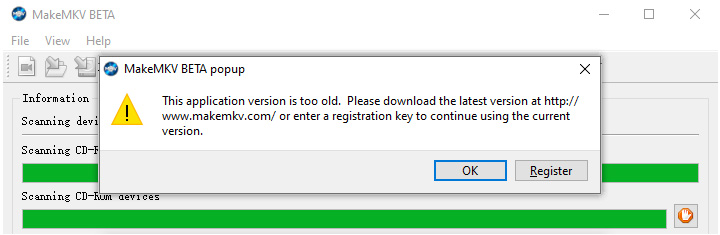
Fresh keys are posted on the official MakeMKV forum. If the official forum is inaccessible, you can check our regularly updated license key page.
Permanent licenses exist, but the purchase page has been unreliable for months. This ongoing key requirement is one of the main reasons some people eventually look for alternatives.
SDF.bin
SDF.bin is a data file that MakeMKV uses for LibreDrive support, especially with UHD/4K discs and firmware-related features. It's not strictly required for basic use, but it's useful to have it available offline for full functionality.
The program normally downloads this file on its own when you have an internet connection. If you are working offline or the automatic download fails, you'll need to download the sdf.bin file and then place it manually in your MakeMKV data folder.
- Windows:
C:\Users\YourName\.MakeMKV\ - macOS:
~/Library/MakeMKV/ - Linux:
~/.MakeMKV/
Start MakeMKV. It will automatically absorb the file into _private_data.tar and you shouldn't need to touch it again.
Conclusion
Downloading MakeMKV when the official website is down is doable if you know where to look. Start with the official links when they are working. If they fail, move to the Wayback Machine or a trusted site like VideoHelp. Linux users have the extra advantage of package managers that often keep working even when the site is offline.
MakeMKV itself is still capable and free. It does a clean job of ripping discs into high-quality MKV files. At the same time, the unstable website, expiring keys, and limited built-in features can wear people down over time.
If you'd prefer a more reliable experience with fewer workarounds, VideoProc Converter AI is a practical alternative. It covers lossless backup (ISO, MKV, etc.) and format conversion (MP4, MOV, etc.) in one place, and it doesn't rely on a site that keeps going offline. For many users, that stability makes the difference between a quick backup and another afternoon spent troubleshooting. Feel free to download and try it out.