
 New AI features are available
 Listed in
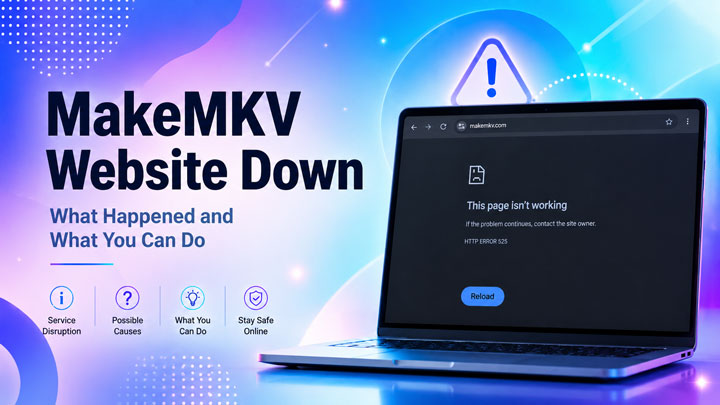
 MakeMKV is down again, leaving users unable to access parts of its official website. Reddit threads and posts on the MakeMKV forum are raising the same questions: What happened to makemkv.com? Why do older DNS and hosts-file workarounds no longer help? And how can users download the installer, update a beta key, or purchase a license while key pages remain unavailable?
"makemkv.com is offline yet again...and the advice in the 1 year old post about how to modify one's hosts file to manually point the DNS names to IP addresses no longer works. Who owns that domain? Is there any way to contact them about the problem?" - by @keithfkelly on reddit.com
"what happened to makemkv.com?" -by @leyer757538 on reddit.com
We checked MakeMKV on August 6, 2026, and found that several key pages were unavailable while the forum and beta key page remained online. So, MakeMKV has not disappeared completely, but parts of its website are clearly not working. What this means for you depends on what you are trying to do. If MakeMKV is already installed, you may still be able to use it. But if you need to download MakeMKV, get a new beta key, or buy a license, the outage may stop you from moving forward. This guide explains what happened, why MakeMKV may work for some users but not others, what you can do during the current outage, and how to troubleshoot similar MakMKV website access problems in the future.
This article will guide you through:
Is MakeMKV Down Right Now
The clearest answer is that MakeMKV is partly down. The forum and beta key page are working, but several core pages failed during our test.
| Service | Latest Check | What It Means |
|---|---|---|
Main website |
HTTP 525 error |
Product information and general pages may not load |
Download page |
HTTP 525 error |
New users may be unable to get the official installer |
Purchase page |
HTTP 525 error |
A permanent license may not be available for purchase |
Support forum |
Online |
Announcements and community discussions remain accessible |
Beta key page |
Online |
The current key is listed as valid through September 2026 |
Installed application |
Varies |
A valid installation may continue working normally |
Note: Partial outages rarely look the same for everyone. One reader can land on a cached page while another gets an error, depending on location, routing, and timing. The table shows what we reached in our August 3 test, so treat it as a snapshot of the outage.
What Happened to MakeMKV
While MakeMKV has yet to issue an official public statement regarding the outage, checks on the site and updates posted on its official forum provide a clear timeline of events:
- Around July 18: Users began reporting that the main MakeMKV website and download servers were offline, though the official support forum remained accessible.
- July 28: A forum moderator confirmed that the backend registration and purchase services were offline, adding that the community was waiting on the developer to resolve the infrastructure issues.
- July 31: The previous free beta key expired, temporarily locking out users who relied on the trial version.
- August 1: The MakeMKV beta key was updated in the official announcement thread, with validity through the end of September 2026.
- August 2: A MakeMKV forum moderator posted an updated beta key valid through late September 2026, confirming that it successfully restored full access for existing users who already had the app installed.
Why the Outage Caused So Much Confusion
The disruption was severely amplified by unfortunate timing: the main site collapsed right as the July beta key expired. While the forum remained operational and quickly supplied a fresh beta key to rescue existing users, the broader ecosystem remained crippled. Because the main site was down, new users could not download the installer, prospective buyers were blocked from purchasing licenses, and permanent license validation failed. There is no evidence of a legal takedown or permanent closure. However, the event has highlighted how heavily the application relies on its centralized web infrastructure.
What to Do During the Current MakeMKV Outage
The current outage is mainly affecting MakeMKV's website rather than the software already installed on users' computers. The main website, download page, and purchase page are returning HTTP 525, while the forum and beta-key page remain available. There is no local setting that can fully repair this website-side problem. What you can do depends on which part of MakeMKV you need.
1. If MakeMKV Is Already Installed
If MakeMKV is already installed and activated with a permanent license, you should still be able to use it normally. The website outage does not deactivate a paid copy or prevent the program from reading discs on your computer. For now, avoid uninstalling MakeMKV unless absolutely necessary. With the official download page unavailable, reinstalling it may be difficult. It is also worth locating and backing up:
- Your MakeMKV registration code
- The original purchase email
- Any installer you previously downloaded from the official website
Save copies somewhere other than the computer running MakeMKV, such as an external drive or private cloud folder. That way, a system reset or computer failure will not leave you dependent on the unavailable website.
If Your MakeMKV Beta Key Has Expired
The official MakeMKV forum currently lists a beta key valid through the end of September 2026. If MakeMKV opens with an expiration or registration message, replace the old key with the current one.
Step 1: Open this MakeMKV beta key page and copy the current MakeMKV registration key.
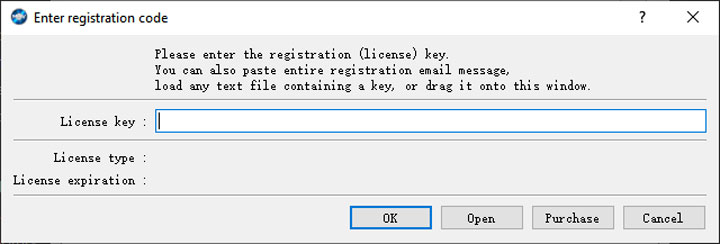
Step 2: Launch MakeMKV and click Help > Register from the top menu.
Step 3: Paste the new key into the registration box and click OK.
Step 4: Close MakeMKV, open it again, and check that the expiration message has disappeared.
Note:
- If MakeMKV rejects the key: Eject the disc, close the program completely, and enter the key again. Also check that you are running a recent MakeMKV version, since an outdated build can show a similar expiration error.
- The current beta key is valid through the end of September 2026. Users who already have MakeMKV installed can follow these steps without relying on the unavailable download or purchase pages.
2. If You Need to Reinstall or Download MakeMKV
The official MakeMKV download page is currently unavailable, so getting a fresh installer takes a little more care than usual. There are still several places worth checking, but the goal is not simply to find a file with “MakeMKV” in its name. You also need to confirm that it is a recent, genuine release.
At the time of writing, the latest version is MakeMKV 1.18.4. An older build may still install, but it can display a version-expiration message even after you enter the latest beta key. Unless you need an earlier release for a specific compatibility reason, look for the newest version you can verify.
Solution 1. Download MakeMKV by Searching Your Local Archives for a Saved Installer
Before turning to third-party mirrors, search your local Downloads folder, external drives, or personal cloud storage for a previously saved installer. An original setup file directly from makemkv.com remains the safest option. For the latest build (v1.18.4), search for these exact file names:
- Windows:
Setup_MakeMKV_v1.18.4.exe - macOS:
makemkv_v1.18.4_osx.dmg - Linux binary package:
makemkv-bin-1.18.4.tar.gz - Linux source package:
makemkv-oss-1.18.4.tar.gz
Note: While an older build like v1.18.3 may still run, using the latest build avoids immediate version-expiration warnings after entering the new beta key.
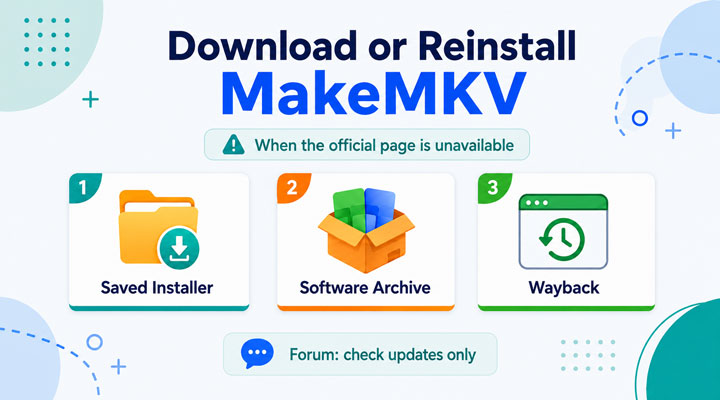
Solution 2. Download the Original Official MakeMKV Installer via the Wayback Machine
If you don't have a local copy, the internet's web archive is your best bet for grabbing the untouched official installer without relying on third-party sites. Because MakeMKV's installation files are relatively small, the Wayback Machine often has the exact EXE or DMG binary cached on its servers:
Step 1. Go to the Wayback Machine and enter the official download URL: https://www.makemkv.com/download/.
Tips:
You can also download MakeMKV from Wayback Machine by using the links below directly:
For windows: https://web.archive.org/web/20260725053714/https://www.makemkv.com/download/Setup_MakeMKV_v1.18.4.exe
For macOS: https://web.archive.org/web/20260615214728/https://www.makemkv.com/download/makemkv_v1.18.4_osx.dmg
Step 2. Pick a functional calendar snapshot from early July 2026 (shortly before the site went offline).
Step 3. Click the download link for your OS (Windows, macOS, or Linux).
The browser will download the file directly from web.archive.org. This bypasses the offline server while guaranteeing you get the authentic, unmodified installer straight from MakeMKV's original files.
A Quick Note on Speed:
While this method guarantees an authentic file, downloads from web.archive.org can sometimes be slower or fail midway due to server load.
Solution 3. Grab the File from a Reputable Download Site
If you prefer not to deal with web archives, large mirror sites like VideoHelp and MajorGeeks are solid alternatives.
VideoHelp: They host installer copies directly on their own servers rather than just linking back to the official site. If the main download button gives you an error, scroll down to the "Old Versions" section and pick the v1.18.4 mirror link.
MajorGeeks: They carry clean builds for Windows, macOS, and Linux. Just double-check that you're clicking the right platform and version before downloading.
Quick tip: Stick to known software sites over random file-sharing links, and always run a quick antivirus scan on any fresh file.
⚠️Attention: Check the MakeMKV File Before You Install It
Before opening an installer from a mirror or archive, check that the version and filename match an official MakeMKV release. On Windows, also inspect the publisher and digital signature. If a trusted SHA256 checksum is available, compare it with the file you downloaded. Be cautious with:
- Repacked or "pre-activated" installers
- Password-protected ZIP or RAR files from unknown uploaders
- Key generators
- Unofficial portable editions
- Personal Google Drive or Dropbox links with no clear source
- Installers that ask you to disable antivirus software
When the source or file integrity cannot be confirmed, it is safer to wait for the official MakeMKV download page to return or use an MakeMKV alternative to back up or rip your DVD.
Other Reasons MakeMKV May Be Unavailable
The current August 2026 outage is producing an HTTP 525 error, which points to a problem between Cloudflare and MakeMKV's origin server. That does not mean every future MakeMKV outage will have the same cause. At another time, the site might fail only on your computer, your internet provider, or a particular VPN. The exact error message matters.
1. Temporary Server Problems
Sometimes the simplest explanation is the correct one: the server is struggling. The website may not go completely offline. Instead, pages load slowly, work intermittently, or time out after a minute or two. This kind of instability has been reported by MakeMKV users before. The site may work normally one day, become painfully slow the next, and recover without a public explanation. When the same behavior appears on several devices and networks, there is little value in endlessly changing local settings. The server needs time—or attention from its operator.
2. DNS Resolution Failures
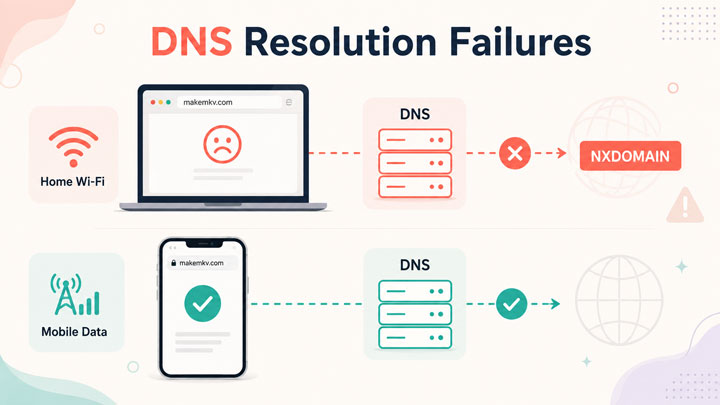
DNS is what turns makemkv.com into the numerical address your device needs to reach the server. When that process fails, you may see errors such as:
- DNS_PROBE_FINISHED_NXDOMAIN
- Server IP address could not be found
- Name could not resolve
- This site cannot be reached
A DNS error is not always proof that MakeMKV's server is offline. Your computer, router, internet provider, or DNS service may be holding an outdated record. That is why a website can work on mobile data but fail on home Wi-Fi.
3. Domain or DNS Configuration Issues
A website can also disappear when its domain registration expires or its DNS records are changed incorrectly. During this kind of incident, users often see:
- Missing DNS records
- Unexpected redirects
- A registrar holding page
- Different name servers
- A domain-parking page
- Different results in different countries
MakeMKV users have discussed domain-related problems in the past. Those incidents help explain some earlier outages, but they should not automatically be used to explain the current HTTP 525 error.
4. Cloudflare or CDN Problems
MakeMKV users have seen Cloudflare error pages several times in 2026, with 522 and 525 errors reported in February, May, and July. The symptoms have been fairly similar each time: pages load painfully slowly, parts of the site stop responding, or the forum works while the main website does not.
Despite the Cloudflare branding on the error page, the fault may still lie with MakeMKV's server. Error 522 means the server took too long to respond, while 525 means Cloudflare could not establish a secure connection to it. That can leave the site in a confusing half-working state. The homepage may load from cache, while downloads, purchases, or registration remain unavailable. To see whether MakeMKV is really back, check the page you actually need rather than relying on the homepage alone.
5. Regional Routing and VPN Differences
The route your connection takes to MakeMKV can vary by location, ISP, DNS provider, and VPN server. A VPN may make the site stop working because it uses a poor route or problematic DNS resolver. On another day, switching to a different VPN location may bypass an ISP routing issue. Neither result proves that MakeMKV is geo-blocking visitors. Ordinary network-routing problems can look very similar.
6. Heavy Traffic or Automated Crawlers
Traffic spikes can slow down almost any website, particularly a relatively small service receiving sudden attention. Some community members have speculated that crawlers, automated requests, or increased traffic may contribute to MakeMKV's performance problems. There has been no official confirmation of that theory, however. It is best treated as a possibility, not an established cause.
How to Troubleshoot MakeMKV Access Problems
The current HTTP 525 outage cannot be fixed from your computer, since the error occurs between Cloudflare and MakeMKV's origin server. The steps below are more useful when MakeMKV appears to be working for other people, or when you see a browser, DNS, VPN, or connection error instead.
1. Check What Is Actually Down
Start by opening the specific MakeMKV service you need. The homepage, download page, purchase page, forum, and beta-key thread do not always go offline at the same time.
A cached homepage can also make the website appear healthy even when downloads or checkout remain unavailable. If the homepage opens, test the download or purchase page directly before assuming the outage is over.
The MakeMKV forum is worth checking at this point. Recent posts can quickly show whether other users are seeing the same error. If several people report the same problem, there is little benefit in changing settings on your computer.
2. Try Another Browser, Device, or Network
Open MakeMKV in a private or incognito window first. If it works there, cached data, cookies, an extension, or a browser setting may be interfering with the connection. If the problem remains, try another device and switch between Wi-Fi and mobile data. The results can help narrow down the cause:
- If MakeMKV fails on every device and network, the website is probably down.
- If it works on mobile data but not Wi-Fi, your router, ISP, or DNS resolver may be involved.
- If it works on another device using the same Wi-Fi, the problem is probably limited to the original device or browser.
Disable browser extensions one at a time rather than turning off every privacy or security feature at once.
3. Disconnect the VPN
A VPN can change both the route and DNS service used to reach MakeMKV. Disconnect it, reload the page, and see whether access returns. If the site starts working, the selected VPN server may be using an unreliable route, an outdated DNS record, or an IP address that is being rejected. Switching to another VPN location may also help, although this does not necessarily mean MakeMKV is intentionally blocking a particular country.
4. Restart the Router and Flush the DNS Cache
Restarting the router can clear a temporary connection problem and request fresh network information from your ISP. Once the router is back online, restart the affected device and test MakeMKV again. If the browser shows DNS_PROBE_FINISHED_NXDOMAIN or another DNS-related error, flush the local DNS cache as well. Choose the instructions for your operating system below.
1) On Windows: Open the Start menu, search for Command Prompt, and choose Run as administrator. Enter the following command and press Enter:
ipconfig /flushdns
2) On macOS:Open Terminal from Applications > Utilities. Run the following commands one at a time, pressing Return after each:
sudo dscacheutil -flushcache sudo killall -HUP mDNSResponder
Your Mac may ask for your login password. Nothing will appear while you type it, which is normal.
3) On Linux: Open a Terminal window, enter the following command, and press Enter:
sudo resolvectl flush-caches
Once you have completed the steps for your system, close and reopen the browser, then try the MakeMKV website again.
5. Try Another DNS Provider
Your ISP's DNS resolver may be slow to update after a domain or DNS change. Switching temporarily to a public DNS service can help determine whether the resolver is the problem. Common options include:
- Google Public DNS: 8.8.8.8 and 8.8.4.4
- Cloudflare DNS: 1.1.1.1 and 1.0.0.1
After changing DNS, reconnect to the network, flush the DNS cache, and reopen the browser.
This step is most useful when MakeMKV works on another network or when the browser reports NXDOMAIN. If every network returns HTTP 525, changing DNS is unlikely to make a difference.
6. Give the Site Time to Recover
DNS and routing changes do not always reach every network at the same time. A restored website may work through one ISP or DNS provider while another continues serving an old record for several hours. Trying mobile data or a public DNS resolver may provide access sooner. Sometimes, however, the only practical option is to check the forum and try again later. If MakeMKV continues to fail across several devices and networks, stop changing local settings. At that point, the problem is almost certainly outside your control.
Need to Back Up DVD Now? Try MakeMKV Alternative
With MakeMKV's website down, downloading or reinstalling the program has become difficult. VideoProc Converter AI is available from its official Windows and macOS pages, so you can continue with a DVD project without waiting for MakeMKV's download and registration services to return.
And this powerful MakeMKV alternative does more than MakeMKV in several practical areas. Besides saving DVDs as MKV, VideoProc can convert them to MP4, AVI, MOV, ISO, VIDEO_TS, and ready-made profiles for phones, tablets, TVs, and media players. It scans the disc, lists every title, and usually finds the main movie automatically, which helps with 99-title DVDs and confusing angle entries. You can also adjust bitrate, frame rate, audio, subtitles, and deinterlacing, while Intel, NVIDIA, AMD, and Apple silicon acceleration shortens processing time.

VideoProc Converter AI for DVD Ripping
- 1-click to back up DVDs to MKV Copy, ISO images or VIDEO_TS folders.
- Rip protecetd commercial DVDs to MP4, MKV, HEVC, H.264, and 420+ formats .
- No monthly beta keys required—it stays active even when the site is down.
- Faster speed and lower CPU usage, with level-3 hardware acceleration tech.
- AI-upscale and enhance old/grainy/low-quality DVD footage to reach 1080p/4K.
- Feature-rich: edit, compress, convert, and download videos; AI-enhance media

How to Back Up a DVD While MakeMKV Is Unavailable
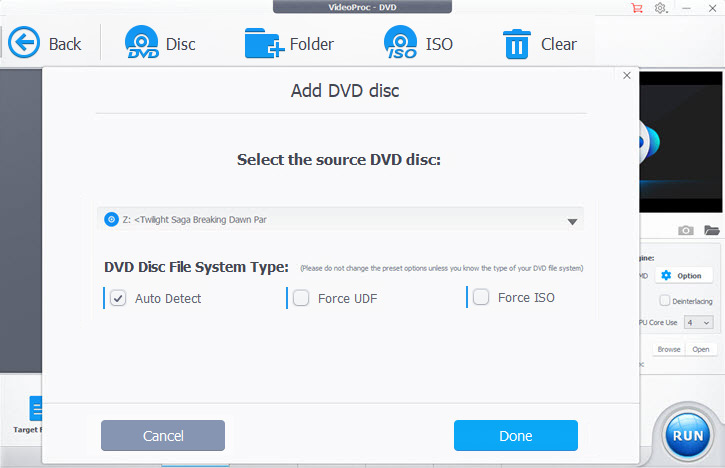
Step 1. Install VideoProc Converter AI, launch it, and choose DVD. Choose the target drive. VideoProc lists the titles found on the disc and picks out the main movie automatically.
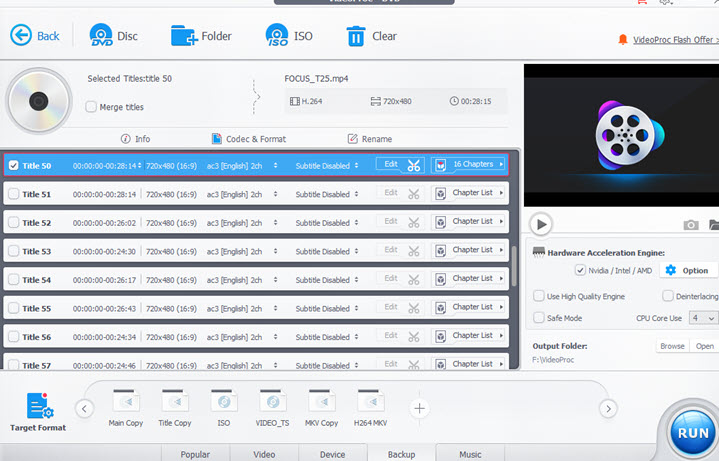
Step 2. For a result close to the usual MakeMKV workflow, choose MKV Copy. It saves the selected title in an MKV container and keeps the original video stream without a full reencode. VideoProc also gives you several other backup choices:
- Main Copy saves the main movie
- Title Copy saves the titles you select
- ISO Image creates a disc image
- VIDEO_TS Folder keeps the standard DVD folder structure
Tips: As a versatile alternative to MakeMKV, this tool allows you to rip DVDs into over 420 formats. You can easily convert your collection to MP4, H.264, or HEVC for smaller file sizes and seamless playback on phones, tablets, TVs, and media servers. It also supports AV1 MP4, ensuring you get a high-quality digital copy with the smallest possible size.
Step 3. Choose a folder with enough free space and click RUN. Hardware acceleration will be used on supported Intel, NVIDIA, AMD, and Apple silicon systems.
Our Verdict
MakeMKV has not disappeared, but its website is not fully usable. The new beta key gives existing users a path back into the application. The inaccessible download and purchase pages remain a real obstacle for new installations.
Use the official forum for updates. Keep a copy of legitimate installers and permanent license details. Avoid random mirrors, shared keys, and repeated checkout attempts. A separate DVD tool can keep an urgent DVD project moving while MakeMKV’s web services recover.
FAQs
1. Has MakeMKV shut down permanently?
It doesn't look like it. There's been no "shut down" announcement, and the community forum is still very much alive. Plus, they just posted a new beta key on August 1st that's valid through the end of September 2026—they wouldn't do that if they were closing up shop.
2. Can I still use MakeMKV when the website is down?
If you already have it installed, you're fine! As long as you have a permanent key or a valid beta key, the software will work as usual. The only problem is for people trying to download it for the first time or buy a new license—you'll likely have to wait for the site to come back.
3. Where can I find the current MakeMKV beta key?
You can still get it from the official "MakeMKV is free while in beta" thread on their forum. The current key posted there will keep the software active until the end of September 2026.
4. Is it safe to download MakeMKV from another website?
I'd be careful. The official site is always the safest bet. If you have an old installer saved, you should verify its SHA256 value to be sure it hasn't been tampered with. I'd stay away from random third-party mirrors or "modified" versions—it's just not worth the risk.
5. What can I use while MakeMKV is unavailable?
If you need to rip or back up a DVD while MakeMKV is down, give VideoProc Converter AI a shot. It's easily one of the best alternatives available. It handles the basics that MakeMKV is known for, like 1:1 DVD backups, but it actually goes a step further. It natively supports protected discs (including those tricky 99-title commercial DVDs) and can rip them into over 420 formats, such as MP4 H.264 and HEVC. The best part? It can even use AI to upscale and enhance your old footage, making it look much sharper on modern high-res screens. It's a great way to give your collection a facelift while you wait for MakeMKV to come back online.
Has MakeMKV been shut down for copyright reasons
There is no public evidence that MakeMKV has been permanently removed because of a DMCA complaint, lawsuit, or other copyright-enforcement action.
It is understandable that users raise the question. MakeMKV is widely used to copy DVDs and Blu-rays, and ripping software often operates in a legally sensitive area that varies by country. But the current signs point more toward a technical problem than a legal takedown. The support forum is still active, and a new beta key was published while the website was experiencing problems. That would be unusual behavior for a project that had been fully shut down.