
 New AI features are available
 Listed in
 I'm seeing multiple vendors flag the most current version of MakeMKV as malicious, particularly as a Trojan. I realize these are sometimes just false positives based on the nature of the application, but it would be helpful to know if anyone has experienced issues with the latest version.
– a Reddit thread
MakeMKV is a popular tool for converting DVD and Blu-ray discs into digital files, specifically MKV format. It's easy to use and able to preserve full video quality and extras. However, questions often arise regarding whether MakeMKV is safe. So we wrote this to reveal the answer through expert analysis, tech reviews and hands-on experience.
Is MakeMKV Safe
Short answer: Yes. MakeMKV is free of malware and is a secure application to use on your PC, as long as you download it from the official site. This can help avoid any repackaged versions.
MakeMKV is widely used and trusted in the home theater and data-hoarding communities for disc archiving. During our own installation and usage, the Windows Security app also didn't report any potential risks or threats. Minor antivirus warnings can be ignored as false positives, given the consensus of security experts and software portals.
Cybersecurity and Malware Concerns
MakeMKV itself is widely regarded as safe and clean from malware. Multiple independent antivirus scans have found no viruses, spyware, or malicious code in the official MakeMKV installer. If you download MakeMKV from its official website, it will not come bundled with any malware or unwanted software.
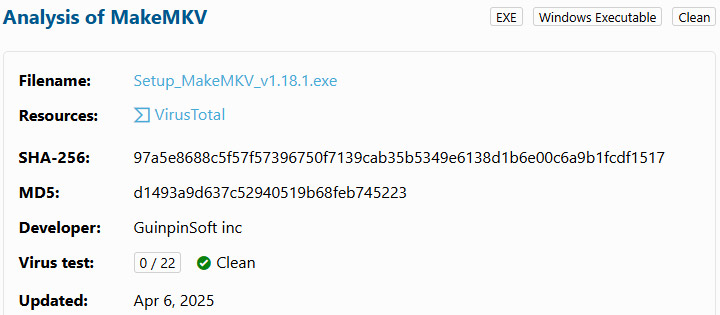
According to LO4D, tests on the latest version (v1.18.1) showed 0 detections out of 22 antivirus engines, with top vendors like Avast, Kaspersky, and Microsoft Defender all passing the file as clean.
VirusTotal'analysis shows three engines flagging the MakeMKV executable as malicious, whereas 69 out of 72 antivirus vendors mark it safe.
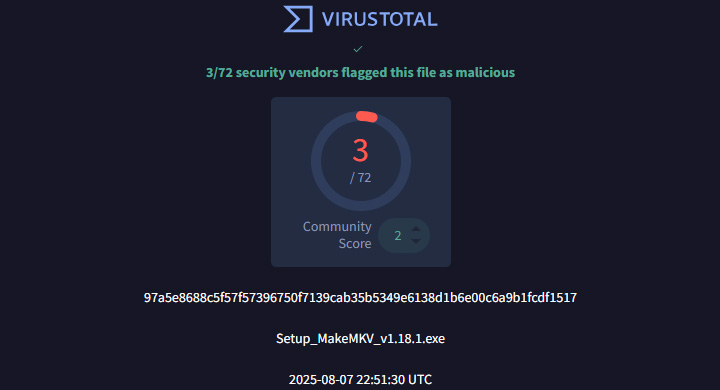
These alarms tend to be false positives. It's likely triggered by the program's disc decryption routines. Just make sure you have the latest antivirus definitions. If you are still concerned, submit the file for reanalysis; antivirus companies will usually fix the false positives.
Safe downloading practices are still important. Make sure to obtain MakeMKV only from the official site or other highly trusted sources. The official MakeMKV download has a solid reputation, but downloading the program from unknown mirrors or torrent "cracks" can be risky.
Software Stability
Beyond security questions, MakeMKV's safety also depends on the software's reliability and upkeep. A program can be malware-free, but it won't be "safe" for your data or system if it's crashing constantly or left abandonware. In this regard, MakeMKV is a stable and reliable application, backed by ongoing development.
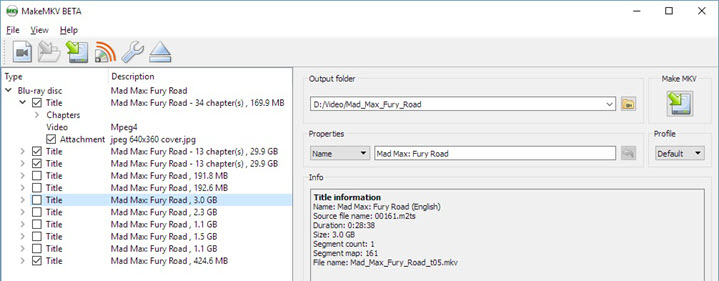
MakeMKV runs smoothly and does what it advertises. The interface is minimalistic and focused on one task: Blu-ray and DVD ripping. It simply rips the discs and copies the streams to MKV; it doesn't re-encode the video, unlike HandBrake DVD ripping. This reduces the chance of errors and keeps the operation straightforward. It's not a flashy app, but it's thoughtfully designed.
In addition, the developer is very responsive in fixing issues and updating the software. MakeMKV has been in continual development for over a decade and receives frequent updates to improve stability and compatibility. This active maintenance has earned MakeMKV a strong reputation.
Potential Issues
Of course, no software is perfect. There are occasional reports of issues occurring in specific scenarios. We think it's important for you to know this so you can consider it carefully before making a decision.
Code Signing and SmartScreen
MakeMKV might trigger Microsoft SmartScreen warnings on download or installation. This is due to MakeMKV's disc access behavior and lack of a digital signature. SmartScreen flags unfamiliar or unsigned programs, and MakeMKV executables are not code-signed.
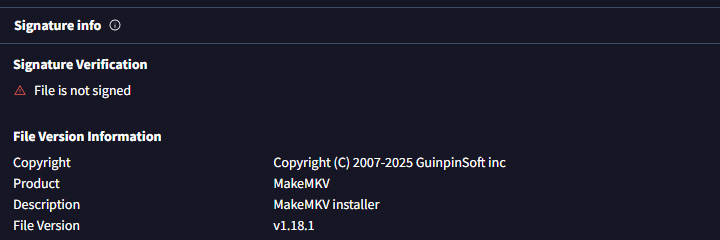
These warnings might indicate potential risks and don't definitively mean the software is malicious, but seeing them can still be annoying.
Registration Key and Version Too Old
MakeMKV has been under continuous development since around 2008 by GuinpinSoft and remains in long-term beta status. It's currently free while in beta, but the beta key does expire periodically. There might be times when it's expired and a new one hasn't been issued yet. That's why users regularly find themselves in a cycle of beta key expiration and searching for a new key.
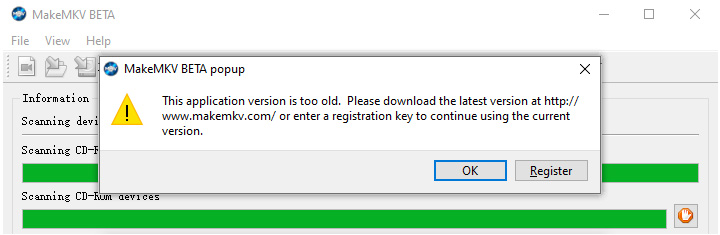
The developers want the software to remain accessible while gently encouraging long-term users to support its development. After the evaluation period, you can get the full version by purchasing a lifetime license for approximately $60.
If the monthly key updates and lack of compression or alternate formats really bother you, you might also consider other DVD ripping software as an alternative to MakeMKV. It's not the only solution for digitizing DVDs and Blu-rays on the market.

VideoProc Converter AI - Best MakeMKV Alternative for DVD Ripping
- Safe and reputable commercial software with a lifetime license key
- 1:1 DVD backup to VIDEO_TS, ISO, and MKV in original quality
- More output formats for smaller file sizes, MP4, AVI, MOV, MP3, WAV, etc.
- Faster conversion and lower CPU usage with hardware acceleration
- All-in-one toolbox: AI enhancer, converter, compressor, downloader, etc.

Conclusion
So, is MakeMKV safe? We think this article addresses this question. MakeMKV is safe in the ways that matter to most users. In terms of cybersecurity, it is clean of malware and safe to install, provided you stick to official downloads. In terms of software stability, MakeMKV is a robust, well-maintained application with a strong stability record and active updates.
If you want a more stable DVD ripper with more flexible output formats, VideoProc Converter AI is a good option. Trusted by millions of users, the DVD tool within this all-in-one multimedia toolbox is 100% safe and clean. Feel free to download it and have a try.




