
 VideoProc Converter AI
 New AI features are available



 Listed in
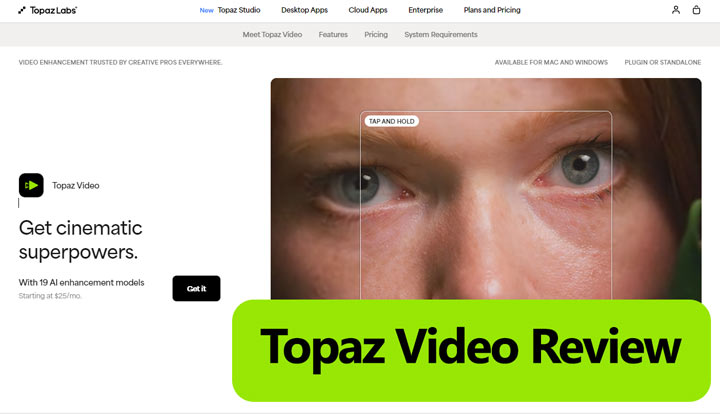
 Ask around on any tech forum about upscaling, and Topaz Video (formerly Topaz Video AI) is usually the first name that comes up. For a long time, it was the only serious option if you wanted professional-grade results.
However, the buying decision is no longer as straightforward as it once was.
Topaz Video has moved from a perpetual license to a subscription model for new customers, with the Personal plan now costing $299 per year when billed annually. Adobe also announced plans to acquire Topaz Labs in the second half of 2026, although it is still too early to know whether this will affect Topaz Video's pricing, licensing, or future integration with Adobe apps. Meanwhile, some of its most demanding AI models still require a powerful GPU or cloud rendering. With more affordable AI video enhancers now available, these changes make it worth taking a closer look at whether Topaz Video still offers the best value for your needs.
For this review, we examined how Topaz Video performs with low-resolution, noisy, archival, and motion-blurred footage. We also looked at its current pricing, hardware requirements, model selection, workflow limitations, and how it compares with its more affordable alternative.
Disclosure:Topaz Video review is published by Digiarty, the developer of VideoProc Converter AI. To make the comparison useful, we distinguish verified product information from our own test observations and avoid claiming that one tool is universally better for every type of footage.
What Is Topaz Video
Topaz Video is a comprehensive video enhancement tool designed to improve footage in multiple ways. It can upscale resolution, remove noise and blur, stabilize shaky shots, interpolate frames for smooth motion, and even convert SDR to HDR. Acting like a digital restoration lab, it helps filmmakers, archivists, and creators bring old or low-quality footage up to professional standards. Whether you're enhancing 480p family videos, restoring archives, or refining shaky drone clips, Topaz Video provides a full set of tools to make your footage cleaner, sharper, and more polished.
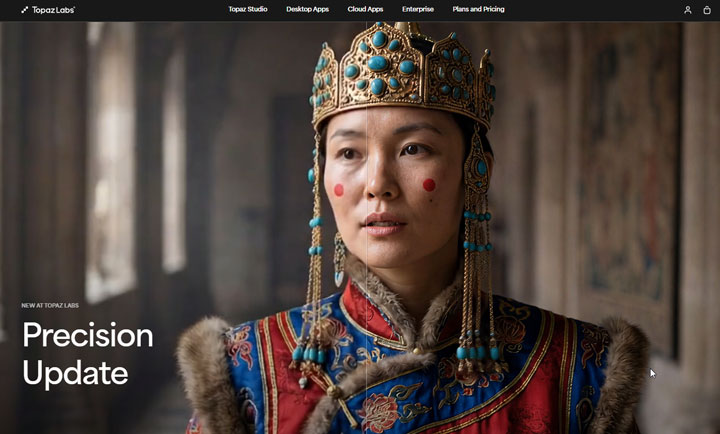
Whether you're a filmmaker salvaging old archives, a content creator upscaling phone footage, or an enthusiast perfecting home videos, Topaz Video AI acts as your personal AI quality lab, making the impossible possible.
What Are Key Features of Topaz Video AI
Topaz Video AI is built around a modular system where the results depend on choosing the right AI model for your specific footage. Here are some of its key features:
1. AI Upscaling and Enhancement
Topaz Video AI helps you improve your videos, making them clearer and sharper. It can upscale older or lower-resolution footage to 4K, 8K, or even 16K, while reducing blur, noise, and compression issues. You can choose different settings depending on your video to keep it smooth or detailed.
2. Video Stabilization
Topaz Video AI's stabilization engine can distinguish between intentional camera movement and accidental jitters. Topaz Video AI delivers a smoother, "Steadicam-like" result while keeping cropping to a minimum. It also includes tools to correct rolling shutter distortions from CMOS sensors and reduce motion blur. By analyzing the camera path, these features recover sharp edges even in footage affected by shaky hands or fast-moving subjects.
3. Frame Rate Conversion
Topaz Video facilitates smooth frame rate conversion, enabling users to transform lower FPS footage into higher frame rates, up to 120fps. Additionally, it provides options to create slow-motion videos by interpolating frames, with various speed multipliers available (e.g., 2x, 16x).
4. Professional Workflow & HDR Tools
Workspaces 2.0 lets users pause and resume exports while managing multiple projects. It also includes HDR enhancement with the Hyperion model, which expands dynamic range for Rec.709 footage to better suit modern HDR displays. Users can free up GPU resources during rendering without losing progress, and Topaz Video integrates directly with DaVinci Resolve, Premiere Pro, and After Effects for a smoother editing workflow.
Recent Topaz Video Updates
Topaz Video receives updates fairly regularly, and recent releases have brought new models, wider hardware support, and useful workflow improvements. Here are the changes that stand out most from the latest releases.
Version 1.6.0 extended support for Hyperion 2 and Starlight Precise 2.5 to compatible AMD GPUs and Apple silicon Macs. It also introduced Nuke plugin support and several workflow and project-management improvements. Version 1.6.1 focused mainly on stability and bug fixes.
Version 1.7.0 introduced Starlight Precise 2.6, which adds three sharpness levels and aims to improve temporal consistency. Topaz also updated Starlight Mini, claiming speed gains of up to 2x on some Nvidia GPUs with more than 12GB of VRAM. Both Starlight Mini and Precise 2.6 are now available for local processing under all subscription tiers.
What Users Are Saying About Topaz Video 1.7.0
Early feedback has been mixed. While some users have praised the new sharpness controls in Starlight Precise 2.6, the release discussion has also surfaced a number of technical complaints. Most of these reports come from the Topaz Labs community forum, with additional feedback from X/Twitter, and they generally fall into three areas:
- ⚠️ Inconsistent image quality: Starlight can improve temporal consistency, but stronger settings may over-texture skin, soften fine details, or create artificial patterns from motion blur.
- ⚠️ Stalled renders: Many report exports getting stuck, along with VRAM errors and large leftover .mmap files.
- ⚠️ Weak compatibility: Many AMD users have complained that Starlight Mini does not run reliably on their systems. Others have also reported issues with imports, previews, plugins, and macOS stability.
How About Topaz Video AI's Performance in Practice
To assess how effectively Topaz Video performs its key functions, I conducted several tests using different video clips and settings. The tests below focus mainly on established models such as Proteus, Iris, and Nyx, and the newer diffusion-based Starlight models.
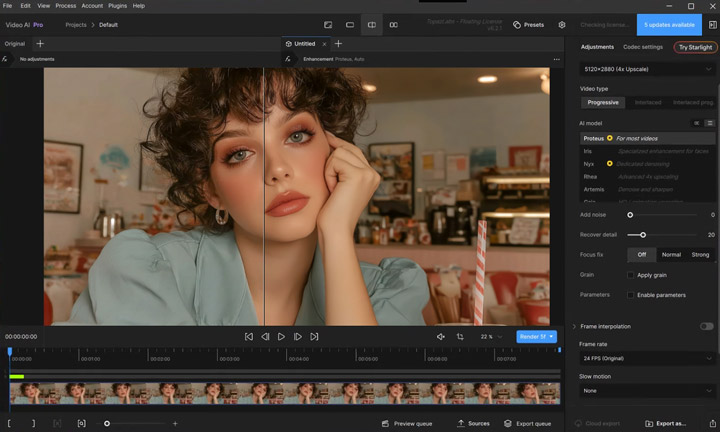
Test 1. Upscale a Blurry 720p Video with Topaz Video's Proteus
AI model: Proteus (This model is often recommended by Topaz Video AI for general video enhancement).
Test Clip: A 720p video generated with Midjourney, with noticeable blur and a lack of fine detail.
After enhancing with Topaz Video, the footage looked noticeably clearer overall. However, on closer inspection, the loss of fine detail was still quite obvious, especially in areas that were heavily blurred in the original.
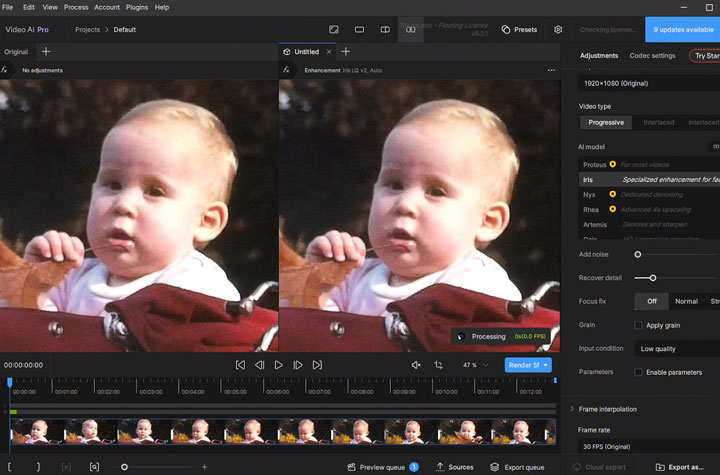
Test 2. Restore Archival Footage with Topaz Video's Iris
AI model: Iris | Upscale:4x
Test Clip: An archive video downloaded from archive.org.
Topaz Video has a good reputation for restoring old videos. I noticed many users recommend IRIS for older portrait footage, so I decided to test it. As you can see from the screenshot of the reuslt below, there was some slight smoothing in certain areas, but it was not excessive or distracting.
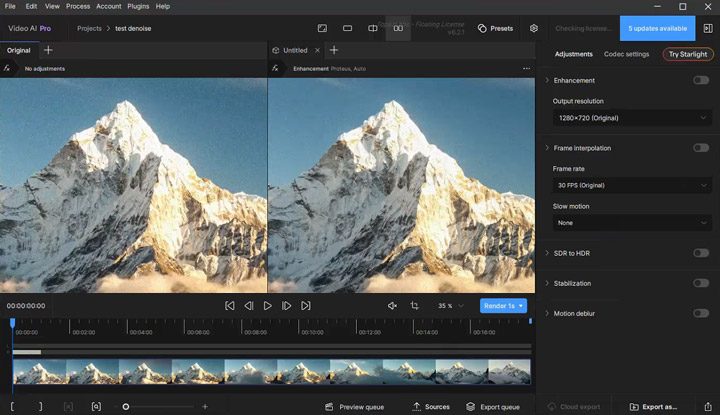
Test 3. Remove Video Noise with Topaz Video's Artemis
AI model: Nyx | Upscale: 2x
Test Clip: A 1366×720 footage downloaded from Pexels that contains noticeable noise.
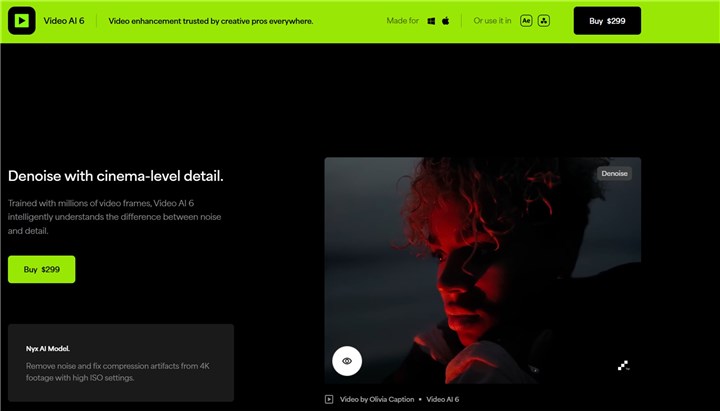
I chose the Nyx model since it's labeled as dedicated for denoising videos. The outcome didn't disappoint. It naturally removed the graininess while keeping details like hair strands and facial features intact.
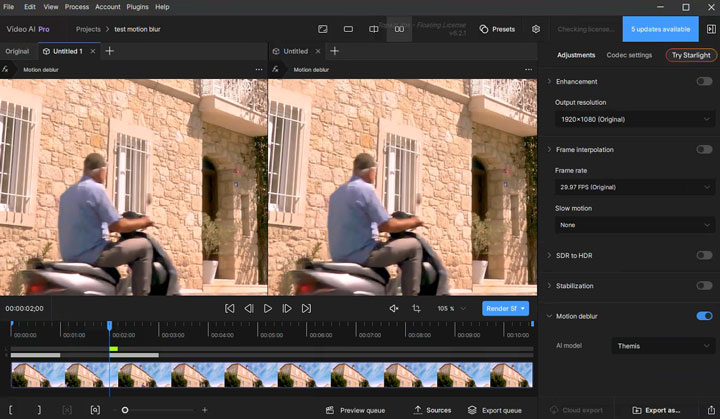
Test 4. Reduce Motion Blur with Topaz Video
Test Clip: A clip I downloaded directly from Pixabay.
Motion blur reduction is a unique selling point that few other AI video enhancers offer. The result was decent: the processed video looked clearer, but it still fell short of being crystal clear.
Test 5. Restore Archival Footage with Starlight Precise 2.6
AI model: Starlight Precise 2.6 | Output resolution: 4K
Test clip: The same archival footage used in the Iris test.
It's incredible how well Topaz Video can restore old footage. As you can see, the original video is heavily blurred, with very little visible detail. After enhancement, the facial features, hair, and other fine details look much sharper and clearer.
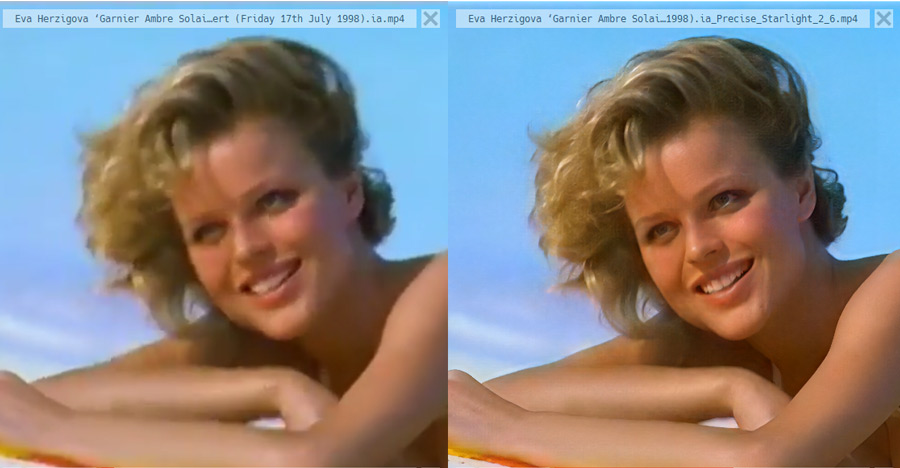
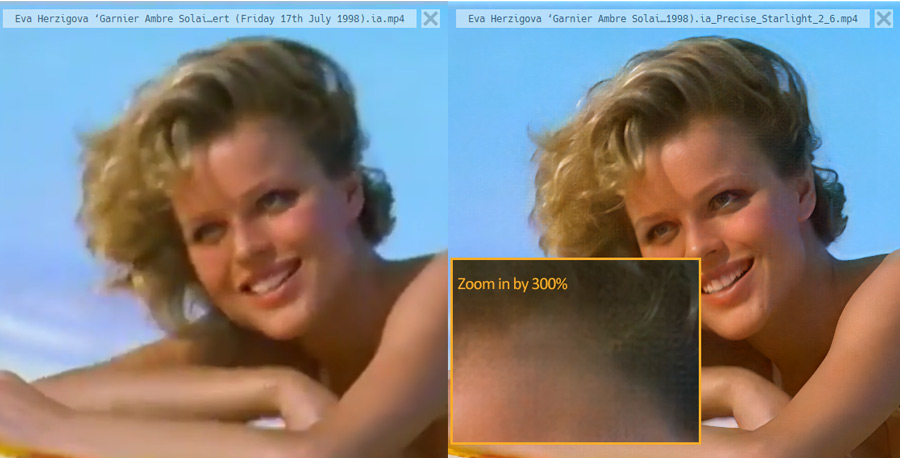
Overall, I'm very happy with the result. However, when I look closely, I can see a fine mesh-like pattern across the entire image, almost like tiny spiderwebs or pixel blocks.
Note: The bigger drawback, however, is processing time. Starlight Precise 2.6 is extremely slow. In my test, I practically had to leave it running for the entire morning before I could see the finished result. So while the restoration quality is impressive, this isn't a model I'd use when I need a quick turnaround. And this doesn't seem to be unusual. Many users have reported similarly long processing times. For example, a Reddit user reported that a 5-minute 1080p30 clip took around 2 hours and 40 minutes at Sharpness Level 1, and nearly 4 hours and 45 minutes at Level 3, even with an RTX 5080.
Test 6. Restore Old Footage with Starlight Precise 2.6
AI model: Starlight Precise 2.6 | Output resolution: 4K
Test clip: An old footage download from archive.org.
I then tested another old video with Topaz Video’s Starlight 2.6 model. The original footage was only 360p, but I upscaled it to 4K. Surprisingly, the result was even better, with a much more noticeable improvement in overall clarity and detail.
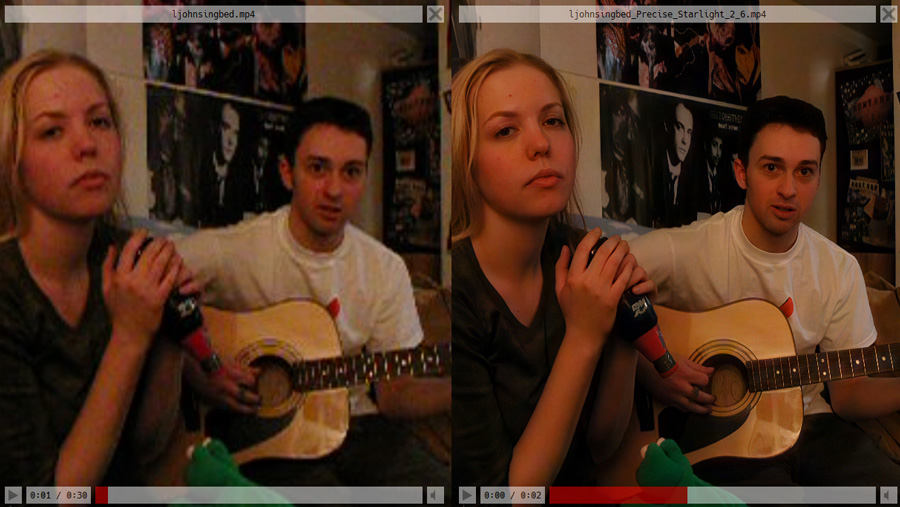
Note: Once again, though, speed was the main compromise. The result made a strong case for what Starlight Precise 2.6 can do with old, low-resolution footage—but you'll need to be patient. For longer videos, the processing time can quickly become a serious consideration rather than a minor inconvenience.
Topaz Video AI Pricing
As said, Topaz Video is now subscription-only for new customers. Pricing therefore deserves particular attention in this review, not only because the software costs considerably more than many competing video enhancers, but also because users must continue paying to access future updates and newer models. Whether the subscription offers good value largely depends on how often you use the software, which models you need, and whether video restoration is part of a professional workflow or only an occasional task.
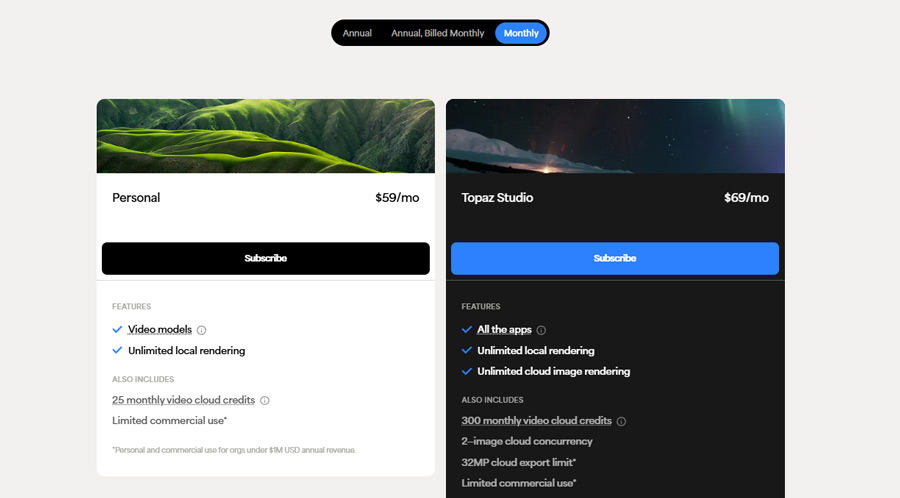
1. Topaz Video Personal Pricing
The Personal plan includes unlimited local rendering, 25 monthly video cloud credits, and limited commercial use for organizations with less than $1 million in annual revenue. It includes local access to standard models such as Proteus, Iris, Nyx, and Starlight Precise. Following version 1.7.0, Starlight Mini and Precise 2.6 are also available locally under all subscription tiers. Monthly cloud credits expire and do not roll over.
- $299 per year when billed annually
- $39 per month with an annual commitment billed monthly
- $59 per month on a month-to-month plan
2. Topaz Video Pro Pricing
The Pro plan adds local access to additional Starlight models, including Starlight Sharp, HQ, and Fast, along with seat management, 100 monthly video cloud credits, and full commercial-use rights. Some Pro-only Starlight models are not supported locally on Mac or AMD GPUs.
- $699 per year when billed annually
- $74 per month with an annual commitment billed monthly
3. Topaz Studio Pricing
Topaz Studio costs $399 per year when billed annually. It includes Topaz Video, Photo, Gigapixel, Astra, and the company's other current applications, along with unlimited local rendering and 300 monthly video cloud credits.
For users who need more than one Topaz application, Studio may offer better value than purchasing separate subscriptions. However, it does not replace the broader commercial rights and local Pro-model access included with Topaz Video Pro.
3. Is There a Free Trial of Topaz Video
Topaz Video does not currently offer a free trial for the new desktop application. Users must purchase a subscription to test the current version, although Topaz allows customers to request a refund within two days if the software does not meet their needs.
The seven-day trial with 50 cloud credits applies to Topaz's online services rather than the Topaz Video desktop application. A legacy version of Video AI may still be available for trial, but it does not include the latest Topaz Video interface, models, or subscription features.
4. What About Existing Topaz Video AI Perpetual Licenses
Users with an older Topaz Video AI perpetual license can continue using the versions covered by that license. Topaz Video AI 7.1.5 remains the final perpetual-license version for eligible users, while the newer Topaz Video 1.x application and its latest models require an active subscription.
5. Is Topaz Video Worth $299 per Year
Topaz Video is worth considering when video enhancement is part of your regular professional or archival workflow.
The subscription is easier to justify when you:
- Restore old or damaged footage frequently
- Work with paying clients
- Need detailed model controls
- Own hardware capable of running the models efficiently
- Can save significant manual restoration time
It is harder to justify when you:
- Only enhance a few clips each year
- Mainly create short social-media videos
- Have an older or mid-range computer
- Need an all-in-one video utility rather than a dedicated enhancer
- Prefer a one-time license
Topaz Video can produce high-quality results, but the software cannot create genuinely accurate detail from nothing. AI-generated texture should be treated as a visual reconstruction, especially in archival, forensic, documentary, or historical work.
Topaz Video System Requirements
Topaz Video relies heavily on the GPU, and its minimum requirements do not necessarily guarantee fast or practical processing. Users planning to upscale long videos, export in 4K, or run advanced models such as Starlight should pay particular attention to RAM and VRAM.
| Requirement | Windows | Mac |
|---|---|---|
Operating system |
Windows 10 or 11 |
macOS 13 or later |
Processor |
Intel or AMD CPU with AVX support, released after 2016 |
Apple M-series processor |
System memory |
16GB RAM minimum |
16GB RAM minimum |
Graphics |
Dedicated GPU with at least 6GB VRAM |
Integrated Apple silicon GPU |
Storage |
At least 45GB of internal storage |
At least 45GB of internal storage |
Recommended memory |
32GB RAM or more |
32GB RAM or more |
Recommended graphics |
RTX 30 series, Radeon 5000 series, or Intel Arc A770 and newer, with at least 8GB VRAM |
M-series Pro, Max, or Ultra |
Some models have higher hardware requirements. Aion, Hyperion, and Rhea require at least 8GB of VRAM, while Starlight is currently the most demanding. Depending on the model, it may require 10GB to 16GB of VRAM or more, plus around 32GB of system memory. Some Starlight models also support local processing only on compatible NVIDIA GPUs.
Starlight Hardware and Performance
Starlight Mini: Nvidia GPUs require at least 10GB of VRAM, while AMD systems may need 20GB or more. Apple silicon Macs work best with 36GB of unified memory or more.
Starlight Precise 2.6: Nvidia and AMD systems require at least 12GB of VRAM, with 16GB recommended. Apple silicon Macs require at least 16GB of unified memory.
Even on supported hardware, Starlight can still be demanding. Some users have reported stalled exports, VRAM errors, stuck previews, and large temporary files, so it is worth testing a short clip before processing a long project.
Intel-based Macs, Snapdragon-based Windows PCs, virtual machines, external GPUs, and Linux systems are not currently supported. An internet connection is also required for installation, activation, model downloads, updates, and cloud rendering.
⚠️ Note: Meeting the minimum requirements only means the application may run. For faster previews, 4K exports, batch processing, or advanced restoration models, a recent GPU with at least 8GB to 16GB of VRAM and 32GB of RAM is a more realistic starting point.
Topaz Video vs Astra: What Are the Differences
Astra is often mistaken for the browser-based version of Topaz Video. In fact, they are separate products with different subscriptions, models, controls, and intended workflows. Topaz Video is primarily a desktop restoration and enhancement tool, while Astra focuses on cloud-based creative upscaling, particularly for AI-generated video.
| Topaz Video | Astra | |
|---|---|---|
Platform |
Desktop app for Windows and Mac |
Browser-based app |
Processing |
Local and cloud rendering |
Cloud-only rendering |
Best for |
Restoration, denoising, stabilization, interpolation, and detailed enhancement |
Creative upscaling and stylized enhancement, especially for AI-generated video |
Controls |
More model, processing, and export controls |
Simpler workflow with creative and precise modes |
File support |
Supports a wider range of professional video formats |
Currently has more limited input and output support |
Subscription |
Topaz Video or Topaz Studio |
Astra or Topaz Studio |
A standard Topaz Video subscription does not include Astra. Users who need both products can subscribe to Topaz Studio or purchase Astra separately. Topaz Video is generally better suited to users who want detailed controls, local processing, and a broader range of restoration tools. Astra is more convenient for users who prefer a simpler browser-based workflow or do not have a powerful local GPU.
Pros & Cons of Topaz Video AI
✅ Topaz Video AI Pros
- Best-in-class detail recovery (faces, textures, film grain)
- No subscription (pay once, own forever)
- 8K future-proofing
- Batch processing
❌Topaz Video AI Cons
- Demands a powerful GPU (Intel i5 users need not apply)
- No built-in editing tools (you'll still need Premiere or DaVinci Resolve)
- Steep learning curve (beginners may struggle with AI model selection)
- Expensive ($299 is a big ask for casual users)
Topaz Video AI User Feedback: What People Are Saying
Positive:
"Restored my grandfather's WWII film—details we hadn't seen in decades finally appeared!" (DPReview forum)
"The only tool that made my 360p concert footage look watchable in 4K." (Reddit user)
Negative:
"Crashed three times processing a wedding video. Switched to AVCLabs for reliability." (Topaz support thread)
"Overkill for Instagram clips—Media.io is faster and cheaper." (YouTube comment)
Best Alternative to Topaz Video AI: VideoProc Converter AI
While Topaz Video AI is undoubtedly a leader in its specialized niche, its high price and demanding hardware requirements can make it inaccessible or overkill for many users. This becomes even more evident when you consider its singular focus – it's exclusively designed for enhancing videos. If you need to upscale and enhance your images, you would then need to subscribe to Topaz Photo AI, which costs an additional $199 USD per year.
If you're seeking a powerful, all-in-one media (video, audio, image) AI enhancement solution that is also significantly more affordable and still delivers impressive results, VideoProc Converter AI stands out as the best alternative.
Why VideoProc is Your Best Alternative to Topaz Video AI
- ✅ Full AI Suite: $34.95/yr. Topaz Video: $299/yr. More power, a fraction of the cost.
- ✅ Enhance video quality with 4 specialized models for crystal-clear, lifelike textures.
- ✅ Eliminate blur, grain, pixelation, and more artifacts, giving pixel-perfect results.
- ✅ Extra AI tools: stabilize, increase fps, upscale images to 4K, restore faces in photos, etc.
- ✅ Offers faster processing speeds and performs efficiently even on mid-range computers.
- ✅ A comprehensive tool for editing, converting, compressing, and downloading videos.

Topaz Video AI vs VideoProc Converter: Side-by-Side Comparison
| Feature/Aspect | VideoProc Converter AI | Topaz Video AI |
|---|---|---|
Primary Focus |
Enhance and process media files. |
Enhance video only. |
Target User |
Users of all levels. 👍 |
Filmmakers and professionals. |
Other Core Features |
|
|
Ease of Use |
Beginner-friendly, one-click presets. |
Advanced UI, more manual controls. |
Performance |
Fast, powered by th level-3 GPU acceleration. |
Slow. |
Pricing |
|
|
Free Trial |
Yes. |
No. |
VideoProc Converter AI Test Examples
See the impressive results when VideoProc Converter AI is used to enhance videos. Among affordable video enhancers, it’s definitely one of the most capable options.
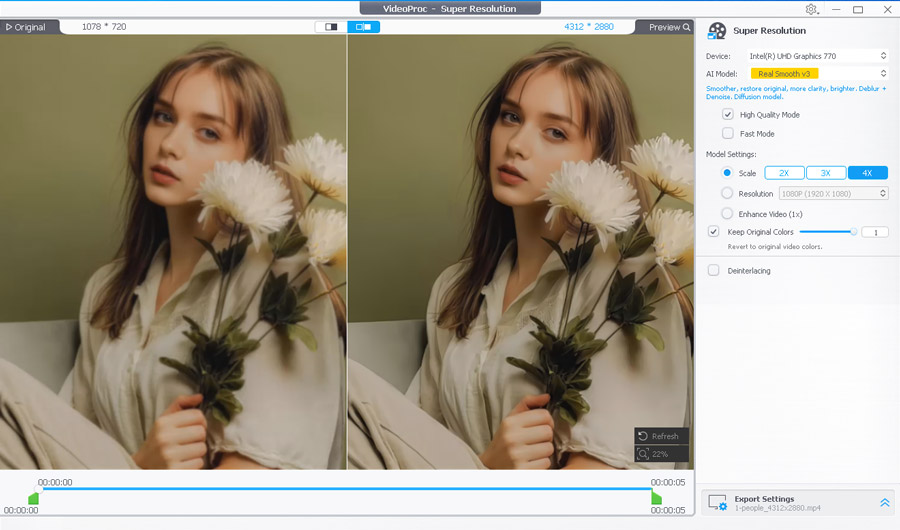
Test 1. Upscale Video to 4K
AI Model: Real Smooth v3
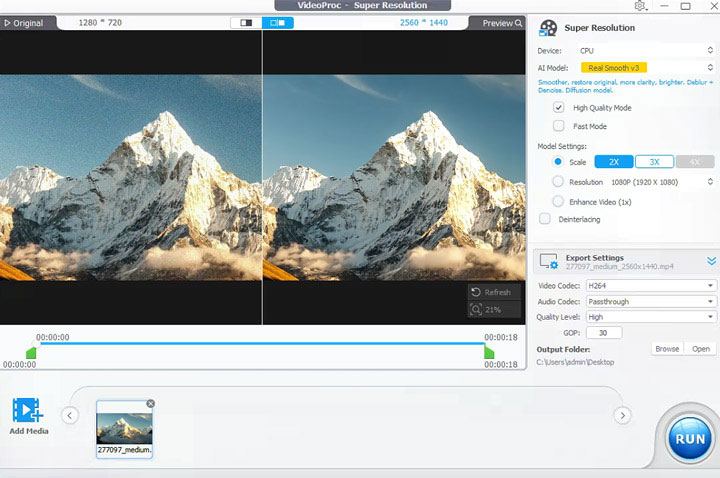
Test 2. Remove Video Noise
AI Model: Real Smooth v3
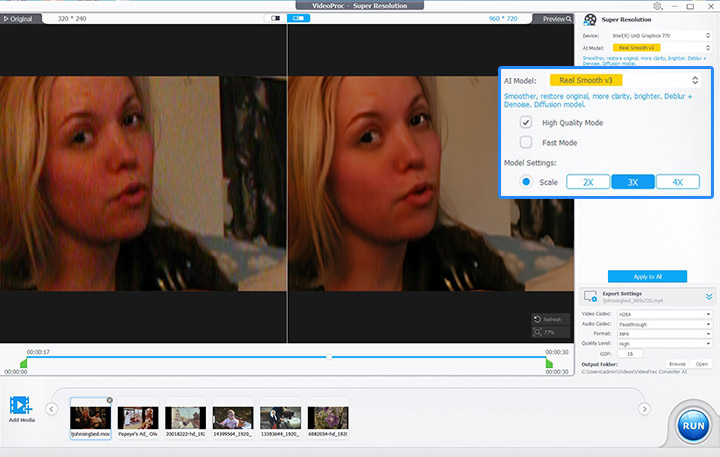
Test 3. Restore Old Video
AI Model: Gen Detail v
The Bottom Line: Our Verdict on Topaz Video AI
Topaz Video is a powerful choice for professional restoration, thanks to its specialized AI models and detailed controls. However, its $299 annual subscription, slow processing, and demanding hardware make it less practical for casual users.
For advanced restoration work, Topaz Video may be worth the cost. For everyday enhancement and broader media tasks, VideoProc Converter AI is a more affordable and versatile alternative.



