

You've just spent hours crafting the perfect video edit. You hit Save, locate the file on your computer, and try to upload it to YouTube or send it over to a client, only to realize the file is completely unrecognizable and refuses to play on any device.
How is that possible?
The truth is, when you save your progress in Adobe's editing software, you aren't actually creating a standalone video yet. This is one of the most common hurdles for new video editors, and the confusion all comes down to understanding the Premiere Pro file extension.
What Is the Premiere Pro File Extension
The default file extension for Adobe Premiere Pro is .prproj.

Those letters simply stand for "Premiere Project." When you open a folder on your computer and see a file ending with that specific tag, you are looking at your saved editing workspace. It really is that straightforward.
What Is a .prproj File
A .prproj file is an Adobe Premiere Pro project file. It is a binary XML file with reference links, containing zero video or audio data. The links point directly to where the original raw footage lives on your hard drive.
Think of a .prproj file as a blueprint. It does not contain the actual bricks or wood to build a house. The file simply acts as a highly detailed set of instructions.
How to Open a .prproj File
As said, the .prproj file is just a project file with references to the media files and settings information. Since it isn't an actual audio or video file, attempting to open it with regular media players will give you an error.
To open a .prproj file, you need to use Adobe Premiere Pro.
- Launch Premiere Pro.
- Click File > Open Project in the top menu.
- Select your .prproj file to open it.
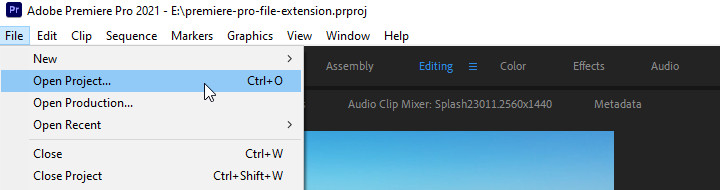
Alternatively, you can simply double-click the .prproj icon on your computer. Your system should automatically launch Premiere Pro and load your timeline.
There is one exception to the Premiere-only rule. Adobe After Effects can also import these project files directly. To open a .prproj file with Adobe After Effects, select File > Import > Import Adobe Premiere Pro Project… in the menu.
Premiere Pro File to MP4
Beginners often easily confuse the difference between saving the workspace and exporting the final product. Pressing Ctrl+S / Cmd+S on the keyboard only saves the .prproj project file. Exporting actually builds the video. To turn your Premiere project into a playable MP4, you need to render the clips together.
Here's how to convert a Premiere Pro file to MP4.
- Click anywhere on your timeline to make sure it is active.
- Go to File > Export > Media in the top menu (or press Ctrl + M on Windows or Cmd + M on a Mac).
- Select H.264 from the Format dropdown menu.
- Choose a preset like "Match Source - High Bitrate".
- Hit the Export button.
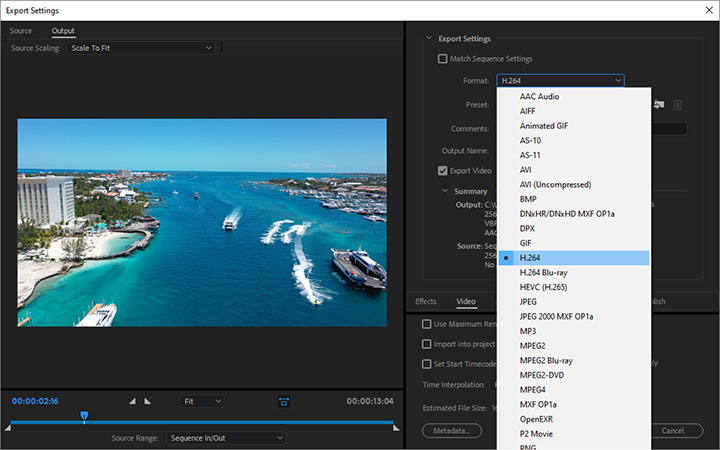
Your computer will now process the data and generate a real video you can share anywhere.
Working Within the Adobe Ecosystem
Your .prproj file does not exist in a bubble. It constantly interacts with other software, different file formats, and even older versions of Premiere itself.
After Effects Integration
As we just mentioned before, you can actually open a .prproj file with After Effects. In practice, experienced editors also frequently use Dynamic Link to import their saved project files into After Effects. This allows you to add complex visual effects to your timeline without ever needing to export a temporary video file first.
Related Adobe Premiere Pro File Types
You will definitely see a few other extensions as you learn the ropes.
- .mogrt: This stands for Motion Graphics Template. When you download cool pre-made title animations or lower thirds from the internet, they usually arrive as .mogrt files instead of project files.
- .xml: This acts as a universal transfer format. If you ever decide to move your entire timeline over to a completely different editing program like DaVinci Resolve, you will export your project as an XML file.
- .pek: This means Peak file. It's a cache file to display audio waveforms on the timeline. You can turn this off in the Preferences or delete the files, and the audio tracks will appear as entirely blank blocks. But when you playback the media, the software recalculates, redraws the waveforms, and regenerates these files regardless.
PRPROJ Version Incompatibility
Sharing project files with other editors can sometimes cause headaches. You might try to open a file from a friend and see an error message stating "This project was saved in a newer version of Adobe Premiere Pro and cannot be opened in this version."
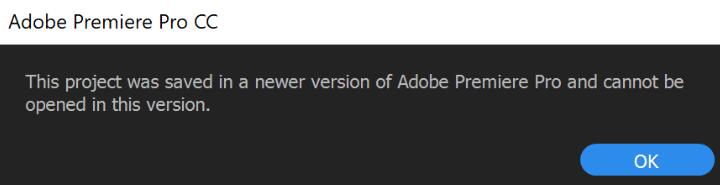
Premiere Pro files are not inherently backward compatible. You always need to use the exact same version of the software, or a newer one, to open someone else's workspace.
Media Offline Error
We mentioned earlier that your project is just a blueprint pointing to your raw video clips on your hard drive. If you rename those original clips or move them to a new folder, Premiere loses the pathway. When that happens, your video suddenly turns into a scary red screen that says "Media Offline."
Fixing this is simple. You just right-click the missing clip in your project bin and select Link Media. That action opens a window letting you point the software to the new folder location, and your video will instantly reappear.
Premiere Pro Alternative for Beginners
Adobe Premiere Pro is an industry standard, but the learning curve is notoriously steep. If you just want to trim clips and add some music without dealing with XML files or "Media Offline" errors, you might want something simpler. VideoProc Vlogger is an excellent free alternative built specifically for newer creators.
This software removes the confusing technical barriers. The interface is highly visual and straightforward to navigate. You do not have to worry about complicated export settings or matching sequence frame rates. VideoProc Vlogger handles the heavy lifting in the background.

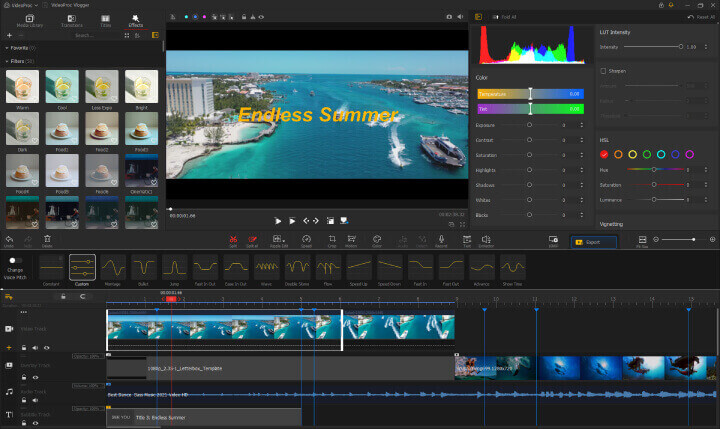
Despite being beginner-friendly, it still packs a punch. The program includes advanced tools like cinematic camera movements, color grading, and smooth speed ramping. You can achieve professional-looking results without needing a degree in video production. Plus, it is completely free to use and does not stamp a giant watermark across your final video. When you finish your edit, you just simply hit export to get a standard MP4 file that plays perfectly on any device.

VideoProc Vlogger - Novice-Friendly Premiere Pro Alternative
- 100% free to use with no hidden restrictions, no watermark
- Easy to use with the simple and intuitive interface
- Advanced features: speed ramping, color grading, LUTs, etc.
- Fast and high-quality 4K/8K/HDR output with full GPU acceleration
FAQ
What is the extension of Premiere Pro?
The standard file extension for Adobe Premiere Pro is .prproj. Those letters simply stand for Premiere Project. This tag tells your computer that the file is an editing workspace.
How do I open a .prproj file?
You must have Adobe Premiere Pro installed on your computer to view this format. You can open the workspace by double-clicking the file directly. Alternatively, you can launch the software first and select Open Project from the File menu.
What is the Premiere Pro file format?
This .prproj format is a proprietary project document that stores your timeline edits, workspace settings, and folder paths. It acts as a lightweight database recording all your editing decisions. The file does not actually embed any real video or audio media inside it.




