
 VideoProc Converter
 New AI features are available

 Listed in
 If you've ever tried to breathe new life into old, grainy footage, like vintage home videos, VHS tapes, or early digital clips, you know how challenging it can be. Topaz Starlight is designed specifically for this.
Launched in early 2025 as a research preview and touted as the first-ever diffusion-based AI model for video restoration, Starlight has since evolved into a mature product line featuring multiple models. In practical terms, this means Starlight uses a generative diffusion approach to add realistic details and sharpness to old or degraded footage. Topaz Labs even calls it their "biggest leap" in video enhancement since Video AI was first released.
In this blog, we'll take a look and test it on some challenging clips. By the end, you'll have a clear understanding of whether it fits your video enhancement needs.
What Is Starlight on Topaz
Topaz Starlight is a groundbreaking AI-driven video enhancement tool. It has grown from its initial research preview into a comprehensive Starlight series of models, becoming a core offering within the Topaz Labs product lineup. The model can upscale video to 4K resolution, denoise grainy footage, deblur and de‐alias artifacts, and overall sharpen videos – all with a single click and no complex sliders or manual tuning needed.
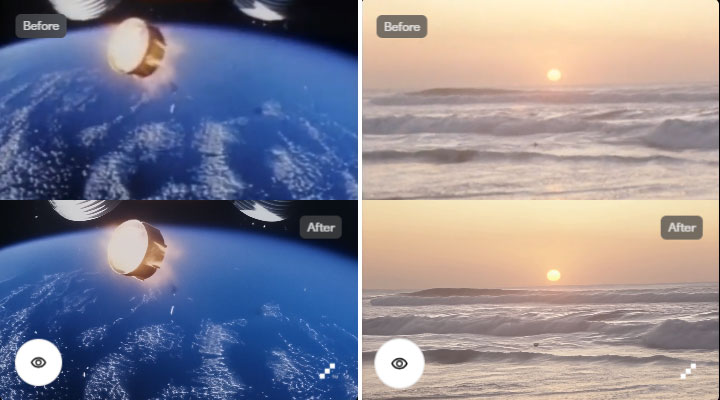
Under the hood, Starlight is built on a massive AI diffusion model. Traditional AI video upscalers often use GANs and can struggle with flickering between frames, while Starlight prevents those jittery or flickering artifacts by analyzing "hundreds of surrounding frames" for each output frame. The result is smooth, natural motion from frame to frame with no weird fluctuations. In other words, Starlight not only makes individual frames look sharper, but does so consistently across your whole video.
All of this makes Topaz Starlight capable of restoring footage once thought impossible to fix, from 8mm/16mm film reels and VHS tapes to early digital videos, and outputting them in crisp HD or even 4K quality.
Topaz Starlight Requirements
Currently, Starlight is delivered through the Topaz Video app (version 6.x and later Topaz Video) as a feature, and also via a dedicated web app interface, Topaz Astra.
For the web app, any modern system that can run a web browser will work. There's no need for a high-end GPU on your side, since the rendering happens on Topaz's servers. However, you do need a stable internet connection.
For local processing, system requirements vary depending on the specific model.
For Mac Users: Topaz Video does not currently support Intel-based Macs. Therefore, you can only use Topaz Starlight locally on a Mac with an M-series processor.
- Starlight Precise 2.5 and Hyperion 2 run on M-series Macs with macOS 26 and 16 GB of RAM.
- Starlight Mini runs on M-series Macs with macOS 15 and 36 GB of RAM. Support for macOS 26 is currently under development.
- Starlight Sharp, Starlight Fast 2, and Starlight HQ do not currently support local processing on Mac.
So basically, considering the future evolution of these models, your Mac needs an M-series chip, the latest macOS, and at least 16 GB of RAM to run the general Starlight models locally.
For Windows Users: Most Starlight models are designed for NVIDIA GPUs. Only Starlight Precise 2.5, Hyperion 2, and Starlight Mini can run on AMD cards.
- OS: Windows 10 or 11 64-bit
- System Memory: 32 GB RAM or more
- CPU: Intel or AMD, with AVX instructions, released after 2020
- CUDA (NVIDIA): compute capability 7+
- VRAM:
- Starlight Mini: 10 GB or more for NVIDIA, 20 GB or more for AMD
- Starlight Sharp: 16 GB or more for NVIDIA
- Starlight Fast 2: 16 GB or more for NVIDIA
- Starlight HQ: 10 GB or more for NVIDIA
- Starlight Precise 2.5: 12 GB or more for NVIDIA or AMD
- Hyperion 2: 16 GB or more for NVIDIA, 12 GB or more for AMD
- Disk: fast SSD recommended
Additionally, Topaz has indicated that Starlight may end support for Windows 10 before 2026. Consequently, for future local Starlight usage, you might ideally have a Windows 11 PC with an Intel CPU, 32 GB of RAM, and an NVIDIA RTX 30-series (or newer) graphics card with at least 10 GB of VRAM.
Price: How Much Does Topaz Starlight Cost
For most users, the primary way to access Starlight models is through a Topaz Video subscription, which is around $299 per year. Plans start at $39 per month and include a set number of cloud credits each month.
Plan |
Monthly Price |
Credits/Month |
|---|---|---|
Standard |
$39/mo |
400 credits |
Plus |
$99/mo |
1,400 credits |
Pro |
$299/mo |
5,400 credits |
Credit consumption for Starlight models depends on the selected model and output resolution. The following shows the number of frames per credit for each "Quality" model at various resolutions. "Fast" models cost roughly half the price of "Quality" models per frame.
Model |
1080p (Frames/Credit) |
4K (Frames/Credit) |
|---|---|---|
Starlight Precise 1 |
10 |
~6 |
Starlight Precise 2 |
~26 |
~12 |
Starlight Precise 2.5 |
~26 |
~12 |
Starlight HQ |
~26 |
~12 |
Starlight Mini |
~26 |
~12 |
Starlight Sharp |
~26 |
~12 |
Starlight Fast 1 |
~52 |
~24 |
Starlight Fast 2 |
~52 |
~24 |
How to Use Topaz Starlight
Topaz Starlight is available via the web app or the Topaz Video desktop application.
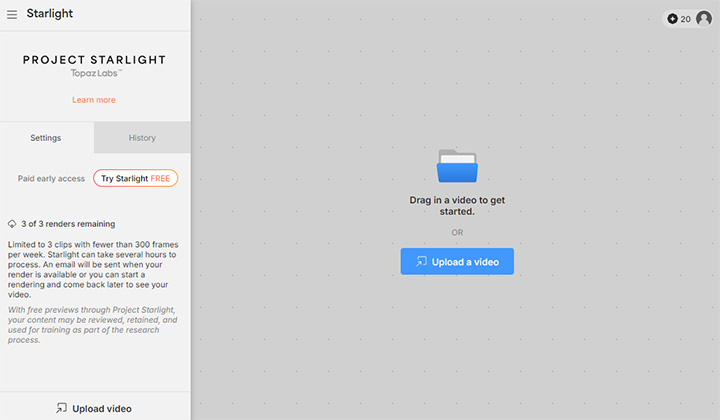
To use Starlight Web Application:
- Go to the Web App page.
- Register or log in to your topaz account.
- Drag and drop your video clips onto the interface.
- Choose a Starlight model.
- Set your desired output resolution.
- Click on the Render button to start the upscaling.
To use the Original Starlight in Topaz Video:
- Import your video into the Topaz Video app.
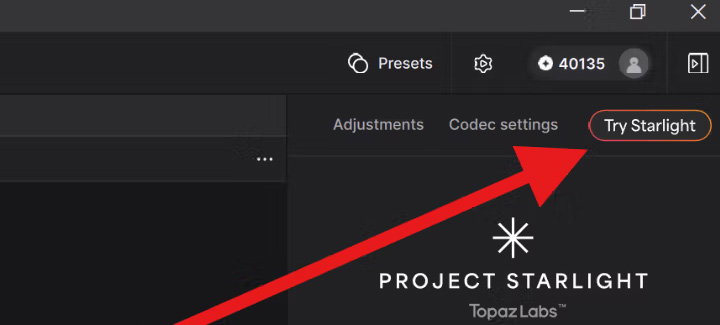
- Click Try Starlight in the upper screen right corner.
- Choose a Starlight model that you want to use.
- Select Preview, 1080p Render or 4K Render (resolution based on the height).
- Click Start export in the Confirmation Pop Up menu.
- Go to Cloud Export Queue to download the output video.
 Note: As of this writing, Starlight/Cloud rendering supports H264, H265, VP9, AV1 video codecs from the desktop. The web app only accepts H.264 MP4 videos.
Key Features Test & Review
So, how does Topaz Starlight perform in the real world? We've tested the model and combed through early user experiences to evaluate its strengths and weaknesses. Below is a breakdown of what you can expect when using Starlight on your videos.
Diffusion Upscaling to HD/4K
Topaz Starlight can transform low-res videos (even <480p) to 1080p or from HD to 4K, often with astonishing detail restoration that wasn't visible before. The AI effectively imagines plausible details for faces, textures, backgrounds, etc.
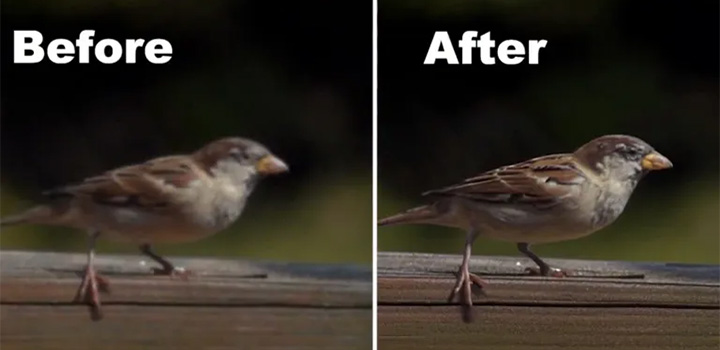
From the example shown earlier by Topaz, Starlight upscaled a high-frame-rate 240p clip to 1080p. Starlight boosted resolution and fixed the aliasing and restored texture. The output looked like a clean HD video shot on modern gear. This kind of result is where Starlight sets a new standard.
Full Temporal Consistency
Another highlight is the temporal smoothness of results. Our tests confirmed virtually no flicker or shifting artifacts between frames. Every frame is generated with awareness of its neighbors, yielding stable, flicker-free footage.
Even in complex scenes with motion, Starlight avoids the shimmer or ghosting that earlier AI upscalers sometimes produced. This makes Starlight outputs immediately usable in a professional timeline. You won't need to spend hours masking or stabilizing bits of the AI output to hide flicker.
Excellent Detail Restoration
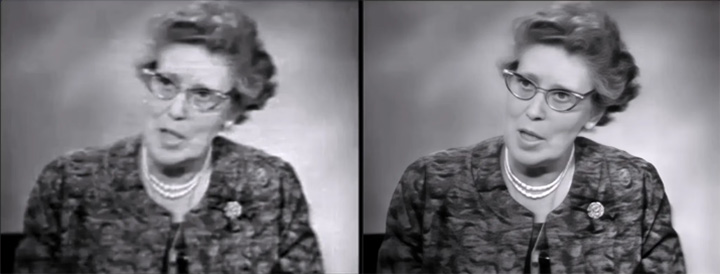
The diffusion AI is generative. Topaz Starlight will invent plausible detail where the original was too blurry. For instance, it might add fine skin texture or hair detail on a face that was just a smudge of pixels before. In our experience, these invented details usually look convincing and can really sell the illusion of a higher-resolution source.
No Tuning Required
Starlight is designed as a one-click tool. Just load your video and hit Enhance. Unlike some traditional Topaz models where you might tweak settings for grain or sharpness, there are no adjustable parameters for Starlight. This makes it beginner-friendly, as you don't have to be an expert to get great results.
Cloud-Powered Processing
Because the diffusion model is extremely computationally intensive, the initial release of Starlight runs on Topaz's cloud servers rather than on your local machine. This means anyone can use it via an internet connection, without needing a high-end GPU. The heavy lifting is done on server-grade NVIDIA hardware, ensuring you get the best quality output even if your own PC is underpowered.
Limitations and Challenges
Topaz Starlight delivers on its promise of unprecedented enhancement quality. Despite its innovative technology, Starlight is not magic. From our test, there are practical drawbacks and limitations to understand.
Slow Processing Speeds
The diffusion model is computationally heavy and currently quite slow. Topaz has openly stated that Starlight "takes time to process and is costly to run". When using the cloud service, expect roughly real-time or slower processing. When using locally, the speed can be even more glacial if your GPU is borderline.
In our experience, the web app took about 160 seconds to process a 6-second video at 636x480 resolution, 23.976 fps, totaling 145 frames. This is not a fast, real-time tool by any means.
High Resource and Cost Requirements
Along with being slow, it's expensive, either in cloud credits or in hardware demands. On the hardware side, if you choose the local route, you basically need a workstation-grade PC. For cloud, the free usage is very limited (3 short clips/week). If you want to enhance a larger project, the credits can add up quickly. Starlight is currently a high-end solution and not as easily accessible to truly budget users without cloud payments.
Occasional Artifacts and Failures
While Starlight usually does an amazing job, it can still stumble on certain content. The most commonly cited issue is with details and faces in very low-quality footage. If a face is extremely blurry or far in the background, Starlight's attempt to recreate it can result in unnatural outcomes. Similarly, small text or logos might not be rendered correctly either.
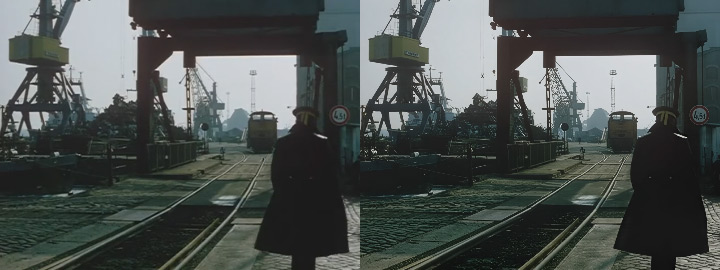
In addition, we also observed overcorrection and a lack of naturalism. As you can see in the comparison above, the edges of the figure in the foreground are very crisp after upscaling. It almost looks like he was rotoscoped or digitally inserted. The separation between the subject and the background feels a bit unnatural. His shoulders and cap have faint glowing edges. These haloing artifacts often happen when the AI oversharpens areas of contrast.
No Manual Controls
The one-click design is a double-edged sword. While it makes things easy, it also means zero adjustability if the result isn't to your liking. Unlike in Topaz Video AI's other models where you could, say, dial back the strength or add grain to taste, with Starlight you get what you get. It's a black box. If the AI over-sharpened a face or introduced a weird artifact, you can't currently tweak any settings to fix it. Topaz has responded that they are considering adding more controls in the future. For now, though, hands-off means lack of fine control.
Topaz Starlight Alternative
While Topaz Starlight excels in advanced AI video enhancement, the speeds and resource demands might not suit everyone's needs. So if you are exploring alternatives to Topaz Starlight, VideoProc Converter AI could be a compelling option, especially if you are seeking a more user-friendly, cost-effective, and versatile solution.
The AI Upscaling (called Super Resolution in the app) of VideoProc Converter AI is very capable. It can upscale videos up to 4K and denoise and deblur the image at the same time. In practice, the results on moderately low-res content are impressive and absolutely usable for most projects. In fact, for many videos, VideoProc's output is close enough in quality that you'd have to zoom in or do a direct A/B to tell the difference.
In addition, VideoProc Converter AI is far more accessible on Windows and macOS. Importantly, it's optimized for NVIDIA, Intel, AMD, and Apple silicon chips to boost performance. This means a much wider range of users can run the software out-of-the-box, without special hardware. Even on a mid-range laptop, you can leverage its AI upscaling. So, in real-world use, unless you absolutely need every drop of detail from a terrible source, VideoProc Converter AI offers 85-90% of the visual enhancement quality while being 100% accessible, faster, and far more cost-effective. Feel free to download and give it a shot for yourself.
VideoProc Converter AI - AI Upscaling for Everyday Use



- Up to 400% and 4K AI video upscaling in batch with more details
- Accessible on Windows and macOS with NVIDIA/Intel/AMD/Apple chips
- Compatible with 370+ codecs and 420+ video and audio formats
- Multipurpose toolbox with AI frame interpolation, image upscaling, etc.

FAQ
What Is Topaz Starlight?
Project Starlight is Topaz's latest AI video enhancement tool for 4K upscaling. It's the first diffusion-based AI model to upscale and restore low-quality videos to high-definition clarity with more details. Unlike traditional methods, Starlight ensures temporal consistency and smooth motion across frames without introducing artifacts.
What Is the Difference Between Topaz Video and Starlight?
Topaz Video (formerly Video AI) is a comprehensive software suite that offers various tools for video enhancement. Within this suite, Starlight is a family of specialized models focusing on high-quality upscaling using diffusion AI technology. While Topaz Video includes multiple models for different enhancement tasks, Starlight specifically addresses the challenge of restoring and upscaling degraded footage with improved temporal consistency.
How Much Does Topaz Starlight Cost?
Topaz Starlight is not sold as a standalone application. It's available through Topaz Astra or Topaz Video subscriptions, which are around $299 per year and include several cloud credits each month. Credit consumption for Starlight models depends on the selected model and output resolution.