
 Download Online Videos & AI Upscale to HD/4K!
The search for a better JDownloader alternative is on. JDownloader has long been a popular choice for many downloaders, trusted for its ability to manage downloads from a variety of file-hosting sites. However, despite its widespread use, it's starting to show its age. It's slow, pushes you to upgrade for faster speeds, and even worse, during installation, it throws in adware and extra apps. On top of that, it's bulky and clunky. With all these frustrations, it's no surprise that more and more users are on the lookout. If you're ready to leave the hassle behind, here are 5 of the best alternatives to JDownloader.
Common JDownloader User Concerns
⛔ "I need an alternative to j downloader for the Sister Site, the new updates broke it and now it is very slow grabbing links then starting D/l" – by @Pure_Energy from audiosexproc.com
⛔ "Oh great, JDownloader came with adwares on my computer" – by @DanaPinkWard from reddit.com
Recently, YouTube changes have become another recurring headache for JDownloader users. Community reports describe YouTube links getting stuck in LinkGrabber, showing "plugin outdated" or "temporarily unavailable" errors, returning HTTP 403 errors, or exposing only low-res video streams. The JDownloader team regularly pushes plugin fixes, but YouTube's frequent changes to its player, tokens, and anti-bot checks can break compatibility again without warning. For users who mainly download online video, this ongoing cat-and-mouse game is another reason to keep a JDownloader alternative at hand.
Top 5 Best JDownloader Alternatives: Quick Comparison
As video platforms tighten their restrictions and constantly update their algorithms to block unauthorized downloads, many once-popular downloaders have started to break or disappear. The good news? We've tested dozens of video downloaders on the market and curated a list of the 5 best JDownloader alternatives that still work reliably, so you don't have to waste time on trial and error.
| Feature / Tool | VideoProc Converter AI | Motrix | 4K Video Downloader Plus | yt-dlp | Video DownloadHelper |
|---|---|---|---|---|---|
Easy to Use |
✔️ |
➖ |
➖ |
❌ |
✔️ |
Clean Installation |
✔️ |
➖ |
➖ |
✔️ |
✔️ |
Fast |
✔️ |
✔️ |
➖ |
✔️ |
❌ |
Stable |
✔️ |
✔️ |
❌ |
❌ |
❌ |
Supported Platforms |
1000+ sites |
100+ sites |
17 sites |
100s of sites |
Popular video platforms |
Support for 4K Download |
✔️ |
✔️ |
✔️ |
✔️ |
Up to 1080p (free user) |
Batch Download |
✔️ |
✔️ |
✔️ |
✔️ |
❌ |
Advanced Features |
Video editing, AI-enhancement |
Selective downloads |
Smart Mode, in-app browser |
Full control over downloads, post-processing |
limited features |
Free Version |
✔️ |
✔️ |
✔️ |
✔️ |
✔️ |
Rating |
|
|
unknown |
|
 by
by  by
by  by
by  by
by Top 5 Best JDownloader Alternatives: Detailed Review
1. VideoProc Converter AI
- Pricing: Free trial.
- Clean Installation: Yes.
- Ease of use: Yes. 1-click to go.
- Best for: Users seeking a clean, stable, and feature-packed solution for video downloads and enhancements.
VideoProc Converter AI is far superior to JDownloader in terms of reliability, simplicity, and safety. Unlike JDownloader, which often feels cluttered with ads and unwanted software, VideoProc Converter AI offers a clean and straightforward experience. It’s also regularly updated, ensuring smooth and hassle-free downloads without the compatibility issues that can trip up JDownloader.
When it comes to the video downloading features, VideoProc Converter AI takes the lead as well. It supports downloading SD, HD, and even UHD 4K videos from over 1000 sites, including Facebook Live, Twitch, and YouTube. Bulk downloads are supported, so you can download all or selected videos from a channel or an entire playlist. This flexible video downloader automatically detects all video versions through the link you provide, giving you the option to choose your preferred resolution, frame rate, size, and more. You can even download videos in their original 4K resolution. For lower-quality sources, the AI Super Resolution feature can upscale videos to 4K, preserving details and eliminating artifacts.
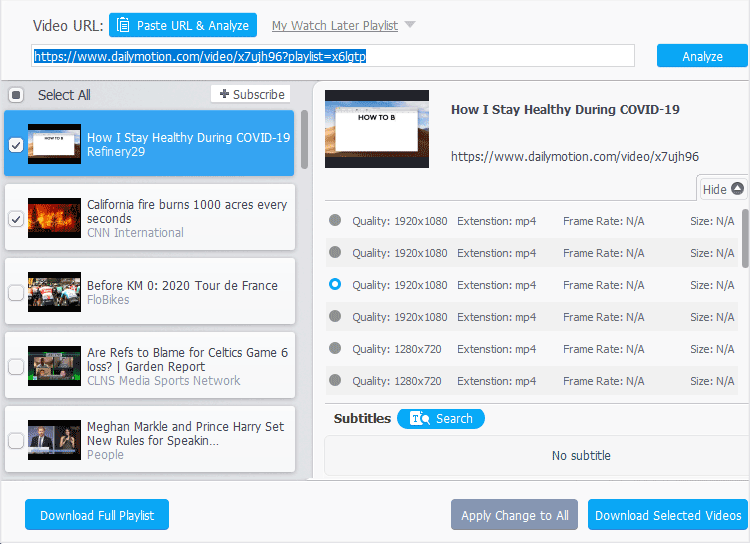
Free download and install VideoProc Converter AI to download videos/audio/subtitles from 1000+ sites!

👍 Pros:
- 1-click to download videos from Vimeo, TikTok, YouTube, and 1000+ more sites.
- Download videos in original quality or upscale low-quality videos to 4K with AI.
- Choose from multiple resolutions (1080p/4K) and formats when available.
- Lightweight yet feature-rich: download music/subtitles; edit, record, convert…
- Stable, regularly updated, with an easy interface and no bundled software.
👎 Cons:
- Requires installation on Windows or Mac.
- Cannot download image files.
Our Conclusion:
VideoProc Converter AI has been around for years, offering all the features JDownloader provides, along with a range of useful extras like AI-driven video and image enhancement. What's more, it's all neatly organized in a user-friendly interface, making it incredibly easy for beginners to get the hang of right away. Plus, it's 100% clean with no bundled ads or malware to worry about.
2. Motrix
- Pricing: Free.
- Clean Installation: Yes.
- Ease of use: Yes.
- Best for torrent downloads and users who prioritize a clean interface and speed.
Motrix is another good alternatives to JDownloader if you want a simpler, cleaner experience without the clutter. It offers a modern, minimal interface that's easy to navigate and doesn't overwhelm you with unnecessary settings. Despite its simplicity, it's powerful under the hood — supporting BitTorrent, magnet links, and even selective torrent downloads. Motrix automatically updates its tracker list every day to keep downloads fast and stable, and with support for up to 10 concurrent tasks and 64 threads per download, it delivers impressive speed and efficiency. However, it isn't perfect — it can't directly handle links from most user-generated content platforms like YouTube, Vimeo, or Dailymotion, so it's not ideal if that's your main need. But for general downloads and torrent management, it remains a reliable, lightweight option.
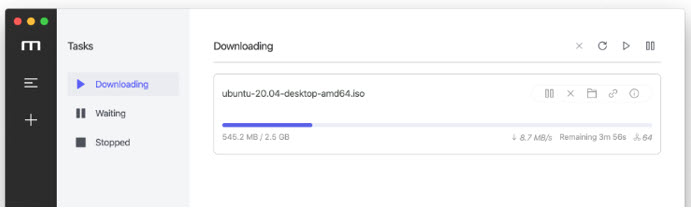
👍 Pros:
- Download videos from HTTP, FTP, BitTorrent, and Magnet links.
- Speeds up downloads by splitting files into multiple parts.
- Clean, modern, and intuitive, making it easy to manage downloads.
- Rich additional features: Includes a speed limiter, P2P torrent support, etc.
👎 Cons:
- Cannot download video from Dailymotion, YouTube, and many popular sites.
- It's hard to change the number of connections after a download has started.
Our Conclusion:
Motrix focuses on supporting various download protocols. While it does support P2P downloads, it is not specifically designed for video platforms like YouTube. Instead, Motrix excels in high-speed downloads, particularly with its multi-threading capabilities and speed optimization features. As a result, while Motrix is a solid alternative to JDownloader for general downloads, it's not ideal for downloading videos from platforms like TikTok, Shorts, YouTube, or X.
3. 4K Video Downloader Plus
- Pricing: $15/year or $42/lifetime.
- Clean Installation: Not guaranteed.
- Ease of use: Yes.
- Best for casual users focused primarily on mainstream video downloads, willing to tolerate some ads.
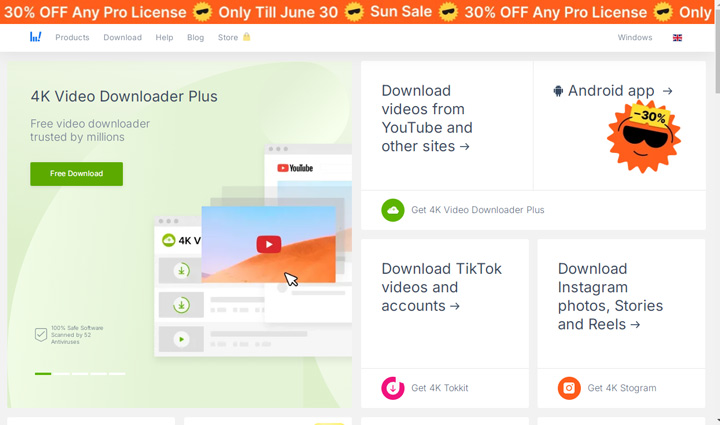
4K Video Downloader Plus is a solid alternative to JDownloader for those who primarily focus on downloading videos and music from mainstream platforms. Unlike JDownloader, which can feel overly complex and cluttered, 4K Video Downloader Plus keeps things straightforward with a clean interface and an integrated browser that lets you search, log in, and grab content without switching tabs. This handy JDownloader alternative supports ultra-high resolutions up to 8K, offers a convenient Smart Mode to automate download settings, and organizes files neatly by type or date.
The downsides? The interface is cluttered with ads, which can be distracting. It supports only 17 sites, meaning you can't download videos from many popular platforms. Additionally, stability can be inconsistent because supported platforms often update their algorithms, block certain download methods, or change their interfaces. 4K Video Downloader Plus often struggles to keep up with these changes, leading to 4K Video Downloader not working or other stability issues.
👍 Pros:
- The straightforward design makes it easy for beginners to navigate.
- The built-in browser lets users search for and download content without leaving the app.
- Pre-set parameters for format, resolution, and content type simplify the setup.
- Supports downloads from most major platforms.
👎 Cons:
- Unstable performance, with frequent errors like failed video link analysis.
- Pop-up ads can be distracting during use.
- The "Plus" version groups downloads by subscription, which some users find inconvenient.
Our Conclusion:
Overall, 4K Video Downloader Plus is a decent alternative to JDownloader. It shines with its simplicity and support for multiple platforms, but it lacks stability and often encounters errors. Additionally, while it focuses solely on downloading, the lifetime version comes with a hefty $42 price tag.
4. YT-DLP
- Pricing: Free.
- Clean Installation: Yes.
- Ease of use: Steep learning curve.
- Best for tech-savvy users who want full control, flexibility, and advanced customization.
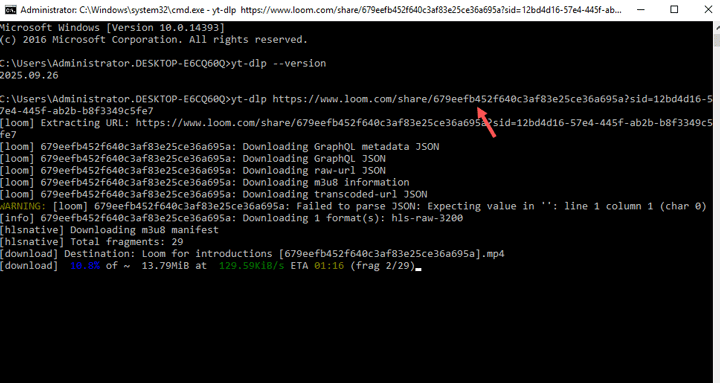
yt-dlp is a robust alternative to JDownloader. It works with FFmpeg dependencies, offering full control over what you want to download, including formats, sizes, resolutions, and more. It provides a wealth of advanced features, such as merging video and audio, downloading private content, and handling complex downloads. Because of this, it's an ideal choice for users seeking a more powerful alternative to JDownloader, without spending any money. However, as mentioned, many people turn to alternatives to simplify the downloading process.
While yt-dlp is extremely versatile, its reliance on command-line usage makes it more complex, not simpler. So, if your main goal is a simpler alternative to JDownloader, yt-dlp might not address the core issue that drives users away from JDownloader in the first place.
👍 Pros:
- Full control over the format, quality, audio stream, bitrate, subtitle tracks, and more.
- Support trendy video, image, audio platforms, incl. Vimeo, SoundCloud, YouTube, and Reddit.
- Bulk download videos from the entire playlist or channel.
- Edit, convert, and compress the downloaded content (with dependency)
👎 Cons:
- Lack of GUI. This command-line based tool is not for less-technical users.
- Require the installation of dependencies to apply extra features like merging videos.
- Errors occur frequently, though they can usually be resolved quickly.
Our Conclusion:
For those with a bit of programming know-how, YT-DLP stands out as the most powerful alternative to JDownloader. It offers unmatched flexibility, extensive customization, and exceptional performance—all without costing a dime. While it may not have the sleek interface of other tools, its command-line power gives users full control over how and what they download.
5. Video DownloadHelper
- Pricing: Free.
- Clean Installation: Yes.
- Ease of use: Steep learning curve.
- Best for quick browser video downloads, ideal for users who prefer extensions.
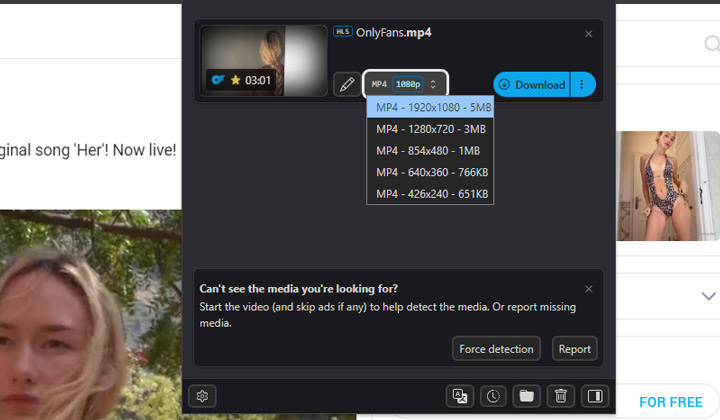
Video DownloadHelper is a great alternative to JDownloader, especially for those seeking a lightweight, browser-based solution. As a browser extension for Google Chrome and Firefox, it eliminates the need for a full software installation, making it quick and easy to set up. It supports a wide range of popular platforms like Facebook, Dailymotion, Vimeo, and Udemy, offering a convenient way to download videos directly from your browser. However, it has some downsides, such as limited functionality for pausing or resuming downloads, which can be a hassle when downloading large files like 4K videos. Users may also encounter the occasional issue of downloads getting stuck.
While Video DownloadHelper is simple and effective for basic needs, it may not offer the same flexibility or reliability as more feature-packed software like JDownloader.
👍 Pros:
- Easy to access. Works directly within your browser (Firefox and Chrome).
- Supports most streaming sites and different stream types (Dash, HLS, MPD).
- Detect all the downable version of videos, in different formats and resolution.
- With over 3 million users, it's widely trusted and should be safe to use.
👎 Cons:
- Not as stable as desktop-based video downloaders.
- During my testing, it can detect the video but fail to download.
Our Conclusion:
When it works, it's definitely one of the best video downloaders to replace JDownloader. It can automatically detect videos on the page you visit and lets you customize settings to prevent the auto-detection of ads. However, it's not always stable and often fails during the downloading process.
How to Choose the Best JDownloader Alternative for You
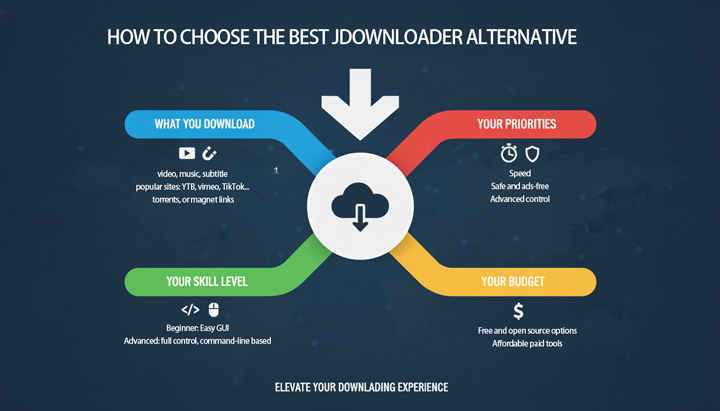
Ditching JDownloader for a better experience is a smart move, but with so many options, how do you pick the right one? The "best" JDownloader alternative isn't a one-size-fits-all answer; it depends entirely on your specific needs and priorities. Use these questions to guide your decision:
1. What Are You Primarily Downloading
If your focus is on videos and audio from streaming sites like YouTube, TikTok, or Vimeo, you'll want a tool that supports a wide range of platforms and offers high-resolution options like 4K. VideoProc Converter AI and YT-DLP are solid options for this.
However, if you're managing general file downloads, torrents, or magnet links, speed, multi-threading, and torrent support should be your top priorities. Motrix excels in handling large file transfers and P2P downloads.
2. What's Your Technical Comfort Level
If you prefer a simple, easy-to-use graphical interface, tools like VideoProc Converter AI, Motrix, and 4K Video Downloader Plus are ideal for beginners. On the other hand, if you're comfortable with command-line interfaces and want more control over every download, yt-dlp offers incredible flexibility. If you only need to grab content occasionally and directly from your browser, a browser extension like Video DownloadHelper might be sufficient.
3. What's Your Budget
If you're looking for a free solution, Motrix, yt-dlp, and Video DownloadHelper are completely free. Some paid tools, like VideoProc Converter AI, offer limited free versions. If you're willing to invest in premium features and support, tools like 4K Video Downloader Plus or VideoProc Converter AI offer lifetime licenses or subscription models, which can be worth the investment if you need stability and advanced features.
4. What Are Your Key Priorities
Understanding your priorities is most important. If you need fast download speeds, look for tools with multi-threading and good download management. For a clean, ad-free experience, choose a JDownloader alternative that is free from bloatware and adware. Stability is important, especially with changing platforms, so pick a JDownloader replacement with regular updates and consistent performance. If you need extra features like video editing, AI enhancement, or subtitle downloads, make sure the video downloader offers them.
By honestly assessing these points, you can quickly narrow down the options and find the JDownloader alternative that truly elevates your downloading experience.
FAQs About JDownloader Alternatives
1. Are these JDownloader alternatives legal to use?
The legality of downloading content depends heavily on the source material, copyright laws in your region, and the platform's terms of service. Generally, downloading public domain content or content for which you have explicit permission is legal. However, downloading copyrighted material without permission (e.g., most commercial movies, TV shows, or music) is typically illegal and violates platform terms. These JDownloader alternatives are designed to facilitate downloads, but users are responsible for ensuring they comply with all applicable laws and terms of service.
2. How can I avoid bloatware and ads when installing JDownloader alternative?
You should always download software from the official developer's website. During installation, pay close attention to every screen, especially "Custom" or Advanced" options. Decline any offers to install additional software, toolbars, or change your browser homepage. Reputable alternatives, like VideoProc Converter AI, explicitly guarantee a 100% clean installation without bundled software.
3. What is the best JDownloader alternative for Android?
Most of the powerful JDownloader alternatives, including those reviewed here, are designed for desktop operating systems (Windows, Mac, Linux). JDownloader itself doesn't have an official Android app. For Android, apps like ADM (Advanced Download Manager) and PonyDroid are worth to consider.




