
 VideoProc Converter AI
 New AI features are available


 Listed in
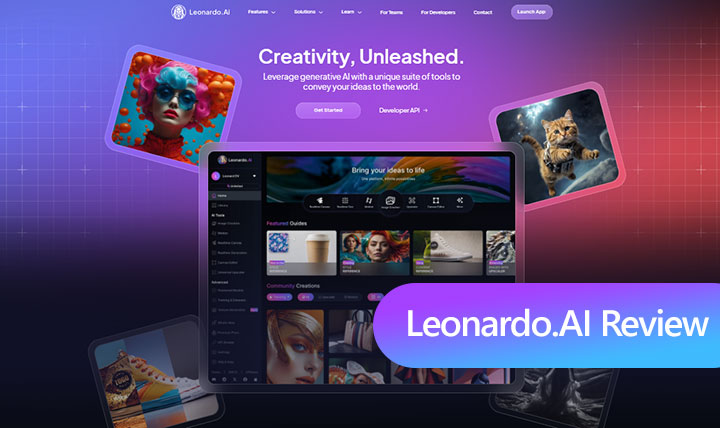
 When Leonardo AI first gained attention around 2022, it quickly established itself as one of the strongest free alternatives to Midjourney. Its accessible interface, flexible workflows, and early support for custom model training gave it an edge at a time when many AI image generators offered little beyond basic text-to-image creation.
Four years later, the AI image generation landscape looks very different. OpenAI's GPT Image models, Google's Gemini-based Nano Banana family, Midjourney's continued refinements, and newer generation and editing models from companies such as ByteDance and Alibaba have raised expectations for realism, prompt accuracy, text rendering, consistency, and creative control.
Leonardo AI has kept pace by adding newer models and expanding its creative ecosystem. It is more capable than ever, with tools that now extend beyond image generation into editing, video, audio, 3D, and upscaling. Yet it seems to appear less often in everyday AI discussions than it once did. That makes it worth revisiting: in 2026, does Leonardo AI still rank among the leading AI image generators, and is it worth your time and money?
⏰ Leonardo AI at a Glance: 20-Second Summary
| Feature | Detail |
|---|---|
Core Function |
Generates high-quality digital art and images from text descriptions using AI. |
Ideal Users |
Digital artists, graphic designers, VFX artists, game developers, marketers. |
Top Features |
|
Pricing |
Free plan (150 fast token/day); Paid plans starting at $12/month. |
Upscaling |
Built-in 2x upscaler (Premium only). External 4K upscaling recommended for print/large displays. |
User Feedback |
Generally positive ( |
Watch Out For |
❗ Quick token consumption. ❗ Occasional distorted outputs. ❗ Many features behind paywall. ❗ Resolution limits 💡 Suggested to upscale your Leonardo.AI images via VideoProc (10K | Keep intricate details). |
 AI Image Models: GPT Image-2, Nano Banana, Krea 2, Seedream 5, Lucid Realism, FLUX.2 Pro, Phoenix, and more, supporting text-to-image, image-to-image, and image editing workflows.
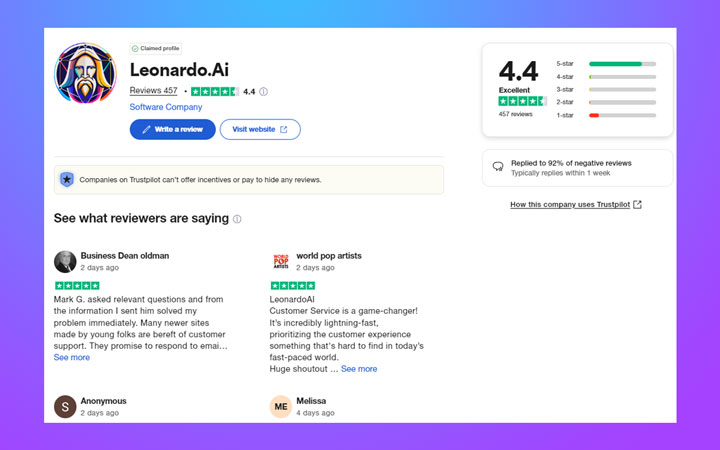
 4.4/5 on Trustpilot), with praise for customer service.
What Is Leonardo AI
Leonardo AI is an advanced AI image generation platform designed with creative professionals in mind. Utilizing sophisticated machine learning, it transforms text prompts into high-quality, realistic images. Its standout feature is the ability to train custom AI models. This means you can feed it your own artwork or preferred styles, ensuring that every creation aligns perfectly with your unique visual identity.
Beyond digital art and concept design, Leonardo AI proves invaluable for game developers in designing character elements, UI, and gaming environments. Marketing teams can also leverage it to generate creative content and ad assets efficiently. Essentially, it's an AI-driven powerhouse for generating diverse visual assets from simple text descriptions, enhancing workflows across various creative fields.
Key Features of Leonardo.ai
Multi-Model Image Generation
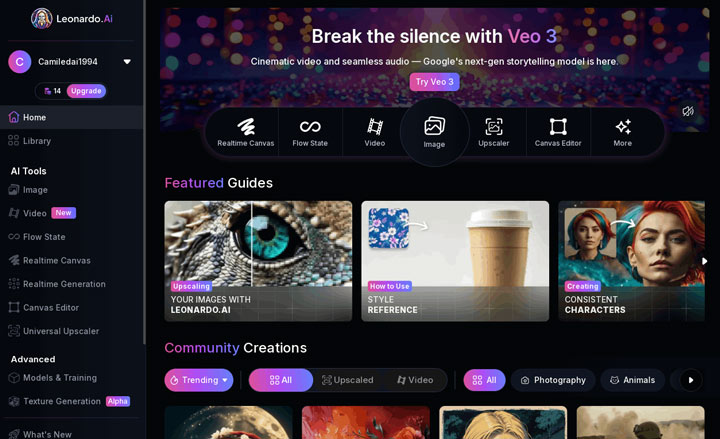
Leonardo brings a wide mix of in-house and third-party image models into the same workspace. You can reuse the same prompt and reference images while moving between them, which makes direct comparisons much easier. The differences are practical: a model that produces clean poster text may struggle with a realistic product shot or a precise edit. Automatic selection gives beginners a quick starting point, and presets make style changes easy. They can also obscure which engine is producing the result. For work involving text, products, or faces, it is worth testing the same prompt with several models before choosing one.
Editing and Ideation Tools
Leonardo gives you several ways to work on an idea before and after the first generation. Omni Editor handles changes to an existing image, including inpainting, outpainting, and edits guided by reference images. It is useful when most of the image already works and you do not want to start again. Realtime Canvas and Flow State come in earlier. Canvas lets a rough sketch guide the composition, while Flow State keeps producing variations until something catches your eye. Flow State is easy to browse for too long, however, and every result uses tokens—even on plans that include relaxed
Custom Models and Elements
Custom training remains one of Leonardo's more distinctive features. Paid plans support between 10 and 50 personal models, while Elements help carry a character, product, or visual style into new images. They can make repeated projects easier to manage, although details may still drift between generations.
Custom Models and Elements
Leonardo no longer stops at a finished still image. It can animate images, generate and edit video, create music and sound, and turn a 2D reference into a GLB asset with a model such as Rodin V2. These additions will not matter to everyone. But for creators working across several formats, they make Leonardo feel less like a collection of image models and more like a connected production workspace.
Hands-On Testing: Putting Leonardo AI to the Test
Testing Leonardo's Image Generation
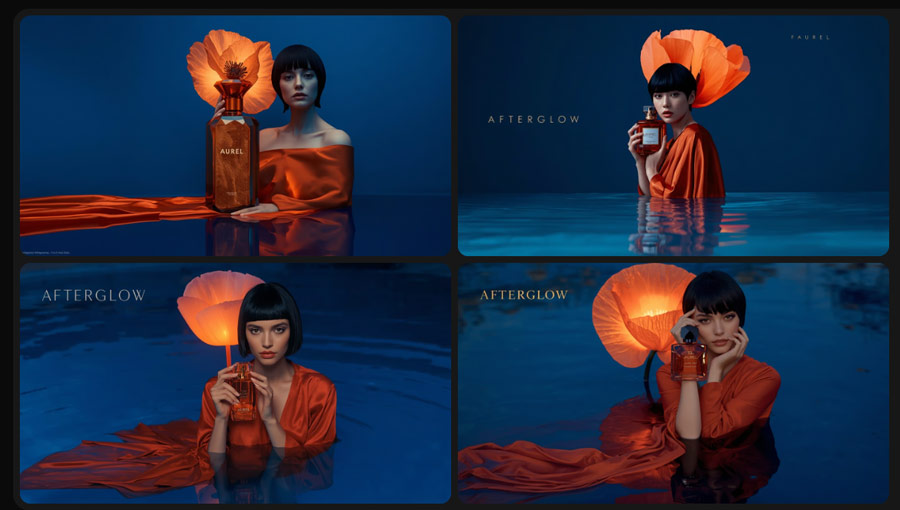
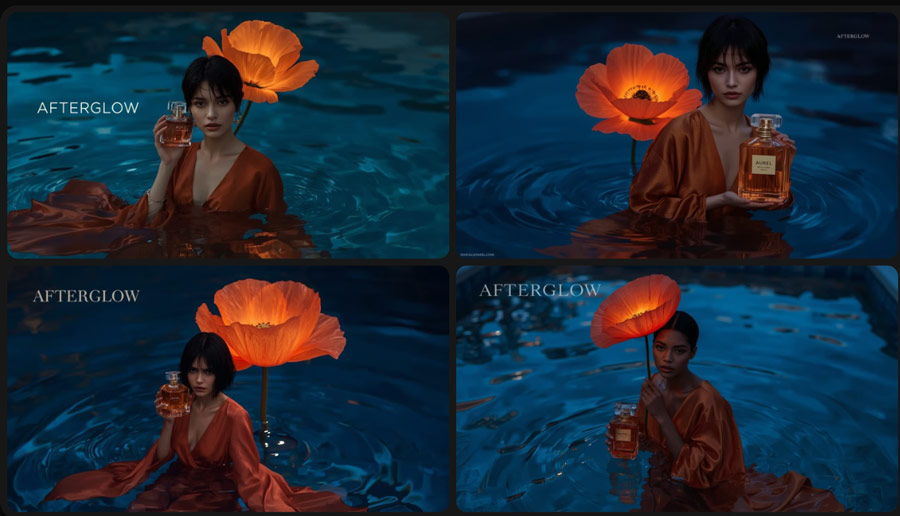
Leonardo currently promotes Lucid Origin and Lucid Realism as two of its main in-house image models. I tested both with the same fragrance campaign prompt, which combined a human subject, a handheld product, translucent petals, reflected light, and precise text placement.
Prompt: A photorealistic, award-winning advertisement poster. In the top center, the bold, capitalized headline text "A TASTE OF TOMORROW". Below the headline, a sleek, minimalist glass bottle of juice is the main subject. The juice is a vibrant green color. On the bottle's label, the brand name "Phoenix Elixir" is written in an elegant, clean font. At the very bottom of the poster, in smaller text, is the slogan: "Freshly Squeezed Future." The background is a soft, out-of-focus image of a sun-drenched orchard.
1) Lucid Origin
The Lucid Origin result looked average overall. The giant poppy appeared solid instead of translucent, and the requested headline did not land in the correct position. The perfume bottle also looked poorly connected to the model's hand, almost as if it were floating beside her fingers.
2) Lucid Realism
Lucid Realism ran into many of the same problems. The petals still lacked the illuminated, semi-transparent quality described in the prompt, and the bottle was rendered much larger than a normal perfume bottle. Its interaction with the hand did not look physically convincing either.
3) How They Compare with GPT-Image-2
GPT-Image-2 provides a useful reference because it is currently one of the benchmarks for text-to-image generation. At the time of writing, its high-quality mode leads the Artificial Analysis Text to Image leaderboard.
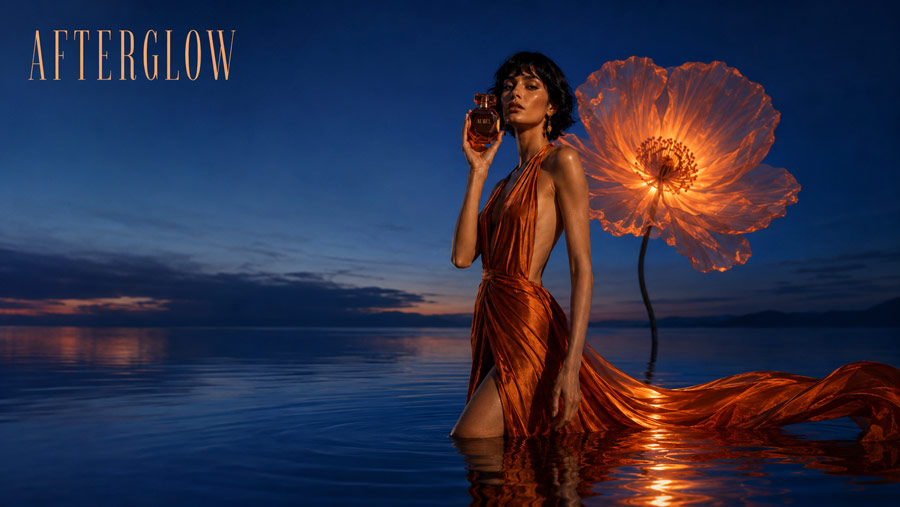
With the same prompt, GPT-Image-2 came much closer to the intended result. The flower looked more translucent, the bottle had a believable size, and the model appeared to hold it naturally. It also produced a more polished advertising image, making the weaknesses of the two Lucid results easier to see.
2. Testing Leonardo's Video Generation
I tested Leonardo's Motion 2.0 Fast model in both image-to-video and text-to-video modes.
Before starting the image-to-video test, I uploaded a photorealistic image of a woman and asked Leonardo to animate her dancing. The image triggered a content-policy warning before generation began. Leonardo did not explain which part of the image caused the rejection, so I switched to a stylized 3D character.
1) Image-to-Video Generation Test
Prompt: The little fantasy doll gently lifts the teacup with both hands, brings it carefully to her lips, and takes a small sip of water. She lowers the cup back onto the saucer, looks directly into the camera, blinks once, and gives a sweet, warm smile. Keep her face, large eyes, curly hair, small horns, hands, clothing, teacup, and background consistent throughout the video. The cup stays solid and correctly shaped, with no spilling liquid. Her movements are slow, delicate, and natural. The camera remains completely still. No zoom, cuts, extra fingers, distorted hands, morphing objects, or changes to the character's appearance.
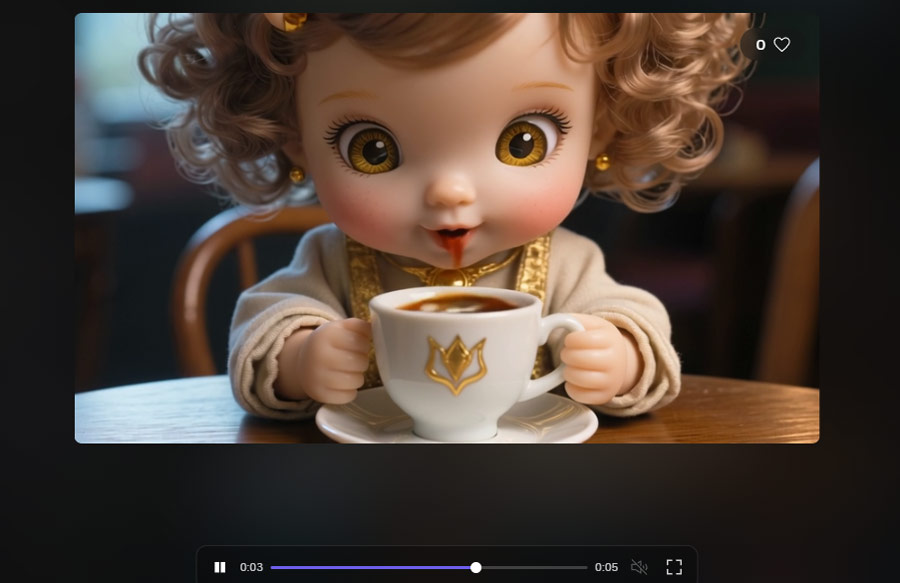
The generation took around four minutes. The source image had an appealing, polished 3D-animation look, but much of that quality disappeared in motion. The character moved like a mechanical puppet, and the drinking action was performed incorrectly. Her interaction with the cup looked unnatural, leaving the final video less attractive than the original still image.
2) Text-to-Video Generation Test
Prompt: Begin with a slow, sweeping drone shot revealing a vast, photorealistic Arctic panorama in the National Geographic style. The camera pans across an endless frozen sea under an overcast, bruised sky, settling on a solitary polar bear poised at the edge. Observe the intricate frost details on its thick, white fur as it crouches, its gaze intensely fixed on the dark water. The camera then initiates a deliberate, cinematic zoom, drawing closer to capture the bear's sharp, focused stare. Suddenly, with explosive, raw power, the bear plunges its colossal paw into the frigid depths, creating immediate, dynamic ripples that spread across the water's surface. A subtle cracking sound emanates from the ice as small fish scatter and dart away. The bear swiftly withdraws its paw, water cascading from its razor-sharp claws, and triumphantly presents a wriggling fish. A gentle, yet persistent wind begins to pick up, swirling delicate snowflakes that momentarily obscure the scene, enhancing the dramatic shift in the sky above as dark, brooding clouds alternate with fleeting moments of pale sunlight, fostering a haunting, primal atmosphere. The camera now holds steady, allowing us to witness the bear's powerful yet graceful feeding, appreciating the rugged texture of its fur and the stark, untamed beauty of its icy dominion, emphasizing the crisp, crystalline nature of the water and the majestic frozen icebergs in stark contrast to the bear's raw vitality.
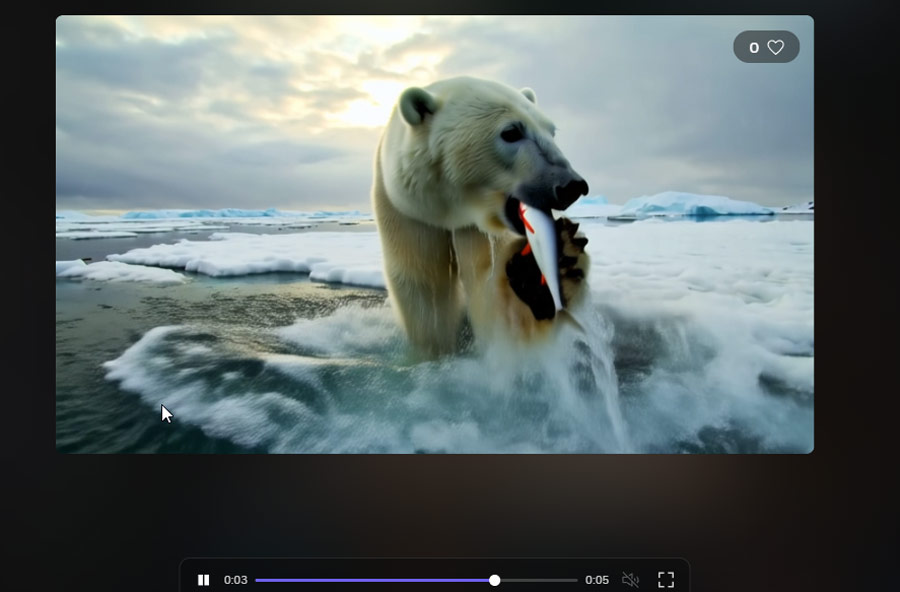
The text-to-video result also looked visibly artificial. I generated the same prompt with Veo 3, and its output was considerably more convincing. The difference was large enough to notice without examining individual frames. See how Veo 3 and Veo 3.1 handled the same prompt in my tests.
3. Real-Time Canva
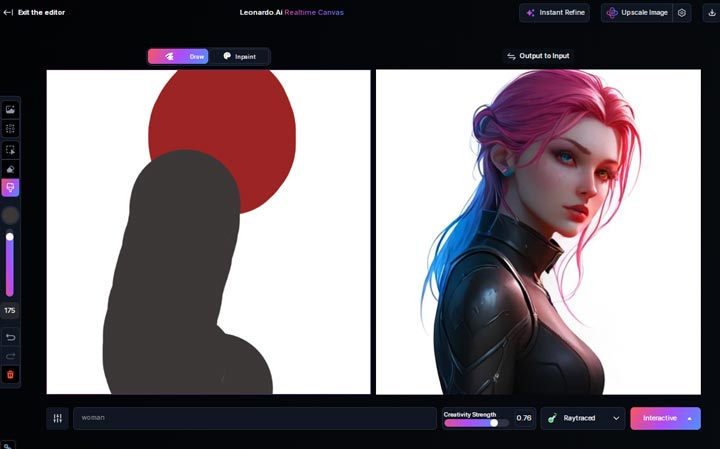
This is a feature I've really come to appreciate after using it. It lets you sketch out an idea directly within the interface, and then watch the AI generate results based on your drawing in real-time. What I realized quickly was how incredibly handy it is for brainstorming concepts, exploring different styles, or quickly refining a rough, hand-drawn idea. It's a highly interactive and creative tool.
4. Flow State
Flow State is designed for rapid iteration, continuously generating a stream of images from a single prompt. The idea is to allow you to quickly explore variations and refine your vision without manually hitting 'generate' each time.
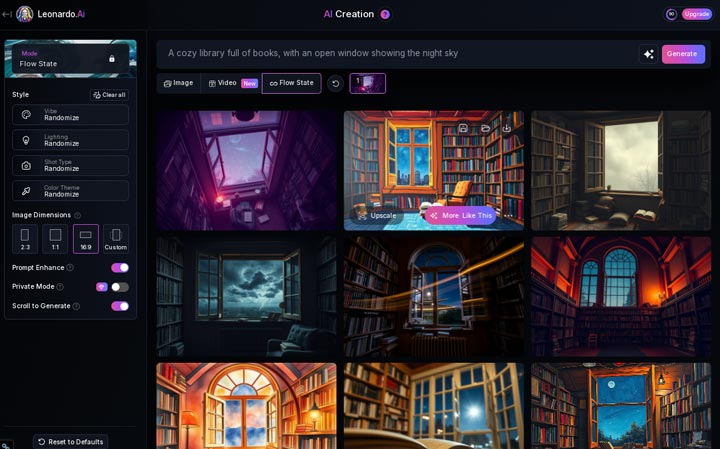
My key takeaway here, however, was the credit consumption. It keeps generating automatically until you manually stop it by clicking on an image you like. Each generation costs one credit. I quickly learned that if you let it run for a while, those credits can add up surprisingly fast. You really need to be mindful and stop the process once you see something promising to avoid burning through your tokens.
5. Universal Upscaler
Pro Upscaler sits between Legacy and Ultra in token cost, making it the most practical option for many users.
1) Leanardo AI Upscale Test 1
I selected Preserve mode, set the upscale ratio to 2x, and turned off Fix AI Artifacts. My goal was to increase the resolution and improve clarity while keeping the original image intact.
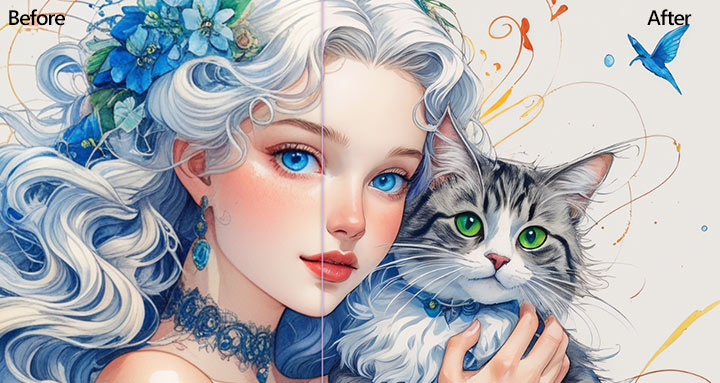
At first glance, the result looked clean and natural. The image was sharper, and nothing immediately appeared out of place. A closer look at the eyes and other fine details revealed some over-enhancement, however. The upscaler had subtly changed parts of the original instead of simply enlarging them. The result should work well for general photos where minor changes are unlikely to matter. I would be more cautious with product images, logos, and other assets that require exact detail preservation.
2) Leanardo AI Upscale Test 2
I then tested Pro Upscaler with a slightly flawed AI-generated portrait. This time, I enabled Fix AI Artifacts to see whether it could clean up the image while increasing its resolution.
The result looked acceptable at normal viewing size, although it still appeared slightly soft. On closer inspection, I could also see small changes to the face and other fine details. The differences were easy to miss, but they were present. Fix AI Artifacts helped produce a cleaner image, but it did not fully remove the softness or preserve every facial detail exactly.
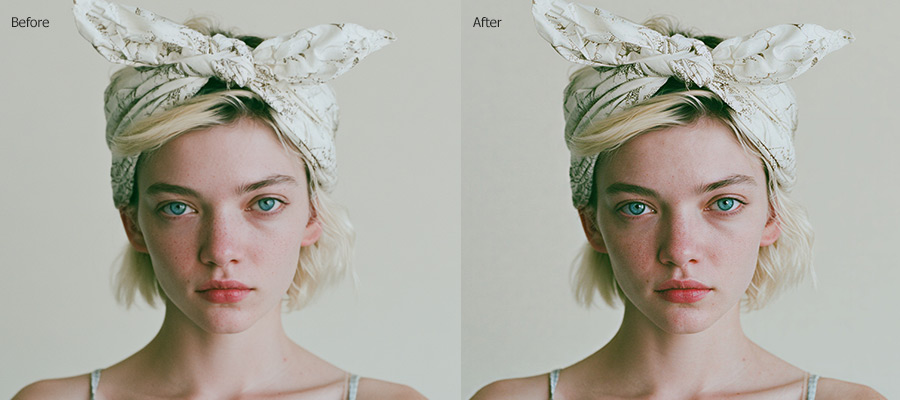
Unfortunately, what I found was this didn't work as intended. Instead of a faithful reproduction, the outcome looked noticeably altered. I observed details lost, like freckles on the face and the fine lower eyelashes. What's more, the lips in the upscaled image looked quite strange, even a little unsettling.
3) Why I'd Use VideoProc Converter AI Instead of Leonardo's Upscaler
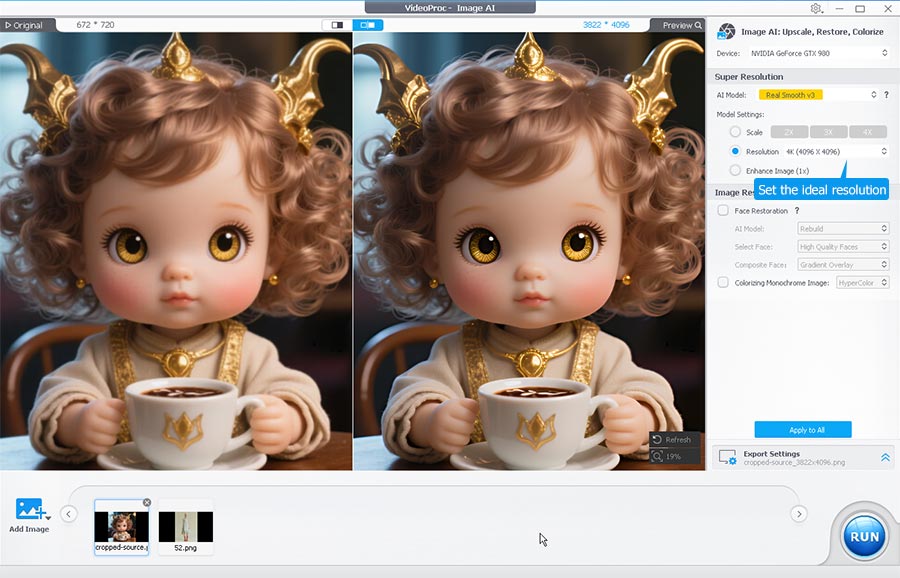
Both tests exposed the main drawback of Leonardo's Pro Upscaler: it can upscale an image, but it also redraw fine details, even in Preserve mode. That can be a real problem with faces, product photos, logos, and other assets that need to remain faithful to the source. Leonardo also accepts still images only and limits uploads to under 25 megapixels. For these reasons, I recommend VideoProc Converter AI for upscaling jobs where preserving the source matters. It supports both images and videos, does not impose the same 25MP image cap, and kept the enlarged image closer to the original in my tests.
VideoProc - Upscale Your Leonardo AI Generations to 10K Clarity
- Bulk upscale images (to 8k/10k) and videos (to UHD 4K)
- Enhance videos/images with the original details kept and improved.
- Automatically address the visual flaws like blurry, pixelation, and grainy
- Rich AI features: restore face(s) in images, colorize faded photos, etc.
- All-in-one: convert, compress, edit, download videos, screen record
 Excellent

What Others Are Saying: User Feedback on Leonardo AI
Moving beyond my own testing, it's always insightful to see what the wider user base thinks. Looking at platforms like Trustpilot, Leonardo AI holds a respectable 4.4 out of 5 stars based on numerous reviews, reflecting a generally positive sentiment among users.
Digging into the reviews, a consistent theme emerges: users are largely satisfied with the customer service and support team. This seems to be a significant strength for the platform, offering reassurance when issues arise. The most frequent criticism seems to revolve around image quality and consistency, particularly when compared to some competitors on certain types of prompts, and the speed at which credits are consumed.
Leonardo AI: Pros and Cons
Based on our testing and user feedback, here's a summary of Leonardo AI's strengths and weaknesses:
Pros:
- User-friendly interface makes it accessible for beginners.
- Automatically turns your basic prompts into detailed, effective text.
- Offers a vast selection of base AI models, including the ability to train your own custom models.
- Style switching feature is efficient and saves time.
- Output quality of Phoenix 1 and Flux Kontext are amazingly good.
- Real-Time Canvas is a highly creative and useful brainstorming tool.
Cons:
- Free plan limits run out very quickly; generating images with advanced models like Lucid Realism can be credit-intensive (e.g., 66 credits per image with the Lucid Realism model).
- Most Presets like Anime and Stock Photography produces distorted/odd-looking images.
- Can miss details or "hallucinate" when given very complex initial prompts.
- Many useful features (inpainting, generating single image, deleting generated images from the gallery) are locked behind a paywall.
- Free members cannot output images with a resolution larger than 1536x1024, and premium initial resolution is still limited to up to 2x upscale ratio.
- The built-in upscaler alters original image details.
Leonardo AI Pricing in 2026
Leonardo offers a free tier and three individual paid plans. The prices below are the monthly rates shown on Aug. 28, 2026, before tax. Annual billing can reduce the effective monthly price by up to 20%.
| Plan | Price | Fast Tokens | Who It Suits |
|---|---|---|---|
Free |
$0 |
150 per day |
Trying the interface and making occasional public generations. |
Essential |
$12/month |
8,500 per month |
Regular image creators who need private generations and want to train up to 10 personal AI models per month. |
Premium |
$30/month |
25,000 per month |
Active creators who need more capacity and relaxed image generation with eligible models. |
Ultimate |
$60/month |
60,000 per month |
High-volume creators who also want relaxed video generation with eligible models. |
Unused monthly tokens on paid plans can roll over into a token bank. The bank is capped at 25,500 tokens for Essential, 75,000 for Premium, and 180,000 for Ultimate. Free tokens reset daily and do not accumulate. Paid subscribers can also purchase top-up tokens.
The phrase "unlimited generation" needs context. Premium and Ultimate subscribers can continue generating at a relaxed pace only with eligible models. Third-party models such as GPT Image, Nano Banana, Veo, Seedream, Flux.1 Kontext, and Flux Kontext Max continue to consume tokens. Flow State also requires tokens on every plan. Check Leonardo's current pricing page before subscribing, as model eligibility and token costs can change.
Is Leonardo AI Expensive?
For occasional image generation, the free plan is enough to explore the workflow. Essential is the most sensible entry point if you need private generations and full ownership of your output. Premium and Ultimate offer better value to creators who regularly use models eligible for relaxed generation.
The value becomes less clear if most of your work relies on premium third-party models. In that case, compare how many finished assets you can produce instead of focusing on the headline token allowance. A workflow involving several generations, editing, upscaling, and video can use tokens much faster than a single-image estimate suggests.
Can You Use Leonardo AI Images Commercially
Yes. Both free and paid users may use Leonardo-generated images and videos commercially, but the ownership and privacy terms differ.
On the free plan, generations are public by default. As between the user and Leonardo, Leonardo owns the output and gives the user a non-exclusive, royalty-free licence for commercial use. Other users may also view or reuse public creations through features available on the platform.
Paid subscribers own the content they create, as between themselves and Leonardo and to the extent permitted by law. They can also enable Private Mode to prevent other users from accessing their work. Leonardo states that it will not use private content for model training or product development without the user's express written consent.
Paid users should still check the visibility setting before generating confidential client work, proprietary products or brand assets. A paid creation marked as public remains owned by the creator, but Leonardo receives broad rights to use it and other users may be able to access it.
These terms do not guarantee that every output is legally protected or safe to publish. Users remain responsible for their prompts, uploaded references and generated content. Copyright, trademark, publicity and privacy laws can also vary by country. Review Leonardo's current Terms of Service before using an output in an important commercial project.
Verdict: Is Leonardo AI Worth It in 2026
Leonardo AI remains a useful all-in-one platform in 2026, especially for creators who want image generation, editing, upscaling, model training and video tools in one account. Access to both Leonardo's own models and third-party models also makes it easy to experiment without joining several separate platforms.
Its own models did not lead the field in my tests. Lucid Origin and Lucid Realism struggled with the translucent flower, text placement, bottle size and the model's grip on the product. GPT-Image-2 handled the same advertising prompt much more convincingly. Motion 2.0 Fast also produced stiff character movement and an incorrect drinking action, while the comparable Veo result looked more natural.
The free plan is still worth trying. Premium and Ultimate make more sense for people who generate frequently with models covered by relaxed generation. The value drops if most of your work relies on GPT Image, Nano Banana, Veo or other third-party models, since these continue to consume tokens on every generation.
My experience did not show Leonardo delivering the best image or video quality available in 2026. Its appeal comes from convenience, model choice and the range of tools gathered in one workspace. Try one complete project on the free plan before committing to an annual subscription, including the corrections, upscale and video steps your normal workflow requires.



