
 Download Online Videos & AI Upscale to HD/4K!
You are probably here for one reason: you want to know whether ClipGrab is safe before you install it. With download tools like this, the issue is rarely just "does it work?" The real question is whether it is trustworthy enough to put on your computer in the first place.
So, is ClipGrab Safe? To answer this, we reviewed the project's own disclosures, tested the software ourselves, and compiled this ClipGrab review. Here's our take.
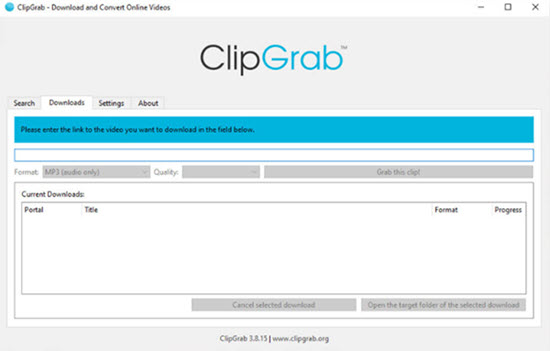
TL;DR: The Short Answer
ClipGrab itself is not malware, but it carries enough practical risk that most people might want to skip it.
The core app is not the same thing as ransomware, spyware, or a credential-stealing trojan, but an official version of its installer includes third-party offers. These bundlers may modify your files, change your desktop, reduce the storage space, and cause crashes. If you try to install it, you'll find that Windows will block it, and Defender will issue a warning.
And that leads to the practical bottom line. If a tool already requires you to hunt for the cleaner build, verify hashes, and second-guess installer behavior, it is probably not the best tool for the average person. Add in the fact that there are safer and more feature-rich alternatives, and ClipGrab becomes hard to recommend.
Potential Risks of ClipGrab
My take on ClipGrab is built up from a series of small warning signs. This is also why people keep asking, "Is ClipGrab safe?" People ask about it because something happens during installation.
Installer Bundling and Third-Party Offers
ClipGrab's own legal page says that its Windows installer with third-party offers is "powered by dotInstaller and TheCassiniLabs," and that TheCassiniLabs operates that installer independently from the ClipGrab project.
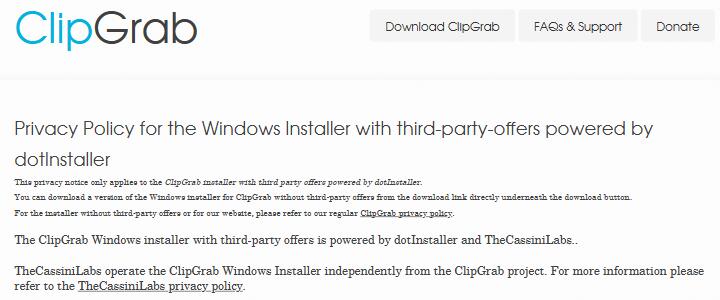
This is the "core app vs installer" distinction. Even if the app itself is legitimate, the thing you actually download and run may be something totally different. It may involve third-party offer logic, extra prompts, and a larger attack surface.
Antivirus and Windows Security Tools Warnings
Here's an analysis result for a ClipGrab installer sample that showed a 32/72 detection ratio on VirusTotal. It proves that some installer paths have enough offerware-style behavior to trigger broad security concerns.
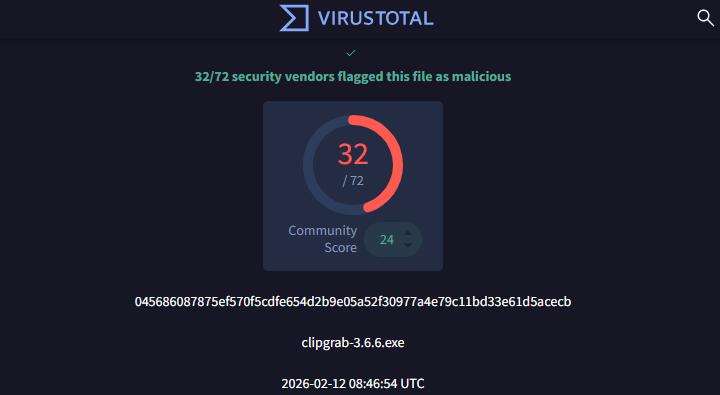
Windows is the highest-risk environment for ClipGrab because of installer bundling and OfferCore-style detections. Security tools, including Microsoft Defender, classify the offer‑enabled installer as a PUA. This is different from malware, but it's still considered a threat.
In fact, that dotInstaller-labeled build showed bundler behaviors in our sandbox analysis, including dropped files, offerware signals, and outbound connections that fit an installer platform rather than a simple, self-contained app.
Code Transparency
ClipGrab is presented as GPLv3 open source, and the site does offer source downloads for Linux-related workflows. That sounds reassuring at first. But when you look closer, the public transparency story is weak. The official changelog stops at version 3.8.5 from September 18, 2019, even though the project and third-party listings show newer 3.9.x builds. In addition, there's no official public repository or issue tracker.
None of this proves anything malicious. But it does whisper something just as important: this is not a project with especially strong public trust signals.
ClipGrab Review
ClipGrab has been around for a long time, and on paper, it is easy to see why people still try it. It is a free video downloader and converter that supports sites like YouTube, Vimeo, Facebook, and Dailymotion. It is lightweight, simple, and designed for people who do not want to mess with command lines or complicated settings.
That convenience is the main selling point. You paste a link, choose a format, and download. The interface is approachable. The built-in search is handy for beginners. And for basic one-off downloads, it can feel easier than more technical tools.
What ClipGrab does well:
- It is free to use
- It has a simple layout that is easy to understand
- It includes built-in search
- It bundles simple download and conversion tools in one place
Where ClipGrab falls short:
- It raises more trust questions than it should
- Some installer paths are risky enough to trigger security concern
- Transparency around releases and verification is weak
- Better options exist if you want more features or less friction
- Fewer advanced features than stronger competitors
In other words, ClipGrab is still attractive if you look only at the front end. But once you zoom out and look at the whole experience, including how you actually get it onto your system, the shine fades fast.
If You Still Want to Use ClipGrab, Use It Very Carefully
I do not recommend ClipGrab, but I know how these things go. Sometimes people read the warning and install it anyway. If that is you, treat this as harm reduction, not approval.
- Download only from the official ClipGrab site.
- Choose the portable or offline no-offers build.
- Verify the file hash before you run it. If the hash does not match, do not run the file.
- Keep Microsoft Defender or your equivalent security tool enabled.
- Test it in a sandbox or virtual machine if you can.
If you already installed a questionable build, uninstall it, remove any newly added programs, check your browser extensions and homepage settings, then run a full security scan.
Better and Safer Alternatives to ClipGrab
This is where the story gets easier, because alternatives are the real answer for most readers. If ClipGrab were the only simple video downloader on Earth, maybe the extra caution would be easier to justify. But it is not. There are safer, cleaner, and often more capable ClipGrab alternatives.
yt-dlp
For users who care most about transparency and raw capability, yt-dlp is the obvious place to start. It is an open-source project with active development, a visible update history, and a large community that reviews changes and contributes improvements. yt-dlp supports thousands of sites and provides fine control over quality, subtitles, formats, and playlists.
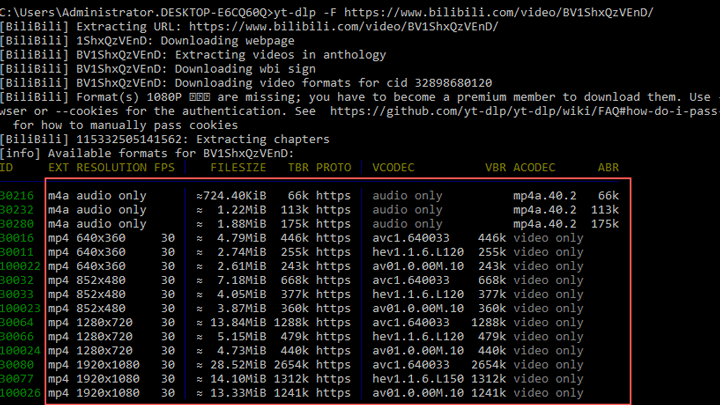
Key downloading features
- Download videos from hundreds of supported websites
- Choose specific video resolutions and codecs
- Download entire playlists or channels
- Extract audio automatically (MP3, M4A, and more)
- Resume interrupted downloads
- Skip sponsored segments, download specific time ranges or chapters
As a command-line tool, yt-dlp is not as beginner-friendly as ClipGrab out of the box, but it wins on community trust, transparency, and maximum control.
VideoProc Converter AI
For users who liked ClipGrab because it was simple and included basic conversion features, VideoProc Converter AI offers a similar workflow but with more modern capabilities and a safer distribution model. Its built-in downloader can grab content from over 1000 sites. After analyzing the links, the program lists all available formats and resolutions, up to 8K.
VideoProc Converter AI is a full video processing toolkit, not just a downloader. That means you can download videos, convert them, enhance quality with AI tools, and edit clips all in one place. The interface is simple and beginner-friendly, so you do not need to deal with command lines or complex settings.

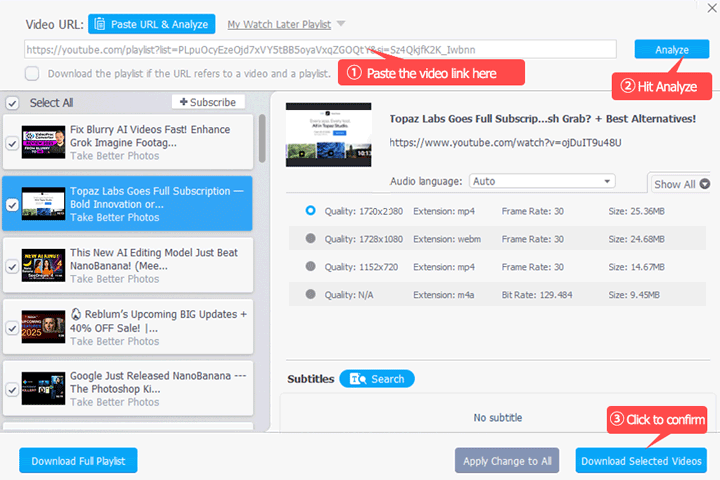
Key downloading features
- Download videos from major platforms and smaller sites
- Choose video quality and formats before downloading
- Batch download multiple videos,audio, playlists at once
- Download subtitles and metadata
- Convert videos to formats like MP4, MP3, or MOV
- Trim or edit clips after downloading; Enhance videos using built-in AI tools
For users who want a safe and beginner-friendly alternative to ClipGrab, VideoProc Converter AI removes the installer uncertainty and offers a smoother workflow for downloading and converting videos.
Conclusion
So, is ClipGrab safe?
The careful answer is this: ClipGrab itself is not classic malware, but it is still not trustworthy enough for me to recommend. The core app is only part of the story. The installer and distribution story matter too, and that is where ClipGrab gets shaky. If you absolutely must use ClipGrab, do it carefully, verify what you download, and treat warnings as real information.
You do not need this much uncertainty just to download a video. There are better and safer alternatives. It's about not taking a questionable risk when you do not have to.




