
 Download Online Videos & AI Upscale to HD/4K!
Got a 403 forbidden message?
In most cases, the problem isn't your internet connection, your computer, or some mysterious YouTube ban. It's simply an outdated version of yt-dlp. YouTube and other video sites change something on their end, and older copies of yt-dlp couldn't keep up.
So this guide will explain how to update yt-dlp to the latest version, whether you installed it as a standalone file, through pip, Homebrew, or another method. Let's get you sorted.
How to Check YT-DLP Version
Before you change anything, a quick check won't hurt anything. It helps to know exactly which version you are running and whether a yt-dlp update is needed. Once the update finishes, it also confirms that everything actually changed.
Open your terminal or command prompt and type this:
yt-dlp --version
You'll see a line that looks something like 2026.07.04 or 2026.08.18.xxxxxx. The date-style number is the version.
How to Update YT-DLP to Nightly
 Mid-August 2026 Update:
YouTube made a change that broke the android_vr client, which yt-dlp used by default to talk to YouTube's APIs, triggering widespread HTTP 403 errors. To fix this, update to nightly with yt-dlp --update-to nightly, or force a different client by adding --extractor-args "youtube:player_client=android" to the command.
Just remember this is only a short-term patch. For users who prefer to avoid such hassles, a timely updated GUI downloader like VideoProc Converter AI offers a simpler solution.
Nightly builds include the latest improvements and bug fixes that are not yet in the regular stable release, such as fixes for various yt-dlp not working issues.
If you use the official standalone binary, run this command:
yt-dlp --update-to nightly
You can also do it manually. Visit the official Nightly releases page, download the file that matches your system, and replace the old yt-dlp file with the new one. Both methods produce the same result.
To install nightly with pip:
pip install -U --pre "yt-dlp[default]"
You can always switch back to stable later if you prefer. For the moment, though, Nightly is the most reliable way to stay current.
YT-DLP Update Command
To update yt-dlp, you need to know your installation type. The correct way to update yt-dlp depends on how you installed it in the first place.
#1. Official Standalone Binary
You probably downloaded a single file from the GitHub releases page: yt-dlp.exe on Windows, the plain yt-dlp file on Linux, or yt-dlp_macos on a Mac. If that sounds like you, the easiest is the built-in updater.
The following command grabs the latest stable release and replaces the old file for you.
yt-dlp -U
If the automatic updater fails for any reason, or if you simply prefer to do it by hand, the manual method works just as well. Go to the official releases page, download the latest file that matches your system, and replace the old one with it. Make sure the new file sits in the same folder, or update your PATH if you put it somewhere else.
Tips: On Windows, close any running yt-dlp windows first so the file isn't locked. On macOS and Linux, you may need to give the new file permission to run.
#2. Update yt-dlp with Pip
If you originally installed yt-dlp using Python's pip, you can pull the latest stable version with the same command you used to install the program. Open your terminal and run:
pip install -U yt-dlp
If you work inside virtual environments, make sure you activate the right one before running the command. Also double-check whether your system expects pip or pip3.
#3. Update yt-dlp with Pipx
pipx keeps tools in their own isolated environments, which many people prefer. Here's the yt-dlp update command for pipx:
pipx upgrade yt-dlp
#4. Update yt-dlp with Brew
On macOS and some Linux setups, Homebrew is a popular choice. The normal update command looks like this:
brew upgrade yt-dlp
#5. System Package Managers
If you installed yt-dlp through your Linux distribution's package manager (apt, dnf, pacman, and the like), running yt-dlp -U will usually refuse to work on them.
For example, here's how to update yt-dlp with apt on Ubuntu or Debian:
sudo apt update
sudo apt upgrade yt-dlp
That command only upgrades to whatever version your distribution currently ships. Be aware that those versions often lag weeks or months behind and will not include the latest fixes.
The cleanest long-term solution is to remove the system package and switch to the official binary or to pip. That way you stay in control of updates instead of waiting for the distro to catch up.
Troubleshooting Common Update Problems
Even when the steps look simple, updates sometimes hit a snag. Here are the problems people run into most often and how to clear them.
YT-DLP Command Not Recognized
If you type yt-dlp and the system says "yt-dlp is not recognized as an internal or external command," the new file is probably not in your PATH. Make sure you placed it in a folder that your terminal already searches, or add that folder to your PATH. On Windows you may also need to reopen the command prompt after the change.
Permission Denied
Permission errors are common on macOS and Linux. The new binary needs execute rights. Run chmod +x on the file and try again. If you installed system-wide, you might need sudo for the move or the permission change.
Keep FFmpeg Updated As Well
One last detail that many people overlook: keep ffmpeg updated too. yt-dlp relies on it for merging formats, extracting audio, and several other tasks. An old copy of ffmpeg can create new errors even after yt-dlp itself is current.
When nothing else succeeds, a clean reinstall is the fastest reset. Delete the current yt-dlp file or uninstall the package, download a fresh copy from the official releases page, and put it in place. After that, check the version number once more to confirm you are on the build you expect.
A Simpler YT-DLP Alternative
If the command-line side of yt-dlp feels like more work than you want, VideoProc Converter AI is a solid desktop downloader worth considering. It gives you a clean graphical interface instead of terminal commands. You paste a link, choose the quality and format you want, and click download.
The developers also keep the tool updated on a regular schedule, so it tends to adapt quickly when sites change their systems. That same reliability that makes yt-dlp powerful is handled behind the scenes while you stay in a familiar windowed environment. No need to remember flags or update paths by hand.

VideoProc Converter AI - A Timely Updated GUI Downloader
- Simpler and faster downloads in a friendly GUI with hardware acceleration
- Wide platform support for 1,000+ sites, YouTube, Facebook, TikTok, etc.
- High quality downloads, formats and codecs, audio-only, 1080p, 4K, up to 8K
- Batch downloads playlists, channels, live videos, audio, M3U8, etc.
- All-in-one: AI tools, video conversion, compression, DVD backup, etc.

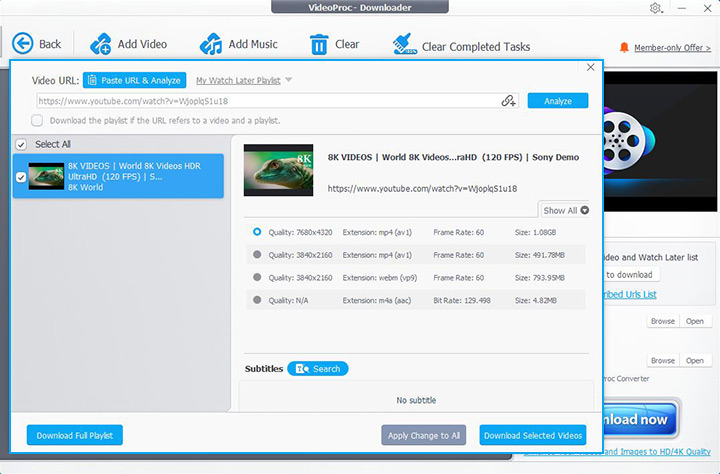
For many people who just want to save a video and move on, the combination of a simple interface and timely updates makes it a practical everyday choice.
Conclusion
YT-DLP update remains the simplest and most effective first step whenever downloads start failing. In most cases, a current version is all you need to restore normal operation.
And if you still run into trouble after updating, gather the full verbose output from a test download. That information makes it much easier to pinpoint whatever remains.
If you would rather avoid the command line altogether, VideoProc Converter AI offers a friendly graphical alternative. Its built-in downloader handles downloads from YouTube and 1000+ sites, keeps original quality when available, and receives regular updates so you stay ahead of site changes.