
 Download Online Videos & AI Upscale to HD/4K!

As one of the largest social media platforms around the globe, Twitter has gathered millions of influencers from all walks to tweet their ideas and works every day. When you are amazed at some creative short videos, GIFs, and live videos, you can like, retweet, and comment, but no download button for you to save them directly.
No worries! With the assistance of the tools below, you can download Twitter videos with a Twitter to MP4 converter on any device as your wish. And here's how.
Can You Download Twitter Videos
No, saving a video from X (formerly Twitter) isn't built directly into the app's standard interface. The only exception to this is for X Premium subscribers. If you pay for an X Premium subscription, X unlocks a native download option for eligible videos.
Here's how to save Twitter videos with Premium:
- Go to the video you want to save.
- Tap the three-dot (•••) icon on the video player.
- Select Download video.
However, please note that even with Premium, though, creators can disable downloads on their individual posts.
How to Download Twitter Videos Without Premium
To download a video from Twitter on your computer, the most reliable way is still to use a decent desktop downloader. VideoProc Converter AI is exactly the right tool to convert Twitter to MP4 and other formats. It is the best video downloader with a powerful download engine baked in. You can also download multiple Twitter videos at a time with this desktop downloader.
Aside from Twitter videos, GIFs, and lives, it offers everyone free services to download videos from FB, channels and playlists on YouTube, Vimeo, Dailymotion, etc.

VideoProc Converter AI - Full-featured Twitter Video Downloader for PC & Mac
- Save videos from 1000+ video sites (YouTube, TikTok, etc.) without size and video length limits.
- Level 3 hardware acceleration to run smoothly on all recent computers.
- All-in-one video editing toolkit: cut, merge, crop, rotate, filter, subtitles, etc.
- Robust video converting and transcoding capabilities to deal with 370+ video formats.
- Able to convert Twitter video to MP4, MP3, FLAC, etc.
Let's download VideoProc Converter AI and convert Twitter video to MP4 in a snap!

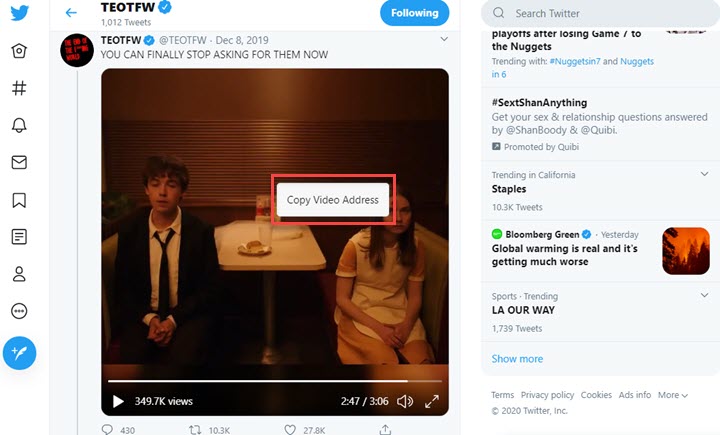
Step 1. Copy the Twitter video link by right-clicking on the video playback window.
Right-click on your favorite GIF or a live video, copy the URL, and VideoProc Converter AI will download Twitter GIFs or lives.
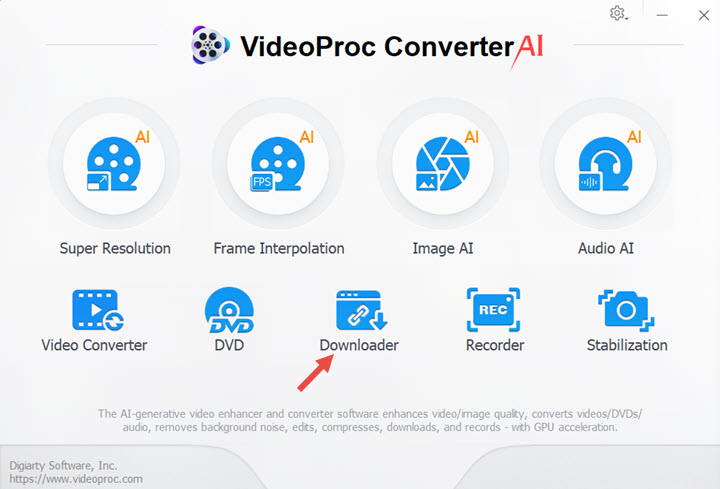
Step 2. Launch VideoProc Converter AI and open its built-in downloader.
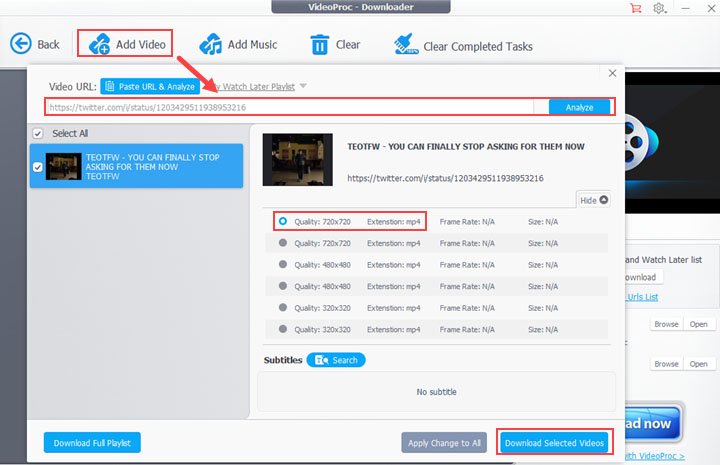
Step 3. Paste the Twitter link to VideoProc Converter AI and hit "Analyze". When link analysis is completed, choose a resolution, and hit "Download Selected Videos".
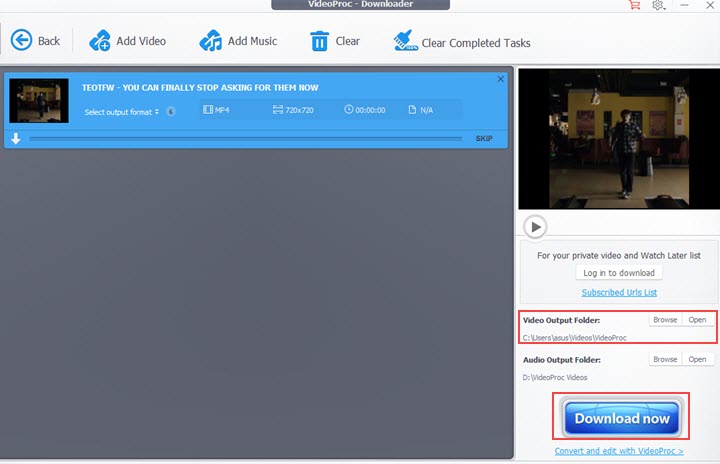
Step 4. Browse to select a folder to save your Twitter video. Hit the "Download now" button to start downloading. Finally, you can check open the folder and check your downloaded Twitter video.
Download Twitter Videos on iPhone
To save a video from X (formerly Twitter) on iPhone, the easiest approach is copying the post link and pulling the .mp4 file through an online tool or using Shortcuts. Follow the steps below:
1. Add the TVDL v3.1 shortcut to your library and allow untrusted shortcuts in the Settings.
2. Now go to the Twitter app and tap on the share icon under the video. Choose Share Tweet via..., and scroll down the screen until you find TVDL v3.1. Tap to run the shortcut.
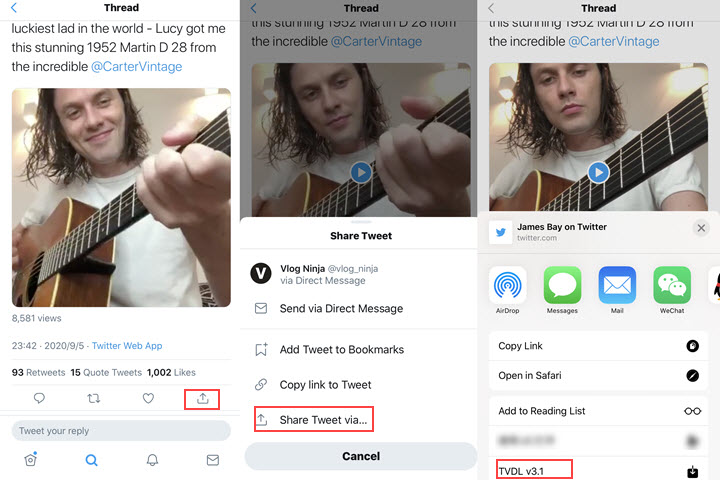
3. Tap OK when it asks any permission.
4. Select the video quality, and then it will begin to convert Twitter to MP4 on your iPhone.
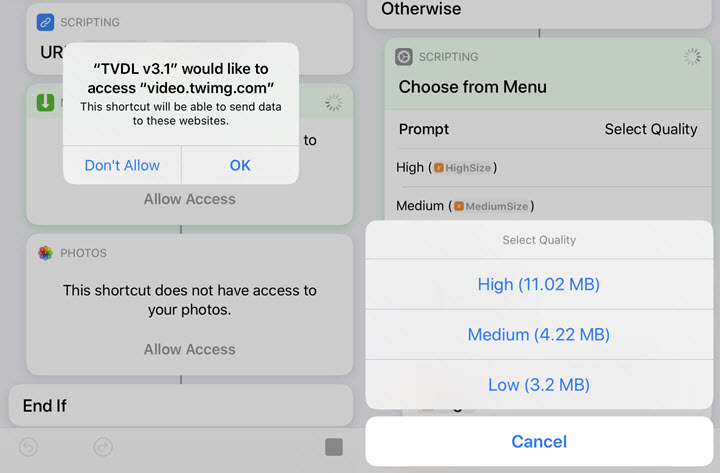
5. When it is done, a Success message windows will pop up. Hit OK, and you'll find the video in the Photos app.
Note:
This can solve Twitter video downloading issues once and for all, but it depends on whether you have added the shortcut correctly. Otherwise, no downloader shortcut appears in the Share option. And these shortcuts expire frequently, you have to keep them updated all the time.
Save Twitter Videos on Android
For Android users, things are getting much easier than on iPhone. Android OS allows downloading files to local storage directly on the browser. So you can just paste the Twitter URL to an online downloader like the one with a detailed tutorial in the iPhone part. Hit the download button, and then you'll find the MP4 video in the Downloads folder of the browser.
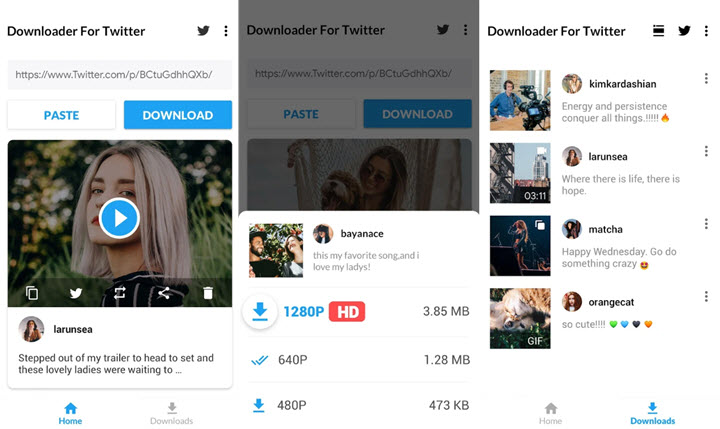
Besides, there are various downloading apps in Google Play. Now take Downloader for Twitter as an example. It tops at the app store for its zero of cost and ease of use.
1. Copy the Twitter link by sharing via link.
2. Open the downloader app, and it will auto-detect the link in your clipboard. If not, paste the link to the blank tab.
3. Select the video resolution and storage path.
4. When the downloading finished, go to the download folder and find the Twitter video.
Download Twitter Videos Online
Many websites provide Twitter video downloading services. You can save short Twitter clips, GIFs, and videos from other social media platforms. (But it is not perfect for users who mind disturbing ads on the main UI.) Using SaveTweetVid as an example, here's how to download videos from X (Twitter) online.
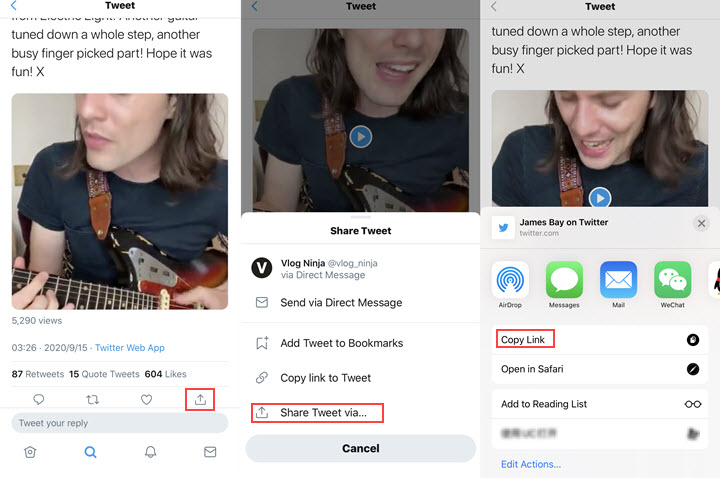
1. Open Twitter and find the video you want to save.
2. Click the share button under the video. Choose Share Tweet via... and copy its link to the clipboard.
3. Open Safari, and type savetweetvid.com to enter this downloading site.
4. Paste the link and tap Download.
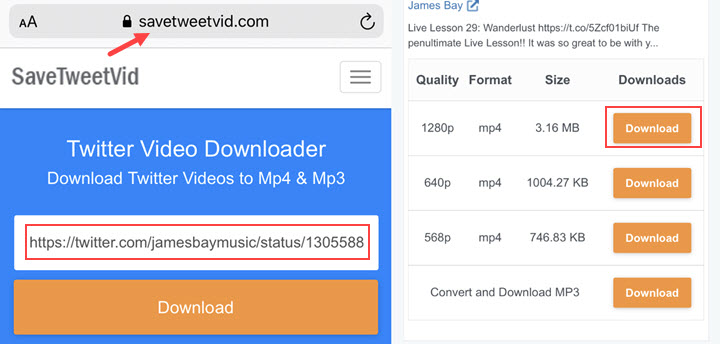
5. Select video resolution. Rename the video file and select a folder to save it.
Download Twitter Videos via Extension
Different from other utilities, browser add-ons do not require a Twitter link copy & paste. They detect videos on Twitter webpages automatically and save the video in the browser downloads folder after you select the video resolution. But they fail to detect videos on occasion, and can only convert Twitter to MP4.
Follow the steps below to save Twitter X videos in a browser using an extension.
- Open your browser's official extension store and install a media downloader. We've listed a few options below.
- Refresh your X tab so the extension can inject its buttons into the feed.
- Navigate to any post with a video or GIF.
- Click the injected download icon.
- Select quality (if prompted) and save the video to your device.
- Firefox: Twitter Video Downloader MP3 MP4, Twitter Media Downloader, GIF Downloader for Twitter, etc.
- Chrome: Video Downloader Ultimate, Twitter Media Assist, TwittaSave, etc.
FAQ
How to download videos from a Twitter DM?
DM (Twitter Direct Message) is highly encrypted to guard users' privacy, so it is twisty to download videos from Twitter DMs especially after its recent update.
1. Right-click on the page of a Twitter DM, and then choose Inspect > Network.
2. Find the U3M8 file by type the suffix of .m3u8 in the searching tab. Copy the m3u8 link.
3. Open VLC, and navigate to Media > Convert/Save > Network.
4. Paste the link to it and select MP4 in the Convert/Save drop-down menu.
5. Set an output folder, and hit Start.
How do I download all videos from a Twitter profile?
Downloading every video from an X (Twitter) profile at once requires a bulk media extractor rather than standard single-post web downloaders. Depending on whether you prefer a browser add-on, a desktop app with a graphical interface, or a command-line tool, VideoProc Converter AI and yt-dlp are good options.
The Bottom Line
If you tried all of these methods, it is unavoidable to be frustrated by the link parsing error, low-res output, or intrusive ads of some tools. But VideoProc Converter AI, devoted to providing the best UX, saves Twitter videos, GIFs, and lives in a fast, safe, and quality lossless manner. Free download it now, and get more editing and converting features.
Disclaimer: Any copy-protected or authorized videos you download from Twitter are not recommended for commercial use.