
 VideoProc Converter AI
 New AI features are available


 Listed in
 This review provides an in-depth look at Nero AI Video Upscaler, a software designed to improve the quality of your videos using artificial intelligence. We'll cover its core functionalities, key features, and pricing structure. By examining the advantages and disadvantages, alongside highlighting some top alternatives, this article aims to help you decide if Nero AI Video Upscaler is the best solution for upscaling your video content. Looking for a Nero AI Video Upscaler alternative? Keep reading to find out our top pick.
What Is Nero AI Video Upscaler
Nero AI Video Upscaler is a software application developed by Nero AG designed to enhance the resolution and visual quality of low-definition video files using advanced Artificial Intelligence algorithms.
Its core function is AI Super Resolution, allowing users to upscale videos up to 4x their original quality. This helps boost resolutions from SD/HD to 4K or even 8K while intelligently restoring lost details and reducing noise and artifacts for a clearer, smoother result. Nero AI Video upscaler employs multiple specialized AI models—Fast, Animation, Realistic, Versatile, Face Enhancement, and Restoration—to optimize the enhancement for different types of content.
The program also includes dedicated features like AI Face Enhancement to restore blurred facial details, as well as AI Frame Interpolation to increase the frame rate for smoother motion. Additionally, it supports features like batch processing, GPU acceleration, clip selection, and color adjustments to speed up the enhancement workflow.
Nero AI Video Upscaler Pricing
The pricing for Nero AI Video Upscaler is as follows:
- A yearly subscription is also often offered around $84.95 USD.
- A lifetime license for the standard version might be around $195 USD.
A free trial (commonly 7 days) is available, and short clips may be processable with limited models at no cost. As always, it's best to check the official Nero website for the most current pricing and any ongoing promotions before making a purchase.

Nero AI Video Upscaler is a dedicated tool focused on boosting video resolution and frame rate. For a complete media suite and macOS solution, we highly recommend VideoProc Converter AI. It delivers superior enhancement for video, image, and audio quality, alongside a full suite of tools for compression, editing, and downloading, all for a much cheaper $34.95/year.
Nero AI Video Upscaler Hardware Requirements
Nero AI Video Upscaler, being an AI-powered tool, can be quite resource-intensive. To ensure smooth operation and reasonable processing times, especially for higher resolutions and longer videos, your system should ideally meet or exceed the recommended hardware specifications. Here's a breakdown of its minimal hardware requirements:
- Operating System: Windows 10 (64-bit), Windows 11 (64-bit).
- Processor (CPU): AMD Ryzen / Intel Core processors released in 2017 or newer.
- Memory (RAM): Minimum: 8 GB RAM; Recommended: 32 GB RAM or above.
- Graphics Card (GPU): AMD Radeon 500 series / NVIDIA GeForce GTX 900 series or higher with 4 GB VRAM. A dedicated graphics card with sufficient VRAM is crucial for accelerating the AI processing. Without it, the CPU will bear the brunt of the workload, leading to significantly slower performance.
- DirectX: Version 11 or higher.
- Storage: 20 GB available disk space.
Key Features of Nero AI Video Upscaler
Nero AI Video Upscaler boasts a range of features designed to enhance the quality and resolution of your video content using artificial intelligence. Here are some of its key capabilities:
AI-Powered Super Resolution
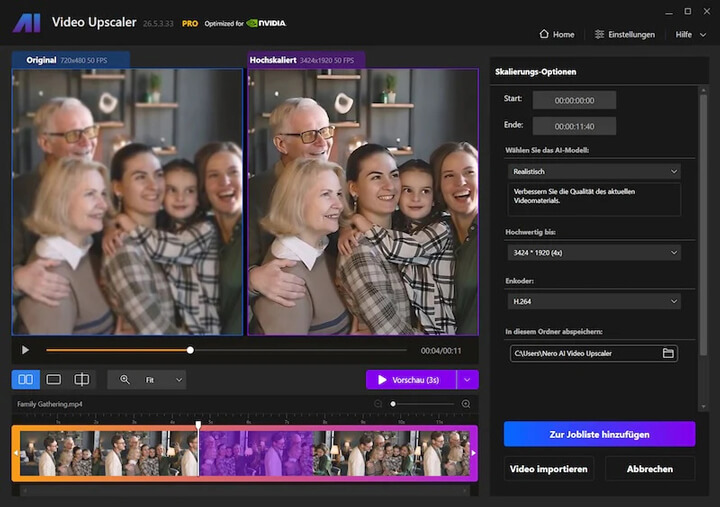
It can upscale standard video into high-definition footage. Users have complete control over the upscaling process, whether scaling videos by a factor of 2x or 4x, or leaveraging one of the 11 resolution presets, which ranges from standard definition (720x576) all the way up to cinematic 8K(7680x 4320). It offers different AI models for enhancing videos of different types with best outcomes. For example,
- Fast: general purpose model for speed and efficiency.
- Animation: specializes in preserving the integrity of sharp lines in 2D cartoon or animation video.
- Realistic: for real-world or natural video footages.
- Versatile: balanced enhancement with less sharpness and more details.
- Face Enhancement: for refining human faces clarity and enhancing skin tones.
- Restoration: for micro-details in old, low-resolution, or compressed footage.
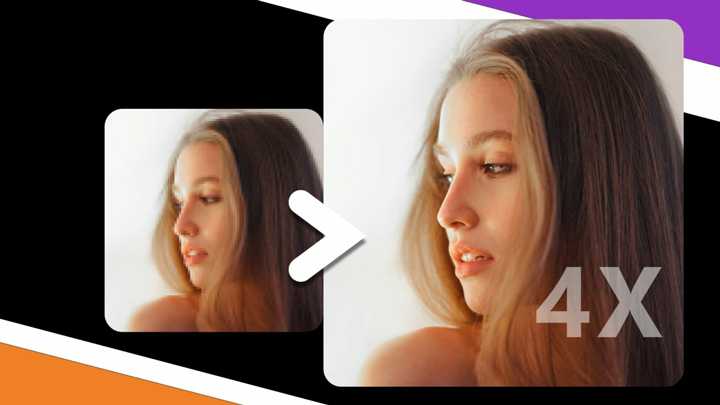
AI Frame Interpolation
It analyzes existing video frames and generates new intermediate frames to increase the frame rate of the video. This can result in smoother motion, especially in fast-paced scenes, and can even be used to create high-quality slow-motion effects from standard footage. It can boost videos up to 120 FPS.
Real-Time Quality Preview & Batch Processing
Nero AI Video Upscaler offers a real-time side-by-side preview, allowing users to compare the original and upscaled video quality before finalizing the process. This helps in selecting the most suitable AI model and settings.
The software also supports batch processing. For multiple video files, you can drag and drop the folder containing the video files or open multiple files, and then queue multiple videos for upscaling. This significantly improves workflow efficiency.
Clip Selection & Color Adjustments
You can select specific segments within a longer video to upscale without needing to trim the video beforehand, saving time and effort. Nero also includes color adjustments, such as brightness, contrast, saturation, sharpness, white balance, etc.
Wide Format Compatibility
Nero AI Video Upscaler is compatible with a wide range of video sources. It generally supports common video formats like MP4, MOV, AVI, MKV, WMV, and others. Please note that some codecs like HEVC, AV1, VP9, MPEG-2 may require Microsoft Video Extensions. Export is typically to MP4 (H.264 or H.265/HEVC).
These features collectively aim to provide users with a comprehensive toolkit for enhancing their video libraries, breathing new life into older or lower-quality footage for a better viewing experience on modern displays.
How Does Nero AI Video Upscaler Work in Practice
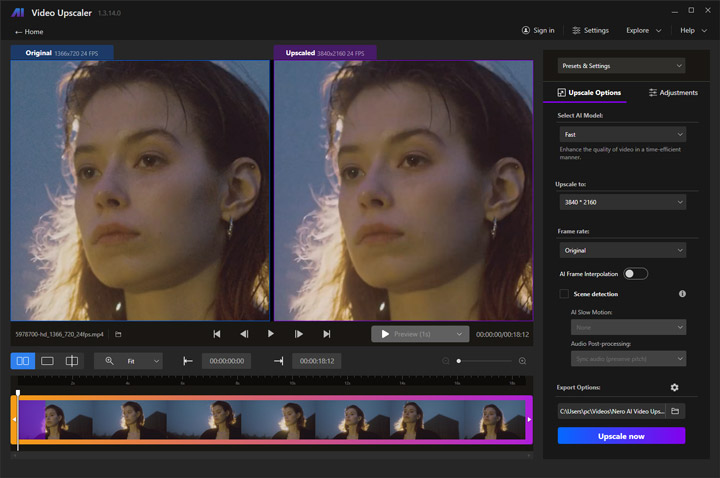
Since the software is named "Upscaler," I selected several 720p videos to upscale to 4K in order to test its upscaling models.
The test system is equipped with an AMD Radeon RX 6700 XT graphics card featuring 12 GB of VRAM. It uses an AMD Ryzen 5 5600X processor with 6 cores and 12 threads, operating at a base clock speed of approximately 3.7 GHz. The computer has 64 GB of system memory and runs the 64-bit version of Windows 10.
However, I found the distinctions between some models are somewhat confusing. For example, I wasn't sure whether to choose Realistic or Versatile when upscaling a realistic video rich in detail. Additionally, if you are using the trial version, there will be a huge and extremely noticeable watermark right in the center of your output video. Anyway, here are the test results.
Test 1: Upscaling 720p Footage to 4K (Fast Model)
I started by upscaling a 720p video to 4K using the Fast model.
What I found: As shown in the preview window, the improvement in image quality is quite limited and difficult to clearly perceive. The difference is subtle and not very noticeable at a glance.
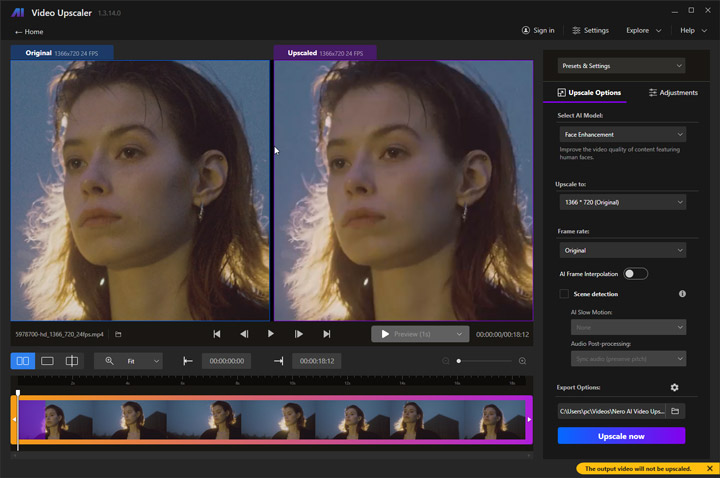
Test 2: Upscaling Old Portrait Footage with Face Enhancement
Since the footage contains portrait shots, I expected it might benefit from the Face Enhancement model, so I tested it as well.
The result looks better overall, with a slight improvement in facial details. However, issues such as background noise are still present and not fully resolved.
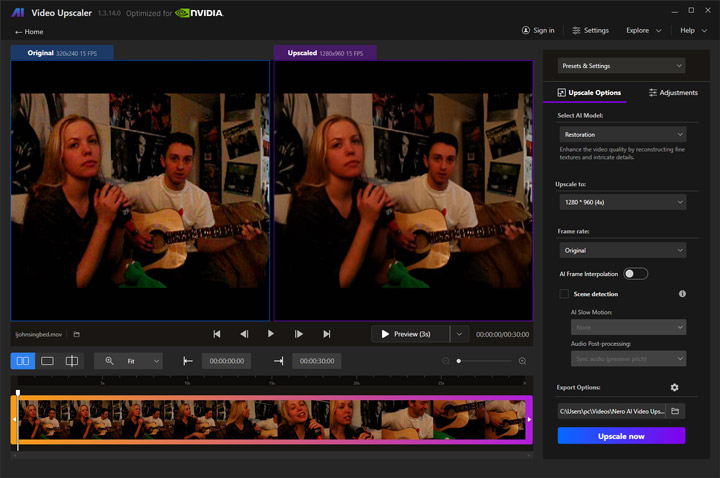
Test 3: Restoring Old Footage
The original footage appears grainy and pixelated, so I used the Restoration model.
The output is acceptable, but still not very crisp. There are also some unnatural smoothing effects, along with slightly odd facial details. However, for small-screen playback, the result is still reasonably usable.
Is Nero AI Video Upscaler Good
Here's a balanced look at the advantages and disadvantages of using Nero AI Video Upscaler:
Pros of Nero AI Video Upscaler
- Transforms blurry, low-resolution videos into sharper, detailed visuals.
- Automatically eliminates distracting digital grain and compression artifacts.
- 6 tailored AI models (e.g., Animation, Realistic) for optimal upscaling quality across different footage types.
- Saves significant time and effort by allowing users to queue and process multiple videos simultaneously.
- User-friendly design with a real-time side-by-side preview to easily select the best settings and AI model.
- Compatible with a broad range of common video formats, minimizing the need for prior conversions.
- Affordable relative to some premium competitors like Topaz Video. (Read our Topaz Video review here)
Cons of Nero AI Video Upscaler
- Windows-only (desktop version).
- The trial version places a huge, prominent watermark in the center of the output video, which hinders evaluation.
- Requires a modern CPU and a powerful, dedicated GPU with ample VRAM to run it normally.
- Upscaling is computationally heavy, resulting in considerable processing times.
- Results depend heavily on source quality; may not perfectly restore all lost detail and can introduce some artifacts.
- It’s more expensive ($84.95/year) than many video upscaling software like VideoProc Converter AI.
- The customization and fine-tuning options are relatively limited.
Overall User Reviews
We also examined user reviews for the software on the Microsoft Store (4.7/5 from 67 ratings), Trustpilot (approximately 4.6/5 from 29 reviews), and Steam (only 4 reviews, mixed). Overall, these reviews are generally positive, especially regarding ease of use and results on everyday footage. The software features a straightforward interface and delivers clear improvements in sharpness, detail recovery, noise reduction, and facial clarity.
At the same time, common criticisms center on performance and expectations. Processing can be slow, sometimes taking many hours or overnight, particularly on systems without a strong dedicated GPU. Output file sizes often increase substantially after upscaling. Results vary with source quality: the tool works well on moderately degraded material but is not described as miraculous on extremely poor or heavily compressed footage, and minor artifacts can appear in complex scenes.

By carefully considering these pros and cons, you can better determine if Nero AI Video Upscaler aligns with your needs, budget, and technical capabilities.
Best Nero AI Video Upscaler Alternative
While the Nero AI Video Upscaler offers a solid foundation for enhancing video resolution, its utility is confined almost exclusively to upscaling. Users often find its $84.95 annual fee steep for a singular tool, especially when they quickly realize they need separate software for basic video processing tasks like advanced format conversion, compression, or downloading. Furthermore, hardware requirements (a dedicated, high-end GPU) remains a consideration for many.
This is where VideoProc Converter AI stands out as a superior, more versatile, and cost-effective alternative. It is not designed just as an upscaler, but as an All-in-One AI Media Enhancing and Processing Suite. Its core advantage lies in the sheer breadth of its feature set, which integrates high-quality AI video upscaling with a comprehensive toolkit for conversion, compression, editing, and more.

Nero AI Video Upscaler vs VideoProc Converter AI
| Feature | Nero AI Video Upscaler | VideoProc Converter AI |
|---|---|---|
Pricing (Annual/Lifetime) |
$84.95/year; $195.00/lifetime |
$34.95/year; $54.95/lifetime |
Core Software Focus |
Dedicated AI Video Upscaling Tool. |
All-in-One AI Media Enhancing & Processing Suite. |
AI Video Upscaling |
2x, 3x, 4x upscaling; Standard detail enhancement. |
2x, 3x, 4x upscaling; Natural detail reconstruction, advanced blur/noise reduction. |
Other AI Features |
AI frame interpolation |
AI Frame Interpolation, AI Stabilization, Audio AI. |
AI Image Enhancement |
Not Supported. |
Upscale photos up to 8K/10K resolution. |
AI Audio Processing |
Not Supported. |
Background noise removal, separate human vocal tracks. |
Codec & Format Support |
Wide range of common video formats. |
Extensive conversion support for 370+ codecs and formats. |
Additional Tools |
Trim video, color adjustments, record video. |
Convert, compress, edit (trim, color adjustments), record screen, and download content. |
In conclusion, Nero remains a capable dedicated AI video upscaler with strong model specialization, local processing, and ease of use. It performs well for many restoration, animation, and face-focused use cases when hardware is adequate.
VideoProc Converter AI offers a more compelling solution with its faster performance, broader hardware compatibility, a comprehensive suite of AI-powered tools and media processing tools. If you're seeking a powerful, all-encompassing video processing solution, VideoProc Converter AI is the clear choice.



