
 New AI features are available
 Listed in
 HandBrake is a popular open-source video transcoder available for Windows, macOS, and Linux. It's widely used for converting videos and ripping DVDs. The program has been in development for many years by a reputable team. Is this really the case? Is HandBrake safe?
Is HandBrake Safe
Generally, HandBrake is considered safe to download and install on all supported platforms, provided it is obtained from the official source. The official releases of HandBrake are free from malware, viruses, or unwanted bundled software. In fact, HandBrake's long-term community development helps ensure transparency and security. Here's why:
- HandBrake's installer is clean and malware-free with no bundled bloatware.
- The open-source nature makes it difficult for hidden malware to go unnoticed.
- Multiple tech sources affirm HandBrake's safety profile over the years.
- Major user forums regularly list HandBrake as a go-to tool for video conversion.
Overall, the consensus is that HandBrake's official version is safe, clean, and reliable for everyday use. It enjoys a solid reputation among both security professionals and tech enthusiasts.
Past Security Incident
In May 2017, hackers managed to compromise one of the official mirror servers of HandBrake (download.handbrake.fr), and replaced the legitimate 1.0.7 Mac installer with a trojan-infected version targeting macOS. The malicious file was distributed to Mac users for a few days, to be exact, between [02/May/2017 14:30 UTC] and [06/May/2017 11:00 UTC].
The rogue installer, when executed, would immediately prompt the user for their macOS administrator password, claiming it needed to install additional codecs. If the user entered their password, the trojan would install itself as an app called "activity_agent." It could potentially spy on the system, such as logging keystrokes, stealing saved passwords, etc.
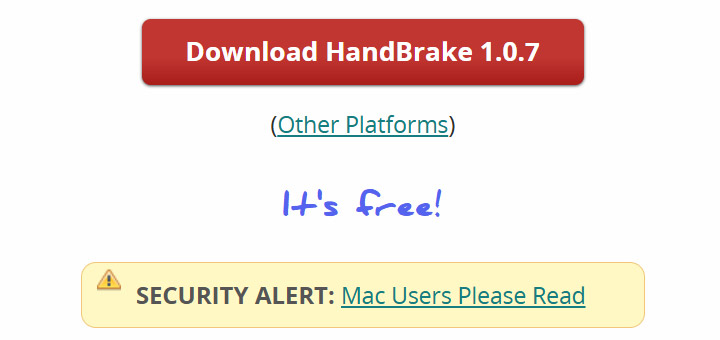
The HandBrake team reacted quickly by removing the compromised file and shutting down the affected download mirror. They also posted a security warning to alert and encourage users to verify downloads during that brief window via checksums. And the XProtect feature of macOS was updated to recognize the Proton trojan.
While this 2017 event was serious, it was essentially a supply-chain attack on the distribution server, not an indication of an inherent flaw or intentional malware in HandBrake itself. Aside from this isolated case, the HandBrake application has not been associated with malware.
Impact on System Stability and Data Safety
In normal operation, HandBrake does not pose a threat to your system's stability or your data. However, HandBrake is a CPU-intensive application and can heavily tax your system. The main "impact" – if it can be called that – is that your computer might run hot or slow during a long encoding job. It only supports a few output formats—MP4, MKV, and WebM—and can push your system to its limits during heavy tasks. To mitigate this, ensure your device has proper cooling, monitor temperatures, and consider using a HandBrake alternative if needed.
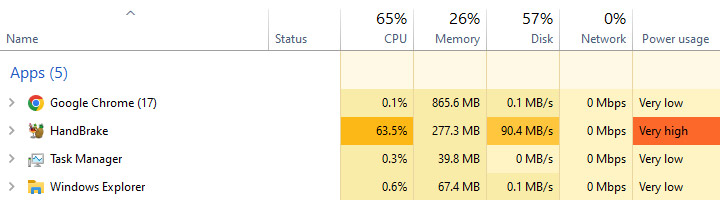
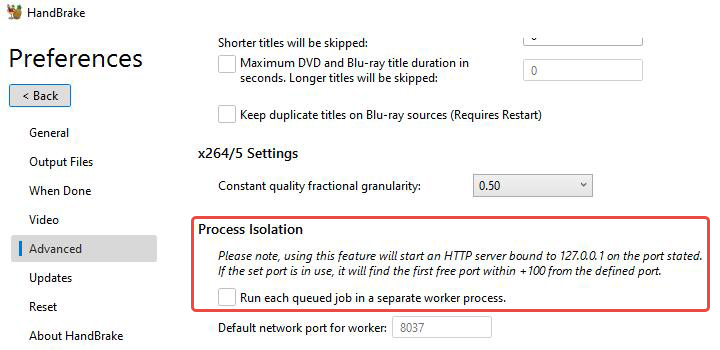
On October 14, 2025, Microsoft released the Windows Update KB5066835 for Windows 11 versions 25H2 and 24H2. Following this update, we see HandBrake freezes when starting video encoding. The update interferes with HandBrake's internal communication system, which relies on a separate worker process connected through Windows' HTTP framework; therefore, the program hangs and stops responding.
Here's a temporary workaround: go to Tools > Preferences > Advanced > Process Isolation, and uncheck "Run each queued job in a separate worker process."
As Windows continues to receive frequent security and compatibility updates, similar issues may become more frequent in the future. In comparison, VideoProc Converter AI handles all video and AI processing tasks in a single, self-contained environment. This architecture makes it more stable, self-contained, and unaffected by OS updates that can disrupt other video tools like HandBrake.

VideoProc Converter AI - Alternative with More Formats, Less Strain
- Simpler and more intuitive interface, great for beginners and casual users
- Wider output format support, including MP4, MKV, WebM, AVI, MOV, and more
- Lower system requirements and smoother operation even on old or low-end devices
- Faster processing and less CPU strain with Full GPU Hardware Acceleration
- More video tools: AI enhancer, converter, compressor, downloader, recorder, etc.

Legal Use of HandBrake
HandBrake the software is legal to download and use. There are no laws against owning or using a video converter. It's how you use it that matters.
Using HandBrake to convert video files between formats is widely legal and safe so long as those files are not protected by DRM. The Anglosphere countries (US, UK, Canada, Australia and similar) allow format-shifting of non-protected content that you legitimately own or have rights to.
Ripping DVDs you own for convenience lies in a legal grey area. HandBrake out of the box cannot rip encrypted DVDs unless you install third-party libraries such as libdvdcss. Here is where legality issues arise. But for ordinary, non-protected video files, HandBrake conversion is lawful and routine.
Safe Downloading Precautions for HandBrake
To ensure you are getting a legitimate and safe copy of HandBrake, follow these precautions before downloading or installing the software:
- Always download HandBrake from the official website or the official GitHub repository.
- Perform an optional verification step by comparing the checksum or signature if needed.
- Beware of unusual installation behavior, such as asking for unrelated permission.
- Keep security software and operating systems updated as an extra layer of defense.
- Download the latest version and updates for bug fixes and any security improvements.
By adhering to the guidelines above, you can confidently enjoy HandBrake's powerful video conversion capabilities without compromising your system's safety.
Conclusion
In summary, HandBrake is safe to use on Windows, Mac, and Linux as long as you follow common-sense precautions. Download it from the official source, verify the file if necessary, and be alert to anything unusual during installation. The software itself has an excellent security reputation and is free of malware or adware.




