
 Download Online Videos & AI Upscale to HD/4K!
Finding a dependable way to download YouTube and other online videos can be tricky today. On the one hand, the development of YouTube-dl slowed dramatically after 2021. On the other hand, YouTube and other services changed their video APIs much more frequently, making many programs unusable. Fortunately, several tools now fill the gap, offering richer feature sets and intuitive graphical interfaces.
This guide lists some of the best YouTube-dl alternatives and compares their strengths, weaknesses, and ideal use cases.
How These Alternatives Were Selected
This guide is not a random list; it results from testing and comparison of numerous video downloaders. We tested a range of programs for downloading content from various sites, playlists, and live streams, and compared their download speeds and quality options. Our selection criteria emphasized:
- Breadth of site support. These apps should at least handle mainstream platforms.
- Update cadence and timeliness to reduce download failures.
- Ease of use. We wanted options for both power users and casual users.
- Reliability and reputation based on user and expert reviews, lifespan, etc.
Through hands-on testing, we found that these programs consistently performed well and together met most common use cases. They therefore form a balanced shortlist that should satisfy most readers, whether you need an open-source script, a feature-rich desktop suite, or a quick browser-based solution.
VideoProc Converter AI
For users who want a YouTube-dl alternative with GUI, VideoProc Converter AI offers a simpler experience and reliable option. The program has been running stably since 2018 and has been updated promptly with every platform-side change to ensure smooth downloads.
Its built-in downloader supports downloading content from 1000+ popular sites and 2000+ niche sites. This means you can save videos, music, or even live streams from major platforms as well as many smaller or regional sites. The downloader supports batch downloads and can grab videos in the best available quality, up to 8K if supported. Uniquely, you can choose the output format right in the app and resume partially downloaded files.

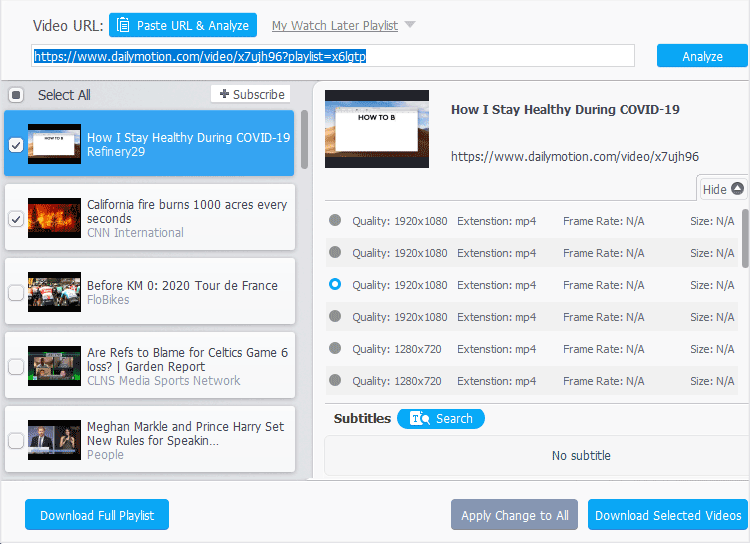
VideoProc Converter AI is a commercial suite that combines a video downloader, converter, AI enhancement suite and recorder. Unlike YouTube-dl, it presents a friendly graphical interface aimed at mainstream users.
Key features
- Support 1,000+ sites, YouTube, Facebook, Vimeo, TikTok, etc.
- List all available formats and quality, audio-only, 1080p, 4K, up to 8K
- Batch download playlists, channels, live videos, audio, M3U8 streams, etc.
- Convert downloaded content to 420+ codecs and formats in one go
- Hardware accelerated for simpler and faster downloads in a friendly GUI
- Additional utilities: AI tools, video conversion, compression, DVD backup, etc.
Pros
- Easy to use in a polished GUI without command-line knowledge
- High quality downloads in desired resolutions and formats
- Comprehensive toolkit in one package
- More frequent updates and maintenance for smooth downloads
Cons
- Freemium pricing. The free version is limited to downloading from 10+ sites.
- Lack of support for Linux/BSD.
Best for average users and content creators who prioritize breadth of functions and speed, all through a friendly GUI without learning command-line tools. It qualifies as one of the best YouTube-dl alternatives because it not only downloads videos from virtually anywhere but also helps you do more with those videos in one place.
YT-DLP
For tech-savvy users, yt-dlp offers unmatched control and reliability since 2021 as a command-line alternative to YouTube-dl. If you're comfortable with terminals, yt-dlp is the best choice. It retains all core functions of YouTube-dl while introducing powerful enhancements.
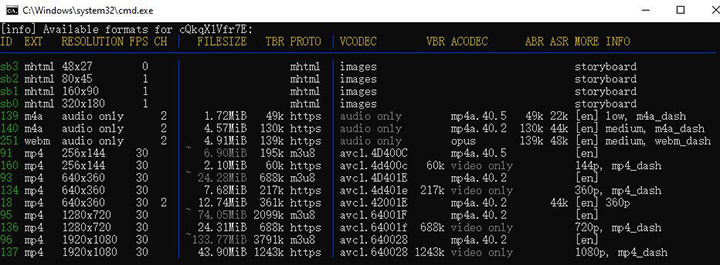
yt-dlp supports thousands of video sites. You can specify preferred video and audio codecs, resolution and bitrate. In addition to the regular download function, you can also specify a timestamp range to download only a portion of the video. Advanced users can even extend functionality via plugins for new sites or post-processing.
Key features
- Support nearly 2,000 sites of all sizes in different countries and regions
- Choose different codecs, resolution and bitrate as needed
- Download segments or split long videos by chapters
- Set thumbnails, metadata, output templates, etc.
- Retry failed downloads automatically
Pros
- Open-source and completely free to use
- Feature-rich with all the old functionality plus much more
- Maximum control over downloads with terminals
- Frequent updates and fixes
Cons
- Command-line only with no official graphical interface
- Higher learning curve with the syntax, format strings, and options
- Too complex for quick, casual, or one-off downloads
Best for tech-savvy users who want a powerful, scriptable downloader that handles obscure sites, playlists and batch operations. It's ideal for archivists, researchers or anyone who needs granular control, but may feel unnecessary for occasional one-off downloads.
Related: How to Use YT-DLP: The Easiest Guide You'll Ever Read
💡 Updated August 2026: Recent YouTube changes have once again caused issues for yt-dlp, triggering sudden 403 errors and compatibility problems. To avoid the hassle of manual troubleshooting and script updates, VideoProc Converter AI is the ideal choice. It is actively updated to keep pace with the latest YouTube updates, ensuring you can easily download the videos you want with a single click, without worrying about errors.
SaveFrom.net
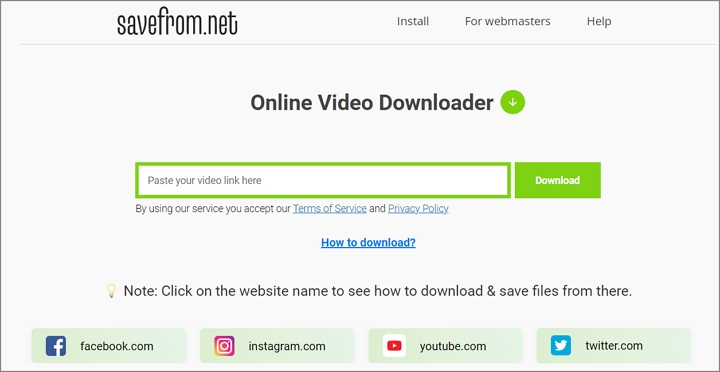
SaveFrom.net is a long-standing online video downloader used via a web browser. You simply go to the SaveFrom website, paste the link to the video, and the site will process it and give you a download link. Because it's web-based, it works on any platform as long as you have a browser and internet connection. This makes SaveFrom extremely accessible for casual users.
Although it supports fewer websites than desktop software, it covers most mainstream platforms such as Facebook, Instagram, YouTube, Vimeo, etc. You can save files in common formats like MP4 or M4A for music. Aside from going to the website and pasting a link, you can install its browser extension or use a shortcut like typing sfrom.net/ in front of the video URL. However, due to technical limitations of a purely online tool, by default the highest combined quality it offers is often 720p MP4.
Key features
- Download videos from over a dozen mainstream services
- Present quality choices, e.g., 360p, 720p, audio streams, etc.
- Support saving files in common formats like MP4, WebM, Opus, M4A
- Offer a browser extension and mobile app
Pros
- Free to use without any registration or login
- Instant and convenient web-based downloads for casual users
- Multi-platform compatibility on Windows, macOS, Linux, Android and iOS
Cons
- Limited format and quality options up to 720p resolution
- Ad-supported with occasional redirects
- Lack of support for batch downloading
- Cannot download playlists or handle age-restricted videos
Best for users who want maximum simplicity and don't need batch downloading or high-definition videos. SaveFrom is the best YouTube-dl alternatives online for quick one-off tasks but not for bulk jobs or high-resolution archiving.
At-a-Glance Comparison
Criteria |
VideoProc Converter AI |
yt-dlp |
SaveFrom.net |
|---|---|---|---|
Site support |
~1,000 popular and niche sites |
Thousands of video sites, including obscure platforms |
Mainstream sites like YouTube, Facebook, TikTok |
Interface |
Polished desktop GUI (Windows/Mac) |
Command-line only; no official GUI |
Web-based; browser extension & Android app |
Quality control |
Auto-select or manually choose output format |
Choose codecs, resolution, bitrate |
Offers 360p-720p by default |
Additional features |
Video/audio converter, editor, compressor, recorder, AI enhancement |
Segment/chapter downloads, SponsorBlock integration, plugins |
None; simple downloads only |
Ideal for |
Average users and content creators for daily downloads |
Power users, archivists, scripting, and obscure sites |
Casual users needing a quick, one-off video download |
Main drawbacks |
Freemium pricing |
Steep learning curve; no GUI |
Limited quality; privacy concerns |
Conclusion
Choosing the right video downloader depends on your workflow and comfort level. We believe this list of the best YouTube-dl alternatives covers almost all use cases.
If you are an advanced user comfortable with command-line tools, yt-dlp is the most powerful and flexible option. If you want a quick solution for occasional one-off downloads, SaveFrom.net is incredibly convenient, though you'll need to accept limitations on quality and features. For the average user, we believe VideoProc Converter AI is a good choice for daily use with a friendly GUI. Its built-in downloader can save videos, music, or playlists from about 1,000 sites. By understanding these differences you can pick the YouTube-dl alternative that best fits your needs.




