
 Download Online Videos & AI Upscale to HD/4K!
If you've looked into downloading videos from the web, you've probably seen SnapDownloader pop up. It's a desktop application for Windows and macOS, letting you save online videos or audio for offline use. You can drop in a link and choose a format such as MP4 or MP3. The software has a free 48-hour trial. After that, you need to purchase a licence.
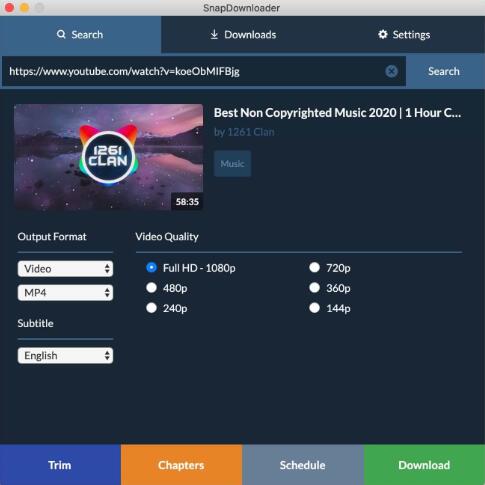
However, is SnapDownloader safe to use? We did some research and then wrote this blog post, based on our testing, user feedback, and the developer's own policies.
Is SnapDownloader Safe
Yes. SnapDownloader is safe to use when you get it from the official source and use it responsibly.
First, there are no indications of malware, spyware, or bundled adware in its official installers. Security scans have shown the software to be clean. Second, the application is digitally signed and, in the case of macOS, notarized by Apple. That means it passed Apple's malware checks. In addition, user feedback over the past several years has been largely positive.
Technical Security
SnapDownloader's installers have not been found to contain viruses, trojans, spyware, or other malware. We didn't observe any antivirus flags or malicious behaviors during our installation process. It didn't install additional programs or inject adware. The program avoids the common unsafe practices of some other downloaders, such as YTD Video Downloader, for example.
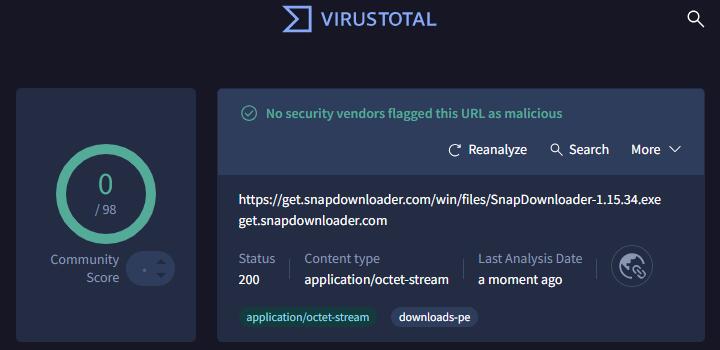
The developer also uses proper code-signing certificates. On Windows, the program's .exe is signed by BitPixel Inc and passes integrity checks. On macOS, SnapDownloader is notarized by Apple, which means Apple's security servers scanned it for malware and deemed it safe to run on macOS Gatekeeper.
It's worth noting that earlier in 2024 the company updated its signing certificate. During that transition, Windows SmartScreen would sometimes warn that the file was unrecognized. But this was temporary. Once the new certificate gained reputation, the warnings disappeared.
User Reputation and Reviews
Looking at community reviews provides another angle. On Trustpilot SnapDownloader holds a TrustScore of around 4.1 out of 5 with around 120 user reviews. About 78 % of users give five-star ratings, praising the tool's simplicity and the company's responsive support.
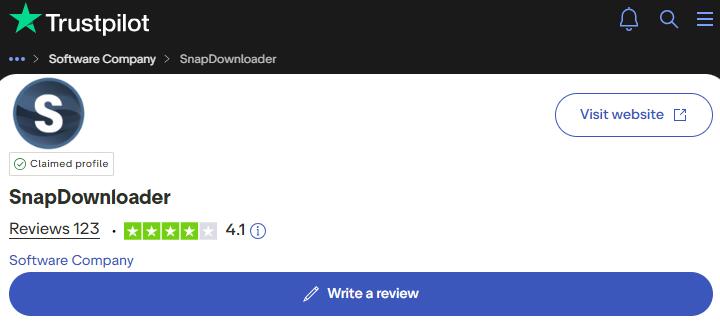
There are some recurring complaints. The most common is that SnapDownloader occasionally stops working when a supported site changes its protocol. Actually, this is an inherent risk with any video downloader. In those moments, downloads may fail until the developer releases an update. The company is active on forums and responds to nearly all negative reviews, which helps build trust. Here's a summary of pros and cons from user feedback.
Good Points |
Caveats |
|---|---|
Good Trustpilot rating (around 4.1/5) |
Occasional downtime when platforms update |
Simple interface and no ads |
Paid subscription after 48-hour trial |
Responsive support team |
Strict refund terms |
Works on Windows and macOS with equal features |
Licence tied to your account; cracked versions may carry malware |
Privacy and Data Handling
Many potential users worry not only about viruses but also about privacy. SnapDownloader does not require you to create an account; you simply enter a licence key to activate the software. According to the company's privacy policy, the app does not track what you download or collect personal information about your usage. Your download history stays on your device.
The app does collect some anonymous technical data to check for updates and improve performance. This includes things like your operating system version or crash reports. Such telemetry is standard for modern software and doesn't include personally identifying information. There is no evidence that SnapDownloader uploads the videos you download or logs your browsing activity.
Tips for Using SnapDownloader Safely
Even though SnapDownloader itself is considered safe, following a few best practices can reduce risks and ensure a smooth experience:
- Always download from the official website. Third-party sites or cracked versions might bundle malware.
- Keep your software up to date. The developer frequently releases updates to fix compatibility issues when video sites change their protocols.
- Use an updated operating system and antivirus. This is especially important on Windows; running outdated systems may block installation or lack security patches.
- Respect copyright. Download only content you own or have permission to save, and use the videos for personal viewing.
- Avoid sharing login credentials. If the app prompts you to log in to a platform to download private videos, make sure you are using the in-app browser and only input your credentials when necessary.
A More Versatile Alternative to SnapDownloader
If you want a tool that goes beyond simple video downloads, VideoProc Converter AI is worth a look. It's an all-in-one media suite with a built-in downloader that rivals dedicated tools. The downloader lets you grab HD, 4K and even 8K videos, movies, music, online courses, streams and playlists from YouTube and hundreds of other sites. Downloads are available in high-quality video and audio formats. Besides, it handles long playlists and entire channels, and offers batch downloading so you can queue multiple files in one click.
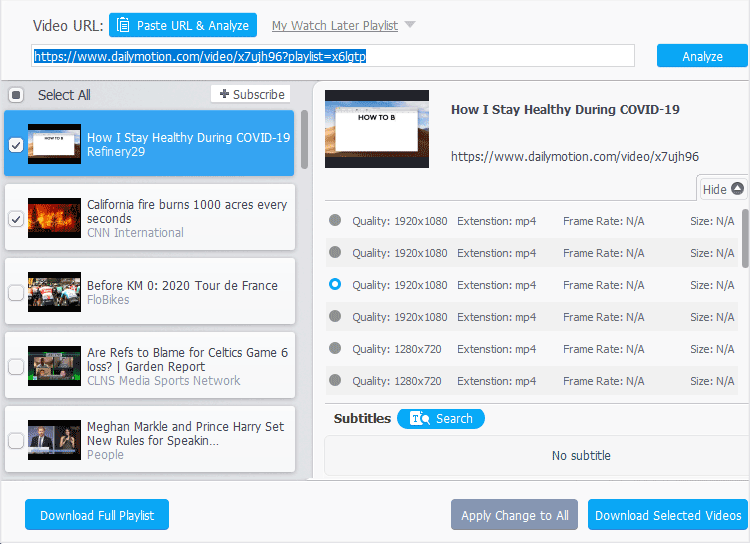
While the downloader is the highlight, VideoProc Converter AI also offers extras that SnapDownloader lacks. You can convert videos to over 420 formats, compress large files, digitize DVDs, record your screen and apply AI enhancements, all inside the same program.
VideoProc Converter AI - Safe & More than Downloading



- 100% safe and clean with no malware or adware
- Frequent and quick updates for smooth downloads
- Wide compatibility with 1,000+ sites, YouTube, TikTok, etc.
- High quality download in desired quality and formats up to 8K
- Batch download playlists, channels, audio, M3U8 streams, etc.
- All-in-one: AI tools, DVD backup, recorder, compressor, etc.

Verdict
SnapDownloader is safe to use when you get it from the official source and use it responsibly. Independent reviews and malware scans show no evidence of viruses, spyware or unwanted software. The installer is digitally signed, the macOS version is notarized by Apple and user feedback is largely positive.
However, safety also depends on your behavior. Because SnapDownloader can download videos from sites that prohibit downloads, always use it for content you have rights to and be prepared for occasional downtime when platforms update their systems. Avoid pirated copies and keep your software updated. Follow these guidelines and SnapDownloader can be a convenient and safe way to save online videos for personal use.




