
 Download Online Videos & AI Upscale to HD/4K!
JDownloader is a free, open-source download manager that promises to automate downloads from file-hosting services. Over the years it has gained a reputation for helping people grab files from sites, even handling waiting times and CAPTCHAs for you. But a question that often appears in forums and review sites is: is JDownloader safe?
This article examines whether JDownloader is safe to install and use, and explains how to mitigate potential risks. For those who want a more reliable and holistic tool, you'll also find a modern media-processing suite with a built-in downloader.
Is JDownloader Safe
In short, the JDownloader application (Java .jar) itself is safe to use, but the installer is the risky part. JDownloader is safe to use as long as you get it from its official website, install it carefully without optional adware, keep it updated, and be smart about what you download.
Windows Installer Bundled Adware
The primary safety concern with JDownloader lies in its installer. The official Windows installer has optional adware offers. If accepted or if one clicks through too quickly, third-party software will be installed. The adware itself isn't part of JDownloader's core functionality, but if installed it can be harmful.
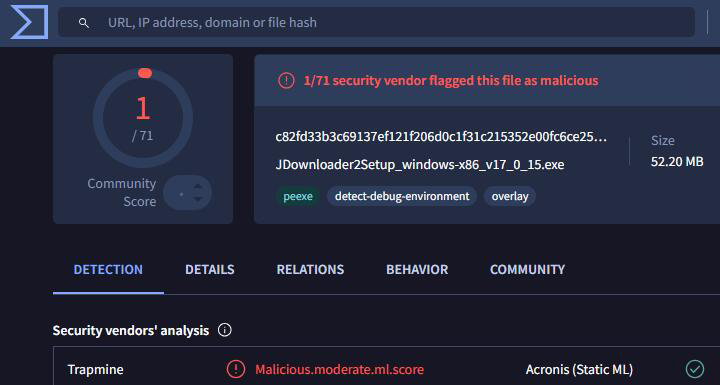
Because of how the installers are packaged, many antivirus programs flag JDownloader's installer as malicious or a potentially unwanted program. We've also found that browsers and Windows Defender may even block the default installer as malicious.
Privacy and Data Collection
JDownloader does not have a history of invasive data collection. The software and its services adhere to GDPR and only collect data as needed to provide functionality. No browsing or downloading activity is reported back to the developer. The act of downloading files is a direct exchange between your computer and the file host.
Update Frequency and Security Track Record
JDownloader is actively maintained. Although JDownloader 2 has been in beta for years, it still receives continuous updates to plugins and core components. However, as platforms change more frequently, JDownloader occasionally experiences download failures for many users due to delays in updating.
In terms of security, there have been a few vulnerabilities discovered in JDownloader's past. But the developers patched them within days and pushed updates to users. Over its lifespan, JDownloader hasn't had any scandalous breaches of user data or intentionally malicious updates, which speaks to the developer's reputation.
Best Practices to Use JDownloader Safely
To minimise risks when using JDownloader, follow these guidelines:
- Download from official sources: Always obtain JDownloader from its official website or GitHub repository. Avoid third-party mirrors.
- Use the Adware-Free Installer or JAR: The standard installer includes optional adware. For a hassle-free experience, download the adware-free package.
- Decline extras during installation: Read each step carefully if you do run the normal installer. Do not simply click Next through the installer.
- Keep your system and Java up to date: Some older installers require Java. Using an up-to-date Java runtime reduces security vulnerabilities.
- Use antivirus software: Scan downloaded files and the installer. False positives can occur, but scanning helps catch real threats.
- Respect copyright laws: JDownloader can be used legally to download freely available or personal files, but using it to obtain copyrighted content without permission is illegal and unethical.
By following these practices, you can enjoy JDownloader's benefits while minimizing any safety risks.
Best Alternative to JDownloader
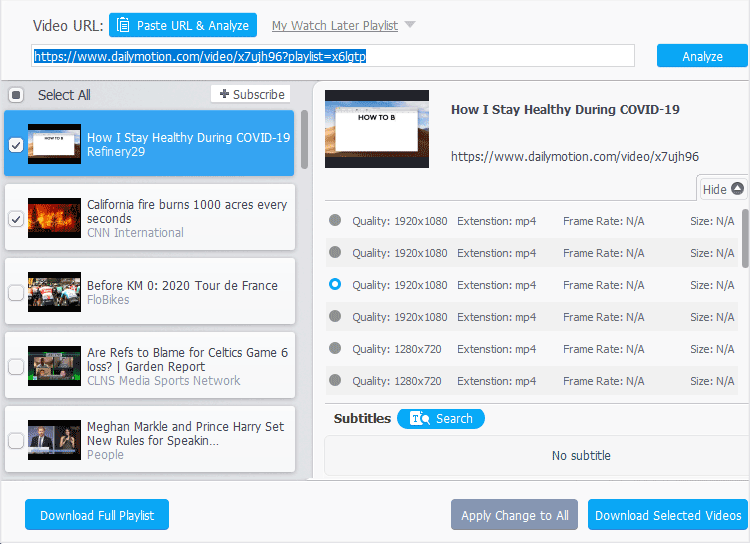
If you need more than just a download manager, VideoProc Converter AI is a compelling alternative. Developed by Digiarty Software, VideoProc is an all-in-one media processing suite that combines downloading, conversion, editing and AI-powered enhancement in one package.

- Free and Safe: No ads or bundled software, 100% safe for Windows PC and Mac.
- Wide Compatibility: Support 1,000+ sites, YouTube, Facebook, TikTok, etc.
- High Quality: Download in desired quality and formats, 1080p, 4K, up to 8K.
- Batch Downloads: playlists, channels, live videos, audio, M3U8 streams, etc.
- Fast Process: GPU accelerated for fast downloads.
- All-in-one: AI enhancement, video conversion, compression, DVD backup, etc.
While both programs can download videos, their focus differs. JDownloader specialises in automating downloads from file-hosting sites with features like CAPTCHA solving and multi-host support. It is free and open-source, but its installer may include adware and its interface can feel dated. VideoProc Converter AI, meanwhile, emphasises AI-powered video enhancement, conversion and editing in one intuitive interface.
Wrap Up
JDownloader is a powerful and, for the most part, safe tool when downloaded from its official sources and installed carefully. Concerns about safety revolve mainly around optional adware in the Windows installer and occasional false positives from antivirus scanners. By choosing the adware-free .jar installer, declining bundled software, keeping Java updated and scanning downloads, users can enjoy JDownloader's automation and batch downloading features safely.
However, if you are looking for a more versatile program that can not only download videos but also upscale, convert and edit them with AI assistance, VideoProc Converter AI is worth considering. It delivers high-quality video processing with a built-in downloader, albeit at a small cost. Ultimately, the safest choice depends on your needs: JDownloader remains a capable free downloader, while VideoProc Converter AI offers an integrated media toolbox with advanced AI enhancements.




