

Summary: Ever wished you could save your favorite OnlyFans videos to watch offline, keep forever, or simply enjoy without an internet connection? You're not alone. OnlyFans, prioritizing creator content protection and user privacy, doesn't offer a direct download button. This can be incredibly frustrating when you want to preserve exclusive content before it's gone or enjoy it on your own terms.
But don't worry! We understand the challenge, and after extensive testing, we've compiled 5 proven, effective methods to download OnlyFans videos. From technical tricks to powerful OnlyFans video downloader and convenient browser extensions, we'll guide you through each option so you can choose the best way to save your favorite OnlyFans content. Let's dive in!
Overview of the 5 OnlyFans Video Download Methods
Before we dive into the detailed explanations of each OnlyFans video downloading method, here's a quick comparison table to help you understand their key features and choose the best option for your needs:
| Feature / Method | Inspect Tool | VideoProc Converter | Kigo Movie One | Video DownloadHelper (Chrome) | Video Hunter (Firefox) |
|---|---|---|---|---|---|
Method Type |
Browser Trick |
Screen Recorder |
Desktop Downloader |
Browser Extension |
Browser Extension |
Cost |
Free |
Paid (Free Trial) |
Paid |
Free (Basic) |
Free (Basic) |
Max Quality |
As streamed |
Up to 4K (recorded) |
As streamed |
Up to 1080p |
Up to 1080p |
AI Enhancement |
❌ |
✅ (Upscale, Deshake) |
❌ |
❌ |
❌ |
Editing Tools |
❌ |
✅ |
❌ |
❌ |
❌ |
Reliability |
Low (technical) |
High (screen capture) |
Medium (platform updates) |
Low (platform updates) |
Low (platform updates) |
Ease of Use |
Low (technical) |
High |
Medium |
High |
High |
Privacy Concern |
Low |
No |
High (credentials) |
Low |
Low |
Best For |
Tech-savvy users |
Quality & Control |
Direct downloads |
Quick, casual downloads |
Chromecast |
Why OnlyFans Doesn't Offer a Download Button
OnlyFans doesn't allow direct video downloads to protect creators and their content. Unlike platforms like Twitter or Reddit, where content is public, OnlyFans hosts exclusive, paid content. Allowing downloads would make it easy for videos to be shared or pirated, potentially costing creators their income. Additionally, many creators post personal or intimate content, and enabling downloads could lead to unauthorized sharing, violating their privacy. These restrictions are in place to safeguard creators' rights and prevent legal issues.
Download Onlyfans Video with the Inspect Tool
If you're familiar with using web tools, Chrome's Developer Tools can help you locate the video file directly. While it's a bit more technical, it's a useful method if you prefer not to rely on third-party apps or extensions. By opening the "Inspect" window in Chrome, you can sift through the page's code to find the link to the video file. Once you have the link, you can save the video through your browser's save option, bypassing the need for additional software. The downsides? This method requires some familiarity with how web pages load content, so its not friendly enough for beginners.
Step 1. Open the OnlyFans website.
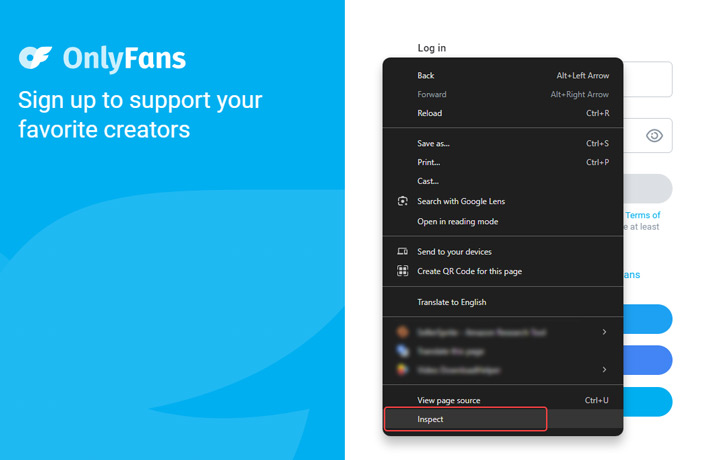
You don't need to log in right away—this is because you'll be automatically logged out once you open the Inspector tool. Right-click anywhere on the page and select Inspect.
Step 2. Click on the Network tab in the Developer Tools. Log in to your OnlyFans account, then navigate to the video you want to download.
Step 3. Under the Media section in the Network tab, look for the video file link. Hover over the link and click Copy Link to copy the URL.
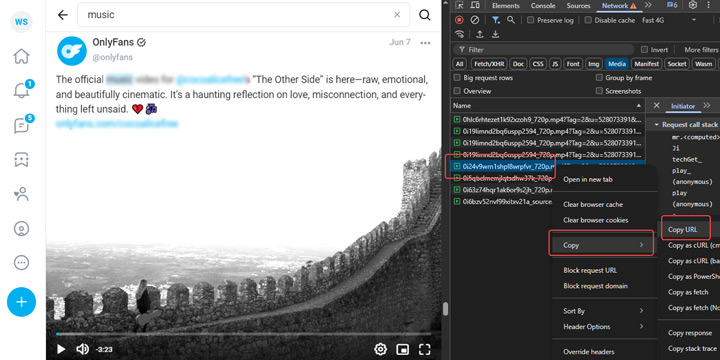
Step 4. Paste the copied link into a new browser tab. Click the Download link to save the video to your device.

Pros:
- No cost involved, as it uses built-in browser features.
- Avoids installing external applications or extensions.
Cons:
- Requires familiarity with web development tools and code, making it unsuitable for beginners.
- May not work for all videos, especially those with advanced DRM or streaming protocols.
- Locating the correct file link can be tedious and requires patience.
- Obtaining the highest quality video file is challenging.
⚠️ Keep in Mind
While the Inspect Tool offers a free, direct approach, it's often a hit-or-miss method. It requires a good understanding of web mechanics and can be frustrating if the video file is obfuscated or protected. For a more reliable and user-friendly experience, especially if you value consistent results and ease of use, dedicated Onlyfans video downloaders or screen recorders often provide a smoother process without the technical hurdles.
Save Videos from Onlyfans with VideoProc Converter AI
If you're looking for more flexibility in saving videos from OnlyFans, VideoProc Converter AI offers a powerful alternative, though it uses screen recording instead of direct downloading. What sets it apart is its ability to record in original quality, including 4K resolution, ensuring that you don't lose any detail. Plus, if you've ever dealt with grainy or low-quality videos, VideoProc's AI-driven video upscaling can enhance video quality to 4K, reducing noise and improving clarity. Check some of its highlight features:
- Record to save videos from Onlyfans at the original 1080p/4K quality.
- AI upscales videos to 4K, enhancing details and fixing imperfections.
- More AI features: deshake, increase fps, enhance image to 4k, etc.
- 29-quick edit tools: trim, merge, crop, rote, add subtitles, and more.
- Directly download video/audio/subtitle files from 1000+ UGC sites.

Step 1. Download and install VideoProc Converter AI on your computer. Launch the program and select the Recorder tool.
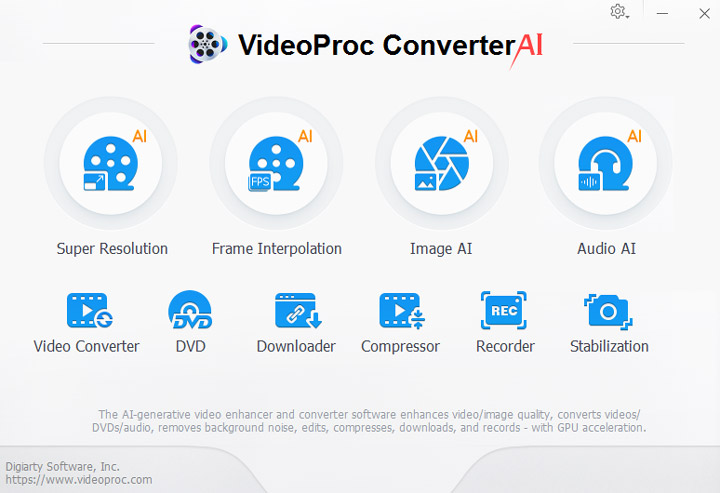
Step 2. Open Onlyfans on your browser. Browse to the video you want to save from Onlyfans. Go back to VideoProc Converter AI. Click the screen button. After that, go to your browser, and hit the full screen icon of the Onlyfans video. And hit the playback button.
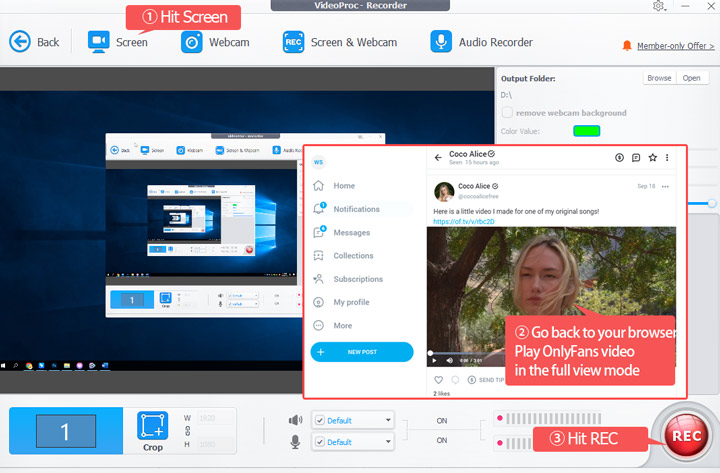
Step 3. When you want the record to end. Just press Ctrl + R to stop the recording. As soon as you stop, you can find the thumbnail of the saved Onlyfans video by recording.
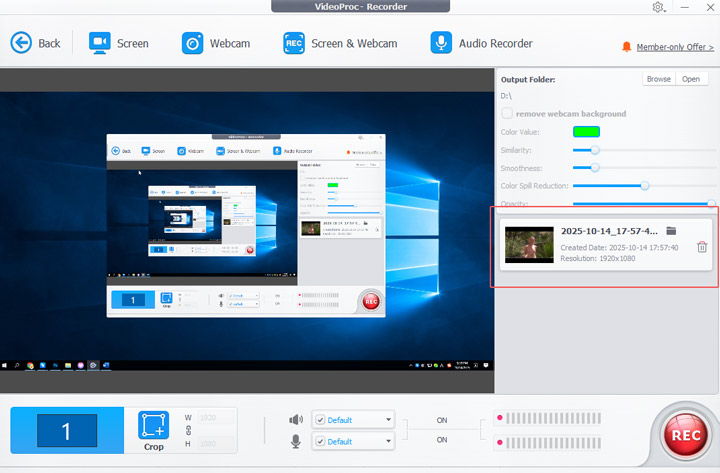
Depending on your need, you can do a few things to make the video you saved from OnlyFans look better. For example,
- ✅ Compress the video size without sacrificing the picture quality.
- ✅ Trim unwanted section or crop redundant pixels.
- ✅ AI stabilize the shaky footage, so they feel like shot by tripod.
- ✅ AI upscale video from 720p/1080p to 4K with enhanced details.
- ✅ AI fix visual imperfections like graininess, noise, and blurriness.
Pros:
- Records in original 4K resolution, ensuring no loss of detail.
- Unique AI upscaling and other features (deshake, FPS increase) to improve video quality post-recording.
- Built-in suite for trimming, merging, cropping, and more, offering complete control.
- No need to share OnlyFans login credentials with the software, as it uses screen recording.
- Screen recording is generally more robust against platform changes compared to direct download methods.
- Directly download videos from vimeo, TikTok, and 1000+ UGC sites.
Cons:
- Not a direct download, meaning you need to play the video in real-time.
💡 Keep in Mind:
While other methods might offer quick downloads, VideoProc Converter AI stands out for users prioritizing uncompromised quality, advanced post-processing, and robust reliability. Unlike easily blocked browser extensions or direct download tools that risk your login security, VideoProc's screen recording approach is more resilient. Its unique AI video enhancement features directly address common OnlyFans video flaws: transforming often grainy, shaky, or low-resolution recordings (many shot on standard phones) into crispy clear 4K content. With AI upscaling, stabilization, and frame rate enhancement, you're not just saving a video, but actively improving its quality, offering a key advantage for everyone demanding premium output from their OnlyFans content.
Download Video from Onlyfans with Kigo Movie One
Kogo Movie One is a desktop video downloader that supports platforms requiring login access, such as OnlyFans, Discovery+, DMM, and Apple TV. The main concern for some users might be that it requires you to sign in with your OnlyFans account credentials, which could raise privacy worries. However, the software claims that its built-in browser mode keeps your browsing history fully private and secure, so this may not be a real concern.
Step 1. Go to the official site of Kigo Movie One. Find the download link for that Onlyfans video downloader and then have it downloaded on your computer.
Step 2. Click on Onlyfans to navigate to Onlyfans platform. Login with your account.
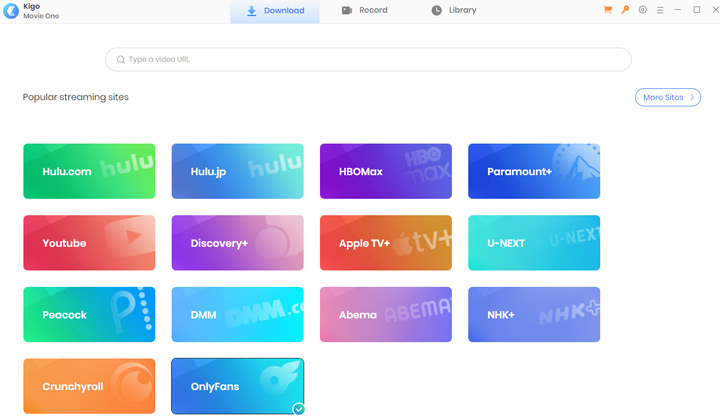
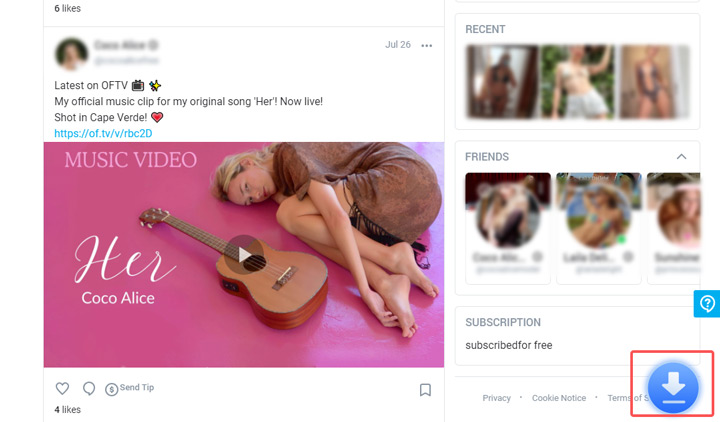
Step 3. Browse and find the video you want to download. The Download button will be located at the bottom. Click on it.
Step 4. The Onlyfans downloader will analyze the video and provide download options. Simply click Download to save the OnlyFans video.
Pros:
- Download content from platforms like OnlyFans that require authentication.
- Supports downloading multiple videos from one Onlyfans creator simultaneously.
Cons:
- Requires signing in with your OnlyFans account, which can be a privacy concern.
- Kigo Movie One is a premium Onlyfans video downloader.
- It relies on parsing OnlyFans' structure, which could break with platform updates.
- No AI Enhancement: Lacks advanced features like AI upscaling or video editing tools.
💡 Keep in Mind:
Kigo Movie One offers a direct download approach, which can be convenient. However, the necessity of entering your OnlyFans login credentials directly into a third-party application is a significant consideration for user privacy and security.
Download Video from Onlyfans with Chrome Extension
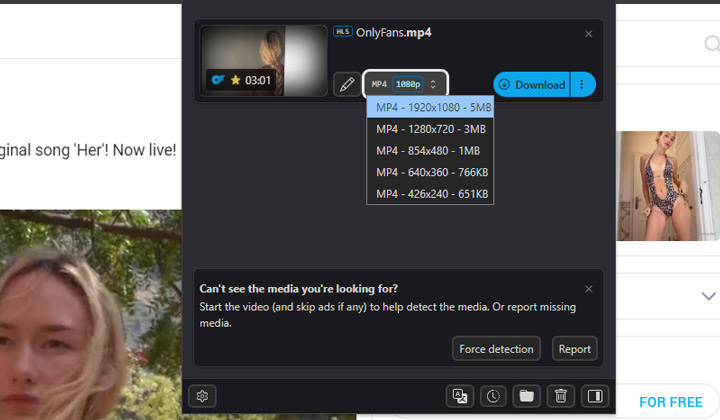
For those who prefer not to install additional programs on their computer and want a simpler, no-fuss solution, using a Chrome extension is a great option. One of the most reliable Onlyfans video downloader extensions I've used is Video DownloadHelper, which boasts over 27.4K ratings and a solid 4.4-star average. This speaks to its reliability and popularity. In addition to OnlyFans, it supports downloads from over 1,000 sites (including Dash, HLS, MPD, and more) and even handles live streaming in HD 1080p. It's an easy and effective way to grab content without the hassle.
Step 1. Open Chrome Web Store and search for Video DownloadHelper to find this Onlyfans video downloader chrome extension.
Step 2. Click Add to Chrome to start downloading and installing Video DownloadHelper on your chrome. Once done, click the extension button and hit the pin icon of it.
Step 3. Go to OnlyFans and find the video you want to download. The extension icon will turn color, indicating that downloadable videos have been detected.
Step 4. Click on the Video DownloadHelper icon, select the video you want to download, and then click Download.
Pros:
- Integrates directly into your browser for quick access.
- Simple interface, often just a few clicks to download.
- Supports many other video platforms besides OnlyFans.
- Free (Basic): The core functionality is free.
Cons:
- OnlyFans actively tries to block such extensions, leading to frequent issues.
- Lacks editing, AI enhancement, or other post-processing capabilities.
⚠️ Keep in Mind:
Browser extensions like Video DownloadHelper offer unparalleled convenience for quick downloads. However, their reliance on browser integration makes them highly susceptible to platform changes. OnlyFans frequently updates its website to prevent unauthorized downloads, meaning extensions can become unreliable or stop working altogether without warning.
Download Video from Onlyfans with Firefox Extension
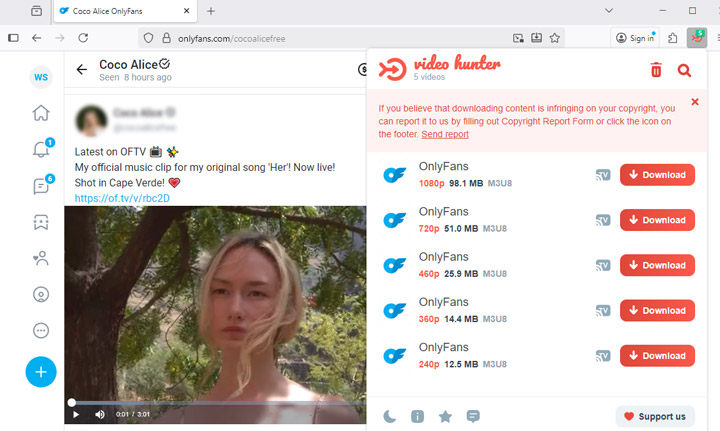
For users who prefer watching OnlyFans videos on Firefox, you can use a Firefox extension like Video Hunter to download videos without the need for any additional desktop-based downloaders. Video Hunter can analyze the videos you come across on OnlyFans and provide download options ranging from 270p to 1080p. The best part? It's compatible with Chromecast and Google Home. This means you can easily stream MP4 videos to your TV via Chromecast or play them directly on your Google Home.
Step 1. Open your Firefox browser and click on the Extensions icon in the upper-right corner to access the Firefox Extensions store.
Step 2. Search for Video Hunter and click Add to Firefox to download and install the OnlyFans video downloader. It will automatically be added to your Firefox browser.
Step 3. Click the Extensions icon again and pin the Video Hunter extension to your toolbar for easy access.
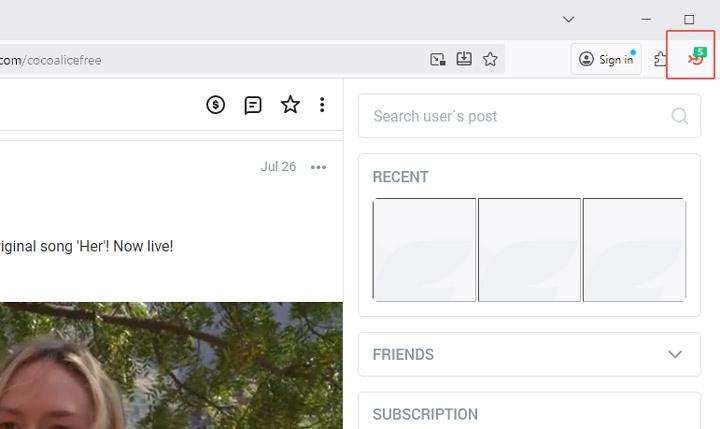
Step 4. Go to OnlyFans and log into your account. Play the video you want to download. You'll see a number appear on the Video Hunter extension icon, indicating how many downloadable videos it has detected.
Step 5. Click on the Video Hunter extension icon, then click the Download button to save the OnlyFans video to your computer.
Pros:
- Unique feature for streaming downloaded content.
- Simple click-to-download functionality.
- Avoids installing separate applications.
Cons:
- Download quality is capped (e.g., up to 1080p) and lacks advanced quality enhancements.
- OnlyFans actively works to prevent such extensions from functioning.
- No Advanced Features: Lacks editing, AI enhancement, or other post-processing capabilities.
⚠️ Keep in Mind:
Onlyfans frequently update their structure, code, or features, and these changes can cause the Onlyfans video downloader extension to stop working properly because it's no longer compatible with the new version of the site.
FAQs
Is downloading from OnlyFans legal?
OnlyFans does not allow content to be downloaded or copied, and doing so is a breach of their Terms of Service. All videos and pay-per-view content are intended to be viewed within the platform, and copying or saving them without permission is not allowed. This means even if you technically can record or download a video, it goes against OnlyFans' rules and could put your account at risk.
What is the best OnlyFans downloader?
There isn't a single “best” OnlyFans downloader, as it depends on your needs. Desktop tools like Kogo Movie One provide a straightforward way to save videos but require logging in. VideoProc Converter AI records videos in high quality and enhances them with AI upscaling, ideal for those wanting more control and editing options. For simplicity, browser extensions like Video DownloadHelper (Chrome) or Video Hunter (Firefox) offer quick downloads without installing heavy programs. Each option balances convenience, quality, and privacy, so choose based on what matters most to you.
How do I download OnlyFans videos to my iPhone?
You can use the built-in Screen Recording feature on your iPhone to capture OnlyFans videos. First, go to Settings > Control Center and add Screen Recording. Then, open the video on OnlyFans, swipe to access the Control Center, and tap the Screen Recording button to start recording. Once the video finishes, stop the recording, and it will be saved to your Photos app.
How do I download OnlyFans videos to my Android?
To download OnlyFans videos to your Android, you can use the built-in screen recorder feature. Simply open the video you want to save, swipe down from the top to access the quick settings, and tap the Screen Recorder icon to start recording. Once the video is done, stop the recording by tapping the notification, and the video will be saved to your gallery. You can also use a video editing app to trim the recording if needed. This method is straightforward but may affect video quality and storage space.




