
 VideoProc Converter
 New AI features are available
 Listed in
 Summary: This is an in-depth review about Nano Banana (Gemini 2.5 Flash Image). After testing it with various image editing tasks, I found notable improvements in areas like character consistency, staying true to its promises. It's worth noting that the model only supports native 1K output. For sharper, high-resolution results, it's best to upscale your Nano Banana creations to 8K/10K using VideoProc Converter AI.
Earlier this year, when we talked about AI image editing, one of the biggest challenges was maintaining character consistency. Achieving precise control over images often meant dealing with complex workflows like ComfyUI, and even then, results were hit or miss.
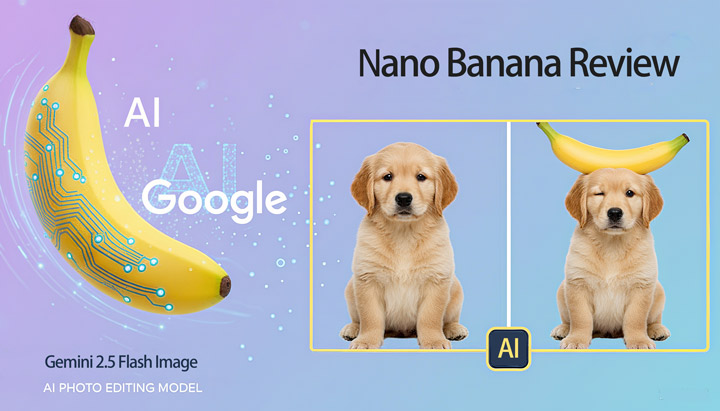
But Nano Banana (Gemini 2.5 Flash Image) seems to have solved that problem. From the reviews posted on social media, it looks like this model can make ultra-precise edits with just a few instructions, producing images with no visible editing traces. Characters, backgrounds, and even the smallest details like letters or objects can be seamlessly adjusted. Styles can be transferred, outfits swapped—without any noticeable "AI" influence in the final image.
The thing is, just like with the releases of GPT-4o and Flux Kontext... the AI always seems to work flawlessly for reviewers, but when we try it ourselves, the results don't always match up. So, what's the real experience like? Today, we're putting Gemini 2.5 Flash Image (Nano Banana) to the test.
What Is Nano Banana (Gemini 2.5 Flash Image)
The journey of Nano Banana began with a mysterious "banana" emoji. On LMArena, a popular AI model battle platform, users noticed that the highest-rated images were marked with a small yellow banana icon. There was no official model name or announcement—just the undeniable quality of the images. The AI community quickly dubbed it "Nano Banana", speculating it was a secret project from Google, possibly testing a powerful new image generation and editing model.
The mystery didn't last long. It was later revealed as Gemini 2.5 Flash Image, built for both creating and editing visuals. Beyond generating images from text prompts, it also supports fine-tuned edits and character consistency, all while drawing on Gemini's broad knowledge base to keep results accurate and contextually fitting.
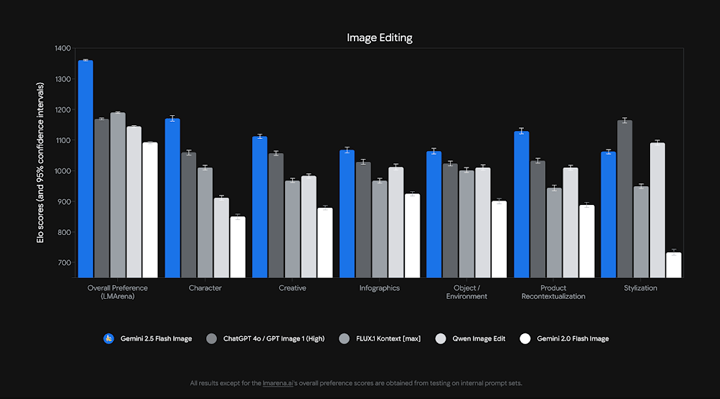
Sadly, Nano Banana Output is Limited to 1K Resolution
However, this won't hold back your final result. You can still achieve stunning visuals at larger sizes by using VideoProc Converter AI. This AI-powered video and image upscaling tool enhances images and videos by up to 400%, effectively reducing noise and blur for a cleaner, sharper visual experience, with support for image resolutions up to 10K.
Download and install VideoProc for free to upscale/enhance your Nano Banana artwork to 10K clarity!

What Are the Key Features of Nano Banana
Gemini 2.5 Flash Image, also known as nano-banana, represents a significant leap forward in image generation technology. It pulls back the curtain on what makes this model a major upgrade, highlighting key improvements that give creators a new level of control and precision, particularly in the following areas:
Character Consistency
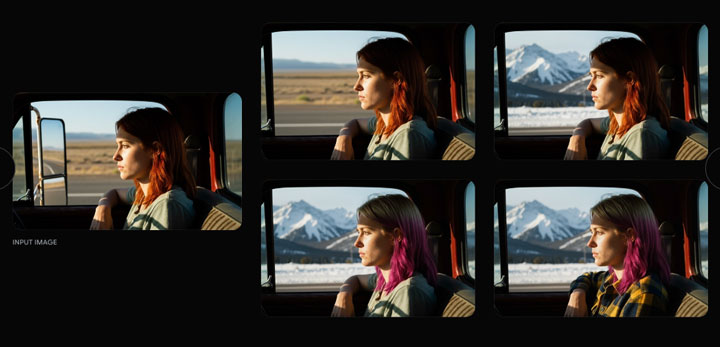
This tackles a fundamental challenge in image generation. While older models often struggle to maintain a character's likeness across different scenes or prompts, Gemini 2.5 Flash Image allows you to place the same character in various environments, from different angles, and in new outfits. This functionality is crucial for rich storytelling, creating consistent brand assets, or generating a series of images that feel cohesive.
Prompt-Based Image Editing
The model goes beyond simple generation by enabling targeted transformations with natural language. You can use a simple prompt to perform precise, localized edits, such as blurring the background, removing an object, or altering a subject's pose. It's like having a powerful editing tool that you can control entirely with text.
Multi-Image Fusion
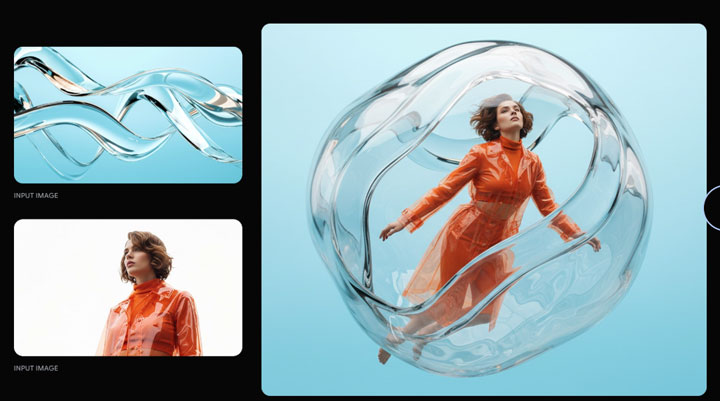
This new capability allows you to merge multiple images into a single, cohesive final image. It goes beyond simple layering and enables you to blend objects, restyle a room with a specific color scheme from another photo, or fuse disparate visual elements together with a single prompt.
Native World Knowledge
Historically, image models were great at aesthetics but lacked a deep, semantic understanding of the real world. By leveraging Gemini's core knowledge, this model can now understand and follow real-world logic. This unlocks powerful new use cases, such as turning a simple hand-drawn diagram into an interactive educational tool or generating images that make factual sense.
Let's Test Out Gemini 2.5 Flash Image (Nano Banana)
A tool's real value isn't just in its feature list—it lies in how well those features handle real-world scenarios. To evaluate Gemini 2.5 Flash Image, we designed tests that move from casual photo fixes to commercial composites and even playful creative experiments.
1. Everyday Photo Editing
Let's start by testing how Nano Banana handles everyday needs like retouching, restoration, and quick fixes.
1) Face Retouching
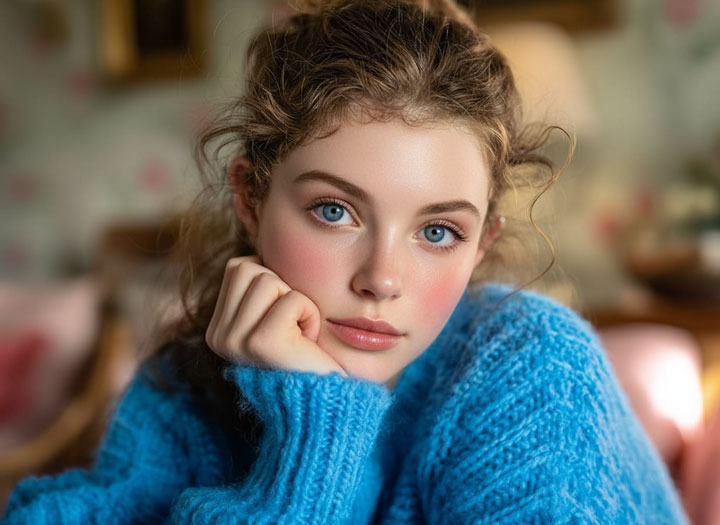
We tested whether Nano Banana could enhance portraits naturally.
Prompt: Remove skin blemishes and apply trending makeup styles.
Result: It successfully removed skin blemishes and applied trending makeup styles.


2) Age Adjustment & Scene Adaptation
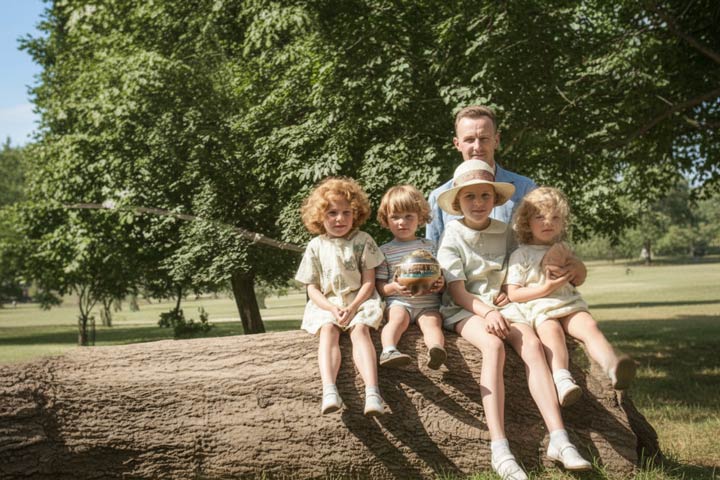
We evaluated age transformation while keeping the scene consistent. Nano Banana made a middle-aged man look 10 years younger and adjusted the environment to match the era. The effect was believable, preserving the original context while achieving a natural-looking transformation.
Prompt: Make him look 10 years younger, and adjust the environment to match the era.


3) Scene Restoration & Enhancement
We explored restoration tasks, such as reconstructing missing or blurred elements and enhancing overall photo quality.
Prompt 1: Erase the people and transform the photo into a bright, sunny midday scene.
Result: It looked so natural that no additional edits were needed.


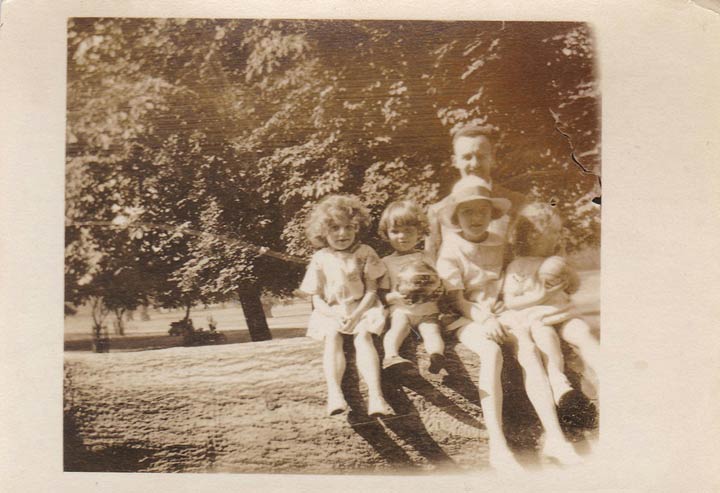
Prompt 2: Restore this old photo back to life: deblur, remove imperfections, colorize naturally.
Result: The restoration looked very natural, comparable to most top photo restoration and colorization tools. There were minor imperfections. The child on the far right had a slightly different posture, but the rest of the details were beautifully preserved.
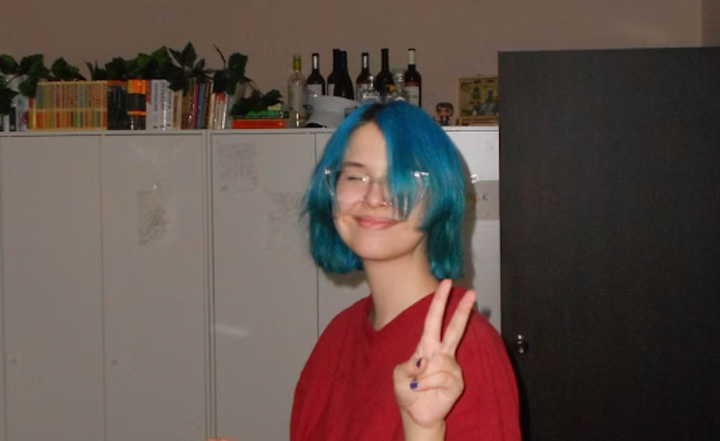
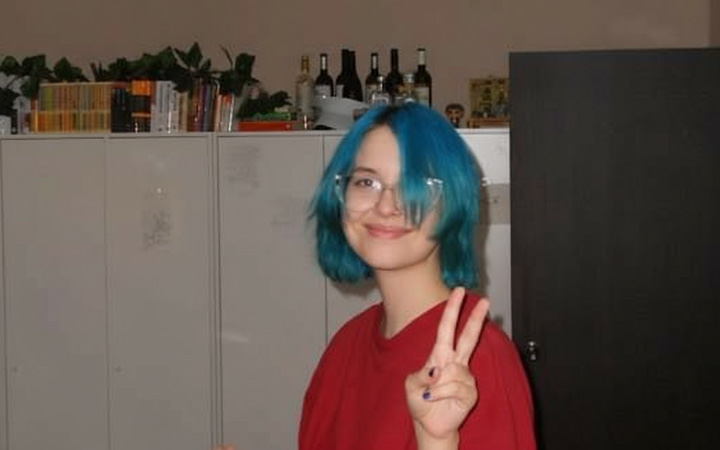
Prompt 3: Fix the closed eyes, make them naturally open and directed toward the camera.
4) Subject Merging
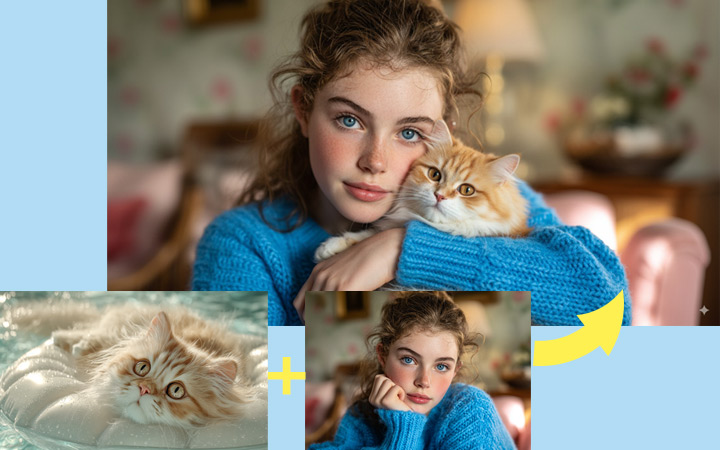
We assessed compositional ability when blending multiple independent subjects. Nano Banana merged a woman and a cat into a cozy, natural-looking scene while preserving details and maintaining realism.
Prompt: The output was extremely natural and perfect, although the cat in the generated image looks slightly different from the original.
2. Commercial Applications
Many regard Nano Banana as the go-to alternative to ComfyUI, especially when it comes to e-commerce photo editing, product retouching, and advertising visuals. But how well does it really perform in practical, business-driven scenarios? To find out, we put it through three common workflows:
1) Product Retouching
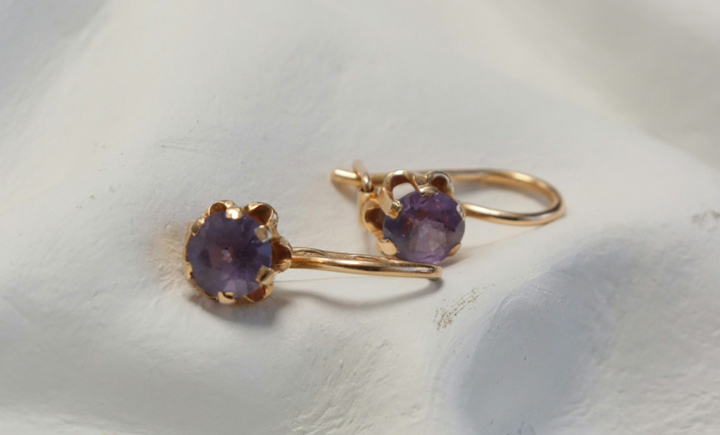
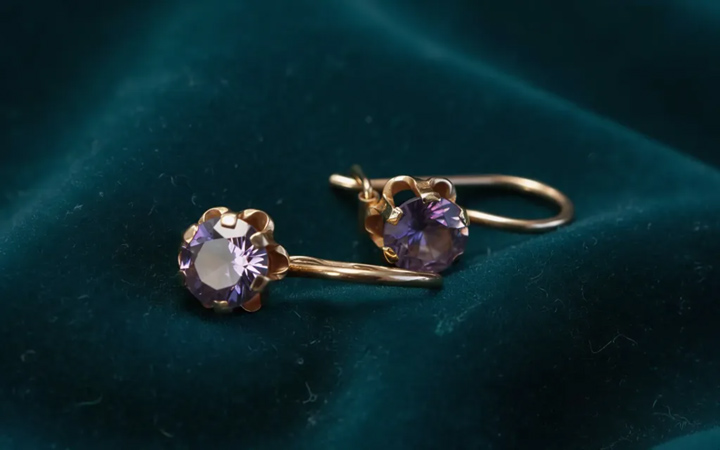
For e-commerce, precision product retouching is something every seller and brand wants, but it's often tricky to pull off—especially with shiny metals like jewelry. The challenge is to refine the product without losing its natural details. Can Nano Banana handle jewelry retouching without altering the fine textures? Let's put it to the test.
Prompt: Retouch this pair of rings by removing dust, blurs, and imperfections. Make the diamonds clear, transparent, and sparkling, and enhance the metallic parts to give a premium, luxurious feel. Do not alter the design of the product. Restore the image to the highest clarity, improve the lighting, and fix any low-resolution issues. Change the background to a rich velvet fabric to better showcase the product and enhance the overall elegance of the scene.
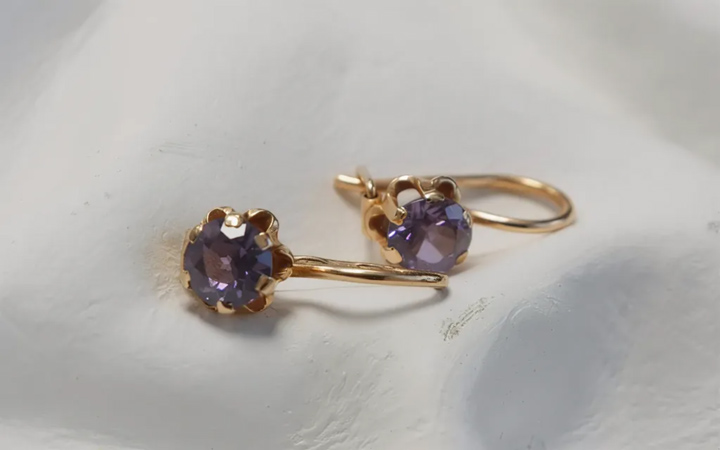
Result: The result below looks good. It's naturally enhanced and keep the details kept.
Note:
However, this result came after I adjusted my prompt multiple times. Without specifying a background change, most of the time it only refined the lighting, and sometimes it altered the design details of the rings.
2) Virtual Try-On
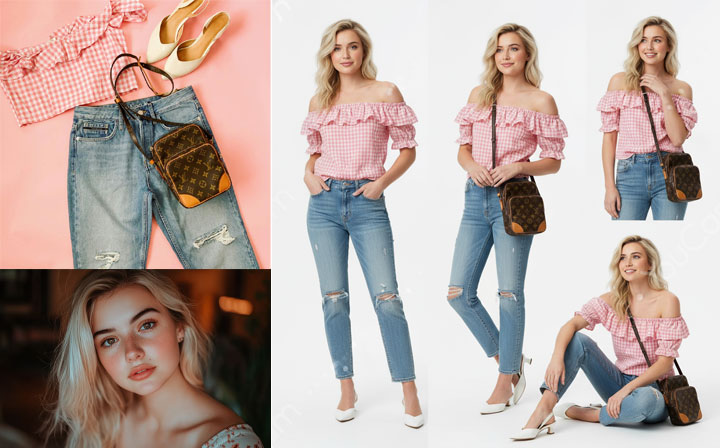
A key challenge for fashion and lifestyle brands is showing products in realistic use. Here, we asked Nano Banana to combine two separate images, a model and a set of clothes and accessories, then render the model in different poses against a clean white background.
Prompt: Make the girl in the first image wear the clothes and accessories from the second image, and show her in different poses against a white background, like a commercial model photo.
Result: The output looked like a professional studio shoot, making it valuable for brands that can't hire models but want polished, scalable virtual try-ons. It preserved many details, like the ripped jeans, although in some cases the cropped top appears longer and tucked into the pants.
3) Advertising Mockups
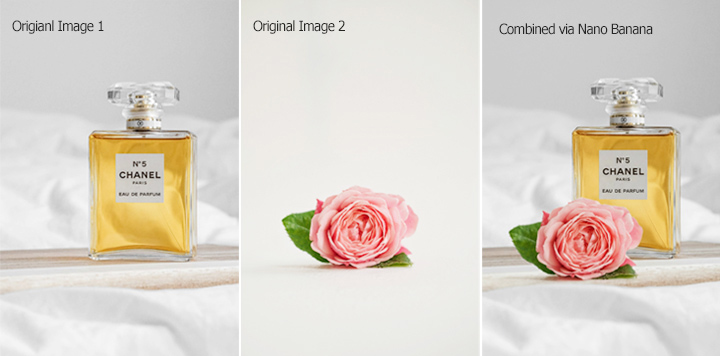
Going beyond standard catalog shots, we tested whether Nano Banana could place an e-commerce product into a new image while keeping the main product intact and ensuring the overall image looks harmonious and visually appealing.
Prompt: Integrate the perfume product into the second image background, with cinematic lighting and a minimal, aesthetic composition suitable for a luxury brand ad.
Result: The lighting and reflections look natural, and the overall image feels clean and minimal.
3. Advanced Features
Beyond standard editing, Nano Banana shows some unique capabilities that open up more creative possibilities.
1) Multi-View Generation
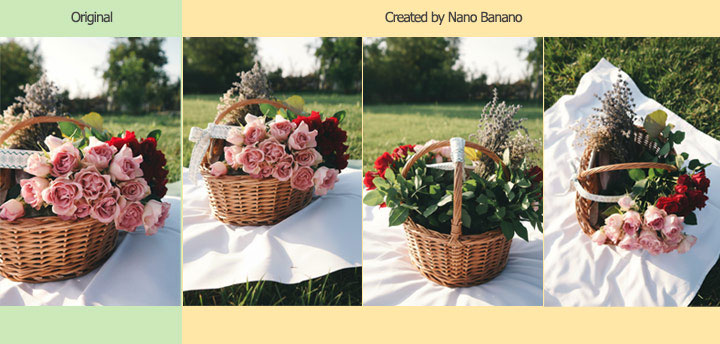
We wanted to see if Nano Banana could generate multiple perspectives of a single subject—something extremely useful for video production, storyboarding, or marketing visuals.
Prompt: Generate multi-angle views of the subject (front, side, back, bird's-eye).
Result: It does a good job in maintaining consistency across angles while keeping the subject natural.
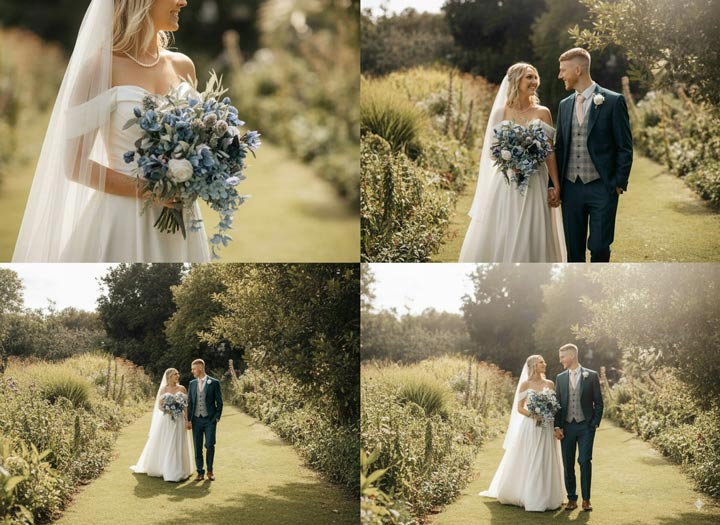
Note:
However, it doesn't perform perfectly every time. Below is an example where I asked Nano Banana to generate four images from different angles. The results included distorted faces and some loss of detail.
2) Text-on-Image Comprehension
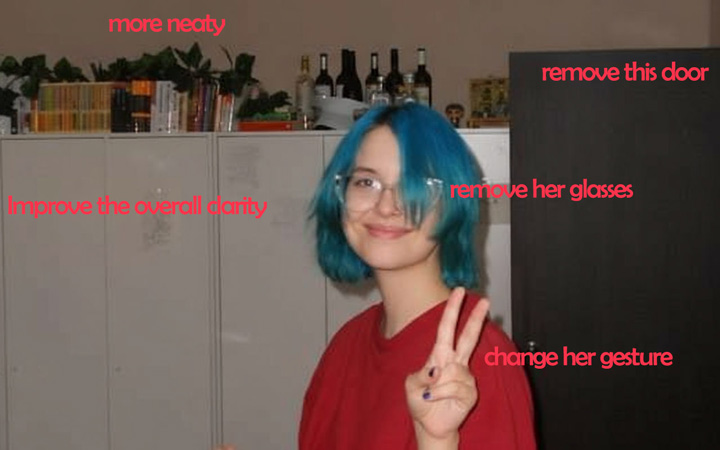
Another interesting test was to see whether Nano Banana could understand and respond to annotations baked into an image, not just plain text prompts.
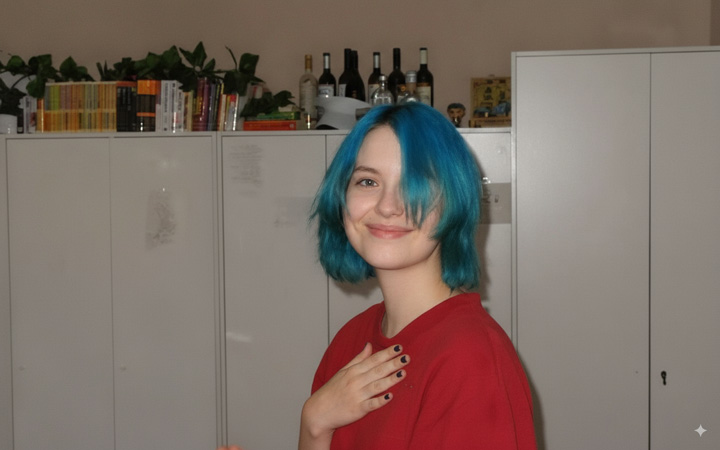
For example, we added notes directly on the source image and asked it to follow them—checking whether it could correctly interpret and execute instructions embedded visually.
Result: It understood most of the annotations in the image. I was really impressed by how well it preserved the details—even the nail art on the woman's fingers remained intact. With the overall image clarity improved, it also naturally added reflections from the camera flash in the woman's eyes.
4. Creative Play
This section pushes Nano Banana into more imaginative workflows, testing both its flexibility and its ability to remember previous edits.
1) Continuous Editing with Memory
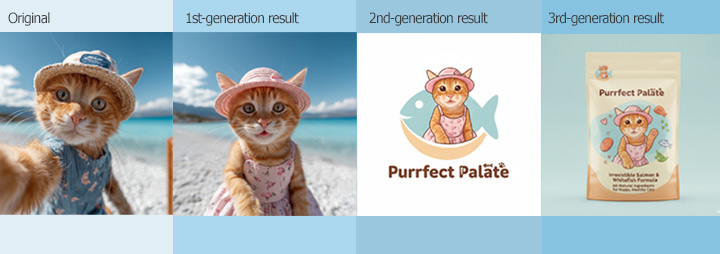
We wanted to see if Nano Banana could handle a chain of edits while keeping the subject consistent. For example, we started with a cat, added a hat, transformed it into a sticker, and finally placed it on a t-shirt.
Result: It's clear that Nano Banana can maintain coherence across multiple editing steps. However, the edited cat didn't turn out as cute as expected.
2) Concept-to-Demo Workflows
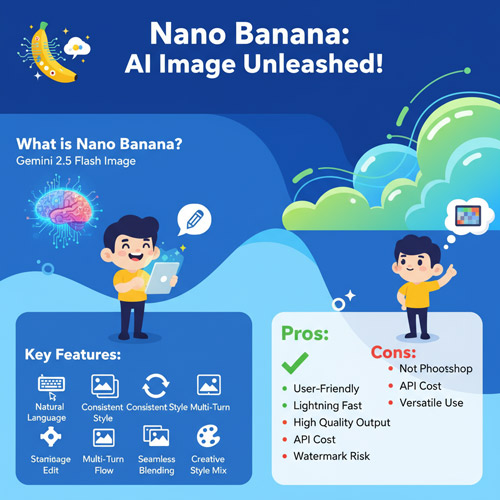
Another interesting test was to see how Nano Banana handles abstract concepts. We asked it to explain "Nano Banano" and then generate a visual demo based on its own explanation.
Result: It wasn't perfect compared to some outputs shared by other reviewers. There were repeated words, spelling mistakes, and the layout could be improved. However, it was still quite close to what we needed and captured the core idea effectively.
Pros and Cons of Nano Banana
Overall, it lives up to its advertised strengths, though a few shortcomings we identified during testing have also been mentioned by Google, even if they weren't heavily emphasized. While Gemini excels at character consistency, it can still struggle with small faces, accurate spelling, and fine details.
👍 Pros:
- Maintains characters consistently across multiple prompts and edits. Subjects can appear in different environments or from various angles without losing their identity.
- Provides precise prompt-based editing. You can blur backgrounds, colorize photos, and more with simple instructions.
- It can interpret diagrams, follow complex instructions, and power interactive educational tools.
- Supports multi-image fusion, allowing multiple images to merge into cohesive, photorealistic scenes for product placement, room restyling, or composites with a single prompt.
❌ Cons:
- Often fails to maintain subject consistency. This is especially frustrating when retouching small objects with lots of details that need to be preserved, such as jewelry, bags, shoes, toys, and other product images.
- Multi-step edits or image fusions can sometimes produce minor detail inconsistencies.
- Background and context adjustments may occasionally fail to preserve perfect lighting or spatial relationships, and intricate textures or reflective surfaces may be misgendered.
- Complex concept-to-visual workflows may result in imperfect text, layout, or minor inaccuracies.
- Struggle to do very basic things like crop, rotate, precisely control the transparency, etc.
- The current 1000 × 1000px resolution mode is not enough for e-commercial photo editing need. For example, Amazon optimal image size is 1600p. Nano banana's 1k image needs to be upscaled further with third party AI image upscaler.
Others Feedback about Google Nano Banana
I also looked into other user reviews to better understand Nano Banana's strengths and weaknesses. Overall, the feedback has been extremely positive, with users praising its impressive character consistency, fast response time, and its ability to handle tasks like product retouching and e-commerce photo creation. These are tasks that used to require Photoshop but can now be easily done through conversation.
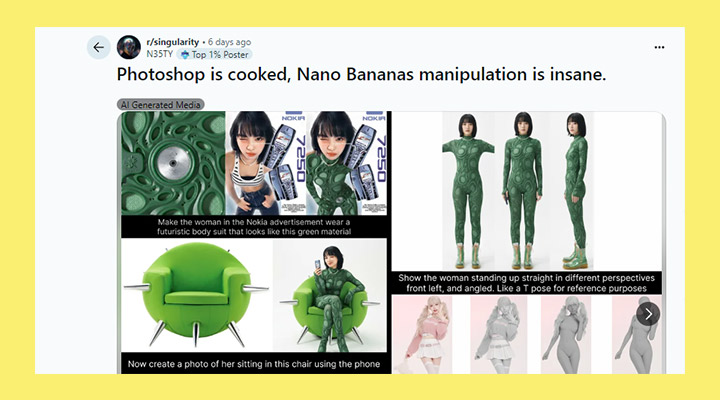
👍 "Mind-blowing stuff! True product and character consistency. Something that has been lacking since AI image generation began. This is clearly the future of image editing and manipulation. Probably even the beginning of the end of Photoshop. Thanks Sirio for the update." - @dennisruks3280 from youtube.com
👍 "I have a totally opposite experience - it's so fast and so accurate with edits and they are really exceptionally realistic. I had a night photo of my car in front of my home and it managed to seamlessly change the car to another one defined by me, along with the colour, plate numbers. It changed the season from summer to winter and made the photo look like it was taken during the day. I wasn't able to do any of these as accurately with other models." - Past-Lawfulness-3607 from Reddit.
👍 "New record? 13 images merged into a single image using Gemini 2.5 Flash Image (Nano Banana). This collage method is absolutely BANANAS! I'm actually amazed that it can do this however I feel like I'm reaching it's limit now but even at 13 elements it's still managing to obtain. - @ MrDavids1 from x.com"
👎 Some reddit users are frustrated with what they see as over-censorship, which they believe makes the model "unusable for many legitimate creative needs" and a "psychological barrier to creativity. - discussion from reddit.com
Nano Banana Pricing: How to Use It for Free (Unlimited)
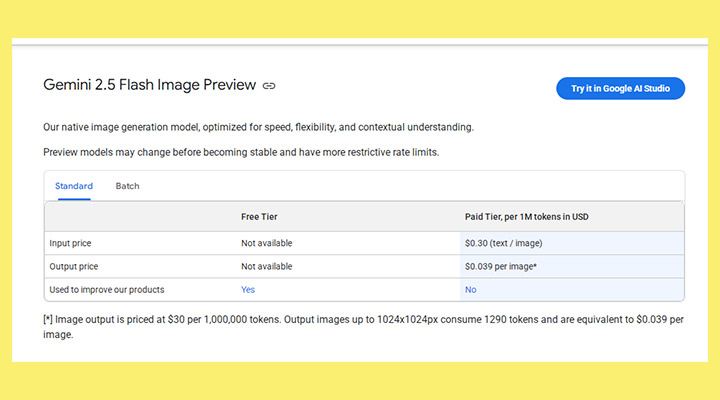
Getting started with Nano Banana doesn't have to cost anything. Several platforms offer free access, while higher-volume or commercial use requires a paid tier. Pricing is token-based: text or image input costs $0.30 per 1,000,000 tokens, and output images up to 1024×1024px use 1,290 tokens each, roughly $0.039 per image. Paid usage does not contribute to improving Google products, whereas free access may be used for model improvement. Since many users are curious about free access, here are some popular platforms where you can try Nano Banana at no cost.
Google AI Studio: The most direct way to access Nano Banana for free is through Google's AI Studio. Developers can sign up, generate an API key in a matter of minutes, and enjoy up to 1,500 requests per day—ideal for prototyping and testing new ideas without incurring any costs.
LMArena: This platform offers free, unlimited access to Nano Banana. However, it does have its drawbacks. Users often encounter connection errors such as "Connection errored out" or "Something went wrong." When this happens, you're forced to reload the page and re-enter your instructions to regenerate the image. This makes it less reliable for projects that require multiple edits in sequence, as the model may lose track of previous instructions or edits, making it difficult to maintain continuity in your work.
Freepik: It provides another free-tier option, allowing developers to access the Nano Banana API for text-to-image generation. After registering for a free API key from their dashboard, users can easily send requests via JSON payloads to generate high-quality visuals.
These platforms together offer diverse ways to experiment with Nano Banana without paying a dime. Once you've secured access, you'll be ready to dive into setup and start creating.
Conclusion
After trying Nano Banana (Gemini 2.5 Flash Image) on different editing tasks, I found that it really does a good job at keeping characters consistent and handling detailed edits with just a few prompts. It’s not flawless, but most of its drawbacks can be managed. The 1K output limit, for instance, isn’t too big of a problem since the images can be upscaled to 8K or 10K using tools like VideoProc Converter AI. Overall, it feels practical enough to fit into a real creative workflow.
Download and install VideoProc for free to level up your Nano Banana artwork to 10K!



