
 New AI features are available
 Listed in Websites
Wondering who screenshotted your public Snapchat story?
When you put your posts out there for anyone to see, you naturally want to know who is saving them. The answer depends entirely on your relationship with the viewer.
Snapchat only reveals the names of people who are already on your friends list. If someone who is on your friend list takes a screenshot of your public story, Snapchat will place a screenshot indicator next to their name in your story details. If a non-friend or anonymous viewer takes a screenshot of that same public story, their identity remains hidden. You will not be able to see their username or profile.
We will show you exactly how to check your viewer stats as we move forward.
A Simple Guide to Checking Your Story Analytics
Even though you cannot see the names of strangers, checking your stats is still very easy. You can quickly see how many people viewed your post and if any of your actual friends saved it.
To see who screenshotted your public Snapchat story, follow the steps below:
- Open the Snapchat app on your phone.
- Tap on your Bitmoji or profile picture at the top left corner.
- Scroll down to My Public Profile. Tap on the specific story you want to check.
- To see your viewer statistics, swipe up from the bottom of your screen once the story starts playing.
- The number next to the eye icon indicates the total number of views. The overlapping triangle icon next to a friend's name indicates that they have taken a screenshot.
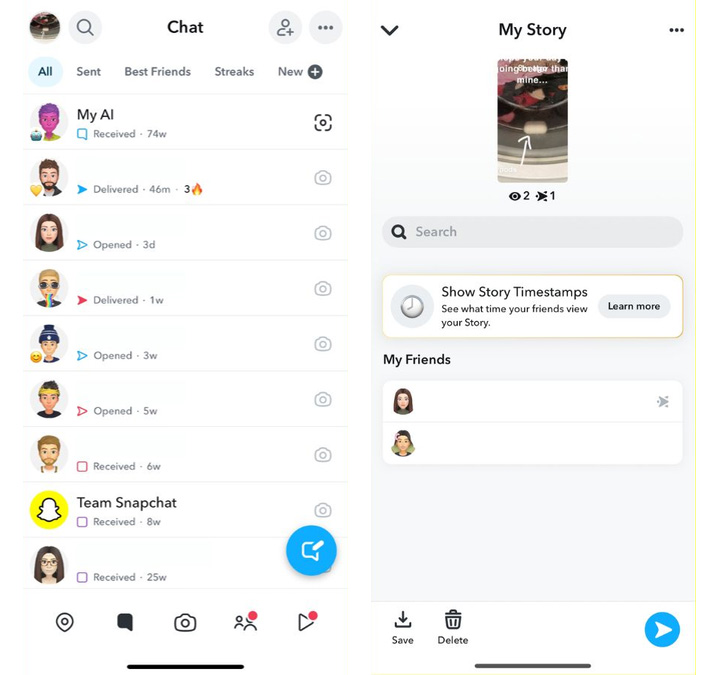
If a stranger took a screenshot, you will not see their name at all. However, your total screenshot count for that story will still go up.
The Privacy Mechanics of Public Profiles
The reason Snapchat works this way comes down to how the app handles different types of accounts.
When you post a regular private story, only your approved friends can see it. Since you know exactly who is watching, Snapchat gives you full details on everything they do. You get an alert the second a friend takes a screenshot.
A public profile is a completely different experience. These profiles are built to help creators and everyday users reach a massive new audience. By keeping non-friends anonymous, Snapchat encourages more people to watch and enjoy public stories. This design choice actually helps you grow your audience by making viewers feel secure.
Third Party Screenshot Apps
It is very tempting to look for a secret trick when you really want to know who is saving your posts. There are apps claiming they can unmask anonymous viewers, promising to show you the exact names of strangers who save your content.
Please do not fall for these wild claims. Every single third party app that promises this feature is a complete scam. Snapchat operates on a very closed and secure system. They absolutely do not allow outside developers to access or share this hidden viewer data. And downloading these fake apps puts your digital privacy at serious risk.
Conclusion
Managing a public profile on Snapchat means giving up a little bit of control. You will not always know the exact names of everyone who saves your content. This is a small trade off for the chance to share your ideas with the whole world. While the app keeps strangers anonymous, you can still track your total numbers and see what your actual friends are doing.
As you keep creating and posting new stories, try to focus on the big picture. Enjoy the fun process of building your audience and sharing your unique perspective. Do not stress too much about the invisible viewers saving your posts. If anyone ever crosses a line, you always have the power to block them and protect your space.
FAQ
Do screen recordings trigger the same notification system?
Yes, Snapchat treats a screen recording exactly like a regular screenshot. If a mutual friend records your public story, you will still see the exact same notification icon next to their name. If a non-friend or anonymous viewer records your public story, you will not be able to see their username or profile.
Can I turn off screenshots completely?
Right now, Snapchat does not offer a button to disable screenshots. When you post a video or photo to a public profile, you have to accept that people might save it. If a specific user is causing trouble or acting creepy, you can always block them.
Why can't I see who screenshotted my public story on Snapchat?
Snapchat will only reveal which of your mutual friends have taken a screenshot of your public story. This is because public profiles are designed to help creators reach massive new audiences. Therefore, when an unknown user takes a screenshot of a public snap, the platform does not send a notification to the creator.



