
 VideoProc Converter
 New AI features are available
 Listed in
 The AI image generation landscape is constantly shifting, with new models pushing boundaries all the time. Google has certainly been a driving force here with its Imagen models, and now they've announced what they call a significant leap forward: Google Imagen 4. Revealed at Google I/O 2024, this latest iteration is said to offer substantially higher quality compared to Imagen 3. Google specifically highlighted its improved ability to handle fine details - picture realistic fabric textures, perfectly rendered water droplets, or lifelike animal fur. What's more, they've reportedly made major strides in fixing the notoriously difficult task of generating accurate text and typography, an area where many AI models struggle.
But with any big announcement, questions pop up. I've seen positive comments from some early users and YouTubers praising its capabilities, while others online have shared results suggesting it might not be a huge step up, or even better than Imagen 3 in some cases. So, what's the real story? To cut through the noise and see for myself, I decided to put Imagen 4 to the test with 12 practical prompts designed to challenge its key features. This post is my unbiased review, sharing what I found based on those tests.
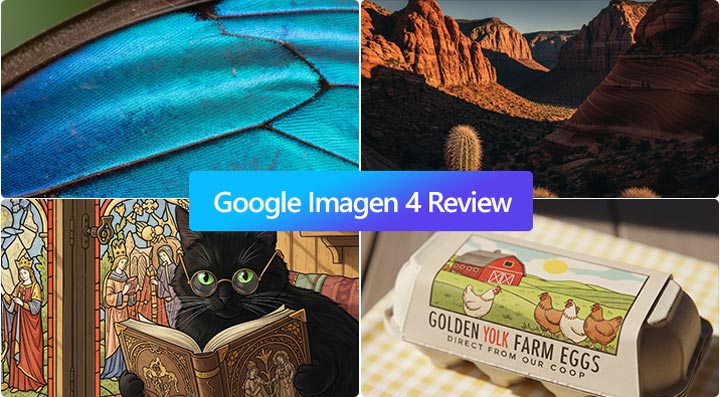
Based on this hands-on testing and analysis of Google Imagen 4, here's a quick summary of what I found:
- Significant Improvement: Imagen 4 is a clear step up from Imagen 3, particularly in handling fine details, textures, and complex scenes.
- Excellent Text Rendering: It shows remarkable accuracy and naturalness when generating text and typography within images, a major pain point for many AI models.
- Impressive Detail & Photorealism: Excels at creating highly realistic images, especially in close-ups of organic textures (like fur or water droplets) and detailed landscapes.
- Strong Surrealism & Art Style: Capable of generating imaginative surreal scenes and accurately replicating distinct artistic styles (like Studio Ghibli).
- Faster Generation: Google reports significantly faster image generation speeds compared to its predecessor.
- Limitations Remain: Like other AI models, it still struggles with precise numerical/spatial reasoning and can sometimes be inconsistent in adhering to subtle instructions regarding mood or complex composition.
- Access: Currently available via Google platforms like Gemini, Whisk (free option), and Workspace apps.
Where Is Imagen 4 Available
Imagen 4 is currently available across several Google platforms. You can find it integrated into the Gemini app, Google's Whisk and Vertex AI platforms, and across Google Slides, Vids, Docs, and more within Google Workspace. However, if you're looking to use it completely free of charge, your primary option right now is Google's Whisk.
Enhancing Imagen 4 Output: Going Beyond 2K
Imagen 4 produces detailed images, but its output is capped at 2K resolution. If you need higher resolution for professional printing or large displays, you'll need an external tool. VideoProc Converter AI can upscale your Imagen 4 creations by up to 400% (reaching 4K, 8K, or even 10K) using AI enhancement. It reduces noise and blur during enlargement, delivering a sharper, cleaner image while preserving detail. For high-resolution needs beyond 2K, use VideoProc Converter AI to enhance your artwork
Download and install VideoProc for free to upscale/enhance your Imagen 4 artwork to 10K clarity!

What Is Google Imagen 4
Google Imagen 4 is the latest version of Google's advanced text-to-image diffusion model. Developed by Google DeepMind, it was showcased at Google I/O 2025 as a significant evolution from its predecessors, Imagen 3 and Imagen 2. Its core purpose is to generate high-quality, photorealistic, and creative images from natural language descriptions, aiming to set a new standard in AI image synthesis.
Google Imagen 4 is the latest version of Google's advanced text-to-image diffusion model. Developed by Google DeepMind, it was showcased at Google I/O 2025 as a significant evolution from its predecessors, Imagen 3 and Imagen 2. Its core purpose is to generate high-quality, photorealistic, and creative images from natural language descriptions, aiming to set a new standard in AI image synthesis.
Google Imagen 4's Stated Goals and Key Features
So, what exactly does Google say Imagen 4 brings to the table? According to their official announcements and descriptions, they're aiming for a significant jump in image quality and control. They've outlined several key areas where they believe Imagen 4 represents a step forward:
- Enhanced Photorealism and Clarity: The model is designed to create incredibly realistic images of landscapes, plants, people, and animals with intricate and true-to-life details.
- Detailed Close-ups: It aims to capture extreme close-ups with richer colors, textures, and gradients, making images look almost tangible.
- Improved Spelling and Typography: A key focus is making text within generated images look much better. This includes more accurate spelling, handling longer lines of text, and creating text in various styles and layouts.
- Diverse and Accurate Art Styles: It's intended to render a wide range of art styles more accurately, including photorealism, abstract art, and illustrations.
- Faster Generation: Image 3 is already one of the fastest text-to-image models. Imagen 4 is tested to be able to run at the speed up to 10x faster than Image 3.
Google Imagen 4's Reported Performance and Benchmarks
Beyond the features Google highlights, how does Imagen 4 stack up according to early evaluations? Google positions Imagen 4 as their most advanced text-to-image model to date, reporting strong performance on internal tests. On GenAI-Bench, a benchmark that uses human evaluations, Imagen 4 reportedly scored very high, earning the top Elo score for overall preference when compared to other models.
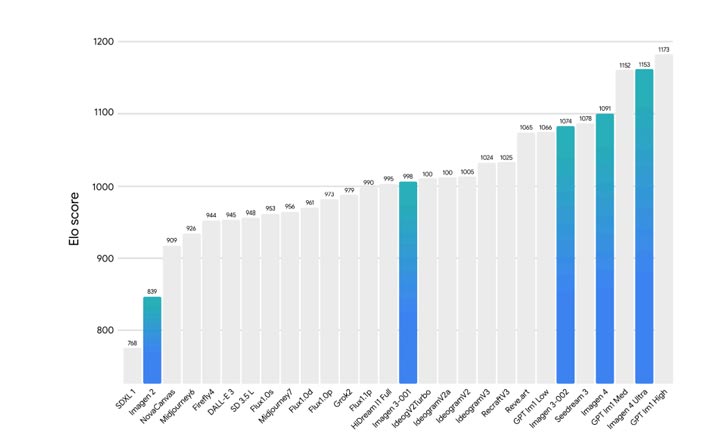
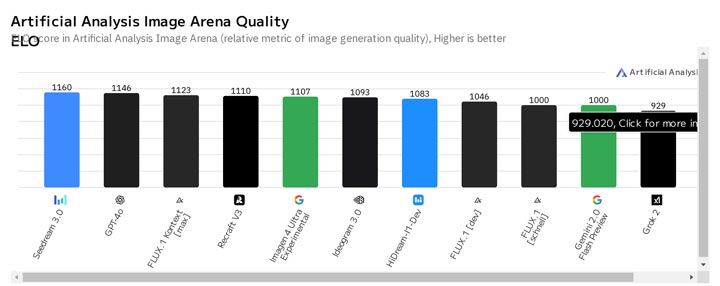
While Google highlights these internal results, it's also helpful to look at external evaluations. For instance, on the Artificial Analysis Text to Image Model Leaderboard, Imagen 4 is currently ranked #5. The models currently sitting above it on that specific list are GPT4o, Flux.1 Kontext, and Recraft V3. This places Imagen 4 among the top contenders, competing directly with some of the most popular and highly-regarded models in the current market.
https://storage.googleapis.com/deepmind-media/Model-Cards/Imagen-4-Model-Card.pdf
Hands-on Testing: Putting Google Imagen 4 to the Test
To see if Imagen 4 truly lives up to its promotions, I tested it using a series of 17 prompts designed to challenge its key capabilities.
Part 1. Imagen 4's Photorealism Performance
1. Photorealism (Portrait)
Let's get started by generating something realistic.
The Prompt: A photorealistic portrait of a middle-aged woman with freckles, soft lighting, and strands of hair blowing gently in the breeze. She's wearing a beige knitted sweater and subtle gold jewelry. Realistic skin texture, natural expression.
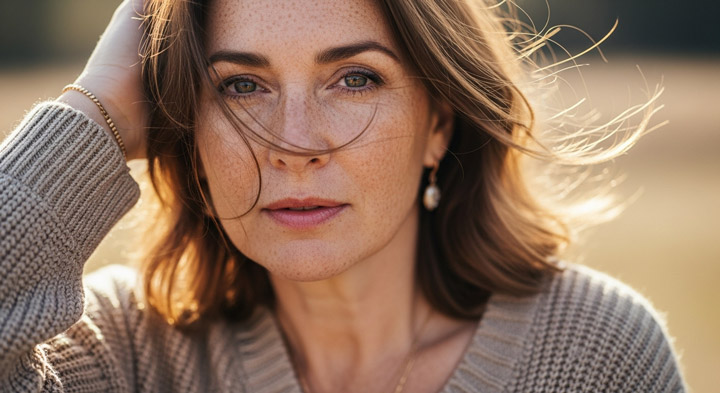
Analysis of Imagen 4 Result: The outcome looks great. Everything matches the prompt perfectly. The overall composition, color, and mood are aesthetic and well-balanced.
Imagen 4 vs Imagen 3: Naturalness and Aesthetic
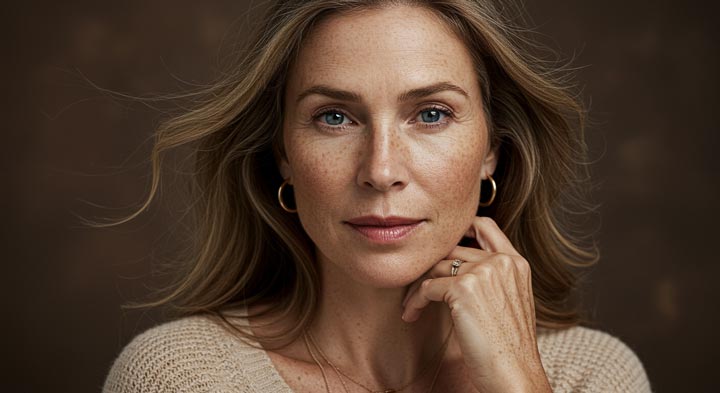
Imagen 3's outcome also looks good and follows the prompt, but Imagen 4 appears more natural and has a better aesthetic quality compared to what Imagen 3 generated.
2. Photorealism (Fur Detail)
The Prompt: A close-up of a sleeping red panda curled up on a tree branch, with individual fur strands visible and soft ambient forest lighting.
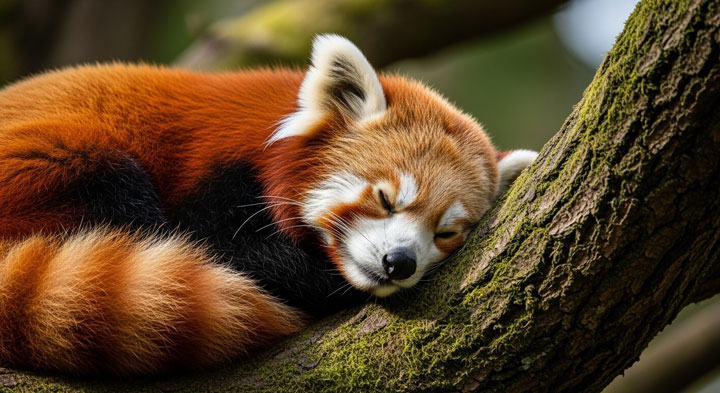
Analysis of Imagen 4 Result: If someone saw this image for the first time, I believe many would assume it came from a paid stock photo website. Everything looks incredibly natural and perfect.
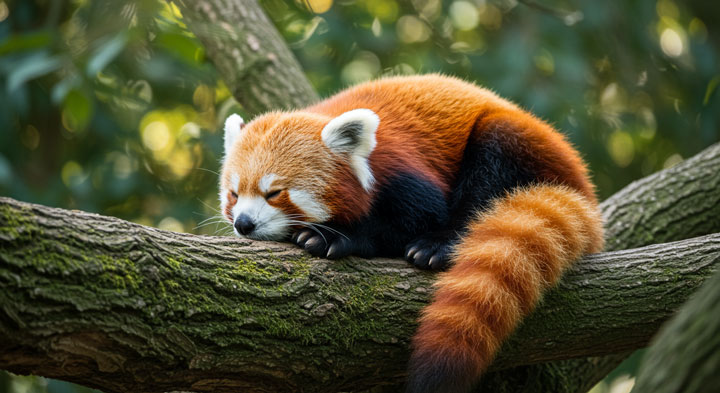
Comparison: Detail and Realism (A Tie)
It feels like a bit of a tie here. Both models produced results with excellent detail and strong realism, looking very much like the work of a professional photographer.
3. Photorealism (Animal and Environment)
It feels like a bit of a tie here. Both models produced results with excellent detail and strong realism, looking very much like the work of a professional photographer.
The Prompt: A cinematic macro shot of a vibrant tree frog perched on a rain-soaked tropical leaf. The frog's glistening green skin, delicate toes, and golden eyes are in sharp focus. Droplets on the leaf reflect abstract jungle light. The scene captures texture, tension, and vivid environmental detail - like a frame from a high-end wildlife documentary.
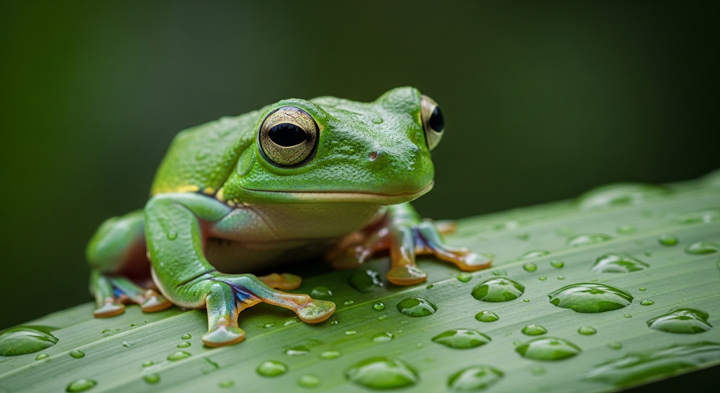
Analysis of Imagen 4 Result: The detail and realism truly amazed me. The frog's own details are incredibly rich and realistic, and the texture of the leaf and the water droplets are also excellent.
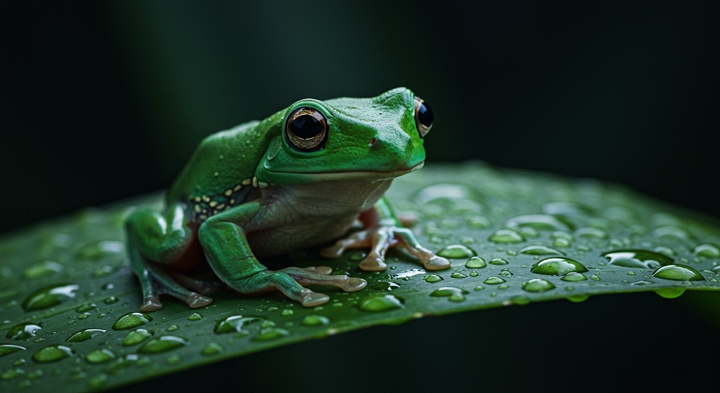
Imagen 4 vs Imagen 3: Color, Detail and Realism
In terms of color, realism, and overall detail, Imagen 3's result is noticeably weaker than Imagen 4's.
4. Photorealism (Landscape)
Imagen 4's official website heavily promotes its capability in generating realistic photographs. So, let's see how it handles pure natural landscapes.
The Prompt: A high-contrast, editorial-style landscape of a red rock desert canyon just before sunset. Sharp sandstone cliffs tower on both sides, carved with wind-eroded textures and ancient striations. A lone cactus stands in the foreground, its needles catching the golden light. Deep shadows and glowing highlights create bold shapes across the terrain. Inspired by National Geographic desert photography and bold natural minimalism.
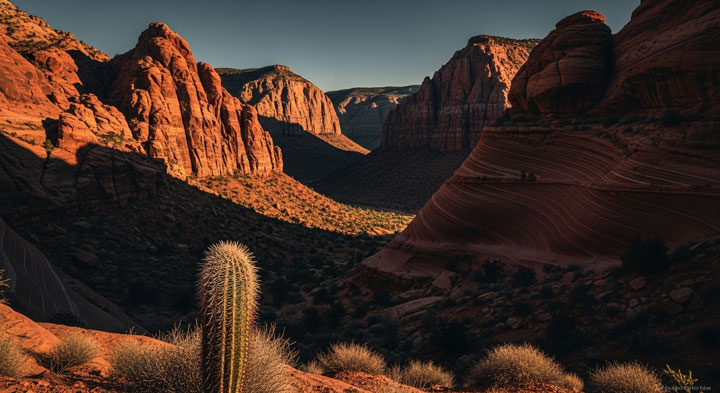
Analysis of Imagen 4 Result: I feel this could easily be used as a wallpaper. It's a great combination of aesthetic quality, light, shadow, and contrast. Everything fits the prompt perfectly. It's truly an impactful masterpiece.
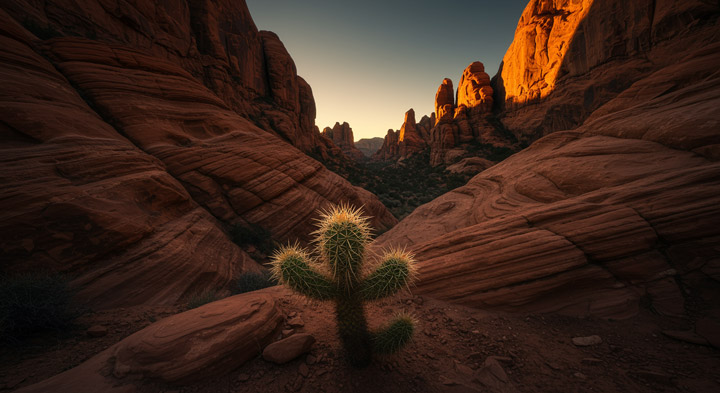
Imagen 3 vs Imagen 4: Improvement in Landscape Realism
Comparing this to the result from Imagen 3 using the same prompt, you can really feel how much Imagen 4 has improved in its capability for generating realistic scenery.
5. Photorealism (Complex Environment)
To test Imagen 4's ability to create highly realistic and detailed landscapes, I used a prompt that combines elements of wind, light, water, motion, and nature, making it suitable for testing the image generator's control over capturing a specific moment.
The Prompt: A windswept coastal cliff at golden hour, waves crashing violently against jagged rocks, sending up plumes of sea spray, while dozens of seabirds circle overhead - the light catching every droplet and feather in crisp, photorealistic clarity.
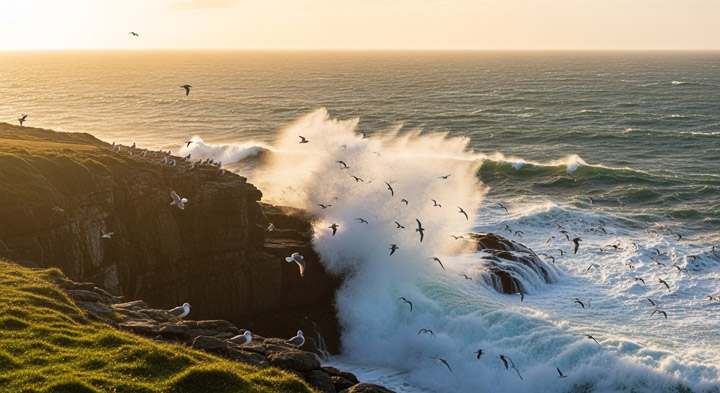
Analysis of Imagen 4 Result: Another amazing job. The entire image not only looks realistic and highly detailed but also conveys a strong sense of artistry.
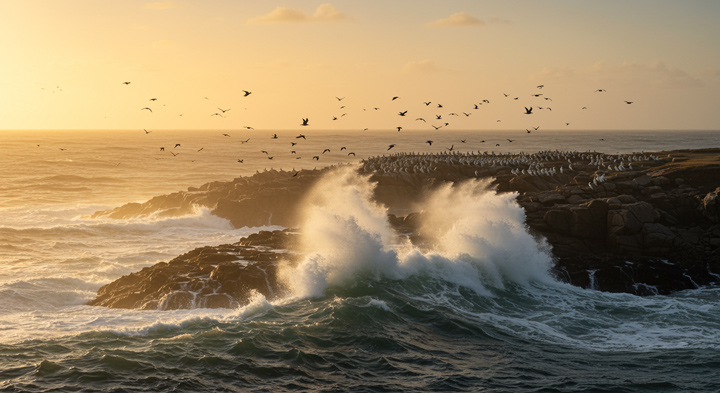
Imagen 4 vs Imagen 3: Handling Complex Scenes
Compared to the result from Imagen 3, which was blurry and whose overall composition didn't quite match the prompt, Imagen 4 is significantly more realistic, fits the prompt better, and includes far more detail.
Part 2. Imagen 4's Text Rendering Accuracy
1. Text Rendering Accuracy (Complex & Legible)
To test Imagen 4's claimed "new level of accuracy" for text rendering, I used a prompt that requires generating multiple words, numbers, and specific styling within a detailed, atmospheric scene.
Prompt: A stunning, highly detailed product photograph of a premium, dark amber glass bottle of craft beer. The main label on the bottle is perfectly legible and clearly reads: 'ECLIPSE BREWERY - Handcrafted IPA - Est. 2023 - 6.5% ABV' in a clean, modern serif font. The bottle stands on a rustic wooden bar, with soft, inviting backlighting."
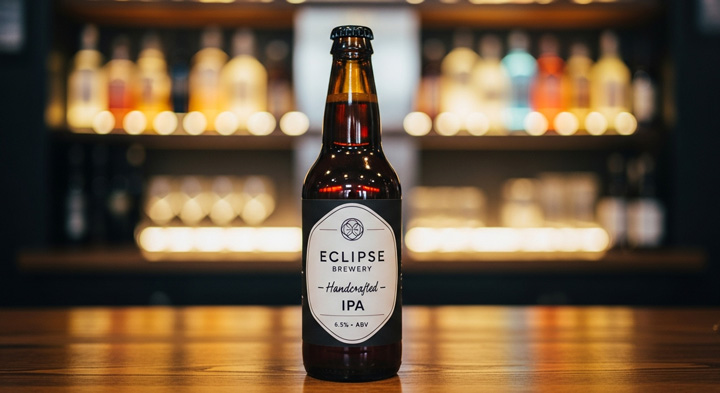
Analysis of Imagen 4 Result: The text generated by Imagen 4 looked as if it had been crafted by a professional designer; it was remarkably natural. What's more, the model seemed to grasp the meaning of the different textual elements quite accurately, resulting in perfectly appropriate placement for each word and number.
Imagen 4 vs Imagen 3: Complex Text Rendering Accuracy
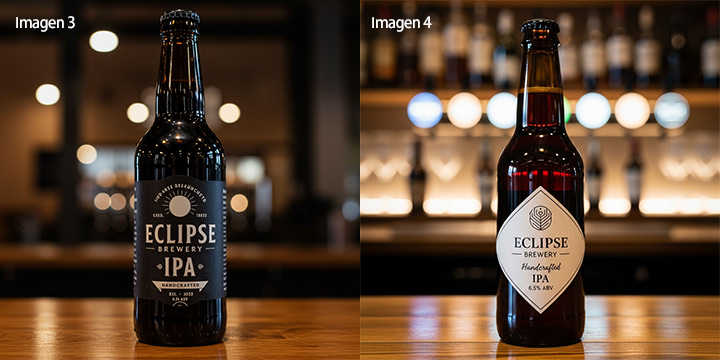
In contrast, Imagen 3's output often featured incorrect or missing spellings for product details. This clearly demonstrates that Imagen 4 indeed offers a significant improvement in text rendering accuracy.
2. Text Rendering Accuracy (Complex & Layout)
Let's now push Imagen 4's text generation capabilities further. We'll be testing its performance with longer text strings and integrating text into stylish layouts.
The Prompt: A comic book cover with dynamic title text: "Galaxy Rangers: The Last Horizon - Issue #27" with clean, readable fonts and balanced layout.
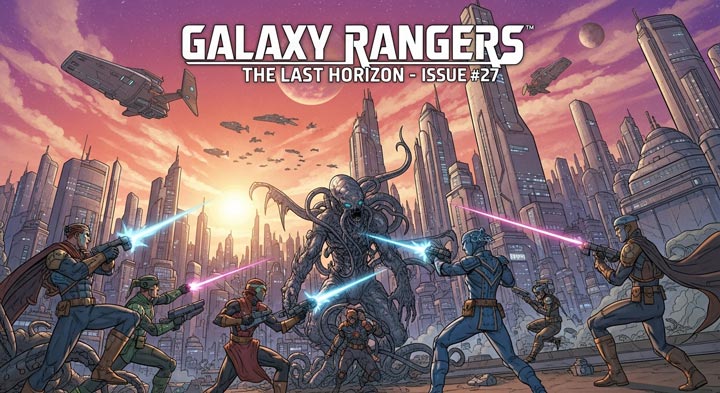
Analysis of Imagen 4 Result: Imagen 4 delivered a convincing comic book cover, and crucially, the title text - "Galaxy Rangers: The Last Horizon - Issue #27" - was rendered accurately and clearly. The overall design felt cohesive, with the text displayed naturally and well-integrated into the layout. It genuinely looks like a plausible comic book title.
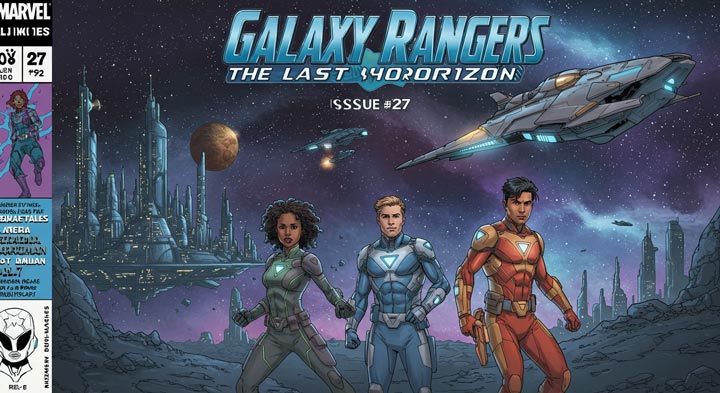
Imagen 4 vs Imagen 3: Fixing Spelling and Layout
Imagen 3 produced numerous misspelled words - a common pitfall for older models, and a clear demonstration of how much Imagen 4 has improved in this specific area.
3. Text Rendering Accuracy (Creative & Fantasy)
The first two prompts focused on realistic scenarios. How about adding some fantasy effects? To explore this, I used the following prompt:
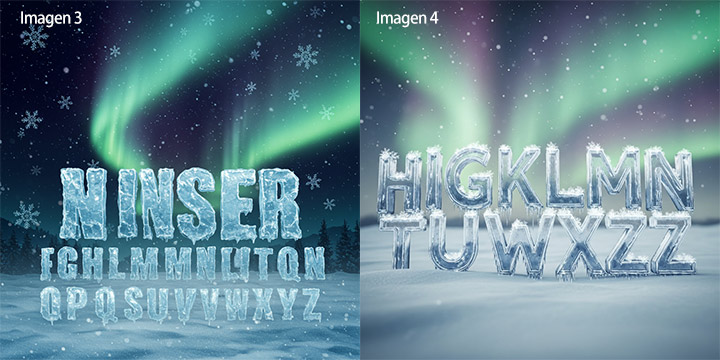
The Prompt: a winter wonderland where every letter is crafted from ice crystals, gleaming with frosty precision. Snowflakes gently drift around the letters, and the frozen words sparkle under the pale light of the moon. A faint aurora borealis glows in the background, casting soft, magical colors that reflect off the icy text
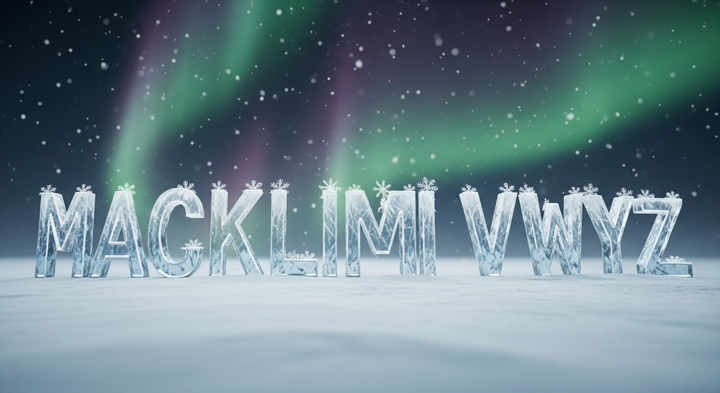
Analysis of Imagen 4 Result: The outcome looks amazing! The text is rendered in a natural and aesthetic way, and the feeling of "the frozen words sparkle under the pale light of the moon" is definitely present.
Imagen 4 vs Imagen 3: Naturalness and Detail in Fantasy Text
Imagen 4's creation looks much more natural. Details like the ice crystals and how the text connects with the background also look better.
Part 3. Imagen 4's Micro-Detail Capabilities
1. Extreme Organic Detail
To test its capability in creating extreme organic detail, I used this prompt:
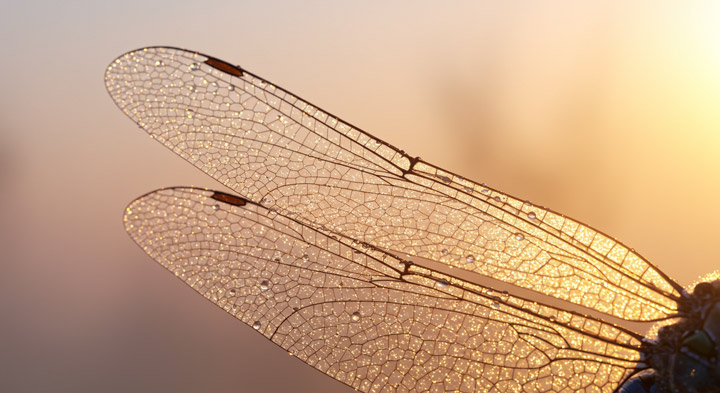
The Prompt: A hyper-realistic close-up of a dragonfly's wings, glistening with dew drops in the soft golden light of a sunrise. The translucent wings are adorned with delicate, crystalline patterns that reflect the warm sunlight, creating a dazzling, kaleidoscopic effect. The texture of the veins in the wings is incredibly sharp and detailed, with an ethereal, dreamlike quality as the background softly fades into a blurred, pastel sky."
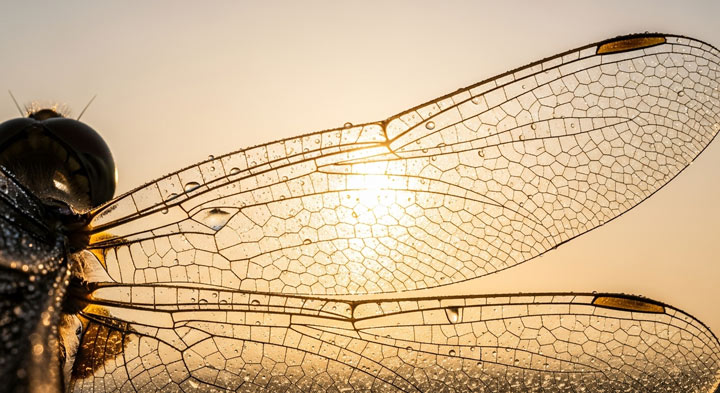
Analysis of Imagen 4 Result: The result feels incredibly impressive. All the details of the dragonfly look very natural and truly detailed. The details around the head's compound eyes and the wings are perfect, almost like a photograph.
Imagen 4 vs Imagen 3: Realism and Detail
Giving the same prompt to Imagen 3, the outcome looks more fake and lacks significant detail. This indicates a big improvement in detail rendering for Imagen 4.
2. Textured Object Detail
Another macro test, specifically targeting the rendering of challenging textures like the creamy, subtle shine on soft serve, was performed using this prompt:
The Prompt: A close-up of a tiny, pastel-colored ice cream cone, topped with a swirl of creamy soft serve in light pink and mint green. The ice cream is dusted with colorful sprinkles, and there's a subtle shine on the soft serve, making it look almost real. The background is a soft gradient of pastel colors, enhancing the overall cute, inviting aesthetic.
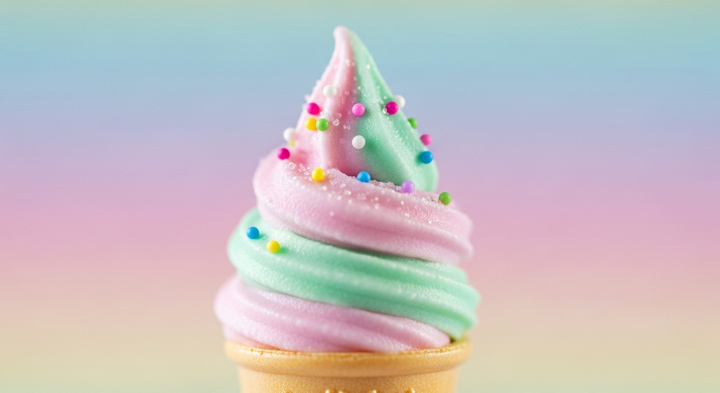
Analysis of Imagen 4 Result: Absolutely amazing look. The details look so real, and the overall color is so pleasant.
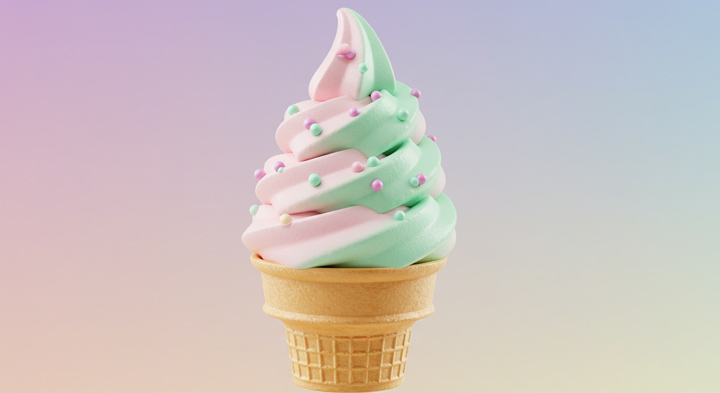
Imagen 4 vs Imagen 3: Detail and Realistic Feel
Obviously, it lacks the detail and the realistic feel provided by the generation from Imagen 4.
3. Vivid Details & Hyperrealism (Animal)
Let's push for peak realism and vivid details in an animal portrait, focusing on challenging aspects.
The Prompt: A close-up of a striking black panther crouching in the moonlit underbrush, its intense yellow eyes staring directly at the viewer, every sleek muscle and glistening black fur strand visible in the pale light, surrounded by the shadows of towering trees
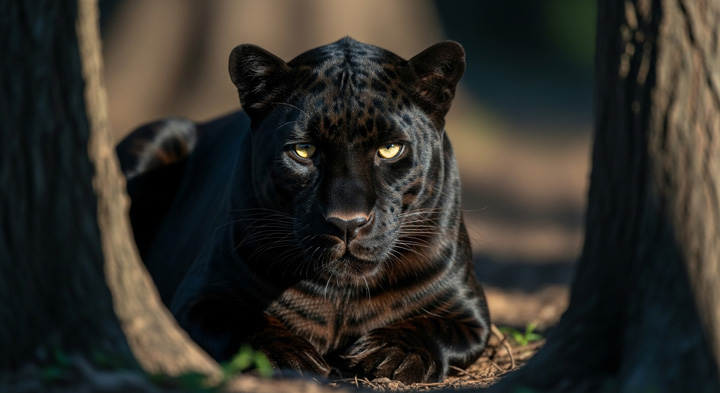
Analysis of Imagen 4 Result: It seems it didn't understand the prompt well. It feels like an animal portrait shot at noon; the light is very bright. But the prompt required it to be shot in moonlit underbrush. Also, the overall composition doesn't really make me feel it's surrounded by the shadowing of towering trees.
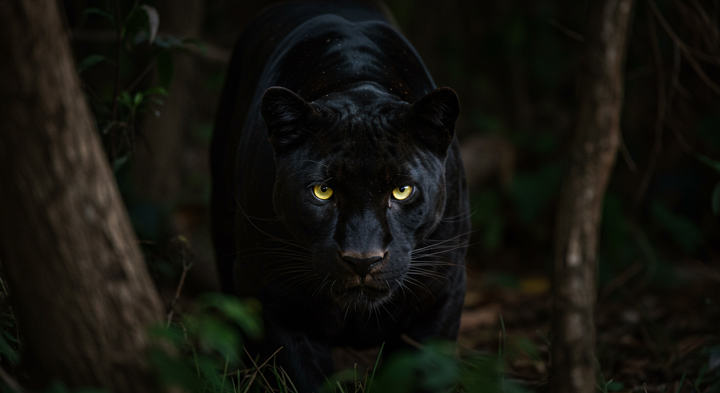
Imagen 4 vs Imagen 3: Prompt Understanding
Clearly, Imagen 3's understanding of the prompt's meaning was better than Imagen 4's in this instance.
Vivid Details & Realism
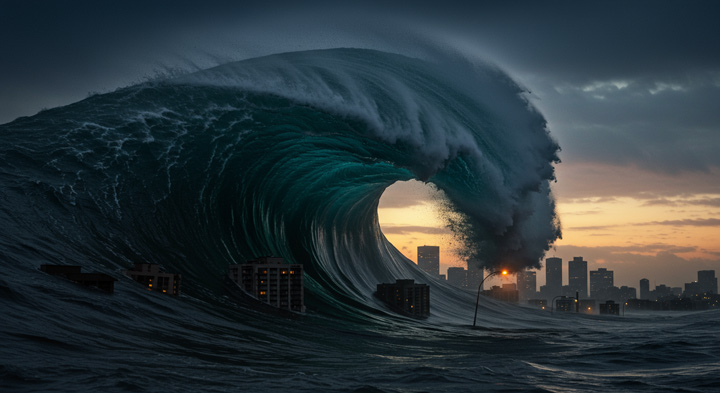
Let's keep testing the Imagen 4's ability to render dynamic, high-energy scenes with extreme realism and vivid details. It introduces urban elements and a tsunami to create an epic sense of disaster beauty, aiming for strong visual impact and detailed complexity.
The prompt: An enormous tidal wave, frozen in time as it curls over a submerged city skyline at dusk, with glimmering windows beneath the waterline and streetlights still glowing faintly - every droplet suspended mid-air, capturing the tension of imminent collapse under a storm-lit sky."
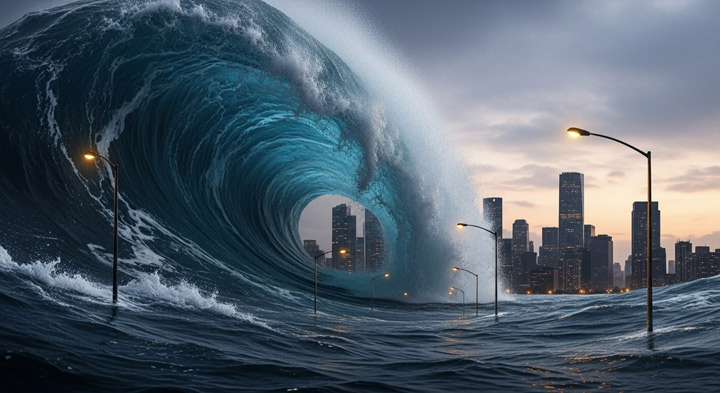
Analysis of Imagen 4 Result: It looks okay and fits what the prompt asked for, but it's not quite "capturing the tension of imminent collapse under a storm-lit sky."
Imagen 4 vs Imagen 3: Handling Complex Scenes and Details
Imagen 4 isn't a clear winner this time. Imagen 3's generation really brings a sense of tension. And some of its details match the prompt's intent better. For example, the streetlights in Imagen 3's generated image truly give a feeling of being unstable or swaying, whereas Imagen 4's are too neat.
Part 4. Imagen 4's Surrealism Tests
1. Surrealism (Vivid Imagination)
How about its capability in surrealism? To explore different styles and surreal themes, I started with this prompt. This aims to test the capability by combining Baroque decay beauty with fantastical imagery to test style blending, narrative sense, and visual tension.
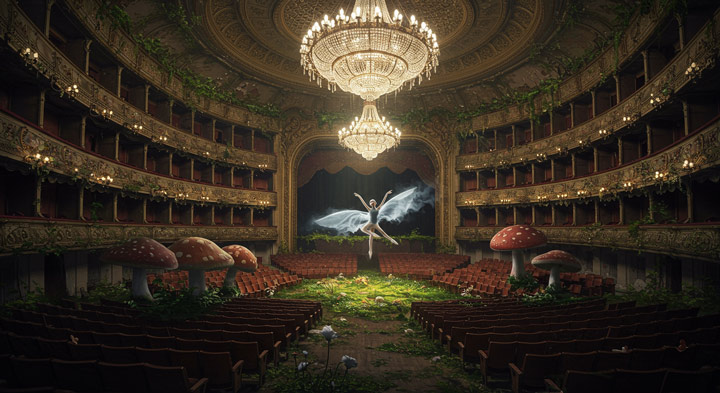
The Prompt: Inside a cavernous abandoned opera house overtaken by nature, where the velvet seats are replaced with giant mushrooms and the chandelier floats midair like a jellyfish, glowing softly. A lone ballerina with wings of smoke pirouettes in the center, dissolving with each movement.
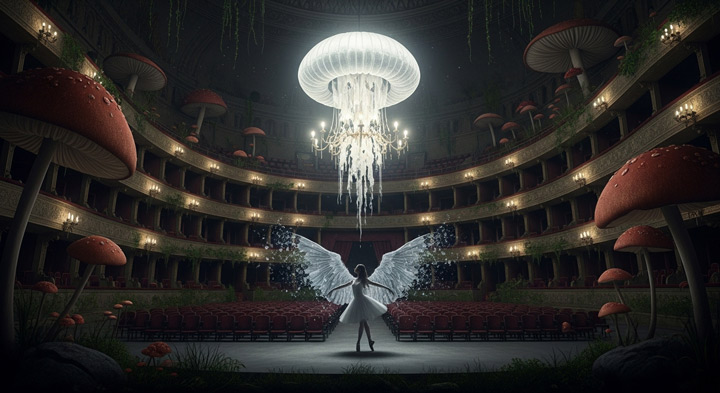
Analysis of Imagen 4 Result: Honestly, this result is better than I expected. It amazingly captures the Baroque decay beauty and fantastical imagery. The sense of eeriness I was looking for was interpreted very well.
Imagen 4 vs Imagen 3: Handling Surreal Concepts and Details
Imagen 4 is a clear winner here. Imagen 3 produced weird, incorrect details and missed many requirements from the prompt, such as the "the chandelier floats midair like a jellyfish".
2. Surrealism (More Dramatic)
To try a more dramatic surreal prompt, I used this:
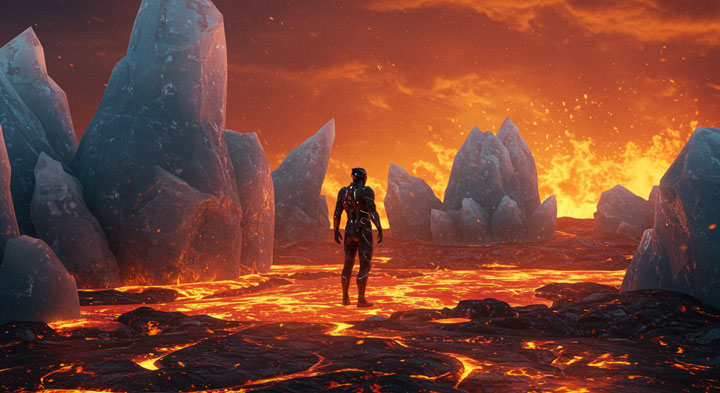
The Prompt: A surreal landscape where jagged ice sculptures rise from a sea of molten lava. The air shimmers with heat, but the icy formations glisten with a cool, reflective sheen. The scene is illuminated by intense, fiery orange contrasts against the cool blues and whites of the ice. A figure in futuristic armor stands at the center, unmoving amidst the chaos, as if balancing between two worlds - burning passion and icy detachment
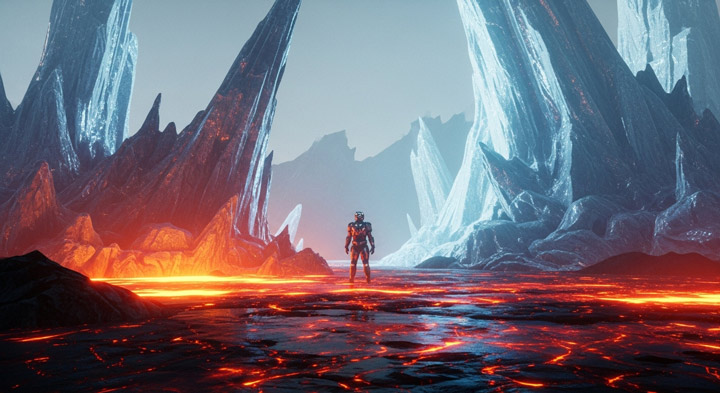
Analysis of Imagen 4 Result: It did another amazing job. Nice details. Impactful color palette.
Imagen 4 vs Imagen 3: Detail, Depth, and Realism in Surrealism
After seeing Imagen 4's generation, which is rich in detail and depth, looking at Imagen 3's result - it feels very 'plasticky' and falls far short compared to Imagen 4!
Part 5. Imagen 4's Art Style & Versatility
1. Art Style
Let's keep testing how well Imagen 4 can replicate distinct artistic styles. I chose a style familiar to countless viewers - the distinctive look of Studio Ghibli animation.
The Prompt: A cat wearing round glasses, reading a book by the window on a rainy day in a Studio Ghibli-style animation frame

Analysis of Imagen 4 Result: Imagen 4 delivered an image that genuinely looks like a frame pulled directly from a Studio Ghibli film.
Imagen 4 vs Imagen 3: Replicating Specific Art Styles
Imagen 3 struggled to replicate the style convincingly. While it attempted the scene, it lacked the specific visual cues - the lighting, the line work, the overall 'feel' - that define the Ghibli aesthetic.

2. Instruction Adherence
To test instruction adherence across various visual elements, I used the prompt below. It balances specific details (like fur strands and moth wings) with broader atmospheric elements (light, snow, ice).
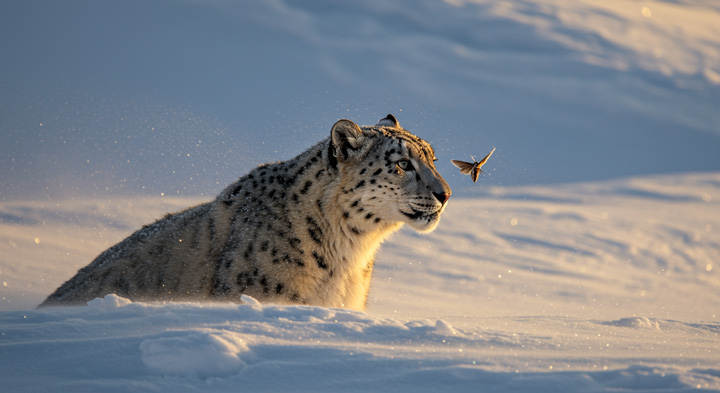
The Prompt: A majestic snow leopard, its fur meticulously rendered to show individual strands, is camouflaged perfectly amidst glistening, wind-swept snow dunes on a pristine mountain peak at late afternoon, with long, dramatic shadows stretching across the landscape and a subtle shimmer of ice crystals in the air.
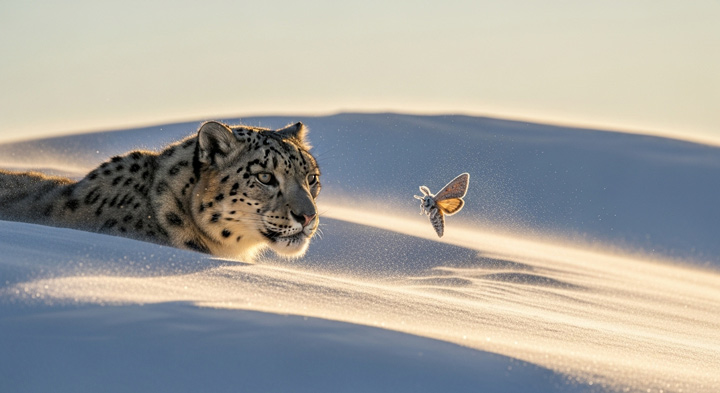
Analysis of Imagen 4 Result: I'm satisfied with this. The overall composition and instruction adherence are really good.
Imagen 4 vs Imagen 3: Instruction Adherence and Naturalness
Both look similar. Imagen 3's looks more natural, but the "A frost-covered moth" isn't depicted perfectly, as the moth isn't covered by frost.
3. Specific Aesthetic Qualities & Mood
To test its ability to capture a specific aesthetic and mood, I used the below prompt.
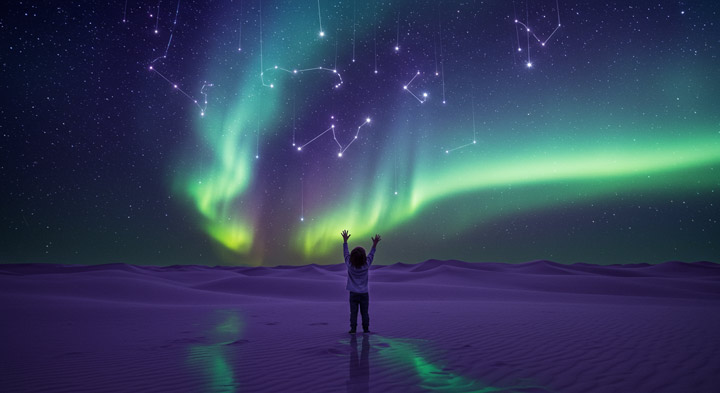
The Prompt: A child reaching up toward a sky where constellations fall like glowing rain, standing in a surreal lavender desert under an aurora-filled sky. Sand reflects the stars as if it were liquid glass. Hyperrealistic with magical lighting and a mood of quiet wonder.
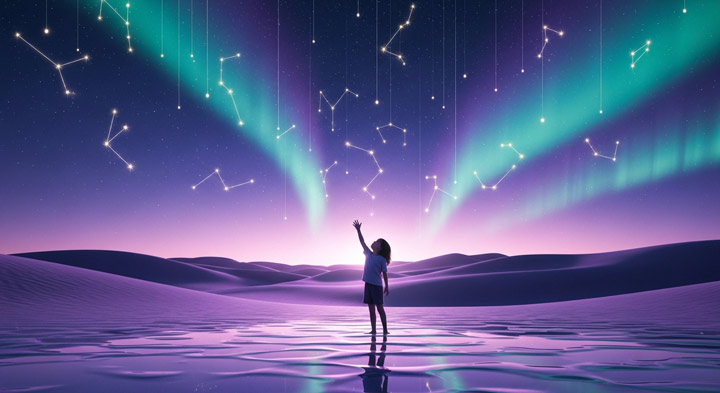
Analysis of Imagen 4 Result: Imagen 4 certainly got the core elements right, without any significant missteps. While it didn't completely blow me away, there was nothing fundamentally wrong with the output either.
Imagen 4 vs Imagen 3: Mood & Aesthetic
Based on these initial tests, Imagen 4 clearly demonstrates considerable strengths, particularly when it comes to rendering intricate details and crafting truly surreal imagery. Consider, for example, the specific instruction for "Sand reflects the stars as if it were liquid glass." This was a crucial detail, and while Imagen 3 completely missed the mark on this, Imagen 4's creation nailed it, perfectly capturing that ethereal quality.
Google Imagen 4's Known Limitations
While Imagen 4 demonstrates impressive capabilities, particularly in detail and text rendering based on the available demos and reports, it's not without its potential weaknesses. Based on Google's own documentation and observations from testing, here are some known limitations:
- Numerical and Reasoning Tasks: Imagen 4 struggles with tasks requiring precise numerical reasoning, such as generating an exact number of objects or understanding complex relationships between parts.
- Complex Compositional and Spatial Reasoning: Prompts involving specific spatial relationships ("the house is the same size as the cat"), complex combinations ("one red hat and a black glass book"), or actions ("a person throws a football") remain challenging.
- Instruction Adherence Inconsistency: As seen in some of the tests (like the black panther prompt), the model can sometimes misinterpret or fail to fully capture specific instructions, especially regarding lighting, mood, or subtle environmental details.
- Abstract Concepts: Capturing abstract concepts like "tension" or specific emotional moods can still be hit or miss, as noted in the tsunami example.
These limitations are common across many advanced AI models today, but they are important to keep in mind when evaluating Imagen 4's performance.
Google Imagen 4: Pros and Cons
Based on the available information, Google's reports, and the practical testing conducted:
Pros:
- Excellent detail rendering, especially in close-ups and textures.
- Significantly improved text rendering and typography accuracy compared to previous models.
- Strong performance in generating surreal and imaginative scenes.
- Reportedly very fast generation speed (up to 10x faster than Imagen 3).
- High ranking on internal benchmarks (GenAI-Bench).
- Capable of accurately replicating distinct art styles.
Cons:
- Can struggle with complex numerical, compositional, and spatial reasoning in prompts.
- Instruction adherence can be inconsistent, sometimes missing subtle details or moods.
- Access is currently limited, making it difficult for the general public to test extensively.
- External benchmark rankings, while high, place it slightly below a few other top models currently.
Target Audience and Potential Applications of Imagen 4
Given its strengths, who is Google Imagen 4 likely best suited for, and how might it be used?
- Graphic Designers and Artists: The improved text rendering and detail capabilities could be invaluable for creating mockups, concept art, or illustrations where specific text or fine details are crucial.
- Marketers and Advertisers: Generating high-quality, photorealistic product shots or visually striking promotional material with accurate text could be a major use case.
- Content Creators: Bloggers, YouTubers, and social media managers could use it to quickly generate unique visuals for their content, especially for topics requiring detailed or imaginative imagery.
- Hobbyists and AI Enthusiasts: Anyone interested in exploring the cutting edge of AI image generation will find its capabilities fascinating, particularly its handling of text and detail.
- Potential applications range from generating realistic product images and marketing visuals to creating unique artwork, illustrations, and even assets for games or virtual environments, provided the limitations are understood.
How to Use Google Image 4 for Free (via Whisk)
You can now access Google Imagen 4 for free via Whisk. Here's how:
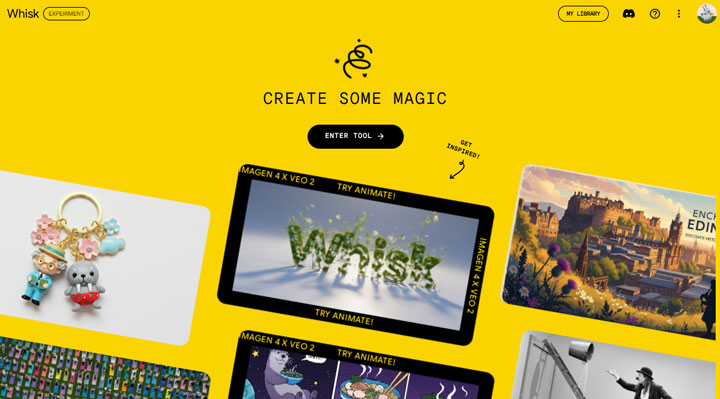
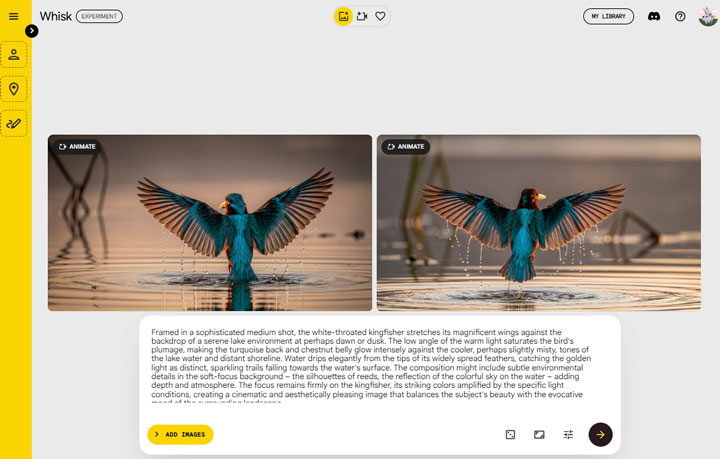
Step 1. Open Whisk in your browser.
Open https://labs.google/fx/tools/whisk on your browser. Hit Enter and then log in with your Google Account. After that, hit Enter Tool to enter Whisk.
Step 2. Describe your image and generate.
Describe what you need to generate. Choose the aspect ratio icon and choose the target aspect ratio: 1x1, 16x9, or 9:16. Click the right arrow icon to start generating Google Image with Whisk for free.
 Tips:
Tips:
While Google Imagen 4 is incredibly capable, its output resolution caps at 2K. But what if your project demands something far grander – say, 8K or even 10K? This is precisely where a dedicated AI-driven image upscaling tool becomes vital. VideoProc Converter AI, for instance, allows you to bulk upscale images, pushing them to a stunning 10K clarity.
Free download and install VideoProc to enhance your Imagen 4 creations to 8K/10K!



