
 VideoProc Converter AI
 New AI features are available




 Listed in
 Dealing with videos that don't look their best? If you're exploring options like Aiseesoft Video Enhancer, this review dives into whether it can truly help.
In today's world, creating and sharing videos is a huge part of how we communicate, whether for fun, work, or telling stories. But let's be honest, not every video we shoot looks amazing right off the bat. Lighting can be off, old footage looks grainy, or maybe you just have a lower-resolution clip you wish looked sharper on a bigger screen. This is where AI video enhancement software comes into play. Aiseesoft Video Enhancer is one tool that pops up when you look for ways to give your videos a facelift. It promises to take your ordinary or even poor-quality videos and make them look better.
In this review, we'll take a close look at what Aiseesoft Video Enhancer offers, how it performs, can it really elevate your video quality, what it costs, and whether it's the right fit for your needs.

What Is Aiseesoft Video Enhancer: Key Features
Aiseesoft Video Enhancer is a desktop program that lets you quickly and easily improve the quality of your videos. It includes a range of AI-powered features, such as video and image generation, video and photo colorization, and AI age filters. In addition, it offers a comprehensive suite of media processing tools, including video format conversion and other practical utilities for managing and enhancing your media. Here’re some of its highlight features:
Upscale Resolution: Convert videos from low resolution up to 720p, 1080p, 4K, or even 8K.
Enhance Video Quality with Different Models: Face Model for refining facial features, Anime Model for clearer anime videos, Colorize Model for turning black-and-white videos into color, Denoise Mode for reducing grainy footage, and more.
Frame Interpolation: Transform choppy, low-frame-rate footage from 30fps or 60fps into silky 120fps for smooth, cinematic motion without visible artifacts.
Creative AI Effects: Add advanced effects with AI tools, including text-to-video, image-to-video, AI video effects, AI age filters, AI photo cutouts, background removal, image upscaling, and more.
Basic Editing Features: Rotate, clip, crop, trim, and add watermarks to your videos with ease.
Video Format Conversion: Convert videos to formats compatible with popular devices for seamless playback.
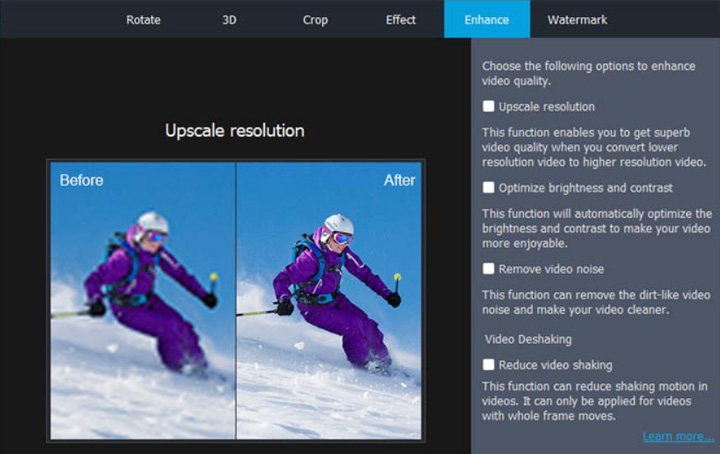
Aiseesoft Video Enhancer Quick Facts
Official site |
www.aiseesoft.com/video-enhancer/ |
Rating |
|
System Requirements |
Windows 11/10/8.1/7; macOS 10.7 or later |
Supported Input Formats |
MP4, TS, MKV, AVI, FLV, WebM, MOV, MXF |
Core Features |
AI driven: Upscale video resolution, enhance video quality, enhance photos, text/image to video generation, etc. Multiple media processing: convert, quick edit, data recovery, etc. |
Best Alternative |


How's Aiseesoft Video Enhancer Performance in Practice
To clarify its capabilities, I tested Aiseesoft Video Enhancer with different video clips, focusing primarily on its video enhancement featurs.
A quick summary after testing: Aiseesoft Video Enhancer’s ability to improve video quality is somewhat limited. Most enhanced videos show little noticeable improvement. In some cases, such as deblurring low-light footage, the software does make the video clearer, but often at the cost of losing fine details.
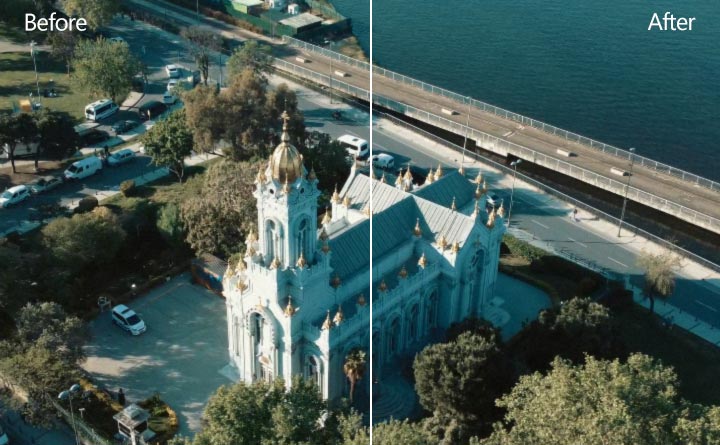
Test 1. Enhance a Low-Quality Grainy Footage
Model used: Video Denoise; Output resolution: 2x upscale, 4K.
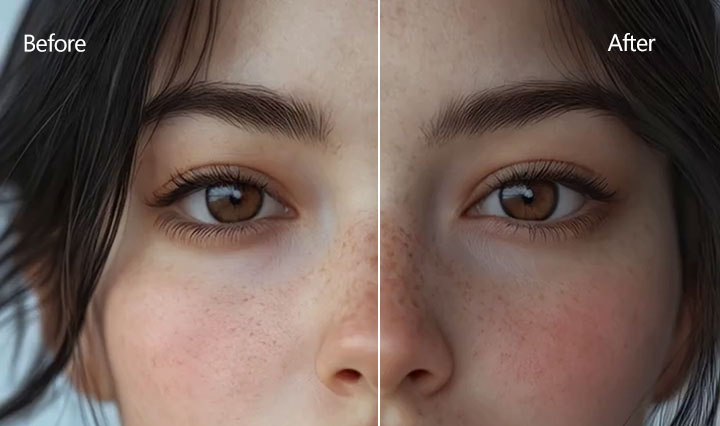
Test 2. Restore a 320p Old Footage
Model used: Face; Output resolution: 2x upscale, 640p.
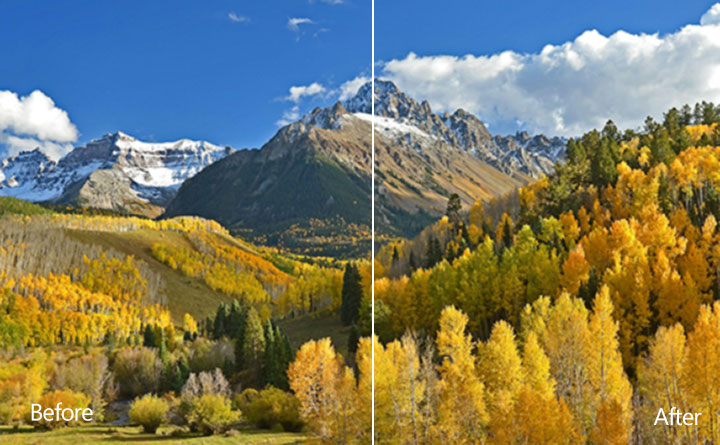
Test 3. Deblur a Low-Light Footage
Model used: General Enhancement; Output resolution: 2x upscale
Test 4. Enhance an Blurry Old Anime
Model used: Anime; Output resolution: 2x upscale

Test 5. Colorize a Black/White Landscape Footage
Model used: Colorize

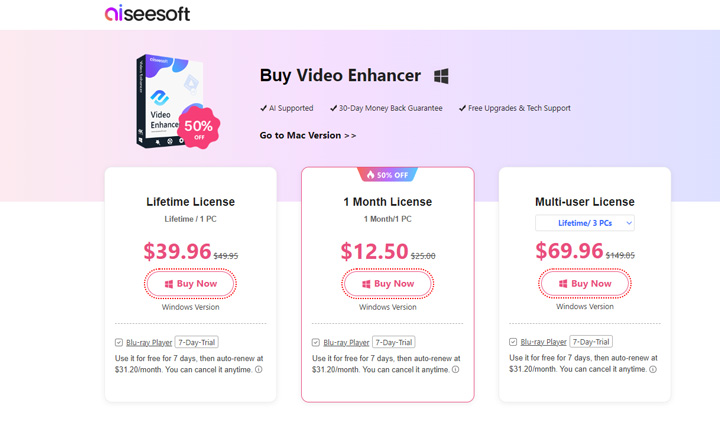
Is Aiseesoft Video Enhancer Free
Aiseesoft Video Enhancer is not availble for free. It’s fere trail version onlay allows you to use You the AI feature in preview mode and limite to preview the first 3 seconds of video. To export full videos or get full results beyond the preview, you must purchase a plan. You can check the pricing details on the official Aiseesoft purchase page.
1-Month License: $14.95 (VIP - 0 credits) | $19.95 (AI Ultra - 0 credits)
Lifetime license: $49.96 (VIP - 300 credits) | $79.92 (AI Ultra - 500 credits)
Is Aiseesoft Video Upscaling User-Friendly
Yes. Its interface is well-designed and organized, with everything reasonably placed under easy-to-navigate categories, making it simple to find exactly what you need. The AI models are clearly labeled, each accompanied by a short preview video that demonstrates its function and features. Once a video is imported and a model is selected, the preview window allows users to see the effect in real time, offering both single-view and side-by-side comparison modes. In addition, it supports bulk processing, saving a lot of time when enhancing multiple files.
Pros and Cons of Aiseesoft Video Enhancer
Things I Like
- It works on both Windows and Mac.
- It supports many output video formats.
Things I Don't Like
- Upscaling resolution can result in noticeable picture quality loss.
- Does not support AI-driven stabilization.
- Enhancing some footage may also lead to quality degradation.
- Offers many features, but most are not very refined.
Try the Best Alternative to Aiseesoft Video Enhancer
While Aiseesoft Video Enhancer offers a range of AI-based tools, its improvements in video quality may be subtle for some users. For those looking for a more user-friendly AI video enhancer that delivers noticeable enhancements with the latest AI technology at an attractive price, VideoProc Converter AI is a strong option. It provides a lifetime license for just $54.95.
Why Is VideoProc the Best Aiseesoft Video Enhancer Alternative
- Upscale video by up to 400% to reach 4K resolution with significantly improved details.
- Fix noise, blur, pixelation, and other imperfections without introducing artifacts.
- AI-driven frame interpolation and stabilization to further elevate your videos.
- Extra AI capabilities like face restoration and coloration for images, noise removal, etc.
- A one-stop media solution: convert, compress, edit, record, and download media.

VideoProc Convert AI vs Aiseesoft Video Enhancer (with Test Results)
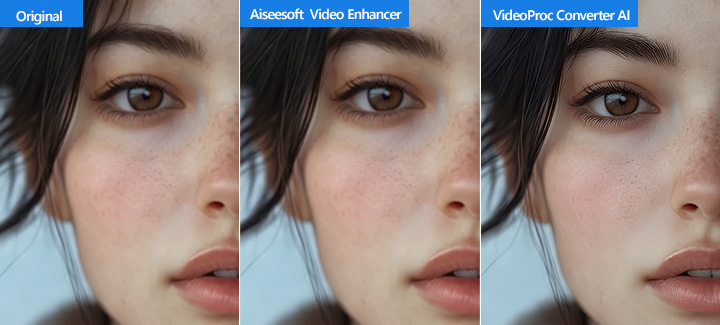
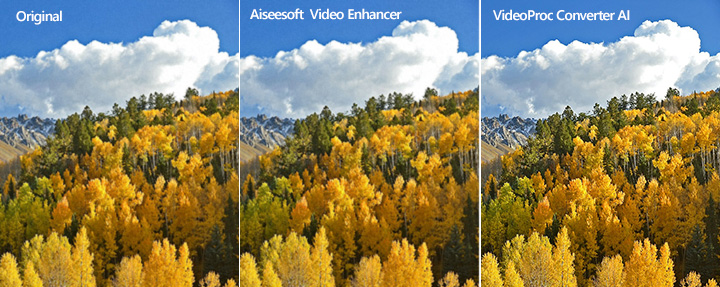
Let's test VideoProc Converter AI with the same three videos, and then compare its results to those from Aiseesoft Video Enhancer.
Test 1 Comparison
Test 2 Comparison
Test 3 Comparison
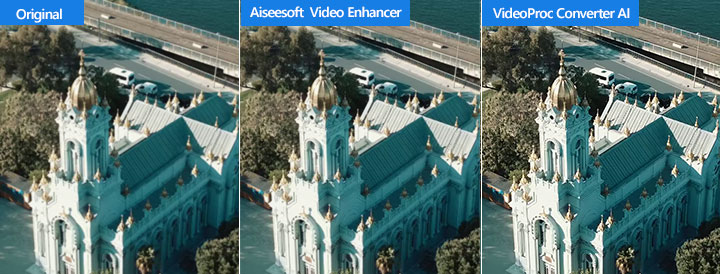
Comparing the enhancement of the same videos revealed VideoProc Converter AI's significant advantage in enhancing picture quality and preserving intricate details far more effectively than Aiseesoft.
Final Thoughts – Is Aiseesoft Video Enhancer Worth It
Unfortunately, based on our testing, Aiseesoft Video Enhancer is not a worthwhile investment. It suffers from fundamental limitations. Basic features expected in a modern tool, like batch processing, real-time preview, and support for common aspect ratios (such as 9:16 vertical video), are simply missing. But the most significant issue lies in its core promise: actual quality improvement. Its AI algorithm is outdated. Upscaling videos to 4K, for instance, often appears to merely 'blow up' existing pixels rather than genuinely adding detail or clarity. It simply fails to deliver true picture quality enhancement in practice.
Given Aiseesoft's significant drawbacks, we cannot recommend it. If you're looking for a tool capable of a significant improvement in video quality, VideoProc Converter AI is the best alternative to consider. It supports batch processing, offers a crucial real-time preview, and provides the flexibility needed for various aspect ratios. More importantly, it leverages advanced AI technology to deliver genuine quality enhancement. And despite these superior capabilities, VideoProc Converter AI is significantly more affordable, available for a lifetime license at just $54.95.
Ready for the best alternative to Aiseesoft Video Enhancer? Download and install VideoProc Converter AI free.



