
We all know the frustration: you download a show from a streaming service, only to find the file expires, plays only in the app, or can't be moved to a USB or media server. That's where StreamFab Video Downloader comes in. It lets you save movies and TV shows from major platforms for offline viewing. The All-In-One bundle costs $299, which makes a lot of people pause and wonder: is it safe, does it actually work as promised, and is it worth the steep price? In this post, I conducted a thorough, hands-on review of StreamFab. I tested its features, performance, and usability in detail, so you can decide whether it is the right video downloader for you.
What Is StreamFab Video Downloader
StreamFab Video Downloader, developed under the DVDFab brand, is a desktop video downloader that allows users to download movies and TV series from major streaming platforms, such as Netflix, Amazon Prime Video, Disney+, and Hulu, for offline viewing and long-term access. It works through a built-in browser. When a video is played inside StreamFab, it detects the stream and saves it locally as an MP4 or MKV file, enabling playback without the original streaming app or an internet connection.
StreamFab Video Downloader Quick Facts
Official site |
|
Rating |
|
System Requirements |
Windows 10 64-bit and later; macOS 10.13 and later; Ubuntu 64-bit. |
Supported Websites |
Neflix, Amazon, HBO Max, Hulu, Peacock, YouTube, Instagram, and more. |
Core Features |
Download videos and audio from streaming services. |
Price |
$99 for individual downloaders (e.g., Netflix Downloader); |
Notable Limitations |
|
Best Alternative |
👍 VideoProc Converter AI, which can download videos, music, and subtitles from 1,000+ popular sites and 2,000+ niche sites. It also includes video and image enhancement, conversion, compression, subtitle downloads, screen recording, and more. |
 by
by  Limited selection of video codecs
StreamFab Video Downloader Features
StreamFab packs a lot of functionality into its interface. It tries to cover every base for the serious media hoarder. Here is a breakdown of what you get under the hood.
High-Quality Downloads
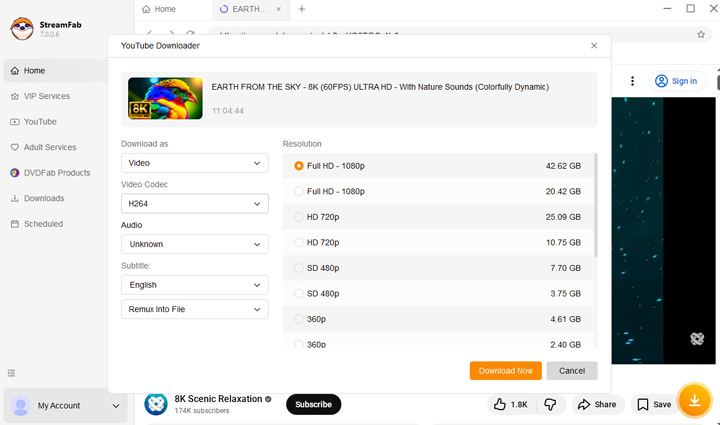
StreamFab can download videos in 1080p for most streaming services and up to 4K or 8K for supported platforms such as Netflix and YouTube. It can detect and gives all downloadable options, in different video codecs (VP9, AV1, and H.264).
Surround Sound Support
The software preserves multi-channel audio, including EAC3 5.1 tracks, ensuring the audio experience remains consistent in offline playback. For some video source, You can also choose from different audio codecs. You can also download audio only clips as M4A or MP3file,
Batch Downloading
Multiple videos or entire seasons can be added to the download queue and processed automatically. Users can configure StreamFab Video Downloader to download video files sequentially or concurrently.
Auto-Download for New Episodes
Users can subscribe to a series, and StreamFab will automatically add new episodes to the download queue when they become available.
Extensive Platform Support
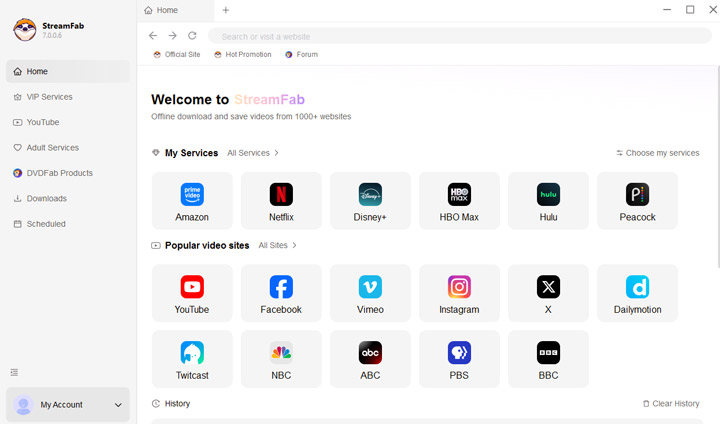
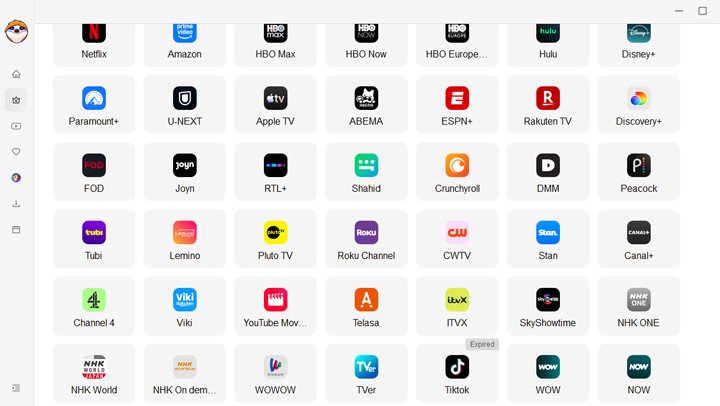
StreamFab supports a wide range of streaming services, including Netflix, Amazon Prime Video, Disney+, U-NEXT, Paravi, Crunchyroll, Peacock, and Paramount+.
Ads Removal
Most streaming services plays ads. StreamFab Video Downloader can remove ads from downloaded videos, regardless of your streaming subscription type.
Let's Test It Out: Performance Under Scrutiny
The features of StreamFab Video Downloader look good on paper, but how does it perform in real-world use? Here is what I found during testing.
1. Ease of Navigation
The interface is straightforward. Popular streaming sites and video platforms are displayed clearly, so browsing for content is simple. Other features, such as the URL analyzer and scheduled downloads, are well-organized, making it easy to figure out how everything works without following a tutorial.
2. Supported Downloads File Types
Audio: You can download music in MP3 or M4A format, or extract audio from video links.
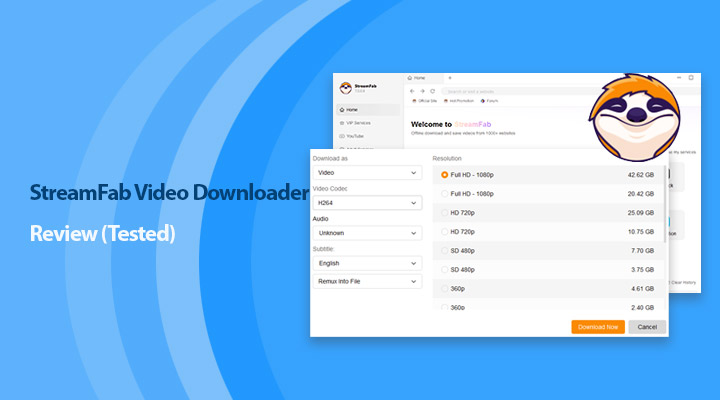
Video: StreamFab offers MKV and MP4 formats. Depending on the platform, it supports codecs such as AV1, H.265, H.264, and VP9. You can select different resolutions, bitrates, and audio codecs.
Subtitles: StreamFab allows you to either remux subtitles into the video or extract them as separate files.
3. Bulk Download
StreamFab supports bulk downloads in two ways:
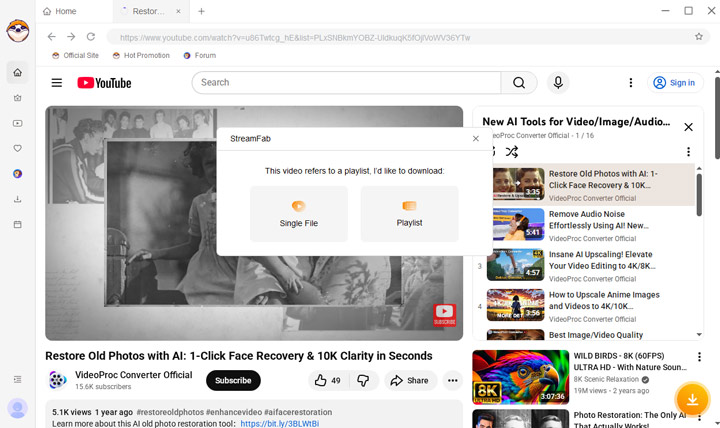
Playlist download: Browse a playlist and click the download button. You can select which videos to include, but all selected videos share the same output settings. Individual video settings cannot be customized.
Multiple URL input: Paste multiple links into the Downloads section and download them simultaneously. You can set preferred download format, size, and audio, but individual video adjustments are not available.
4. 8K Support
While StreamFab advertises 8K downloads, in practice most content is capped at 4K. The 4K option is only available when using the AV1 codec, which is not widely compatible. Selecting H.264 or VP9 typically limits downloads to 1080p. Some H.265 options are available depending on the streaming site.
5. Supported Sites
In my tests, StreamFab Video Downloader successfully downloaded content from paid streaming services including Hulu, Netflix, and Amazon Prime. After logging into your account, the software analyzes the link and provides options for format, codec, resolution, and subtitles.
6. Mac vs. Windows Stability
The performance of StreamFab Video Downloader on Windows is generally stable. Mac users, especially with M1, M2, or M3 chips, report more frequent crashes. Batch downloads can be resource-heavy, and memory leaks sometimes cause the program to close unexpectedly during long sessions.
7. Stability and DRM Updates
Streaming services frequently update their DRM systems (like Widevine) to block downloaders. When Netflix or other platforms update their code, StreamFab may temporarily stop downloading in high resolution, forcing downloads to lower quality such as 540p. Developers usually release patches, but fixes can take anywhere from three days to three weeks.
Note:
During my tests, the analysis phase occasionally took several minutes or hung indefinitely. Clicking the download icon sometimes caused the program to freeze, requiring a restart to proceed. Overall, Windows users will generally have a smoother experience, while Mac users may encounter more crashes, especially on M1, M2, or M3 machines.
Download Speed
While marketing claims fast streaming video downloads, actual performance depends on DRM decryption and processing. Downloading itself is usually quick, but analysis and remuxing stages add time. In my tests, a 2-hour movie took about 3 minutes to analyze and 23 minutes to download.
Does StreamFab Video Downloader Support Free Trial
A free trial of StreamFab is available, but it's extremely limited. You can download only 3 videos per service. It's enough to check that the software works, but not enough to actually use it for building an offline media library.
StreamFab Video Downloader Pricing Plan
StreamFab offers several pricing options depending on which features you need:
Individual Modules
You can purchase single downloaders, such as the Netflix Downloader or Amazon Downloader, typically around $99 for a lifetime license. This is straightforward if you only need one service.
MyCombo (Lifetime)
Starting at $159.99, this option lets you pick at least two StreamFab products to suit your needs. It's more flexible than buying single modules, but the price can add up quickly if you want more.
All-In-One Bundle
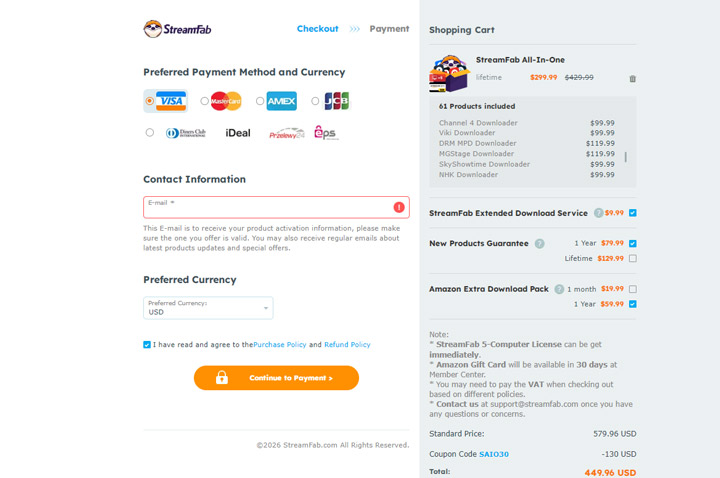
This bundle includes all StreamFab products (about 61 in total) for a lifetime license, usually priced at $299. There are also optional add-ons:
- New Products Guarantee ($129.99): Gives you access to future StreamFab products.
- Amazon Extra Download Pack ($59.99): Increases your daily download limit to 200 videos.
- Extended Download Service ($9.99): Lets you re-download any past official release without time limits. Without it, you can only re-download for a limited period after purchase.
Altogether, the pricing feels quite steep, especially if you start adding optional features. It's something to consider carefully before committing.
Is StreamFab Worth the Investment
If you download content frequently, the cost per download can feel reasonable over time. However, there is a real risk to consider. A "lifetime" license applies to the lifetime of the product, not to your lifetime as a user. Software products can be discontinued, rebranded, or replaced. If StreamFab were to stop development and release a separate "StreamFab 2" as a new product, your original purchase would not necessarily carry over.
Whether it is worth the investment depends heavily on how often you use it and how comfortable you are with these uncertainties.
Pros
- Videos are usually saved at the same quality as the original stream, not as screen recordings.
- Browsing streaming platforms directly inside the app makes finding content straightforward.
- Supports downloads from platforms like Netflix, Amazon Prime Video, Hulu, and others.
- Subtitles can be muxed into the video file or saved separately as SRT files.
- Files are saved in MP4 or MKV, which work on most devices and media players.
Cons
- StreamFab is one of the more expensive tools in this category.
- There will be periods when high-resolution downloads are unavailable.
- Streaming platforms prohibit downloading. While bans are rare, aggressive downloading could potentially trigger account warnings.
- Bulk downloads share the same settings, with little room for per-file customization.
StreamFab Video Downloader User Feedback
StreamFab Video Downloader generally receives positive reviews on sites like G2 and TrustPilot. Many users praise it as a capable tool for downloading streaming content, offering a wide range of options for different services. It's appreciated for its ability to download in high quality and for its straightforward interface, making it easy for users to save content for offline use.
However, user frustration tends to rise during outages, and the common thread in many reviews is the software's instability after updates. One recurring issue noted is poor customer support and delays in fixing bugs.
-
"Had an issue with Paramount Plus subtitles since August 29, 2025. I submitted a ticket and nothing was done. All I get are canned responses. When it works, it works great. But right now, it's just not working." - user from TrustPilot
"I tried using it with Netflix, but got blocked. It's been hit and miss for me, and I ended up requesting a refund." - user from AVForum
While the software can be a powerful tool when it's running smoothly, the lack of timely support and occasional DRM blockages leave some users frustrated.
Try the Best Alternative to StreamFab Video Downloader
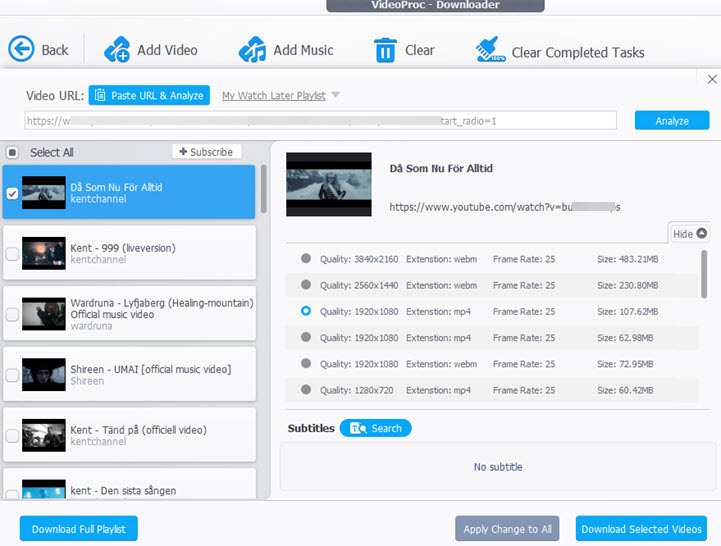
If StreamFab Video Downloader feels too expensive, or if you mainly download videos from UGC and niche sites like YouTube or Vimeo, VideoProc Converter AI is a practical alternative. At $39.95 per year or $65.95 for a lifetime license, it's much more affordable and supports downloading videos from over 1,000 popular UGC sites and 2,000+ niche platforms. In real use, it reliably detects all available download options for a given link, including 4K and 1080p resolutions, MP4 output, and different codecs, frame rates, and audio tracks, making it easy to get the exact quality you want.
Bulk downloading is another strong point, allowing you to download multiple videos or entire playlists from one or multiple URLs while setting properties for each video individually. For streaming services like Netflix and Hulu, it relies on a built-in 4K screen recorder rather than direct DRM downloads, which may have limitations but is generally more stable and avoids the frequent download failures seen with direct downloaders.
Why VideoProc Your Best Alternative to StreamFab Video Downloader
- Download videos from 1,000+ UGC sites and 2,000+ niche sites, incl. YouTube and Dailymotion.
- Supports bulk downloads from URLs and playlists, with more flexible per-video output settings.
- Built-in 4K screen recorder to record DRM protected videos in the top-notch picture quality.
- Upscales low-resolution videos to 4K quality while fixing imperfections like noises and graininess.
- All-in-one: conversion, compression, editing, subtitle extracting, audio extraction, and more.

Comparison Table: StreamFab vs. VideoProc Converter AI
| Feature | StreamFab Video Downloader | VideoProc Converter AI |
|---|---|---|
Pricing |
Expensive ($250+ for full access) |
Affordable ($39.9/year or 65.95/lifetime) |
Supported Sites |
Major streaming services like Netflix and Hulu; limited UGC support |
YouTube, Vimeo, Dailymotion, plus 1,000+ UGC sites and 2,000+ niche sites |
Stability |
Medium (affected by DRM updates) |
Very high |
4K Output Support |
Yes (original stream quality) |
Yes (original stream quality + AI upscaling) |
Bulk Downloading |
Yes (limited customization) |
Yes (per-video control over format, resolution, codec, and more) |
Account Safety |
Moderate risk with heavy usage |
Very safe |
Extra Tools |
Download-focused only |
AI upscaling, format conversion, compression, editing, screen recording, and more |
System Resource Usage |
High (CPU-intensive decryption) |
Low to moderate (GPU acceleration supported) |
Long-Term Reliability |
Unpredictable |
Consistent |
Conclusion
StreamFab Video Downloader is a capable tool, but it comes with clear trade-offs. It offers direct downloads, native quality files, and convenient batch processing, which can be appealing for users who rely heavily on offline access. However, its high price, frequent DRM-related breakages, and inconsistent stability make it far from a worry-free solution. Based on my testing, downtime is not an occasional edge case but something you should realistically expect.
FAQ
1. Is StreamFab legal?
In most jurisdictions, downloading copyrighted content is against the terms of service of streaming platforms. While keeping a personal backup (fair use) is a legal gray area in some countries, distributing or sharing those files is strictly illegal. Always use the software for personal viewing only.
2. Is StreamFab safe to use?
Yes, the official software is free of malware and viruses. It is a legitimate product from a known company. However, be cautious of "cracked" versions found on third-party sites, as these often contain malware.
3. Why is StreamFab stuck on analyzing?
This usually happens when the streaming service (like Hulu or Amazon) has updated its DRM encryption. StreamFab cannot interpret the new video URL structure. You typically have to wait for the developers to release a patch update.
4. Does the StreamFab crack work?
We strongly advise against using cracks. Aside from the high risk of infecting your PC with ransomware, cracked versions of StreamFab rarely work. Since the software relies on server-side communication to decrypt the latest DRM, an offline cracked version will fail to download new content almost immediately.



