
 New AI features are available
Key Takeaway: Topaz Video AI vs. Video Enhance AI: Topaz Video AI is the stronger option. If you already own a perpetual license, it still works well and requires no ongoing payments.
However, since both are discontinued, the real question today is whether the subscription-based Topaz Video is worth the ongoing cost and required hardware upgrades, or whether you would be better off with a lighter alternative with a perpetual license and ongoing updates.
If you searched for "Topaz Video AI vs Video Enhance AI," you probably expect a choice between these two tools. That is not the case.
Topaz Video Enhance AI and Topaz Video AI come from the same company, Topaz Labs. They are successive versions of the same product line, not rival software. So, actually, you are looking at an older generation next to the one that replaced it. The software you can buy and update in 2026 is the newer subscription product named Topaz Video.
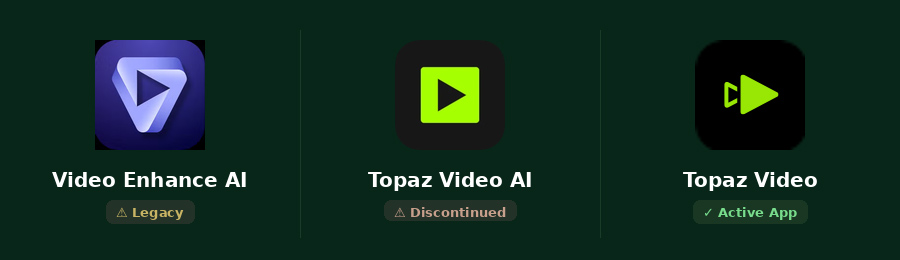
This distinction matters. Many still own a perpetual license for Topaz Video AI. Others are new buyers trying to decide if the current subscription is worth the cost. The rest of this article will help you sort out which situation applies to you.
Who Should Care About Which Version
For the literal comparison in the question, the answer is straightforward:
Choose Topaz Video AI over Video Enhance AI unless you have specific requirements to maintain the old environment. Topaz Video AI represents a full-generation architectural advance rather than a minor rename. If you own the perpetual Topaz Video AI 7.1.5 and the current results meet your needs, you can continue using Topaz Video AI.
If you regularly need the latest models (such as newer Starlight, Astra, or Hyperion variants), want the current plugin support for After Effects, Resolve, Final Cut Pro or Nuke, or need future operating-system and hardware compatibility, you might consider subscribing to the new version.
For new users and casual creators today, however, the more practical question is: is the subscription-based Topaz Video worth the ongoing cost and the hardware upgrades required?
If image quality is your top priority and you plan to process video often, the subscription becomes easier to justify. Otherwise, if the cost or hardware demands of the Topaz line feel too high for your needs, other tools can still improve your video.
VideoProc Converter AI - A Lighter Topaz Video Alternative
- 16+ AI models for different video, image, audio enhancement tasks
- Beginner-friendly, Lifetime License, and Continuous updates
- Lower requirements: support NVIDIA, AMD, Intel GPUs, and Apple Silicon
- All-in-one: AI tools, quick editor, converter, compressor, DVD ripping, etc.

Product Lineage Timeline
Topaz's product naming has always been quite confusing. Understanding the product lineage helps you make sense of the names you see. Here's a quick visual summary:
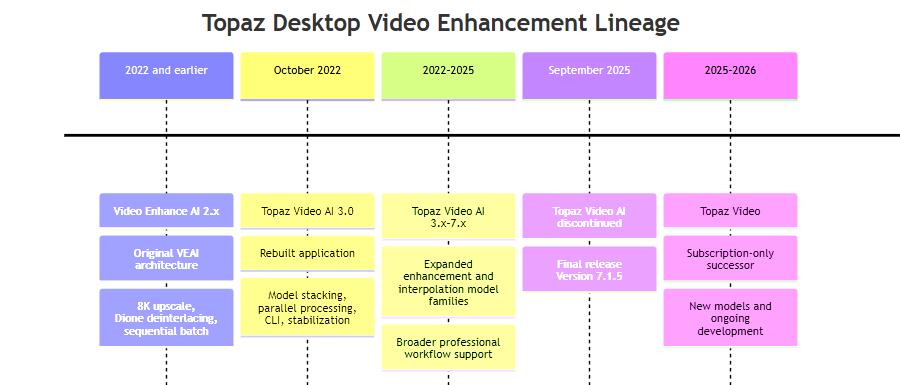
Topaz Video Enhance AI (2.x) was the original product in 2022 and earlier. It corresponds primarily to the 2.x generation.
In October 2022, Topaz rebuilt the entire application and rebranded Video Enhance AI as Topaz Video AI (3.x – 7.1.5). In September 2025, the company discontinued it and described Topaz Video AI 7.1.5 as a discontinued legacy application with no future model updates.
Topaz now sells a third-generation product, confusingly named simply Topaz Video, without "AI," under a subscription model.
Key Differences Between Topaz Video AI and Video Enhance AI
The jump from Video Enhance AI to Topaz Video AI was more than a name change. Topaz rebuilt the core of the program. Here is a quick comparison table. We'll then see what that meant in practice.
Attribute |
Video Enhance AI 2.x |
Topaz Video AI 3.x–7.1.5 |
|---|---|---|
Processing style |
Queue processed sequentially |
Parallel tasks + model stacking |
Model variety |
Smaller, more general |
Large specialized catalog |
Interpolation models |
Basic |
Mature set (Apollo, Chronos, Aion) |
Stabilization |
Not a central capability |
Built-in |
Normal max resolution |
8K |
About 16K (codec-dependent) |
Command-line tools |
Not available |
Full CLI + FFmpeg support |
Format support |
Solid but limited |
Broader (ProRes, FFV1, DPX, EXR) |
#1. Core Enhancement Capabilities
Video Enhance AI used a smaller group of more general models. Topaz Video AI offered a much larger catalog. You can choose the right tool for the exact issues in your clip.
Furthermore, Topaz Video AI lets you stack different AI models and filters in a single pass. This change alone made complex restoration work much more practical. It also added parallel processing, so you can run multiple tasks at the same time.
#2. Quality & Real-World Performance Differences: How the Results Actually Look
To compare the two programs under identical conditions, I tested the same clip on the same computer.
The source video lasts 7.034 seconds and measures 810×1440 pixels. The test system is a Windows PC with an AMD Radeon RX 6700 XT graphics card (12 GB of VRAM), an AMD Ryzen 5 5600X processor running at a base clock of about 3.7 GHz, and 64 GB of system memory. Both applications were set to perform a 2× upscale using the Proteus model, producing an H.264 output of 1620×2880 pixels. Here are the key data points:
Spec |
Topaz Video AI |
Topaz Video Enhance AI |
|---|---|---|
Model Used |
Proteus |
Proteus |
Time Taken (s) |
43 |
92 |
Avg. Processing FPS |
4.91 |
2.29 |
Max GPU Utilization |
99% |
99% |
Peak VRAM Usage |
4440 MB |
2078 MB |
Output File Bitrate |
10.9 Mb/s |
13.1 Mb/s |
Total Frame Count |
211 |
211 |
These figures show that the newer Topaz Video AI processed the footage roughly twice as fast while drawing more graphics memory. As for the actual results, Topaz Video AI is superior in terms of micro-detail and edge definition.
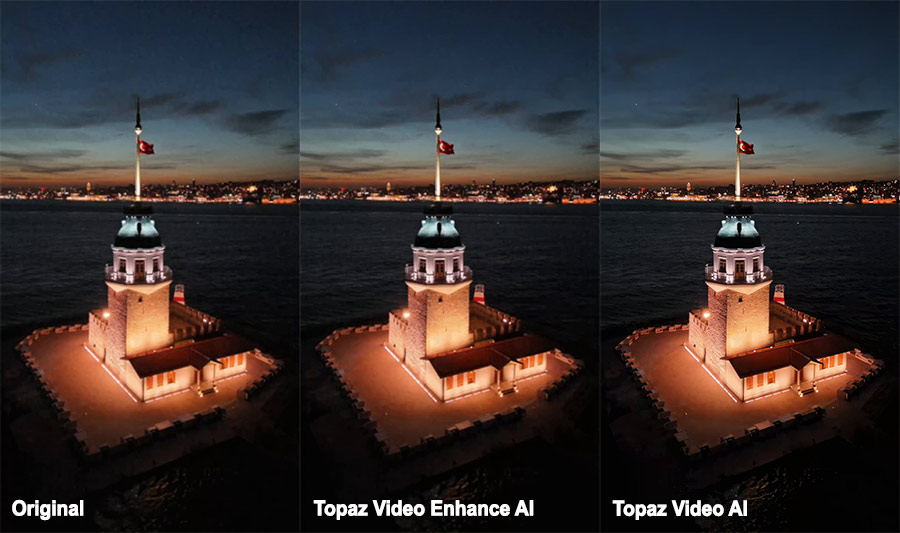
Video Enhance AI does a solid recovery of structural detail on the tower, lantern, and flag, with effective noise suppression in dark regions. However, it trails the Video AI version slightly in the finest textural detail. If you examine the high-frequency details of the primary subject, such as stone textures, architectural edges, and flags, you'll notice that Topaz Video AI achieves better yet well-controlled noise reduction in these areas.
#3. Frame Interpolation
Later versions of Video Enhance AI offered basic frame-rate conversion.
Topaz Video AI developed a full set of interpolation models, including Apollo, Chronos, Aion, and their Fast versions. These models handle different kinds of motion and speed needs with more control and better results.
Chronos is a general-purpose interpolation model. Designed around exact 2×/4×/8× frame count multiples, Apollo targets nonlinear motion and slightly blurry inputs. Aion is described as more precise than Apollo and Chronos but more computationally intensive.
#4. Input, Output, Codecs, and Resolution
Video Enhance AI normally topped out at 8K for standard video. Its preserved official compatibility list is comparatively compact: video inputs include AVI, DV, FLV, M1V, MKV, MOV, MP4, MPG/MPEG, MXF, TS, VOB, WebM and WMV, plus JPEG, PNG and TIFF still images or image sequences.
Topaz Video AI raised the practical ceiling to around 16K, though the exact limit also depends on the output codec. It also supports a wider range of professional formats, including more ProRes options, AV1, DPX, and EXR (with some bit-depth limits on EXR).
#5. Plugins and Host Integration
Video Enhance AI had no real command-line tools in its main versions. Topaz Video AI added a full command-line interface. You can also use its filters inside FFmpeg. These options make it far easier to build automated pipelines for repeated work.
The current 2026 Topaz Video product goes further and officially documents plugins for Adobe After Effects, DaVinci Resolve Studio, Final Cut Pro, and Nuke.
System Requirements
Hardware needs grew with each generation of the software.
Video Enhance AI ran on relatively modest machines for its time. It needed a DirectX 12-compatible GPU from NVIDIA or AMD, plus a CPU from roughly 2015 or later on Intel or 2016 or later on AMD. On Mac, it could work with 8 GB of RAM and as little as 2 GB of VRAM. CPU-only mode was possible on older macOS versions.
Topaz Video AI raised the requirements a bit. The Mac minimum moved to 16 GB of RAM. A dedicated GPU with at least 4 GB of VRAM became the practical baseline on both Windows and Mac.
The current Topaz Video sits higher still. Topaz recommends 32 GB of RAM and 8 GB or more of VRAM for comfortable work. Modern NVIDIA RTX 30-series or newer cards, recent AMD cards, or strong Intel Arc GPUs perform best. Some of the newest models, especially certain Starlight variants, can ask for 10 GB to 20 GB of VRAM if you want to run them locally.
Licensing and Pricing: Is Topaz Worth the Money?
Video Enhance AI belonged to Topaz's older purchase model. It is no longer sold or updated.
Topaz Video AI followed the same perpetual-license approach. If you bought it, you own the specific version tied to your license. You can keep using it as long as you like with the models it already contains. Topaz does not require you to switch, but it no longer offers new models or major features. The software authenticates every six months (requiring an internet connection).
Current Topaz Video is subscription-only. A common Personal plan sits around $299 per year when paid upfront, with monthly options also available. When the subscription ends, access to the software ends. All new models and ongoing development go into this version. Read our Topaz Video review here.
A Practical Alternative to Topaz
VideoProc Converter AI is a practical Topaz Video alternative. It integrates AI video enhancement capabilities with other everyday media tasks. Its main AI video tools include:
- Super Resolution for upscaling videos while denoising, deblurring, and adding details
- Frame Interpolation to create smoother motion and higher frame rates
- Stabilization to reduce camera shake
It also offers AI tools for images (upscaling, face restoration, colorization) and audio (noise reduction and vocal separation).
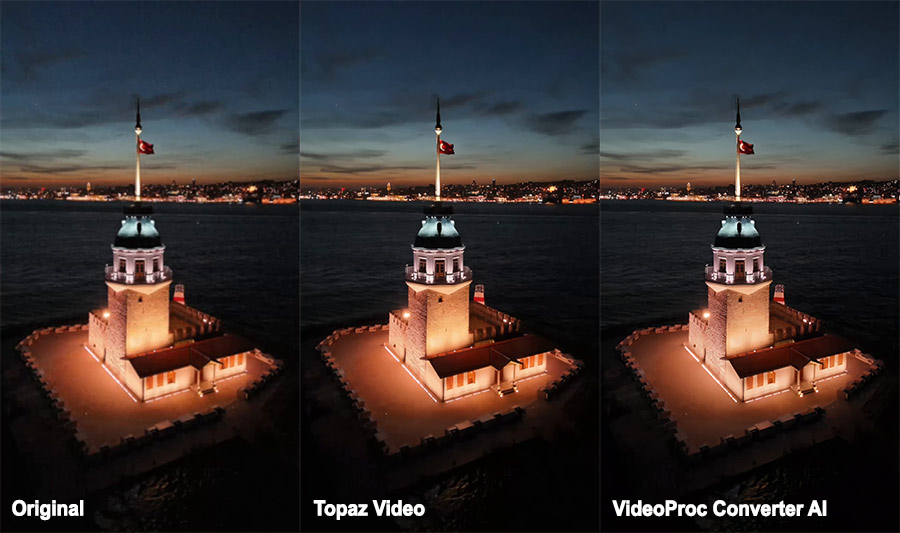
Beyond AI enhancement, VideoProc Converter AI handles everyday media tasks that Topaz does not cover. You can convert formats, compress files, cut and merge clips, record your screen, and download online video. This makes it a convenient daily toolkit rather than a specialized restoration tool only.
VideoProc Converter AI - A Lighter Topaz Video Alternative
- 16+ AI models for different video, image, audio enhancement tasks
- Beginner-friendly, Lifetime License, and Continuous updates
- Lower requirements: support NVIDIA, AMD, Intel GPUs, and Apple Silicon
- All-in-one: AI tools, quick editor, converter, compressor, DVD ripping, etc.
VideoProc Converter AI may not match the deepest restoration quality or the most advanced model control of current Topaz Video on difficult archival footage. However, if you mainly need solid upscaling, smoother motion, stabilization, and a full set of conversion and editing tools without high hardware costs or a subscription, it is a strong and cost-effective alternative. Many casual creators and users with mid-range computers find it meets their needs well.
Final Verdict
Between the two products in the title, Topaz Video AI vs. Video Enhance AI, Topaz Video AI is the stronger option. If you already own a perpetual license, the software still works well for these tasks and requires no ongoing payments. Accept that it will not receive new models or future system updates.
But today, the more useful question is whether your existing perpetual license still meets your needs or whether the current subscription product better fits your budget, hardware, and workload.
If you enhance video only occasionally or work on a mid-range computer, consider a lighter Topaz Video alternative like VideoProc Converter AI. The lower cost and lighter system requirements can make more sense for casual or mixed-use workflows.