
 New AI features are available
Topaz Video includes several AI models that create new frames between the ones you already have. This lets you raise the frame rate for smoother playback or slow the action down without the usual choppy look. Among these frame interpolation models, Apollo vs. Chronos is the most common comparison. Which one do you pick?
In this guide, you'll get a clear side-by-side look at both models. You will learn how each one works, when one outperforms the other, and simple rules that help you decide quickly. By the end, you should know exactly which model to try first on your own clips.
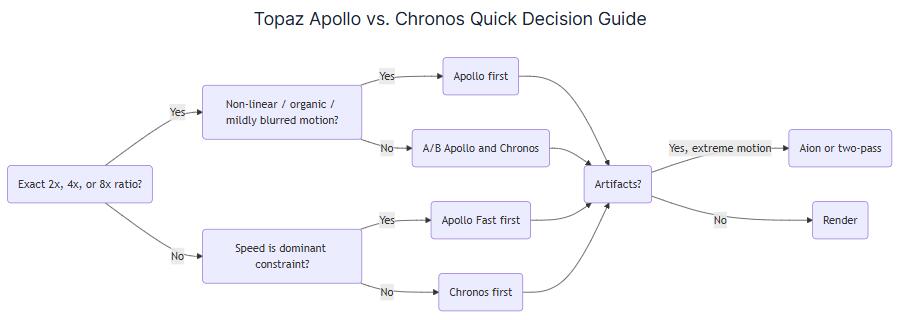
What Apollo and Chronos Actually Are
Apollo is the more specialized model. Topaz built it to handle non-linear motion and slightly blurry footage well. Think of handheld shots, people moving in unpredictable ways, or action that does not travel in a straight line.
When processing, Apollo generates eight intermediate frames at a time, then builds your final frame rate from those. That design works especially well when you want an exact 2x, 4x, or 8x increase. For example, turning 30 fps into 60 fps or slowing a clip down by 4x often plays to Apollo's strengths.
Chronos, in contrast, is the general-purpose option. Topaz describes it as suitable for everyday frame-rate conversion and moderate slow motion (around 4x or less). It does not lock itself into the same rigid eight-frame structure. That flexibility makes it a safer starting point for ratios that do not divide evenly.
Fast Variants Are Materially Different
Apollo Fast is normally faster than Apollo, but the quality can drop when there is a lot of fast or complex motion. It is specifically recommended when speed matters more or when the frame-rate change is not a clean double.
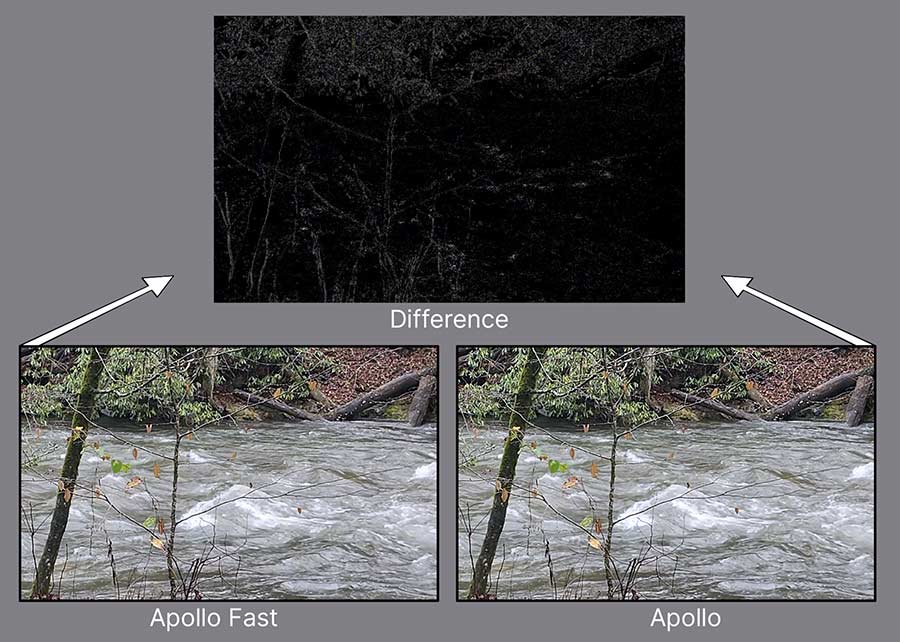
Chronos Fast focuses on fast motion with larger changes between frames. It can finish faster, but sometimes adds a thin field- or scanline-like texture in detailed areas. Check those areas carefully before you commit to a long render.
Consumer-Tier and Prosumer-Tier Real-World Performance
For real-world performance, we found the following benchmark results from the Topaz community, based on a 1920×1080 input and the "4X Slowmo" setting. "Nominal ms/frame" is simply 1000 / reported FPS.
Hardware |
Apollo |
Chronos |
Apollo nominal time |
Chronos nominal time |
|---|---|---|---|---|
RTX 3060 Ti, i7-12700K |
17.58 fps |
9.09 fps |
~57 ms |
~110 ms |
RX 7800 XT, Ryzen 9 9900X |
21.55 fps |
10.15 fps |
~46 ms |
~99 ms |
RTX 4070 Ti Super, Ryzen 5800X3D |
23.70 fps |
17.20 fps |
~42 ms |
~58 ms |
RTX 3090, Threadripper 3970X |
31.94 fps |
18.71 fps |
~31 ms |
~53 ms |
RTX 4090, Ryzen 9800X3D |
46.29 fps |
34.43 fps |
~22 ms |
~29 ms |
RTX 4090, i7-14700K |
41.68 fps |
32.39 fps |
~24 ms |
~31 ms |
Apollo often finishes 1.3x to more than 2x faster in these tests. Exact numbers change with your GPU, driver, and Topaz version, but the pattern stays consistent. At 4K resolution, the gap still favors Apollo, yet both slow down a lot.
Apollo vs Chronos at a Glance
Feature |
Apollo |
Chronos |
|---|---|---|
Primary role |
Specialized nonlinear-motion interpolation |
General-purpose FPS or slow-motion interpolation |
Best motion type |
Non-linear, organic, or slightly blurry movement, e.g. handheld, action, people moving unpredictably |
More linear or controlled movement, e.g.tripod, gimbal, steady camera |
Preferred ratios |
Exact 2x, 4x, or 8x multiples |
Flexible ratios, including odd ones like 2.5x or 3x |
Relative speed |
Usually faster on matching 2x, 4x, or 8x jobs |
Slower than Apollo on those same jobs; speed scales with how many frames it creates |
Quality on complex motion |
Stronger on irregular movement and articulated subjects (limbs, hair, water) |
Solid all-around, but can struggle more with fine repeating patterns |
Sharpness |
Specifically retrained/improved for sharper moving frames |
More neutral/general treatment |
Resource / GPU load |
Medium |
Low to medium |
Pros |
|
|
Cons |
|
|
Recommended scenarios |
Clean slow motion at 2x/4x/8x, handheld footage, sports with irregular action |
Everyday frame-rate conversion, 24→60 fps, 30→90 fps, locked-off shots |
Here are a few quick takeaways from the table:
Start with Apollo if:
- You want exact 2x, 4x, or 8x slow motion
- Your footage is handheld, action-cam, or has natural, irregular movement
- You are converting clean doubles like 24→48, 25→50, or 30→60 fps
- The motion includes people, limbs, hair, or water that does not travel in a straight line
Start with Chronos if:
- Your target frame rate is not an exact double (for example 24→60 or 30→90)
- The camera is locked off, on a gimbal, or the motion is mostly steady and linear
- You need everyday frame-rate conversion more than dramatic slow motion
- You care more about even timing than peak speed on a clean multiple
A popular community trick is to run Apollo first for a clean 2x step, then use Chronos for the remaining smaller change. This gives Apollo the exact multiple it likes and leaves Chronos a smaller gap to fill. It does not always win, so treat it as a useful experiment rather than a rule.
Beyond Apollo and Chronos: Aion
Apollo and Chronos cover most everyday needs. But when you need something stronger, Aion is Topaz's higher-end frame interpolation model. It aims for better accuracy on difficult motion and supports extreme slow motion up to 16x. Topaz describes it as more precise than Apollo or Chronos, especially on complex, fast-moving, or high-resolution footage.
The trade-off is clear. Aion uses more system resources and takes longer to render. So, if Apollo or Chronos still show warping, judder, or lost detail on your hardest shots, try Aion. It can properly handle footage with large, complex motion. It works best when you are working on a hero shot where the extra render time is worth it.
A Lighter Topaz Video Alternative
Both Apollo and Chronos models use the same Topaz Video license, priced at $299/year, $39/month with annual commitment, or $59/month on the month-to-month option. Even based on an overall positive review, I wouldn't say the price is low. It is not the only tool that can raise frame rate or create slow motion. If you are looking for a lighter alternative, VideoProc Converter AI is another option many people consider.
VideoProc Converter AI is an all-in-one desktop tool. It combines format conversion, basic editing, upscaling, and frame interpolation in one package. You can boost frame rates from 2x to 5x and also create slow motion from ordinary footage.

VideoProc Converter AI - A Lighter Topaz Video Alternative
- Increase the frame rate to 2x, 3x, 4x, 5x the original
- Create 2–5x slow-motion videos with a single click
- "Skip scene changes" option to avoid artifacts
- Lifetime License, NVIDIA, AMD, Intel GPUs, CPUs, Apple Silicon
- All-in-one: AI tools, quick editor, converter, compressor, DVD ripping, etc.

The two programs target distinctly different user bases. Topaz focuses more deeply on AI models and gives you finer control over interpolation choices like Apollo and Chronos. VideoProc Converter AI provides a more beginner-friendly solution suitable for everyday frame-rate boosts or light slow motion, while still delivering excellent results.
Wrapping Up
Choosing between Apollo and Chronos comes down to two simple questions: What kind of motion is in your footage, and what frame-rate numbers do you need?
Apollo is usually the better first choice when you want clean 2x, 4x, or 8x slow motion and the movement feels natural or a bit messy. It handles organic motion well, runs faster on those exact multiples, and often produces cleaner results for handheld, sports, or action clips.
Chronos is the more flexible option. Use it when the target frame rate does not divide evenly (like 24→60 or 30→90) or when you want steadier timing on controlled, linear motion. It may take longer on clean multiples, but it adapts better to awkward ratios.
If you want a lower-cost or all-in-one alternative, VideoProc Converter AI is worth a look. It offers frame interpolation along with conversion, upscaling, and basic editing in one simpler package. While Topaz still leads on the hardest motion and finest detail, VideoProc Converter AI often runs faster on everyday hardware and costs less than Topaz.