
 New AI features are available
AVCLabs vs. Topaz: they take very different approaches to the same video-enhancing job. Topaz focuses on maximum quality and a large set of specialized models with more control. AVCLabs focuses on simplicity and still offers a lifetime license option.
For this review, I ran controlled 2× upscaling tests on the same hardware using several real-world clips. Those tests cover speed, visual quality, and how each tool behaves on different types of video. By the end, you should have a clear idea of which tool fits your needs and your computer.
Quick Decision Guide
Key takeaway: Topaz is the stronger choice when the priority is maximum restoration quality, model choice, deinterlacing, professional codecs, RAW-photo workflows and integration into Adobe/Resolve workflows. AVCLabs is more attractive when the priorities are simplicity, lower entry cost, a perpetual-license option, integrated colorization/privacy tools, and getting respectable enhancement results without learning a large model library.
Choose Topaz Video if…
- You need the highest possible detail recovery.
- You work with difficult footage such as interlaced, noisy, or old archival video.
- You feel comfortable choosing and tuning different AI models.
- You have (or plan to get) a capable GPU, ideally an NVIDIA card for the best results.
Choose AVCLabs Video Enhancer AI if…
- You want a simpler interface with fewer model choices.
- You prefer a lifetime license option.
- Colorization of black-and-white footage matters to you.
- You need built-in privacy tools such as face or object blur.
- You mainly restore ordinary home videos or do occasional enhancement work.
At-a-Glance Comparison Table
Here is a quick side-by-side look at the three tools. This table gives you a fast overview before we go into the details.
Category |
Topaz Video |
AVCLabs Video Enhancer AI |
|---|---|---|
Best for |
Maximum quality and difficult archival footage |
Everyday restoration, colorization, privacy tools |
Ease of use |
More complex with many model choices |
Simple and beginner-friendly |
Model approach |
Large set of specialized models |
Fewer general models plus useful extras |
Max practical output |
Up to 8K (higher in some cases) |
Up to 8K |
Standout strengths |
Detail recovery, deinterlacing, model control |
Colorization, face tools, lifetime license option |
Pricing model |
Subscription only for new users |
Monthly, yearly, or lifetime |
Platforms |
Windows and macOS |
Windows and macOS |
So, in short, AVCLabs works best for easy everyday use and flexible licensing, while Topaz works best when quality and specialized control matter most.
Product Overviews: What Each Tool Actually Is
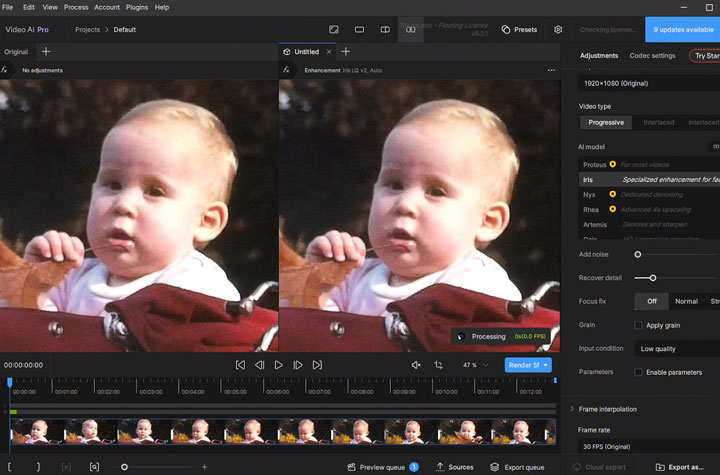
What is Topaz Video
Topaz Video is the current version of Topaz's well-known AI video enhancement software. Earlier versions were called Video Enhance AI and then Topaz Video AI (view our detailed comparison of the two here). The company has moved active development to the current Topaz Video app.
Topaz focuses on a large collection of specialized AI models. Each model targets different problems, such as noise, faces, interlaced footage, or fine detail. This gives you more control when the source video is difficult.
What is AVCLabs Video Enhancer AI
AVCLabs Video Enhancer AI is a desktop tool that improves video quality with AI. It handles upscaling, noise reduction, face enhancement, and stabilization. It also includes colorization for black-and-white footage and privacy tools such as face or object blur.
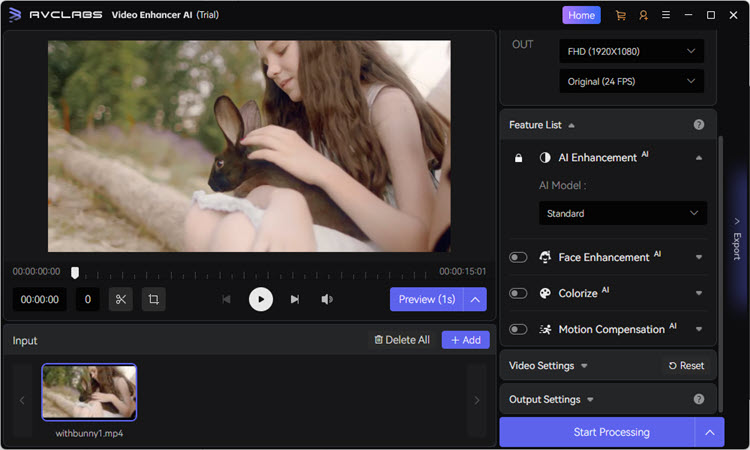
The current versions sit in the 5.3 range. You can choose a monthly plan, a yearly plan, or a lifetime license. This flexibility makes it appealing if you prefer to pay once and keep using the software.
Core Features and Model Options
Both tools improve video with AI, but they organize their features differently. First, AVCLabs keeps choices limited and simple, while Topaz offers more targeted models for different types of footage.
For features like face restoration, frame interpolation, and support for pro codecs, Topaz usually offers more specialized settings. AVCLabs achieves similar results with simpler, more accessible controls.
#1. Core Upscaling and Enhancement
Feature |
Topaz Video |
AVCLabs Video Enhancer AI |
|---|---|---|
Main models |
Proteus, Artemis, Gaia, Rhea, Starlight and more |
Standard, Ultra, Anime, Multi-frame versions |
Denoise |
Yes (Nyx and others) |
Yes |
Detail control |
Recover Detail and advanced tuning |
Detail Balance slider |
Overall approach |
Many specialized models |
Fewer, simpler models |
#2. Face Recovery, Motion, and Repair Tools
Feature |
Topaz Video |
AVCLabs Video Enhancer AI |
|---|---|---|
Face enhancement |
Yes (Iris and related models) |
Yes |
Frame interpolation |
Apollo, Chronos, Aion and more |
Motion Compensation |
Stabilization |
Yes |
Yes |
Deinterlacing |
Strong (Dione models) |
Basic support |
Motion deblur |
Yes |
Limited |
SDR to HDR |
Yes |
Yes |
#3. Extra Features and Workflow
Feature |
Topaz Video |
AVCLabs Video Enhancer AI |
|---|---|---|
B&W colorization |
Not a core feature |
Yes (including Premium model) |
Privacy / blur tools |
Limited |
Yes (faces, objects, background) |
Professional codecs |
Strong (ProRes, DNxHR, and more) |
Limited |
Batch processing |
Yes |
Yes |
Editing software links |
Stronger history with major editors |
Limited |
Output Quality & Real-World Performance
This section focuses on real test results. I ran the same clips through AVCLabs Video Enhancer AI and Topaz Video on identical hardware so you can see how they actually compare in speed, resource use, and quality metrics.
Test Setup and Methodology
All tests ran on this same system:
- GPU: AMD Radeon RX 6700 XT (12 GB)
- CPU: AMD Ryzen 5 5600X
- Memory: 64 GB
- System: Windows 10
I upscaled most clips by 2×. One longer movie clip was processed at 1× for enhancement only. The test clips covered anime, people, old footage, animals, night scenes with noise, and a movie segment.
With the exception of the anime clip, which used models made for anime (Gaia 2 for Topaz and the Anime model for AVCLabs), all other tests used the most general-purpose models (Proteus for Topaz and the Standard model for AVCLabs).
#1. Processing Speed and Resource Use
The table below shows average processing speed (FPS), maximum GPU use, peak VRAM, and maximum CPU use. Higher FPS means faster processing.
Clip Type |
Tool |
Time (s) |
Avg. FPS |
Max GPU |
Peak VRAM |
Max CPU |
|---|---|---|---|---|---|---|
Anime |
Topaz |
9 |
16.78 |
98% |
1779 MB |
79% |
AVCLabs |
543 |
0.28 |
19% |
982 MB |
59% |
|
People / dance |
Topaz |
143 |
0.94 |
99% |
10652 MB |
69% |
AVCLabs |
1064 |
0.13 |
20% |
1260 MB |
62% |
|
Old kid footage |
Topaz |
134 |
1.12 |
99% |
10550 MB |
59% |
AVCLabs |
1201 |
0.12 |
32% |
1307 MB |
67% |
|
Animal (blur) |
Topaz |
308 |
0.73 |
99% |
6715 MB |
71% |
AVCLabs |
2246 |
0.10 |
29% |
749 MB |
74% |
|
Night (noise) |
Topaz |
258 |
0.82 |
99% |
6705 MB |
72% |
AVCLabs |
2206 |
0.10 |
27% |
603 MB |
74% |
|
Movie clip (1×) |
Topaz |
1747 |
0.26 |
99% |
12037 MB |
84% |
AVCLabs |
16419 |
0.03 |
30% |
949 MB |
69% |
Key speed and resource patterns:
As is readily apparent from the data, AVCLabs took an exceptionally long time to process these clips, and GPU utilization on the AMD graphics card remained low. Furthermore, the "GPU acceleration" indicator in the interface did not show as enabled during my tests. It is, therefore, safe to conclude that AVCLabs has not been sufficiently optimized for AMD graphics hardware.
On the other hand, Topaz was very fast on the anime clip but much slower on other material. It also used the most VRAM on several clips.
#2. Quality Metrics (NIQE, Bitrate, and Visual Checks)
Speed is only one part of the picture. Quality matters more for most users. NIQE is a no-reference quality score. Lower numbers usually suggest better perceptual quality, but they should be read together with visual checks. File size and bitrate show how large the exported files became.
Clip Type |
Tool |
NIQE Score |
File Size (approx.) |
Bitrate (approx.) |
|---|---|---|---|---|
Anime |
Topaz |
13.57 |
2.23 MB |
3.708 Mb/s |
AVCLabs |
10.64 |
4.15 MB |
6.907 Mb/s |
|
People / dance |
Topaz |
9.05 |
6.22 MB |
4.663 Mb/s |
AVCLabs |
8.30 |
16.00 MB |
12 Mb/s |
|
Old kid footage |
Topaz |
8.13 |
4.16 MB |
5.806 Mb/s |
AVCLabs |
7.64 |
9.93 MB |
14.0 Mb/s |
|
Animal (blur) |
Topaz |
9.96 |
5.59 MB |
6.239 Mb/s |
AVCLabs |
8.40 |
16.0 MB |
17.8 Mb/s |
|
Night (noise) |
Topaz |
7.04 |
7.12 MB |
8.479 Mb/s |
AVCLabs |
7.76 |
14.5 MB |
17.3 Mb/s |
|
Movie clip (1×) |
Topaz |
8.60 |
8.15 MB |
4.467 Mb/s |
AVCLabs |
7.64 |
23.7 MB |
13 Mb/s |
#3. Visual Quality Observations
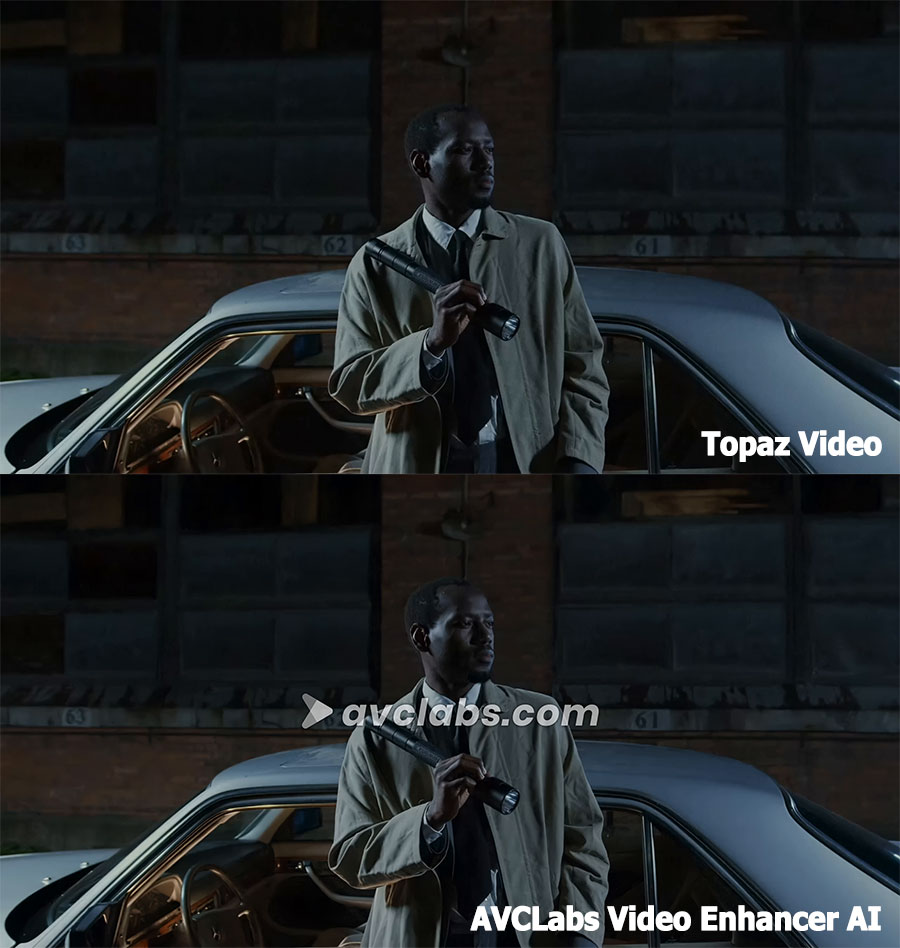
Numbers alone do not tell the full story. Side-by-side comparison of the actual exported videos is important. So, I extracted a single, identical frame from each video to create the comparison images below.
1) Anime Clip
This test clip is a flat 2D cartoon with typical compression softness. The example used models designed for that style (Gaia 2 in Topaz and the Anime model in AVCLabs).
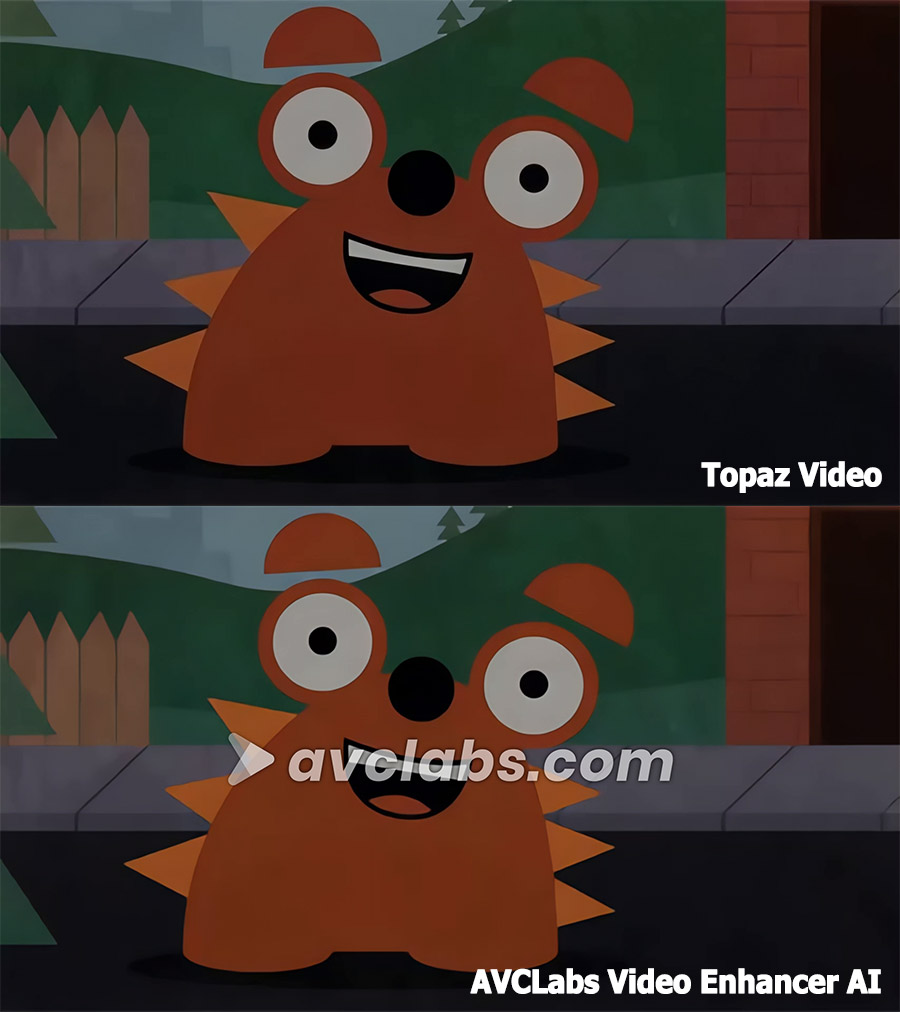
Topaz delivers a clean, sharp, and natural-looking 2× upscale. It preserves the flat cartoon aesthetic while significantly improving definition. Colors are richer and contrast is better than the original without looking over-processed.
In comparison, AVCLabs did a general sharpening and cleanup, but the watermark is a major flaw. You can see a cleaner black shape with tighter edges. The brick wall has slight improvement in the separation of color blocks, but still a relatively soft texture.
2) People / Dance Clip
This clip tests face detail and motion. Watch how each tool handles skin texture, hair strands, and whether the faces stay natural or become overly smooth.
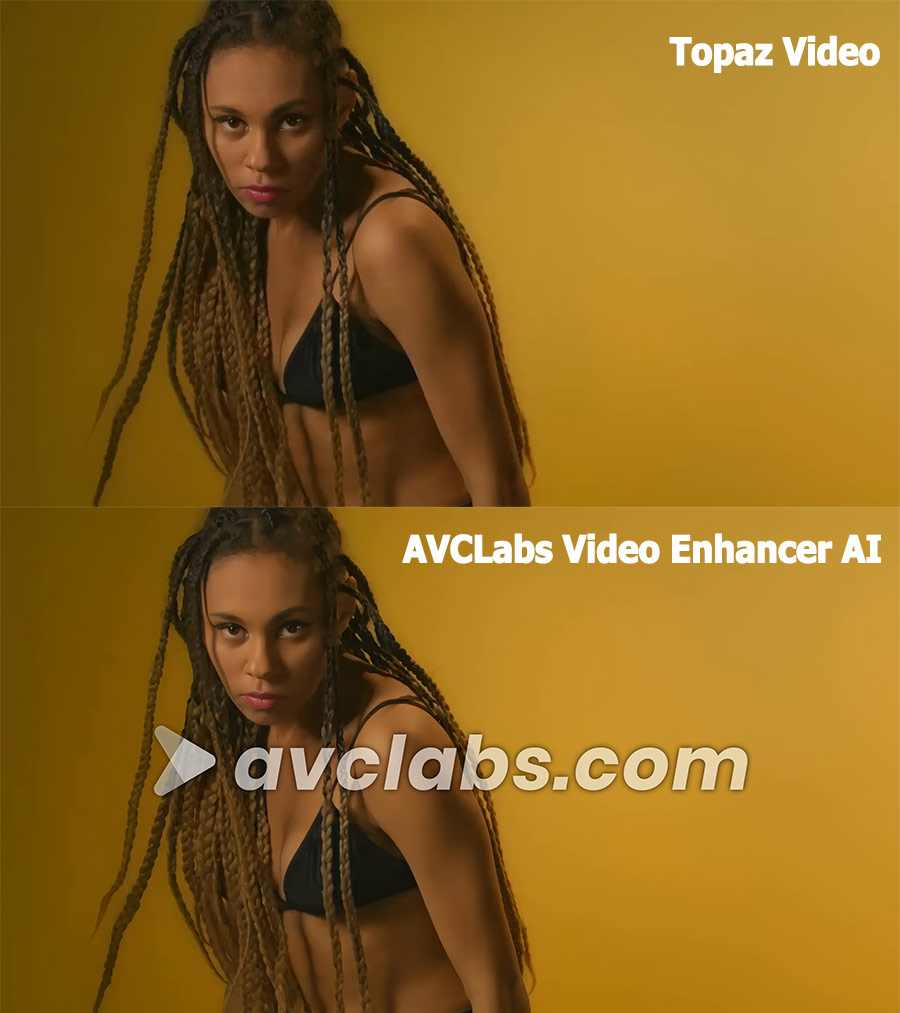
We can see that AVCLabs performs strong detail recovery in the hair. Skin looks cleaner and smoother. Fine texture is partially recovered, but some areas (especially cheeks and forehead) appear slightly over-smoothed.
Topaz handles both the complex hair structure and skin texture well. Avoids the common AI upscaling pitfalls of over-smoothing skin or creating plastic-looking surfaces.
3) Old Kid Footage
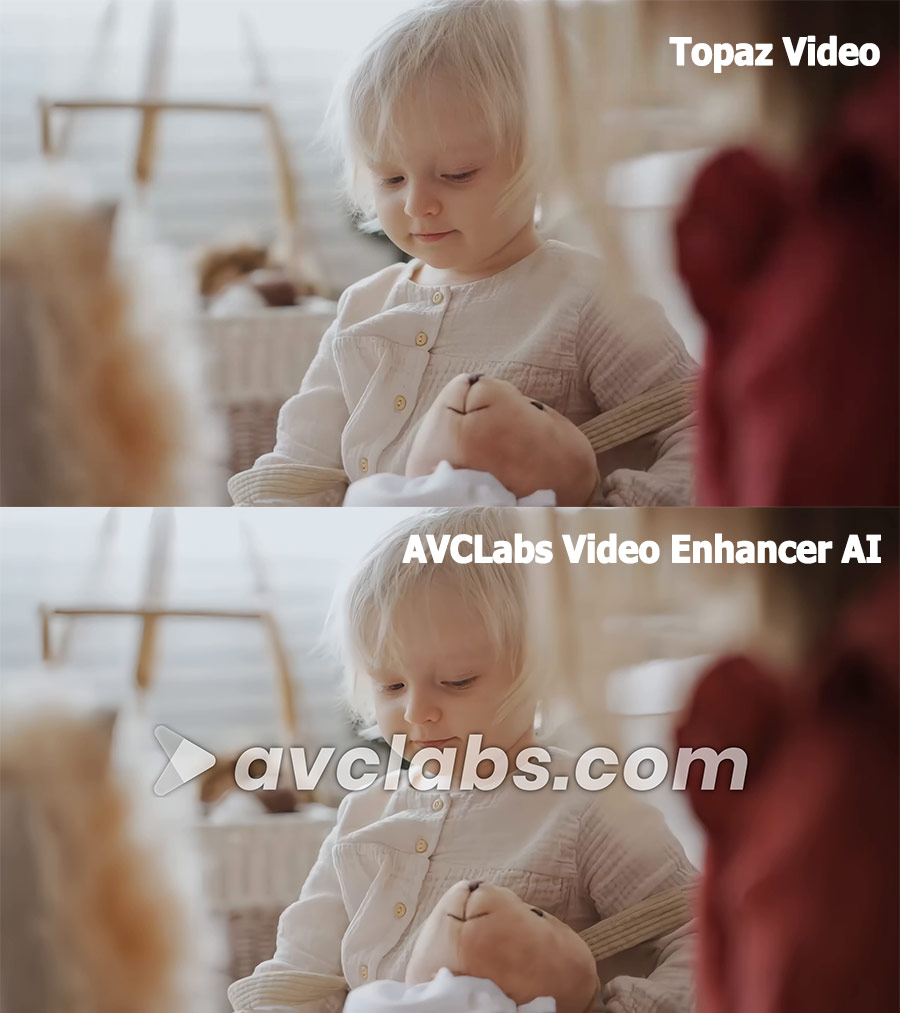
Older home video often has soft focus and lower resolution. The output from AVCLabs shows noticeable improvement. Skin remains appropriately smooth for a young child. The edges of the face, nose, and eyelids are cleaner. No heavy plastic look, but also not a large gain in natural micro-texture (which is expected on toddler skin).
Topaz delivers a clean, natural-looking upscaling that enhances detail without hardening the soft, dreamy quality of the original. Skin stays appropriately smooth for a toddler while gaining subtle definition around the cheeks, nose, and mouth.
4) Animal Clip
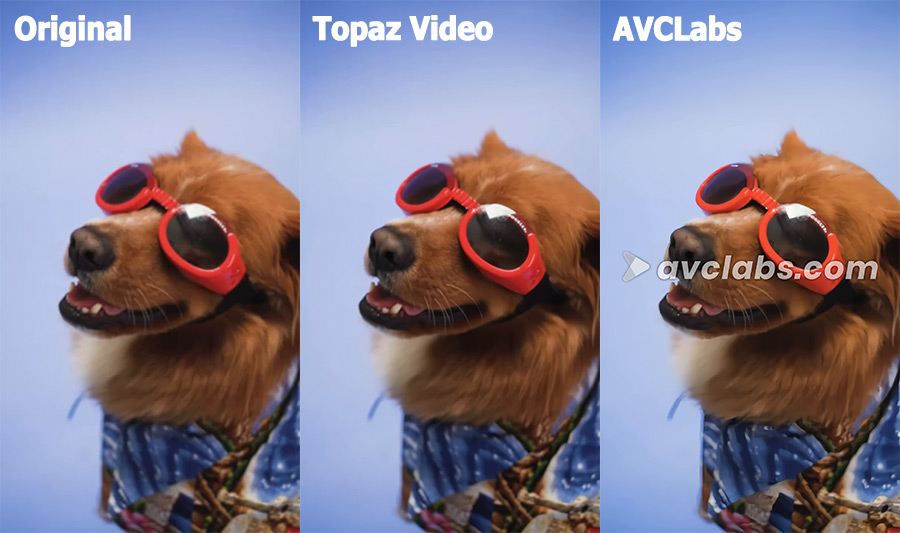
This is a close-up portrait of a golden-brown dog. Soft lighting with gentle highlights on the fur and glasses. Topaz is especially strong on complex fur texture and the hard surfaces of the sunglasses. It maintains a natural photographic look rather than a processed or painterly one.
AVCLabs did a good general sharpening and color pop. The dense fur on the cheeks, neck, and around the ears is better separated, though some areas look slightly smoothed or "painted" rather than fully natural.
5) Nighttime Footage
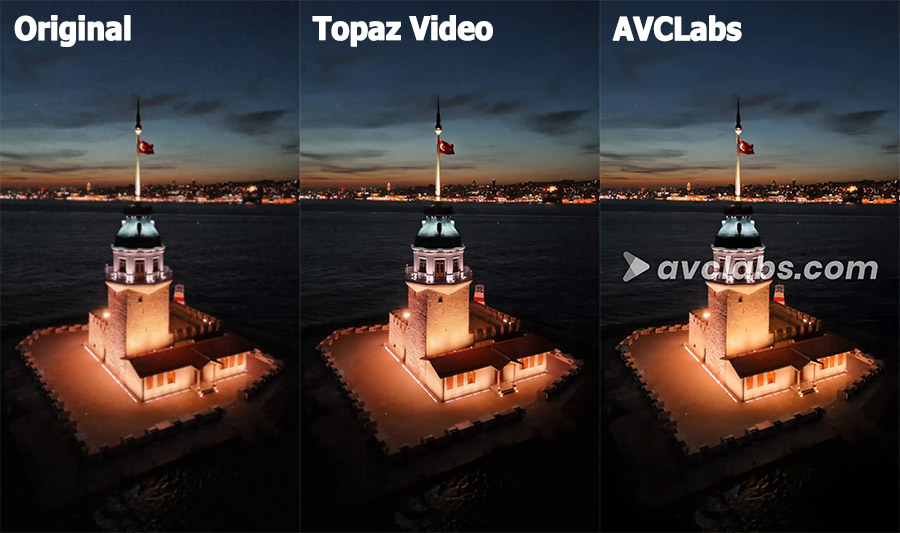
AVCLabs deliver a good boost in clarity and contrast. The stone rendering and some surface variation are improved, though certain sections look somewhat smoothed rather than fully natural. On the other hand, Topaz is particularly strong on architectural stone texture and the balance of night lighting. The water surface near the tower shows a subtle texture without noise.
6) Movie Clip (1× Enhancement)
This longer clip was processed without upscaling. It gives a clearer look at pure enhancement quality on more complex real-world footage.
Hardware Requirements
The tools have different hardware needs. Your GPU and system memory affect both speed and which models you can run smoothly.
AVCLabs Video Enhancer AI lists relatively modest system requirements. It runs on a wide range of GPUs and works with 16 GB of system memory in most cases. It performs best with NVIDIA cards.
Topaz Video has higher requirements, especially for its advanced models. The baseline asks for 16 GB of system memory and a dedicated GPU with at least 6 GB of VRAM. Recommended specs rise to 32 GB of memory and 8 GB or more of VRAM. Some Starlight models need 10–16 GB of VRAM or higher for local processing. Topaz works on Windows and Apple Silicon Macs, with some advanced models limited on certain hardware. Check out our Starlight review for more information.
Pricing and License Options
Pricing is one of the biggest practical differences between these tools. Here is a clear look at the current plans.
Plan Type |
Topaz Video (Personal) |
AVCLabs Video Enhancer AI |
|---|---|---|
Monthly |
$59 (month-to-month) |
$39.95 |
Yearly |
$299 (or $39/mo with annual commitment) |
$119.95 ($95.96 on sale) |
Lifetime / Perpetual |
— |
$299.90 ($149.90 on sale) |
Higher tier |
Pro: $699/year |
— |
License notes |
Unlimited local rendering + limited cloud credits |
1 PC per license |
So your usage frequency matters. If you enhance videos only from time to time, a lifetime license from AVCLabs can cost less over two or three years. If you process video often and want the newest specialized models, a Topaz subscription may deliver better long-term results even though the yearly cost is higher.
Ease of Use and Workflow Differences
Preview and batch processing are available in each program.
AVCLabs keeps the interface simple and focuses on its own feature set. Most users can get started quickly. The built-in privacy and colorization tools reduce the need to switch apps for those tasks. It also offers newer agent-style options through its MCP service.
Topaz offers more power but requires more learning. You choose from many specialized models and often fine-tune settings such as Recover Detail or input condition. Additionally, Topaz has a longer history of working with professional editing software. It supports more advanced codecs and has better links to tools many editors already use.
Pros and Cons Summary
Topaz Video |
AVCLabs Video Enhancer AI |
|
|---|---|---|
Pros |
|
|
Cons |
|
|
A Strong Third Option: VideoProc Converter AI
VideoProc Converter AI is worth serious consideration if neither AVCLabs nor Topaz feels like the perfect fit.
In the real tests, VideoProc delivered steady speed across different types of clips. It fully used the GPU and avoided the very slow results that AVCLabs showed on the AMD card. At the same time, it produced solid visual quality that stayed competitive without needing complex model choices. It is easier and often cheaper over time than Topaz.
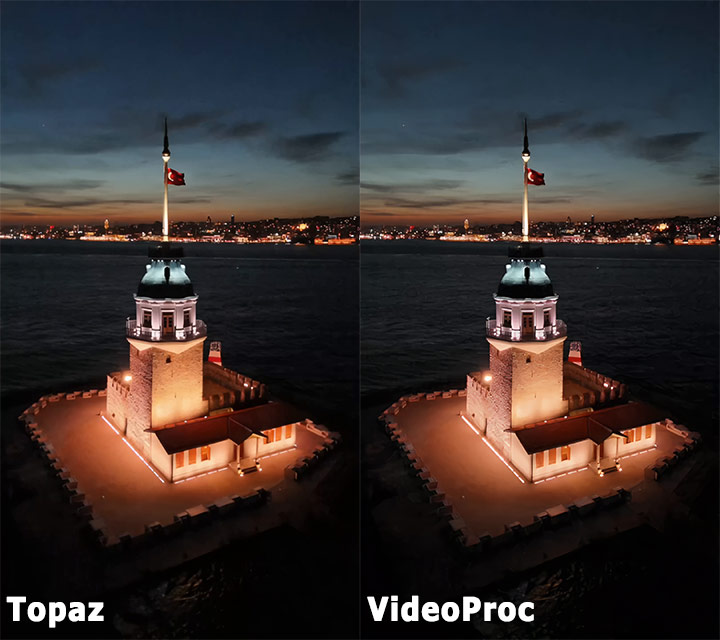
It also gives you more than pure enhancement. The app includes video conversion, compression, and other practical tools in the same package. This reduces the need to switch between programs for common tasks.
Choose VideoProc if you want:
- Faster and more consistent processing than AVCLabs showed on AMD hardware
- A simpler experience than Topaz without giving up too much quality
- A lower long-term cost through lifetime license options
- Extra conversion features alongside AI enhancement
It works especially well for users who enhance videos regularly but do not always need the absolute highest detail recovery that Topaz can deliver with the right model. If your main goals are reliable speed, solid results, and good value, VideoProc is a strong alternative that many users overlook.

Who Should Buy Which: Recommendations by Use Case
The best tool depends on what you need most. Here are clear recommendations based on common situations.
- Occasional home user: AVCLabs or VideoProc
- Quality-focused creator or restorer: Topaz
- User who wants speed + value + extra tools: VideoProc
There is no single winner for everyone. Match the tool to your footage type, hardware, budget, and how often you plan to use it. Testing a short sample of your own video remains the most reliable way to confirm the right choice.
Wrapping Up
AVCLabs Video Enhancer AI, Topaz Video, and VideoProc Converter AI each solve the same problem in different ways.
AVCLabs focuses on simplicity, useful extras like colorization and privacy tools, and flexible licensing that still includes a lifetime option. Topaz delivers the strongest detail recovery when you select the right model and have capable hardware. It is the better choice when maximum quality is the top priority.
VideoProc Converter AI sits in the practical middle. It offers consistent speed, solid quality, extra conversion features, and strong value. In the tests it delivered consistent performance, solid visual results, and useful extra conversion tools at a lower long-term cost.
For many users, VideoProc strikes the most useful middle ground. It avoids the slower results AVCLabs showed on AMD hardware and does not require the steeper learning curve or higher ongoing cost of Topaz. If you want reliable everyday performance without extremes, it is often the smartest place to start.