
 New AI features are available
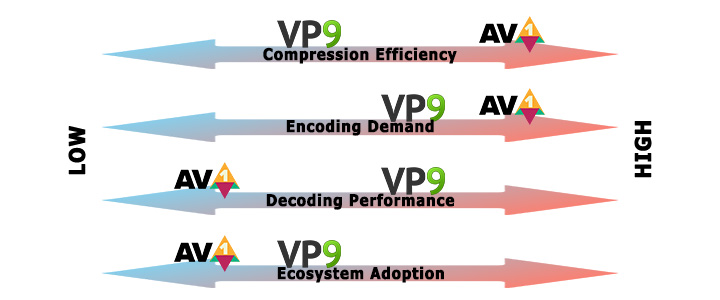
Modern video streaming demands codecs that can deliver high-resolution content while minimizing bandwidth consumption. Among all these modern codecs, VP9 vs AV1 is a common debate. Both formats are open-source and royalty-free, designed to deliver high-quality video at reduced bitrates.
In this article, we'll compare VP9 and AV1 across several dimensions, including compression efficiency, speed, compatibility, and real-world use cases. We hope this can help you decide which codec suits your needs.
What is VP9
VP9 is an open and royalty-free video coding format released by Google in 2013.
VP9 is block-based and divides frames into superblocks up to 64x64 pixels. Also, it uses adaptive motion prediction, discrete wavelet transforms, and adaptive entropy coding. These techniques cut bitrates roughly in half compared with its predecessor, VP8, while maintaining similar quality.
For now, VP9 decoding is supported on more than two billion devices, including major browsers, Android and most smart TVs. YouTube encodes most videos in VP9, especially HD, 4K, and VR content.
What is AV1
AV1 (AOMedia Video 1) is a video coding format introduced in 2018 by the Alliance for Open Media, a consortium including Google, Netflix, Amazon, Microsoft, and Apple. It's designed as the successor to VP9, aiming to offer even better compression while remaining open and royalty-free.
AV1 partitions frames into blocks from 4x4 to 128x128 pixels. Compared to VP9, it supports more intra prediction modes (69 vs 10 in VP9) and more diverse transforms with efficient arithmetic coding. These new technologies allow AV1 to achieve 30–50% better compression than VP9 at a similar quality.
AV1 is catching on. Netflix, Amazon Prime Video, and YouTube use it for 4K or 8K streams. Meta uses AV1 to reduce CDN traffic by ~30 %. Apple M3 processors and newer GPUs provide AV1 hardware decoding.
Quick Comparison VP9 vs AV1
| Metric | VP9 | AV1 | Quick take |
|---|---|---|---|
Compression efficiency |
Good: reduces bitrates by ~50 % compared with VP8 |
Excellent: typically 30–50 % better than VP9 |
AV1 saves more data, ideal for 4K/8K streaming |
Video quality |
Very good but can show more artifacts at low bitrates |
Higher fidelity at lower bitrates due to improved prediction and transforms |
AV1 retains detail better |
Software encoding |
Faster and less complex; lower CPU usage; suitable for live streaming |
High computational complexity; several times longer times for same quality |
VP9 wins for real-time encoding |
Hardware support |
Very broad: major PC GPUs, mobile SoCs, Smart TVs, streaming sticks, etc. |
Limited but improving: new CPUs and GPUs support decoding from 2020 onward |
VP9 currently has wider support |
HDR support |
Supports HDR and wide color but HDR metadata only in container |
HDR metadata integrated in bitstream and container |
AV1 provides more reliable HDR |
Licensing |
Open and royalty-free |
Open and royalty-free |
Both are patent-free |
VP9 vs AV1: Comprehensive Comparison
1. Compression Efficiency
Compression efficiency refers to how well a codec reduces file size or bitrate for a given video quality.
Both VP9 and AV1 are high-efficiency codecs. VP9 itself is a major improvement over older codecs, but AV1 builds upon and exceeds it. In general, AV1 can deliver ~30% better compression than VP9 for the same visual quality, although exact results vary with the content and encoder settings.
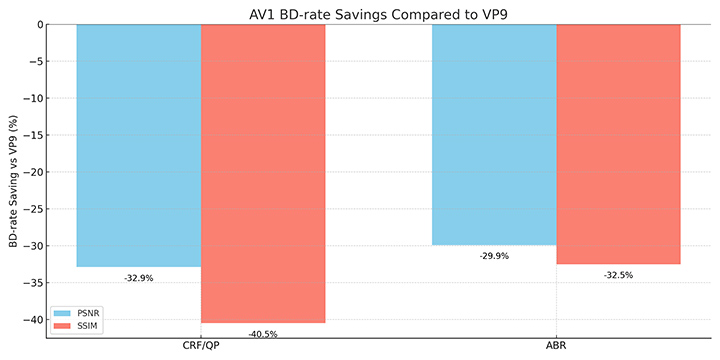
Facebook's 2018 real-world testing used the BD-rate metric to measure the compression efficiency of different encoding formats at the same PSNR and SSIM. The result shows AV1 requires ~34% lower bitrate than VP9 at equal quality.
| Mode | PSNR-based BD-rate saving vs. VP9 | SSIM-based BD-rate saving vs. VP9 |
|---|---|---|
CRF/QP |
-32.9% |
-40.5% |
ABR |
-29.9% |
-32.5% |
In CRF/QP mode, AV1 reduces bitrate by ~33% (PSNR) to ~41% (SSIM) compared with VP9 for the same quality. In ABR mode, AV1 saves ~30% bitrate (PSNR) and ~33% (SSIM) compared to VP9.
2. Encoding Speed
Encoding speed, which reflects how quickly a video can be compressed, is a key practical consideration. AV1 is a far more complex codec than VP9, which makes encoding significantly slower in software. By contrast, VP9's encoding process is less intensive.
In 2020, researchers at the University of Waterloo carried out a test with 1200 videos at different resolutions. The result shows that AV1 encoding was dramatically slower than AVC, taking about 590x longer at 2160p, 546x longer at 1080p, and 806x longer at 540p. By comparison, VP9 encoding times were far closer to AVC, at only about 5.29x longer at 2160p, 6.63x longer at 1080p, and 5.26x longer at 540p.
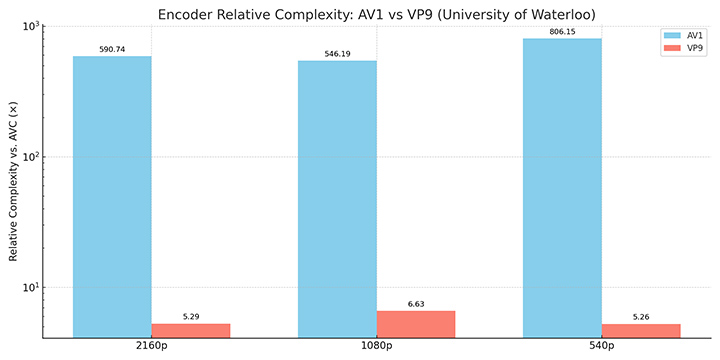
This demonstrates that at the time of the study, AV1 is ~100x slower than VP9 at all tested resolutions. Facebook's 2018 tests similarly reported that AV1's encoder required much longer processing time than VP9.
Read further in our AV1 vs H.264 comparison guide.
3. Resource Usage
VP9 has the advantage of lower complexity. Although AV1 achieves higher compression efficiency, it does so with considerably heavier resource requirements compared to VP9.
In 2020, the University of Valencia team designed a cloud-based distributed architecture to evaluate modern video codecs under real encoding conditions. As part of this study, the researchers measured CPU and memory usage and found clear differences between VP9 and AV1.
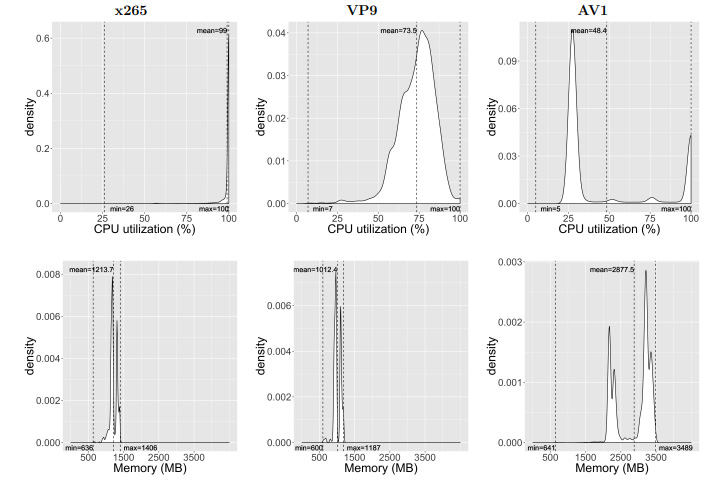
VP9 encoding consumed around 73% of the available CPU, showing relatively balanced processor utilization. AV1, on the other hand, did not fully use the CPU despite being more computationally complex and slower.
Memory consumption also highlighted the gap between the two codecs. VP9 required a moderate amount of RAM, comparable to what was observed with x265, while AV1 demanded at least twice as much memory to process each video chunk.
4. Hardware and Software Support
Support for a codec can be examined in terms of software and hardware. Both VP9 and AV1 are well-supported in modern software, but AV1's hardware integration is relatively new and not yet as widespread as VP9's.
VP9 has been supported in all major web browsers for years. In contrast, AV1 support in browsers rolled out around 2018–2020. At the desktop and mobile OS levels, both codecs have broad support, with AV1 slightly lagging behind.
| OS support | Windows | macOS | BSD/Linux | ChromeOS | Android | iOS |
|---|---|---|---|---|---|---|
VP9 |
Yes |
Yes |
Yes |
Yes |
Yes |
Yes |
AV1 |
Yes |
Partial |
Yes |
Yes |
Yes |
Partial |
On the hardware side, virtually all modern hardware platforms have VP9 decoders, while AV1 hardware decoding is emerging and rapidly growing.
5. HDR Support
High Dynamic Range video has become increasingly important for delivering more vivid colors, brighter highlights, and deeper contrasts. VP9 provides HDR support mainly through its advanced profiles, while AV1 integrates HDR support more comprehensively and with broader format compatibility, making it better suited for future HDR streaming.
| Feature | VP9 | AV1 |
|---|---|---|
Bit Depth |
8-bit (Profiles 0, 1) 10-bit / 12-bit (Profiles 2, 3) |
8-bit, 10-bit, 12-bit supported natively |
Color Space |
Rec. 709, Rec. 2020 |
Rec. 709, Rec. 2020 |
HDR Formats |
HDR10, HDR10+ (limited) |
HDR10, HDR10+, HLG, Dolby Vision (in some implementations) |
Dynamic Metadata |
Partial (HDR10+, device support dependent) |
Full support for dynamic metadata, more flexible bitstream |
Adoption Examples |
YouTube HDR via VP9 Profile 2. Supported on Android and some Smart TVs |
Netflix & YouTube HDR in AV1. Broad adoption in Smart TVs, streaming devices, and new mobile hardware |
6. Licensing and Royalty Costs
VP9 and AV1 are both royalty-free codecs, backed by industry consortia or big tech sponsors, with transparent licensing. Neither codec will incur direct royalty costs for users or implementers. They were explicitly developed to be free of royalties, lowering the cost barrier for adoption.
7. Use Cases and Adoption
Streaming Platforms (VOD)
VP9 became the backbone of services like YouTube, handling most HD and UHD streams for years, while Netflix also relied on it to optimize mobile and TV playback.
AV1, however, is now being adopted at scale by both YouTube and Netflix, with most of Netflix's catalog and nearly half of YouTube's content already available in AV1. This shift shows AV1's growing role as the preferred codec for major streaming platforms.
User-Generated Content and Social Media
On social media, VP9 supported smoother playback for Facebook and other platforms, but its role is gradually diminishing. AV1 is now being deployed in Instagram Reels, Facebook Watch, Twitch, and Discord, helping these platforms reduce bandwidth costs while maintaining quality. AV1 is quickly overtaking VP9 as the codec of choice for user-generated video at scale.
Video Conferencing and Real-Time Communication
VP9 was tested in some WebRTC scenarios but never became a dominant codec for video calls due to its higher CPU use and latency than VP8. In contrast, AV1 is being integrated directly into conferencing apps such as Google Meet, Microsoft Teams, and Discord, where its efficiency allows video to remain usable even under extremely low bandwidth. This makes AV1 more future-proof for real-time communications compared to VP9.
Broadcasting and Other Use Cases
VP9 saw limited adoption beyond web streaming, with H.264 and HEVC often preferred for broadcasting. AV1, however, is beginning to find a role in new areas such as smart TVs, 8K broadcasting, cloud gaming, and surveillance video storage. These emerging use cases highlight AV1's potential to expand far beyond the traditional scope of VP9.
Which Codec Should You Choose
VP9 is the safer choice for environments where broad compatibility and lower complexity are most important. It is supported by virtually all major browsers, operating systems, and devices released since the mid-2010s. VP9 encoding is also much faster than AV1 and requires fewer resources, making it suitable for workflows with time constraints or limited hardware capacity. For services or creators targeting a wide range of older devices, VP9 remains the most reliable option.
AV1 is the best option when compression efficiency and future-proofing matter most. It consistently delivers 20–30% better compression than VP9, with even greater gains at higher resolutions. AV1 also provides stronger HDR support and is increasingly backed by hardware decoders in new GPUs, smart TVs, and smartphones. For large-scale streaming services or long-term archives, AV1 reduces bandwidth and storage costs significantly. However, its heavy encoding complexity means it is most practical when you can leverage hardware acceleration or optimized encoders.
AV1 Video Converter
AV1 and VP9 conversion could be necessary at times. Both codecs are not always supported on every device or editing workflow. This makes video conversion an important step.
VideoProc Converter AI is a practical solution for video conversion. Unlike open-source command-line tools that may require complex settings, VideoProc Converter AI is a much more friendly AV1 converter for average users. It supports more than 420 codecs and formats, including VP9 and AV1. With Level-3 Hardware Acceleration, you can efficiently and easily convert VP9 to AV1 or vice versa without sacrificing quality, preparing files for streaming, editing, archiving, and more.
VideoProc Converter AI - Easy Yet Powerful VP9 & AV1 Converter
- Support 420+ codecs and formats, including AV1, VP9, H.264, HEVC, etc.
- Intuitive interface; 1-click VP9 and AV1 presets for different use cases
- Customizable video codec, bitrate, frame rate, resolution, quality, profile, etc.
- Fast batch conversion with Level-3 Hardware Acceleration
- All-in-one: AI tools, converter, compressor, DVD, downloader, screen recorder.



How to convert AV1 and VP9 video files
Step 1. Download and install VideoProc Converter AI to your device.
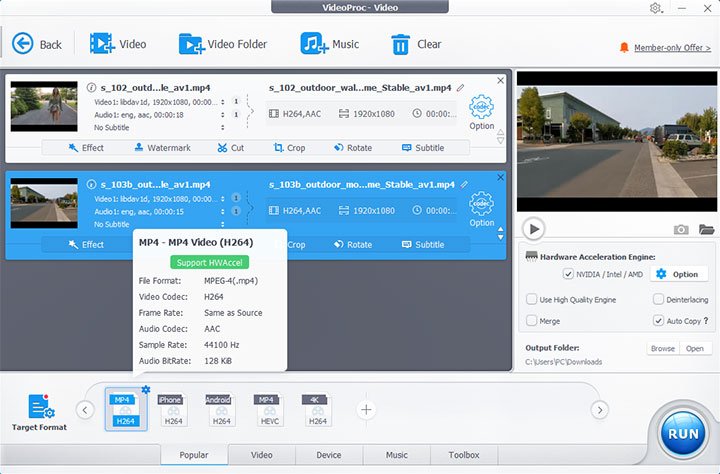
Step 2. Enable Video Converter from the main interface, then drag and drop the videos you want to convert.
Step 3. Click Target Format, then search and select the output format you need.
Step 4. Adjust video parameters as needed using the Codec Option gear icon (optional).
Step 5. Click the RUN button to start the conversion.
Conclusion
Both VP9 and AV1 are royalty-free codecs that have shaped modern streaming. VP9 offers reliable compatibility and lower CPU requirements, making it ideal for live streams and legacy devices. AV1, on the other hand, delivers unmatched compression and quality improvements, making it the codec of choice for forward-looking services and 4K or 8K content.
VP9 vs AV1 isn't a one-size-fits-all decision. Instead, evaluate your audience, infrastructure and bandwidth costs to choose the right codec or implement a hybrid strategy that adapts to device capabilities. If you need a reliable and easy-to-use AV1 converter, VideoProc Converter AI is a great choice.




