New AI features are available
"Should I shoot in 422 hq or regular pro res 422. I will be shooting in C4k V-Log on the GH6 and color grading the footage in resolve. Honestly how much of a difference will there be in flexibility of the footage." - @EnergyDoctor from reddit.com
In professional video production, the moment arrives when you must commit: should you choose ProRes 422 vs 422 HQ for your video?
Many assume ProRes 422 HQ is always superior, but the reality is a nuanced technical and logistical balancing act that defines your project's budget, hard drive capacity, and editing timeline, etc. In this guide, I'll give you the ultimate comparison between Apple Prores 422 and ProRes 422 HQ, covering everything from their architecture and color sampling to differences in bitrate and how they affect editing, storage, and everyday post-production.
What Are ProRes 422 and ProRes 422 HQ
Both ProRes 422 and ProRes 422 HQ are members of Apple's family of visually lossless Intermediate Codecs. They are specifically designed to maintain the highest quality from camera source files while providing superior, smooth performance during post-production. They are favored over highly compressed delivery formats for professional editing because they minimize generational quality loss.
| Feature | ProRes 422 (Standard) | ProRes 422 HQ (High Quality) |
|---|---|---|
Primary Goal |
Efficiency & Quality Balance |
Maximum Image Fidelity |
Color Depth |
10-bit |
10-bit |
Chroma Subsampling |
4:2:2 |
4:2:2 |
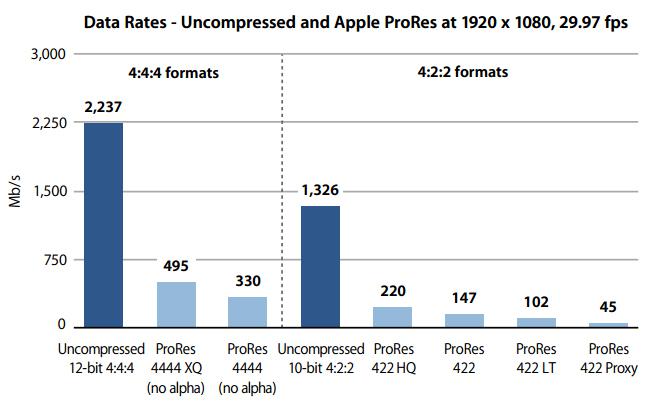
Target Bitrate (1080p/29.97) |
~147 Mbps (Manageable data rate) |
~220 Mbps (50% higher data rate) |
Compression Level |
Medium (Good for file size) |
Minimal (Best for quality resilience) |
Typical Use Case |
Broadcast TV, Corporate Video, High-Volume Productions, Archival Backup |
Feature Films, Complex VFX, Demanding Color Grading, Multi-Generational Mastering |
Impact |
More manageable file sizes, less strain on hardware. |
Larger file sizes, maximum preservation of original image detail. |
ProRes 422 and HQ: The Shared Foundation of 10-Bit and 4:2:2
Before comparing ProRes 422 and 422 HQ, it is essential to ground the discussion in the core philosophy of the ProRes family. This understanding clarifies why ProRes is the preferred format over rivals like DNxHR, or highly compressed delivery codecs such as H.265, for the entire post-production chain.
1.The Architecture of Speed: The Intermediate Codec Distinction
ProRes is not a delivery codec; it is an intermediate codec, a file format designed explicitly to accelerate the editing process. Its primary optimization target is decoding speed, prioritizing fast performance over extreme compression ratios. This efficiency stems from its intra-frame (I-frame only) structure, meaning every frame is encoded independently. This is a massive advantage for Non-Linear Editor (NLE) software:
- Responsive Editing: Scrubbing, reversing playback, and applying real-time effects are significantly smoother.
- Efficient Rendering: The NLE can split the rendering load across multiple CPU cores much more efficiently.
2.The Visual Baseline: 10-Bit Color Depth and 4:2:2 Sampling
Both ProRes 422 and 422 HQ rely on the same fundamental color science framework, which sets a high standard for image fidelity right from the start.
10-Bit Color Depth
All ProRes 422 formats utilize a 10-bit color depth. This capability allows the codec to represent over one billion colors, providing a massive leap in gradient smoothness over 8-bit. This increased depth is crucial for high-dynamic-range (HDR) work and is the primary defense against visible color banding.
Note: A common misconception is that 422 is 8-bit; all ProRes 422 family codecs are 10-bit capable, a key factor often overlooked in online comparisons.
4:2:2 Chrominance Sampling
ProRes manages quality while maintaining file size through 4:2:2 chroma subsampling. The notation means all brightness (luminance) information is recorded, while color (chrominance) information is sampled at a reduced rate. Since the human eye is more sensitive to brightness, this technique reduces data volume significantly while maintaining a visual quality that is highly acceptable for all broadcast and cinematic needs.

ProRes 422 and 422 HQ: Technical Deep Dive
When you compare ProRes 422 with ProRes 422 HQ, the biggest difference comes from the target data rate (bitrate). This difference, which is roughly 50% higher for HQ across all resolutions, defines the codec's level of resilience against generational loss and aggressive post-processing.
1. The Key Difference Between ProRes 422 and 422 HQ: The Bitrate
ProRes 422 HQ is engineered to minimize data loss during compression. It uses a much gentler quantization process, which is the mechanism that simplifies data. By committing to a 50% higher bitrate, ProRes HQ preserves more subtle information—providing the safety net needed for demanding post-production.
| Format | ProRes 422 HQ (Target Mbps) | ProRes 422 (Target Mbps) | Approx. Increase |
|---|---|---|---|
1080p / 29.97 fps |
220 Mbps[from Apple] |
147 Mbps[from Apple] |
~ 50% |
4K (UHD) / 24 fps |
~707 Mbps |
~471 Mbps |
~50% |
4K (UHD) / 60 fps |
~1760 Mbps |
~1170 Mbps |
~ 50% |
6K / 30 fps |
varies by aspect |
varies by aspect |
~ 50% |
These figures consistently show that ProRes 422 HQ pushes significantly more data per second, which translates to better preservation of fine detail.
2.What This Means for Your Footage
The practical consequence of this 50% bitrate difference is two-fold: an increase in visual resiliency and a massive increase in file size.
Picture Quality
ProRes 422 HQ keeps more information per frame thanks to its higher bitrate and gentler compression. The difference is most noticeable when the footage undergoes multiple renders, heavy color grading, or complex VFX. Shadows, highlights, and subtle gradients stay more intact, giving editors and colorists more flexibility without introducing unwanted artifacts. In everyday playback, the difference may not be obvious, but it becomes clear in demanding post-production workflows.
File Size
That extra data comes at a cost. A 1-minute 4K clip at 30fps is roughly 1.2 GB in HQ compared to 540 MB in standard 422. Over a long shoot, file sizes can easily double, affecting offload times, backup storage, and long-term archival costs.
Note:
It's important to note that converting a standard ProRes 422 file to HQ does not improve its image quality. You can't “create bits from nothing.” HQ only preserves more data when starting with high-quality sources, helping minimize loss during future re-encodes.
How to Choose Between ProRes 422 and HQ
Selecting ProRes 422 or 422 HQ is a project-based decision. It's less about creativity and more about budget, schedule, hardware, and final delivery requirements. Here's a clear way to think about it.
1.When to Use ProRes 422 HQ
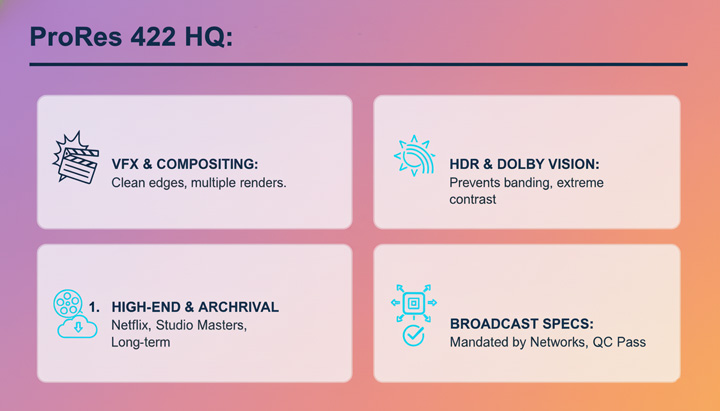
Apple ProRes HQ is worth the extra storage and processing demands when maximum image fidelity is the project's non-negotiable goal, or when delivery specifications demand it for bureaucratic reasons.
- VFX and Compositing: ProRes 422 HQ preserves clean edges for keying, matte work, and multiple rounds of rendering.
- HDR and Dolby Vision Projects: ProRes 422 HQ provides a higher data cushion to prevent banding in extreme shadows and highlights.
- High-End Films and Archival: ProRes 422 HQ is often required by streaming platforms like Netflix or studios for long-term master files.
- Network Specifications: Some broadcasters mandate ProRes 422 HQ in their standard procedures. Delivering standard ProRes 422 could trigger QC rejection even if the difference is visually subtle.
2.When ProRes 422 is Enough
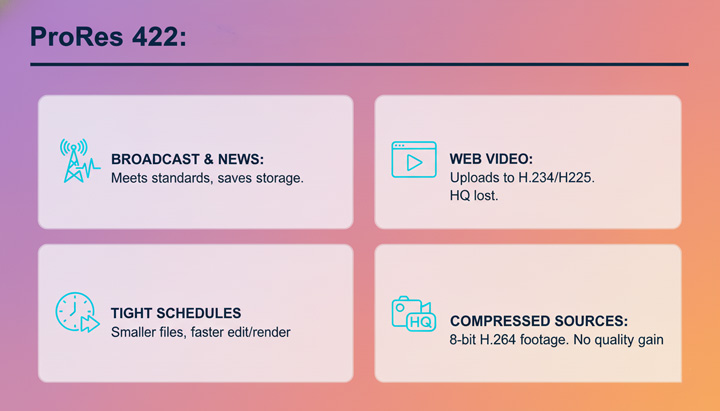
For most projects, standard ProRes 422 delivers excellent image quality with smaller files and faster workflows.
- Broadcast TV and News: Standard ProRes 422 meets nearly all broadcast standards while saving storage and transfer time.
- Corporate or Web Video: Any advantage of ProRes 422 HQ is lost when files are compressed to H.264 or H.265 for online use.
- Tight Schedules and Limited Hardware: Smaller files reduce system strain and speed up editing and rendering.
- Already Compressed Sources: If your footage comes from H.264 or 8-bit cameras, transcoding to ProRes 422 HQ will not improve quality, and standard ProRes 422 is sufficient.
How to Make Your ProRes 422/HQ Files Easily Share, Edit, and Play
Apple ProRes 422 and Apple ProRes 422 HQ are excellent editing codecs. They are designed to preserve image quality during cutting, color grading, and repeated exports without noticeable degradation. The downside is practicality.
ProRes files are often extremely large, which makes them difficult to move between systems, share over networks, or store efficiently. Support outside Apple's ecosystem is limited as well. Windows machines usually require additional codecs, many standard media players struggle with smooth playback, and most hardware decoders cannot process ProRes natively. For easier sharing, playback, and storage, ProRes files are usually converted to formats like H.264 or HEVC. VideoProc Converter AI is one option for handling this conversion. Here are some of the standout features of this powerful video converter:
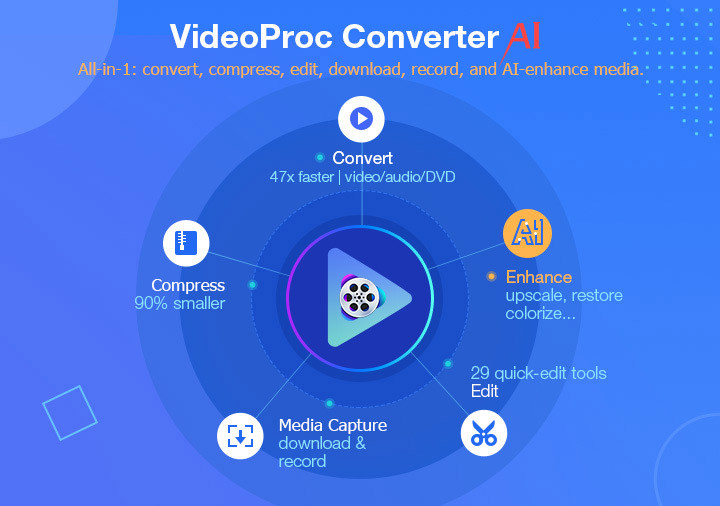
- Convert ProRes 422/HQ to a more compatible format like H.264 and HEVC to play and share everyhere.
- Compress video files from GBs to MBs for freeing up space and easier sharing with top quality.
- Built-in 29 quick editing tools like trim, cut, rotate, and defisheye, for fast touch up your footage.
- AI-enhance: denoise, deblur, upscale, and enhance your footage with natural and improved quality.
- All-in-one: AI-enhance images and audio; edit, compress, record, download, rip DVDs, and more.

Optional Reading: Understanding the Full ProRes Family
To get the most out of ProRes, it's helpful to see where 422 and 422 HQ fit within the broader family. On the lower end, ProRes 422 Proxy and 422 LT prioritize efficiency: Proxy produces tiny files for offline editing, remote collaboration, or quick web reviews, while 422 LT balances smaller file size with decent quality, making it suitable for multi-camera shoots or storage-conscious projects.
ProRes 422 Family
- ProRes 422 Proxy: The workhorse of offline editing. Very small file sizes, perfect for remote editing, laptops, or web-based review.
- ProRes 422 LT: Slightly higher compression than standard 422, reducing file size by around 30%. Ideal for storage-conscious documentaries or multi-camera shoots where 422 is too heavy but Proxy is too rough.
- ProRes 422/422 HQ: The sweet spot for most professional editing. 422 HQ offers higher bitrate and better image resilience for color grading and VFX, while standard 422 balances quality with efficiency.
ProRes 4444 Family
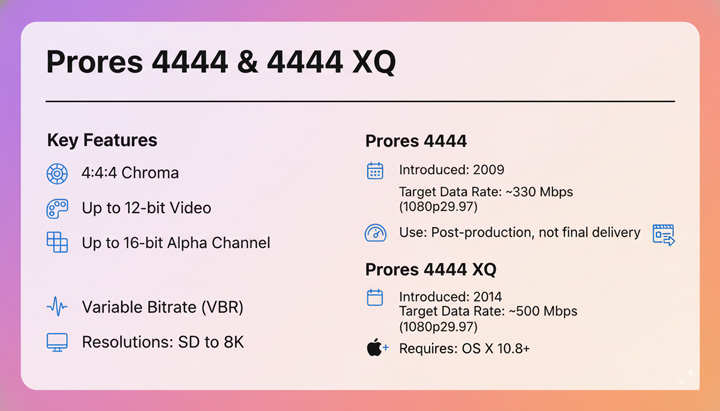
- ProRes 4444: Gold standard for VFX and animation. Supports 4:4:4 color sampling and includes an alpha channel for transparency, providing digitally lossless visual quality.
- ProRes 4444 XQ: The ultimate quality variant, reserved for demanding feature film masters and extreme dynamic range media.