
 New AI features are available
In today's digital world, the appeal of "free" software is hard to resist, and Freemake Video Converter has long been promoted as an easy, no-cost solution for video conversion, DVD ripping, and basic editing. However, in 2025, the reality is quite different: the free version adds a persistent watermark, and even the paid version struggles with a lack of 4K support, slow conversion speeds, and missing essential features like HEVC/AV1 conversion. Compounding these limitations are concerns about bundled adware or unwanted software during installation.
This in-depth Freemake Video Converter review aims to cut through the marketing hype, rigorously testing its features, performance, and user experience to reveal its true capabilities and limitations, ultimately helping you determine if it meets your modern video conversion needs.
Why Trust Me for This Freemake Video Converter Review
With over ten years of experience in testing and reviewing multimedia software, I've built a solid understanding of video converters, editors, and processing tools. For this Freemake Video Converter review, I conducted detailed hands-on testing on a mid-range system that mirrors what most users would have. I compared its performance, features, and overall user experience to industry standards and competing products to give you a clear and unbiased evaluation.
My Test Setup:
- Operating System: Windows 10 Enterprise 2016 LTSB 64-bit
- Processor (CPU): AMD Ryzen 5 2400G with Radeon Vega Graphics (8 CPUs), ~3.6GHz
- Graphics Card (GPU): AMD Radeon™ RX Vega 11 Graphics
- Available RAM: 6600MB
- Freemake Video Converter Version: 5.0.0.14
I focused on real-world tasks like video conversion speed, output quality, and system resource usage. This setup represents the kind of system many users would have, making the findings more relevant and practical for you.
What Is Freemake Video Converter
Freemake Video Converter, initially launched in 2010 by Ellora Assets Corporation, is a Windows-based software designed with beginners in mind. It offers a range of basic features, including video format conversion, DVD ripping, and simple video editing tools like trimming, rotating, and merging clips. At a time when DVDs were still widely used, the software also allowed users to burn videos to DVDs and Blu-ray Discs. However, despite its initial popularity, Freemake Video Converter hasn't seen an update since 2022, leaving it lagging behind more modern video conversion solutions.
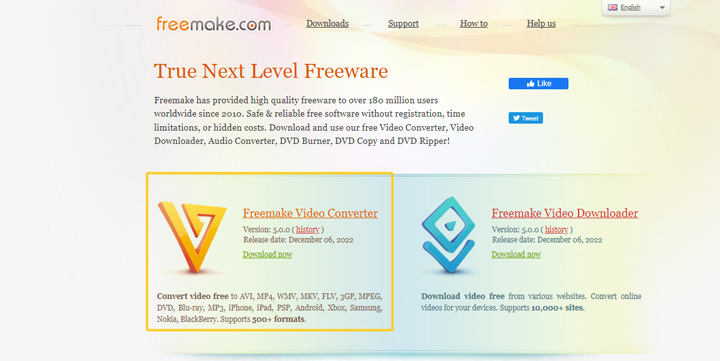
Freemake Video Converter System Requirements
To run Freemake Video Converter smoothly on your computer, here's what you'll need:
- Operating System: Windows 11, 10, 8.1, 8, 7, and Vista versions.
- Processor (CPU): Requires at least a 1 GHz processor from Intel, AMD, or a compatible brand. Most computers from the last 15 years should meet this requirement.
- Memory (RAM): 256 MB.
- Hard Drive Space: 50 MB of free space for installation.
- .NET Framework: Your system needs Microsoft .NET Framework version 4.5. If it's not already installed, Windows will prompt you, or it may come with the Freemake installer.
Freemake Video Converter Installation and Activation
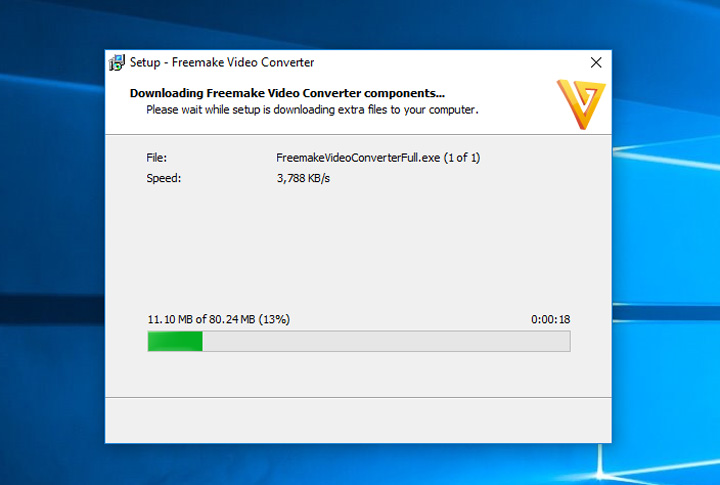
The process of acquiring Freemake Video Converter can be a bit indirect. When you download the software from the official website, you'll receive a small setup file. Upon double-clicking the file, you'll be prompted to choose between a complete installation or a custom installation. The program will then start downloading the necessary components. Once the download is complete, it will automatically extract the files and finish the installation process. To activate Freemake Video Converter, simply open the program, click on the Activation option within the software, and enter your unique Freemake activation key.
⚠️ Note:
However, it's important to note that since version 4.0, the installer has been known to include potentially unwanted software, such as a search toolbar from Conduit and SweetPacks malware. Although users can opt out of these additional programs during installation, the option to decline is often grayed out, which might make it seem like the option is unavailable. This can be misleading and lead to accidental installations of unwanted software.
Freemake Video Converter User Interface
The main interface of Freemake Video Converter can be a bit distracting due to the ads promoting its video downloader and audio converter products. However, since its focus is on a single function, it's still relatively easy to find the options you need.
At the top of the window, you'll see five import options: +Video, +Audio, +DVD, +Photo, and +Paste URL, allowing you to import videos, audio files, DVDs, photos, and even video links.
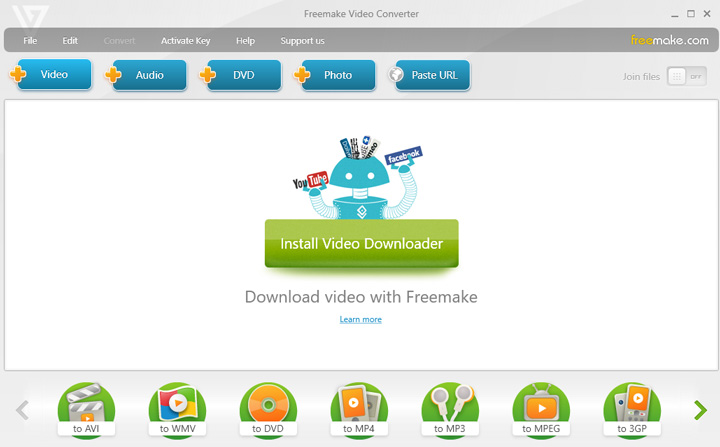
In the large middle section, there's an ad banner showcasing other products, like the audio converter and video downloader. The bottom of the main window displays a comprehensive array of output options, organized by formats, devices, and platforms. For example, the "To AVI" option allows you to convert videos to the AVI format, while the "To App" section lets you choose from devices like iPhone, iPod, and others.
Freemake Video Converter Conversion Feature
In this section, I will explore a range of features offered by Movavi Video Converter, from basic video conversion capabilities to advanced AI upscaling features. These features serve as essential criteria for assessing the software's suitability in meeting your specific needs.
Supported Formats and Codecs
While Freemake Video Converter claims to support over 500 formats and codec types, a closer look reveals several limitations. It disappointingly lacks support for many popular formats like HEVC, VP9, and AV1, which are known for their small file sizes and high-quality output. Additionally, it doesn't support professional editing-friendly formats like ProRes 422LT, ProRes Proxy, and ProRes 4444. Below are the formats supported by Freemake Video Converter.
Video Formats
avi, mp4, wmv, mkv, dvd, mpg, 3gp, flv, swf, tod, mts, mov, m4v, rm, qt, ts, amv, avchd, avs, bik, bnk, cavs, cdg, dpg, dv 1394, dxa, ea, ffm, film, film_cpk, flc, flh, fli, flm, flt, flx, gxf, h261, h263, h264, mj2, mjpg, mkm, mtv, mxf, nc, nut, nuv, ogm, ogv, pva, r3d, rax, rms, rmx, rpl, rtsp, sdp, smk, thp, vc1, vfw, vro.
Audio Formats
mp3, aac, ogg, wma, wav, flac, m4a, amr, ape, m4r, au, aif, aiff, aifc, ac3, adts, alaw, apc, caf, dts, gsd, gsm, mka, mlp, mmf, mp1, mp2, mpeg3, mpc, mp+, m2a, nut, oma, qcp, ra, rmj, shn, tta, voc, w64, wv, xa.
Image Formats
bmp, jpg, gif, png, tif, anm, dpx, pam, pbm, pcx, pgm, ppm, sgi, sr, ras, tga, txd.
Ready Preset Output Profiles
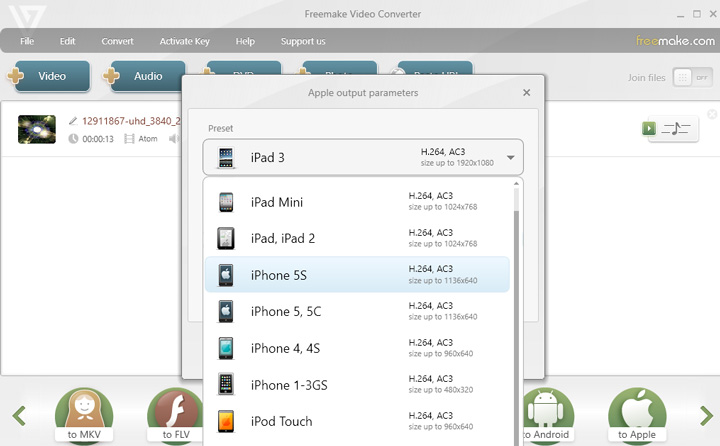
Freemake Video Converter offers a variety of output profiles designed for devices like iPhone, Samsung, Xbox, and Sony. However, many of these profiles are outdated.
For example, although the latest iPhone model is the iPhone 17, Freemake Video Converter only includes profiles up to the iPhone 5. Similarly, it has profiles for older devices like the Samsung Captivate SGH-i897, but fails to provide presets for popular brands like Motorola, Xiaomi, and others. Instead, it includes presets for less commonly used devices such as BlackBerry and Nokia. When it comes to video-sharing platforms, the only available preset is for YouTube.
Customizability
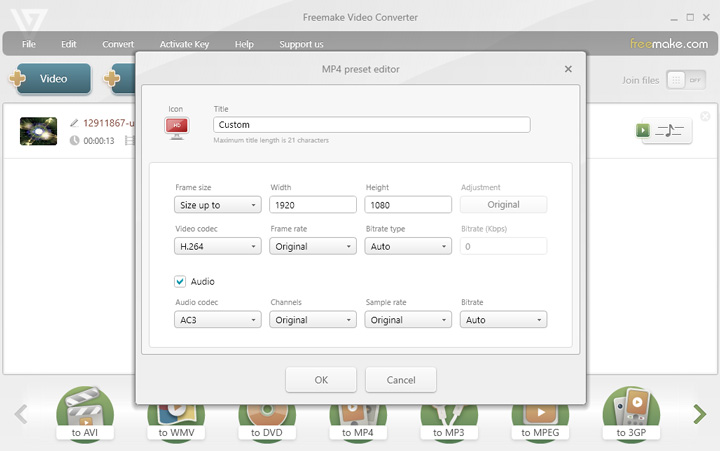
For more experienced users or those familiar with video decoding and encoding, the customization options in Freemake Video Converter may feel quite limited. You can adjust basic settings like resolution, video codec, frame rate, bitrate type, and bitrate. However, more advanced options such as GOP, CBR, VBR, and the ability to change profile levels when selecting H.264 are not available.
Freemake Video Converter Additional Features
Rip & burn DVD and Blu-ray
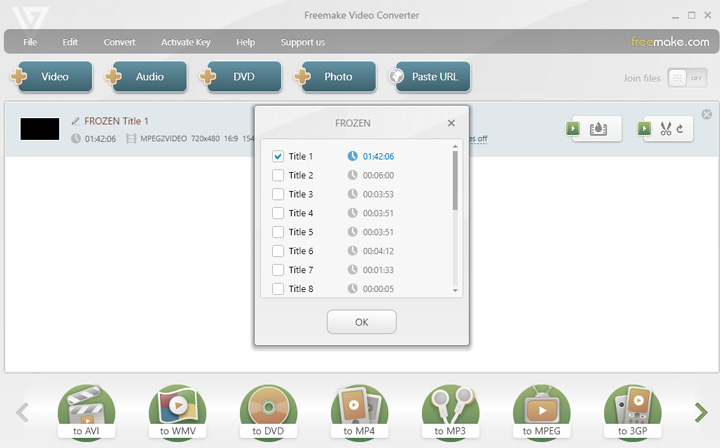
Freemake Video Converter allows you to rip DVDs to MP4, either with or without subtitles. It also lets you burn up to 40 hours of movies onto a single DVD disc, and you can save them as a DVD folder or create an ISO file. Additionally, the software supports converting MTS files from Blu-ray discs.
Basic video editing features
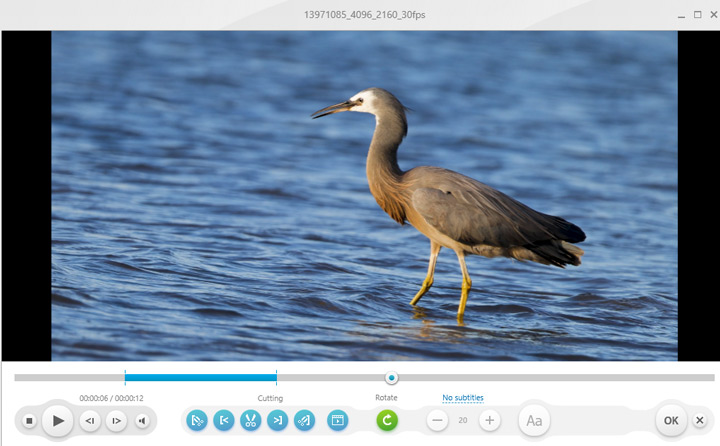
Freemake Video Converter provides basic video editing tools, allowing you to trim unwanted sections (though it doesn't support cutting multiple parts at once). You can rotate your video by 90° or 180°, and easily join MP4 and other clips together. It also lets you remove black bars, add subtitles in SRT, ASS, or SSA formats, and insert text watermarks. Additionally, you can add audio to your videos for a more customized touch.
Additional Media Features
- Create photo slideshows with images and music.
- Directly upload videos to YouTube (saves account info for frequent use).
- Download videos from sites like Facebook, Flickr, VK, YouTube, Vimeo, Dailymotion, etc. (However, during testing, I encountered errors and couldn't grab videos. It seems the standalone Freemake Video Downloader is needed for this feature.)
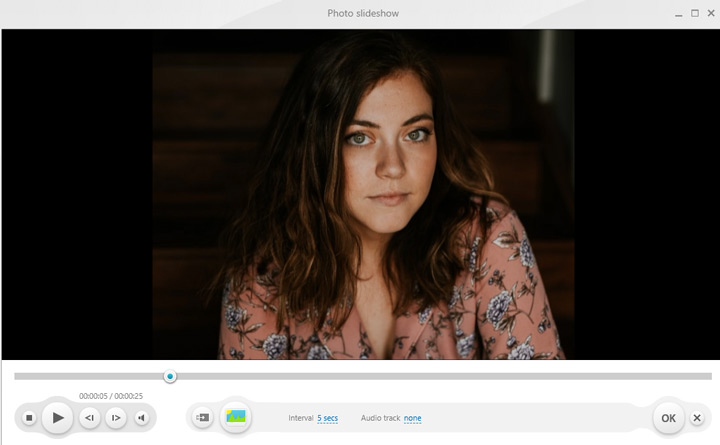
Let's Put It to the Test: Performance and Efficiency
Freemake Video Converter claims on its official website that it can offer conversion speeds up to 4x faster, depending on your PC's hardware configuration. However, this isn't particularly impressive when compared to other video converters. To put it to the test, I compared Freemake's performance against several popular alternatives. I used two video clips for testing:
- Clip 1: MOV (HEVC + AAC), 25FPS, 1920x1080p, 13s, 14.2MB
- Clip 2: MP4 (HEVC + AAC), 30FPS, 3840x2160p, 13s, 32MB
For Clip 1, I converted it from MP4 (H.264) to WebM (VP8) without changing the resolution or frame rate. For Clip 2, I converted 4K MP4 (HEVC + AAC) to 1080P MP4 (H.264 + AAC) without modifying the default encoding settings. This setup allowed me to gauge the speed and efficiency of Freemake Video Converter.
Conversion Speed
| Tools | Test|Clip 1 | Test|Clip 2 | ||||
|---|---|---|---|---|---|---|
Tool |
Time Spent |
Avg CPU Usage |
Avg Memory Usage |
Time Spent |
Avg CPU Usage |
Avg Memory Usage |
Freemake |
23s |
65% |
83% |
52s |
87% |
92% |
VideoProc |
8s |
3% |
97% |
12s |
36% |
53% |
Freemake Video Converter falls short in both speed and resource efficiency. During testing, it took noticeably longer to convert videos and consumed more CPU and memory compared to competitors like VideoProc Converter AI.
Conversion Quality
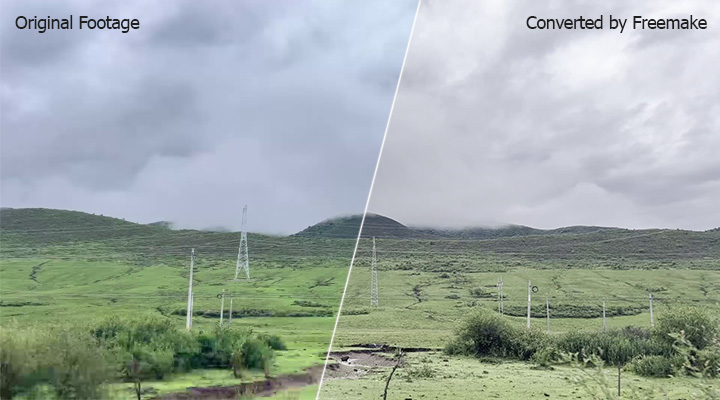
Quality is another key factor when evaluating a video converter. We all want to maintain as much image quality as possible during the conversion process. Unfortunately, Freemake Video Converter doesn't deliver on this front. From my testing, the output from Freemake showed significant quality loss. Specifically, with Clip 1, the colors were washed out, and noticeable pixelation appeared, which was very disappointing.
Freemake Video Converter Pricing
Many people wonder, "Is Freemake Video Converter free?" The answer is no. Despite its branding, Freemake markets itself as a free tool, but it doesn't clearly disclose that the software is not entirely free. Terms like "premium" or "upgrade" are conspicuously absent from its website, and it even has a "Support Us" option typically used by open-source projects.
However, since version 4.1.9.44, Freemake Video Converter adds a welcome screen at the start of videos, along with a large Freemake logo watermark in the center. To remove the watermark, users must pay for the Mega Pack plan, available on a weekly, monthly, or lifetime basis.
| Purchase Plan | 1 Week Trial | Month | Lifetime |
|---|---|---|---|
Price |
$0.95USD |
$39.95USD |
$59.95USD |
Watermark |
No |
No |
No |
Conversion Speed |
Up to 4x faster |
Up to 4x faster |
Up to 4x faster |
Full HD Support (1080p) |
No |
Yes |
Yes |
Basic Editing Tools |
No |
Yes |
Yes |
URL Conversion |
No |
Yes |
Yes |
TV/DVD Presets |
No |
Yes |
Yes |
Subtitle Editor |
No |
Yes |
Yes |
Pros and Cons of Freemake Video Converter
Pros
- It allows ripping DVDs, burning videos to DVDs, and handling some Blu-ray files.
- You can create photo slideshows with music.
- It offers a convenient option to upload converted videos directly to YouTube.
- It runs smoothly on most Windows computers, even older ones.
- Its main interface is generally easy to navigate for video conversion tasks.
Cons
- The "free" version adds a persistent, unavoidable watermark to all output videos.
- It is unmaintained and lacks support for modern video formats (like HEVC, AV1).
- It lacks 4K support, modern efficient output formats, and up-to-date device presets.
- Conversion processes are notably slower and consume a lot of system resources.
- Converted videos often show significant quality loss.
- Many users report getting unwanted adware or software during installation.
- Limited options to customize video encoding settings.
- The user interface contains prominent ads for other Freemake products.
Is Freemake Video Converter Safe
Freemake Video Converter is generally safe to use, but it's important to be cautious during installation. In the past, it has bundled unwanted software, often referred to as "crapware," which users need to opt out of. While many users have had positive experiences, some have reported issues with these bundled programs, which can pose potential risks. To stay safe, make sure to carefully uncheck or decline any additional offers during installation, and always scan the downloaded software with a trusted antivirus program.
Freemake Video Converter Alternative
After this hands-on review of Freemake Video Converter, it's clear that it falls short in many areas. If you're looking for a more capable and flexible alternative for modern video conversion, enhancement, and downloading needs, VideoProc Converter AI is a far better choice.
This powerful tool supports a wide range of formats, including AV1, HEVC, and ProRes, and removes resolution restrictions, allowing you to convert 4K, 8K, and beyond without hassle. Thanks to its high-quality engine, it maintains excellent picture and sound quality. Beyond core conversion, VideoProc Converter AI offers impressive features like AI-powered video and image enhancement, video compression, a full suite of video editing tools, and the ability to download videos from over 1,000 sites. Let's take a closer look at how it compares to Freemake Video Converter.
Download VideoProc Converter AI and experience the difference now!

Freemake Video Converter vs. VideoProc Converter AI: Quick Comparison
| Feature | Freemake Video Converter | VideoProc Converter AI |
|---|---|---|
Basic Information |
||
Latest update |
2022 |
2025 |
Oprating Systems |
Windows |
Windows, Mac |
Conversion Capabilities |
||
Supported Formats |
Can't output HEVC, VP9, ProRes. |
Support HEVC, AV1, ProRes, and 370+ formats |
Conversion Speed |
Up to 4x faster (quite slow) |
Up to 47x faster (blazing fast) |
Picture Quality |
Visible quality loss |
No visible Quality loss 👍 |
Additional Features |
||
Audio Conversion |
Limited supported |
Converts both lossy and lossless audio codecs |
Video Compression |
Not supported |
7 methods, incl. direct target size setting |
DVD Ripping |
Supported, but can't handle encrypted DVDs |
Supported, can handle encrypted DVDs |
Video Editing |
Merge, trim, rotate, subtitle, crop |
Merge, trim, rotate, flip, speed change, crop, defisheye, deshake, and more |
Downloading |
No |
Yes (Download online video/music/subtitle files) |
AI Features |
Not supported |
✨ AI enhance video, image, and audio |
Pricing Plans |
||
Monthly Pricing |
$39.95 |
$29.95 |
Lifetime Pricing |
$59.95 |
$49.95 |
Free Trial |
Yes, with watermark on output videos |
Yes, convert up to 5 minutes without watermark |
FAQs
1. Is Freemake Video Converter truly free?
No, Freemake Video Converter is not truly free. While it offers a free version, it adds a persistent watermark to all output videos. To remove this watermark and access other key features like editing tools and subtitle support, you need to purchase a paid plan (Mega Pack).
2. Does Freemake Video Converter support 4K or modern codecs like HEVC/AV1?
No, Freemake Video Converter does not support 4K output, nor does it support modern, efficient codecs like HEVC (H.265), AV1, or VP9, even in its paid version. This limitation makes it unsuitable for users dealing with high-resolution or next-generation video formats.
3. Is Freemake Video Converter safe to install?
Freemake Video Converter is generally safe, but caution is advised during installation. Past versions have been known to bundle unwanted software (adware or "crapware"). It's crucial to carefully review and uncheck any additional offers during the setup process and to scan the downloaded installer with a trusted antivirus program.
4. What are the main drawbacks of Freemake Video Converter?
The main drawbacks include a persistent watermark in the free version, lack of updates since 2022, no support for 4K or modern codecs (HEVC, AV1, VP9), slow conversion speeds, significant quality loss in converted videos, limited customization options, and the potential for bundled adware during installation. Its device presets are also outdated.




