
 VideoProc Converter
 New AI features are available
 Listed in
 The world of content creation is fundamentally shifting, powered by AI video generators that are making it possible for virtually anyone to conjure up dynamic visuals without needing to be a tech guru. Among the many tools like Google Veo 3, Hailuo AI, and others vying for attention, PixVerse AI has definitely made a splash. It promises to spin text and images into captivating video, and its presence on platforms like TikTok and Instagram speaks volumes.
Their official TikTok account alone has almost 600,000 followers, and one AI-generated "baby video" snagged over 56 million views in less than a month. That kind of impact immediately makes me wonder: how much does it truly deliver? This review dives deep into PixVerse AI, sharing my real-world experiences, laying out its genuine strengths and weaknesses, and helping you figure out if it's the right creative partner for your projects.
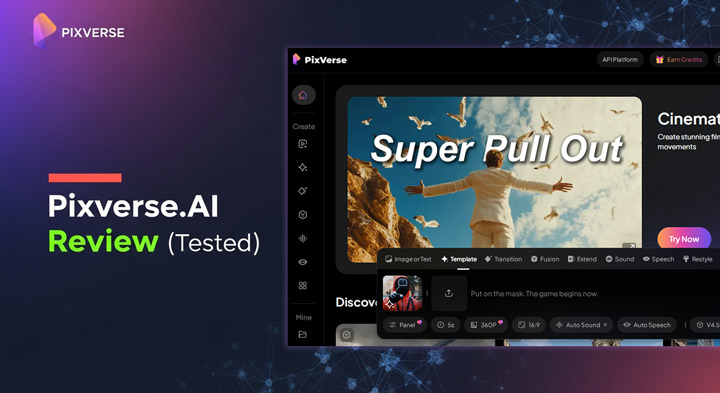
What Is PixVerse?
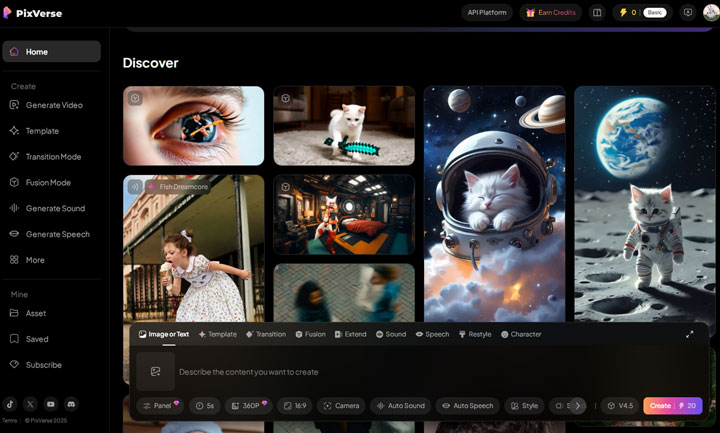
PixVerse AI is an AI-driven platform designed to generate videos from text prompts or static images. It provides a versatile solution for creating short-form content, allowing users to turn written descriptions into moving scenes (text-to-video), animate still images (image-to-video), or extend existing video clips with smooth transitions. Known for its quick output, PixVerse aims to meet the demands of content creators looking for an efficient way to produce engaging visuals, particularly for social media. With updates like v4.5, the platform continues to improve video quality, animation fluidity, and realism, enhancing its appeal for various creative projects.
Upscale and Enhance Your PixVerse AI Videos to 4K Clarity
PixVerse limits free users to 360p output, which feels pretty restrictive. Even paid accounts are capped at a maximum of 1080p. For those who need 4K clarity, we recommend upscaling with VideoProc Converter AI. This AI-powered video and image enhancer allows you to increase resolution by 200%, 300%, or even 400%, achieving stunning 4K quality while naturally enhancing details and overall video quality.

Key Features & Highlights of PixVerse AI (Official Claims)
PixVerse AI highlights a comprehensive suite of features aimed at streamlining video creation for users. Based on the platform's public statements and documentation, here's what PixVerse asserts it can do:
Core Video Generation: PixVerse lets you convert your written content into dynamic visuals or breathe life into static images with various effects. Plus, you're allowed to upload custom first and last frames for making the transition between different scenes smoother and more controllable.
Automatic Audio Generation: The platform generates audio to match your video scenes, which is said to align with the overall vibe of your content. You can include basic audio cues in your prompts, generate speech at a human pace, and choose from different voice tones.
Lip Syncing: PixVerse automatically synchronizes character lip movements with either provided text or generated audio, creating a more natural video experience. It supports multiple languages, including English, Chinese, French, and Japanese, and handles various audio options such as speeches, music, and operas. This feature is optimized for PixVerse-generated videos up to 30 seconds long.
Multiple Creation Modes: Beyond the fundamentals, PixVerse highlights additional features like "Video Extension" to seamlessly maintain continuity across clips, and "Character-to-Video" for designing and animating your own custom characters.
Trending AI Effects & Templates: The platform offers a diverse array of popular, AI-driven templates and effects, such as "AI Kiss," "AI Hug," "AI Dance," "Cinematic Camera," and "Epic Morph." These are specifically curated to boost your content's viral potential, especially on social media.
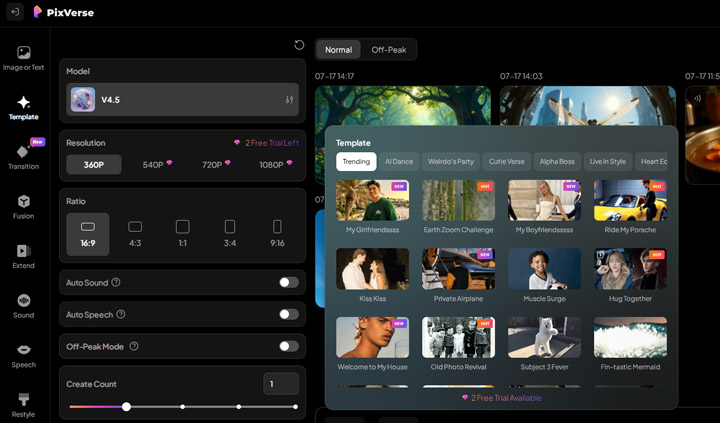
Pro Camera Movements: PixVerse claims to include over 20 film-quality camera movements—think horizontal glides, vertical tilts, zooms, crane shots, and rotations—all intended to add dynamic visual flair to your videos.
API & MCP Support: Its video generation features plug directly into ComfyUI using built-in API nodes, making it a simple addition to your existing workflow. Plus, PixVerse now supports the Model Context Protocol (MCP), which means it should work with other MCP-compatible apps like Claude or Cursor for a more connected and efficient experience across various AI services.
Pricing of PixVerse
You're absolutely right! Combining text and a table will make the pricing information much clearer and easier to digest without losing any crucial details. Here's the revised "PixVerse AI Pricing" section, presented more concisely with a table:
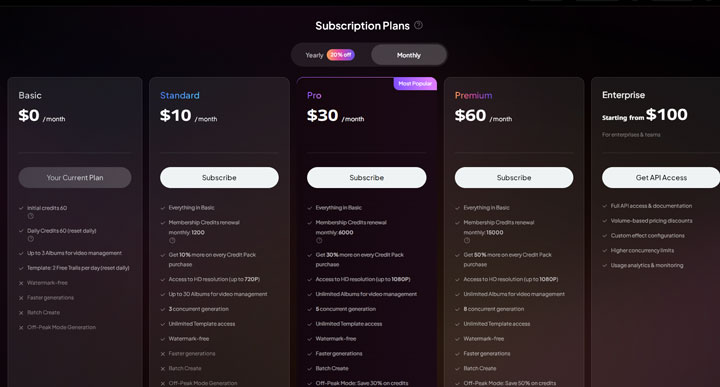
PixVerse AI offers various subscription plans to suit different user needs, from free access for casual exploration to powerful tiers for high-volume creation. All paid plans include watermark-free generations, faster processing, and batch creation. Opting for annual billing provides a 20% discount on monthly prices. Here's a concise overview of their main subscription plans:
| Plan Name | Monthly Cost | Billed Annually (20% off) | Monthly Credits | Max Resolution | Key Differentiators |
|---|---|---|---|---|---|
| Basic | $0 | N/A | 60 initial + 60 daily | 360p | 3 Albums, 2 free template trials/day |
| Standard | $8 | $96 | 1200 | 720P HD | 30 Albums, 3 concurrent gens, unlimited templates, etc. |
| Pro | $24 | $288 | 6000 | 1080P HD | Unlimited albums, 5 concurrent gens, unlimited templates |
| Premium | $48 | $576 | 15000 | 1080P HD | Unlimited albums, 8 concurrent gens, unlimited templates |
Enterprise Plan: For larger teams and businesses, an Enterprise plan starts from $100. This custom tier offers full API access, volume-based pricing discounts, configurable custom effects, higher concurrency limits, and dedicated usage analytics.
Hands-on with PixVerse AI: My Real-World Test and Insights
To truly get a feel for PixVerse AI, I put it through its paces with some specific, detailed prompts. My experience wasn't just about checking off features; it was about seeing if the tool lived up to its promises in the real world. What I found was a mix of impressive moments and some significant hurdles.
Test 1: Whimsical Scene Generation and Object Consistency
Prompt Used: "Ultra wide shot of an adorable white Bichon Frise dog wearing a high-quality skydiving suit, joyfully free-falling through a bright blue sky with fluffy clouds. Instead of a regular parachute, the dog's back is carrying a giant fluffy cotton candy shaped like a dog bone. The cotton candy is floating and swaying gently with the breeze. The scene should be detailed with high-resolution quality suitable for mobile phone wallpaper, with the dog's fur texture and the cotton candy glowing in the sunlight. The background features a vivid blue sky and soft clouds, with smooth and continuous motion as the dog floats through the air."
My Take: This was a strong start. PixVerse AI did a really good job with the core visuals here. The little Bichon Frise looked great, down to its fur texture, and the bone-shaped cotton candy was spot on, even swaying convincingly. The overall whimsical vibe came through beautifully. However, it completely missed the "ultra wide shot" instruction. This suggested to me that while it can visualize concepts well, precise camera framing might not be its strong suit.
Test 2: Automatic Audio Generation Capability
Prompt Used: "A warm and cozy kitchen, dimly lit by soft, golden lighting. A pot of hot soup is gently simmering on the stove, steam rising in delicate tendrils. The camera slowly zooms in, revealing the bubbling soup with floating carrots, onions, and herbs dancing in the broth."
My Take: The visual aspect was decent; it captured the cozy kitchen ambiance and the simmering soup quite well. My main focus here, though, was the automatic audio. And that's where things got odd. The sounds it generated were surprisingly unnatural and strange, definitely not matching the cozy kitchen vibe or the subtle bubbling I'd hoped for. This told me that PixVerse's automatic audio, at least for now, needs a lot of work.
Test 3: Complex Camera Movements and Imaginative Scenarios
Prompt Used: "A high-speed tracking shot through a futuristic metropolis, where towering buildings gleam with reflective, organic chrome surfaces that shimmer in the daylight. Above, a distant, glowing alien planet looms softly in the sky, casting an ethereal glow, while vibrant rainbows arc gracefully through the air. The camera zooms in sharply on a mechanical dragonfly, its intricate wings and glowing sensors at work inside the sleek, mirrored chrome structure, creating a surreal, otherworldly atmosphere."
My Take: This test was a significant letdown. PixVerse AI completely failed to interpret the crucial "camera zooms in sharply on a mechanical dragonfly" instruction. The mechanical dragonfly itself appeared neither mechanical nor detailed. The futuristic metropolis and glowing alien planet, intended to be grand, ended up looking like a disaster. In direct comparison to similar prompts I ran on Dreamina and Google Veo, PixVerse AI's performance here fell far short, clearly showing its struggles with complex, imaginative scenarios and precise camera choreography.
Output from Dreamina (with the same prompt):
Test 4: 2D Animated Scenes and Artistic Style
Prompt Used: "A breathtaking, painterly 2D animated continuous visual narrative, rendered in a lush, vibrant, and dreamlike style, infused with the intricate detail of traditional Japanese woodblock prints (Ukiyo-e). The scene follows a solitary, wise, and ancient creature �perhaps a giant, glowing turtle with a moss-covered shell and eyes like liquid amber. It moves slowly through a peaceful, sun-dappled forest glade, where towering, twisted trees create a cathedral-like canopy above. In the soft shadows, glowing, firefly-like insects flutter around, casting a gentle, magical light on the forest floor. The turtle's slow, deliberate steps leave tiny wildflowers blooming in its wake, and as it moves, the atmosphere pulses with a quiet, respectful energy. The forest itself seems to breathe in rhythm with the turtle, its leaves and branches shifting like a whispering lullaby. The color palette is a rich symphony of earthy greens, soft yellows, vibrant floral hues, and the turtle's glowing shell, illuminated with ethereal, bioluminescent light. The only sounds are the soft rustling of leaves, the gentle hum of the turtle's movement, and the occasional call of distant birds. The animation captures the profound, unspoken bond between the ancient creature and the ancient forest, a quiet, peaceful ode to nature's deep wisdom and the harmony of life."
My Take: Another letdown. The video didn't feel like a 2D animated clip at all; it leaned more towards a flawed realistic render. Crucially, it completely missed key details, like the "glowing shell" of the turtle. This showed me that PixVerse struggles with specific artistic styles, like Ukiyo-e, and has trouble rendering intricate, imaginative details when you're aiming for something non-realistic.
PixVerse AI Pros & Cons
After the comprehensive hands-on testing of PixVerse AI, I've gathered clear insights into its real-world performance. Here's my honest assessment of where it truly excels and where it notably falls short:
� Pros
- Good for Basic Visual Concepts: If your vision is straightforward, or a bit whimsical without needing ultra-precise control, PixVerse can actually churn out some pretty good visuals that stick to your descriptions.
- User-Friendly for Beginners: The interface is quite intuitive, making it easy for newcomers to AI tools or video editing to get started quickly with simple video generations.
- Accessible for Simple Projects: It's a decent entry point for casual users and new content creators who just want to play around with AI video without diving into complex software.
- Social Media Ready: For quick, attention-grabbing clips, especially those using trending effects or templates, PixVerse can be a great choice for social media.
�Cons
- Poor Handling of Camera Control: This was a consistent issue. PixVerse struggles to interpret and execute specific camera instructions, like "ultra wide shot" or "zoom in sharply," which severely limits creative direction.
- Unnatural Automatic Audio: The auto-generated sounds were a big letdown, often sounding weird and artificial, pulling you out of the video's atmosphere rather than enhancing it.
- Struggles with Complex, Imaginative Scenes: If your prompt involves a detailed, fantastical, or technically intricate scenario, PixVerse tends to fall apart, missing key elements and producing messy environments.
- Lacks True Artistic Style Control: Despite official claims, it had trouble delivering specific artistic styles (like 2D animation or Ukiyo-e) and often defaulted to a flawed realistic look.
- Inconsistent Object Fidelity in Motion: While it can render static object details well, maintaining that consistency when objects are moving or in complex, changing environments can be hit or miss.
- Not for Professionals (Yet): For those needing precise control, high cinematic quality, or the ability to render complex physics and imaginative elements accurately, PixVerse simply isn't on par with more advanced tools like Dreamina.
What Others' Opinion about PixVerse AI
Beyond my personal tests, understanding how the broader community views PixVerse AI offers crucial context. Across platforms like Reddit, X, and YouTube, user reviews paint a somewhat polarized picture, largely confirming what I encountered myself. Many users praise its speed and the creative potential for quick, engaging social media content. However, a significant portion highlights inconsistencies, unpredictable outputs for complex prompts, and limitations in free access, particularly regarding video resolution. This often means users need an external solution, like a video upscaler, to enhance the quality of their generated clips.
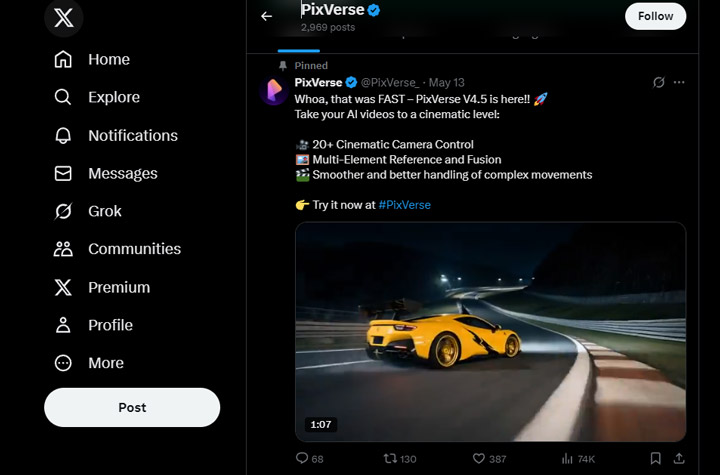
Here are some direct comments from users:
- "Just tested it. Its really fast." �@mhdfaran (X)
- "Just tried PixVerse V4.5 and was absolutely blown away. The cinematic camera control is next level, and the multi-element fusion makes everything feel so seamless. Massive upgrade." �@SarahAnnabels (X)
- "No matter where I make mine, they are utter garbage. It keeps backgrounds like lighting or rain frozen in mid-air; it merges animals together into one; it drops a whole new land (yes really) on top of the scene I started with. It's a total disaster." �@footofwrath (reddit.com)
- "Trying out PixVerse, and honestly, it's a total hit or miss. One moment, I have a 16-year-old beautiful girl, and the next�she randomly transforms into a giraffe mid-scene. It's wild! The AI has potential, but man, the unpredictability is insane. Anyone else getting these crazy results?" �@Biscotti6167 (reddit.com)
- "why this ai is not giving resolution 720p for free? this is giving only 360p for free which is useless." �@james-bond-007 (YouTube.com)
Who Is PixVerse AI For
Considering its strengths and weaknesses, PixVerse AI fits well with certain types of users and projects:
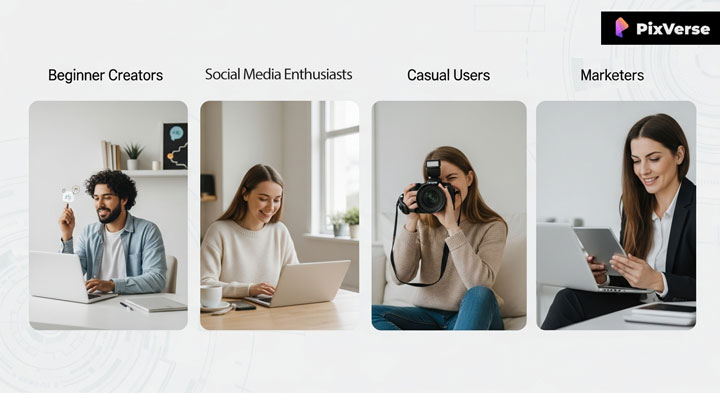
Beginner Content Creators: If you're just dipping your toes into video editing or AI tools, PixVerse AI offers an approachable way to generate initial video ideas.
Social Media Enthusiasts: For those looking to quickly make trending videos, short clips, or eye-catching visuals for TikTok, Instagram Reels, or YouTube Shorts, its template-driven approach and ease of use are a plus.
Casual Users and Hobbyists: If you're experimenting with AI video generation for personal enjoyment, creative exploration, or just for fun, without needing professional-grade results or precise control, PixVerse is a solid option.
Marketers with Simple Needs: Businesses needing quick, visually appealing (but not overly complex) promotional content might find PixVerse useful for rapid prototyping.
⚠� However, PixVerse AI is likely not the best fit for:
- Professional Video Editors and Filmmakers: Its current limitations in precise camera control, consistency, and handling complex narratives make it less suitable for high-fidelity, cinematic, or long-form productions.
- Artists and Designers Requiring Specific Styles: If you need to render videos in very particular artistic styles (e.g., Ukiyo-e, specific animation types), you'll probably be frustrated by its tendency to default to a more realistic—and often flawed—aesthetic.
- Users Needing Realistic Human/Animal Motion in Complex Scenarios: While it can handle basic object consistency, complex movements and interactions of characters might still show "uncanny valley" effects or inconsistencies.
FAQs About PixVerse
1. Is PixVerse AI completely free to use?
PixVerse AI offers a free plan with 60 daily login credits, allowing users to generate videos. However, free users may face some limitations, such as lower resolution output (e.g., 360p) and limited access to advanced features and templates. For those who need higher resolutions (up to 1080p) and additional credits, paid plans are available.
2. What are PixVerse AI's strengths for a beginner?
PixVerse AI is quite user-friendly for beginners due to its intuitive interface and quick generation times. It's excellent for creating basic visual concepts and leveraging trending effects for short-form social media content. If you're new to AI video, it provides an accessible entry point.
3. Can PixVerse AI create professional-quality videos?
While PixVerse AI can produce visually engaging clips, it currently struggles with the precise control, consistency, and fidelity required for professional-grade cinematic or long-form productions. It often falls short on complex camera movements, intricate imaginative scenes, and consistent character rendering compared to more advanced tools like RunwayML or Google Veo 3.
4. Does PixVerse AI support multiple languages for lip-syncing?
Yes, PixVerse AI's lip-syncing feature supports multiple languages, including English, Chinese, French, and Japanese, for character lip synchronization with provided text or generated audio. This feature is optimized for PixVerse-generated videos up to 30 seconds long.
5. What are the common challenges users face with PixVerse AI?
Common challenges include inconsistent output for complex or highly imaginative prompts, poor execution of specific camera angle instructions, unnatural automatic audio generation, and difficulty maintaining precise artistic styles. Free users also frequently note limitations in video resolution, often requiring external upscalers.
6. Can I use PixVerse AI on my mobile device?
As of the latest information, PixVerse AI functions primarily as a web-based application, making it accessible through mobile browsers. However, it does not currently list a native Android or iOS app on official app stores, though unofficial APKs might exist (use with caution).
7. How does PixVerse AI compare to other AI video generators like RunwayML or Dreamina?
PixVerse AI stands out for its ease of use and speed, making it great for quick social media content. However, tools like RunwayML generally offer a wider suite of advanced AI video generation tools, more sophisticated AI models (like Gen-1 and Gen-2), and greater creative control for professional-grade outputs. Dreamina also offers features like HD upscale and frame interpolation. PixVerse is more accessible and simpler for basic tasks, while others provide more depth and precision.



