
 New AI features are available
AV1 (AOMedia Video 1), developed by the Alliance for Open Media (AOMedia), is evolving rapidly with frequent updates and optimizations. For instance, the SVT-AV1 v3.1.0 release (July 24, 2025) improved encoding speed, visual quality, and real-time communication (RTC) performance. While AV1 offers next-generation compression efficiency and royalty-free licensing, HEVC (H.265), developed by the MPEG group under the Joint Collaborative Team on Video Coding (JCT-VC), remains a widely used standard with mature hardware support.
In this post, we'll explore what HEVC and AV1 are, how efficient their compression is, their compatibility, as well as the practical implications of both codecs for streaming video and content creation. Ultimately, we aim to answer which codec is best for today's video ecosystem and, more importantly, which one meets your needs, whether for streaming, high-resolution downloads, or content creation.
AV1 vs. HEVC: The Quick Take
HEVC (H.265) offers immediate compatibility and established hardware support. AV1, on the other hand, is rapidly gaining ground as the strategic choice for future-proofing, maximizing compression efficiency, and avoiding licensing fees. For readers who want a quick comparison before we dive deeper, here's a snapshot of how AV1 and HEVC stack up:
| Feature | AV1 (AOMedia Video 1) | HEVC (H.265) |
|---|---|---|
| Compression Efficiency | Superior (approx. 30% better than HEVC) | Excellent, but less efficient than AV1 |
| Video Quality | Higher quality at lower bitrates | Good quality, but requires higher bitrates for parity |
| Hardware Acceleration | Growing rapidly (newer devices, GPUs) | Widespread and mature (most modern devices) |
| Browser/Device Support | Strong in modern browsers & streaming platforms; growing device support | Near-universal on new devices and many older ones |
| Licensing Model | Royalty-free (open-source) | Proprietary (complex, fragmented patent pools) |

Turn Your Videos to AV1, HEVC, and 370+ Formats Effortlessly
With VideoProc Converter AI, you can easily convert videos to HEVC, AV1, or 370+ other formats without noticeable quality loss. It helps shrink file sizes, improve compatibility, and make your videos more editable, shareable, and playable across PCs, Macs, TVs, and portable devices. Thanks to level-3 GPU acceleration for Nvidia, AMD, and Intel, conversions can be up to 47× faster, making it a one-stop solution for all your digital media needs.
What They Are: AV1 and HEVC
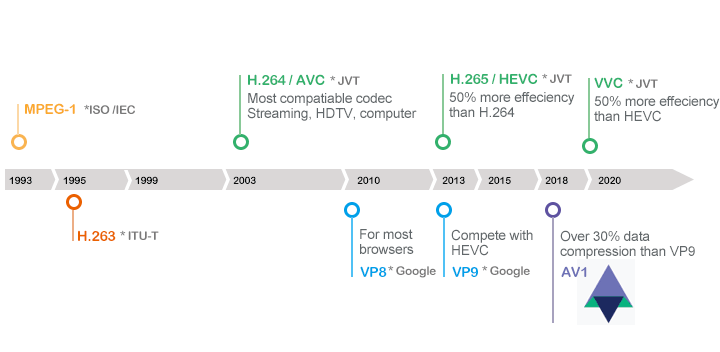
❓ What Is AV1
The Alliance for Open Media (AOMedia), which includes tech giants like Amazon, Google, and Netflix, developed AV1 to be a royalty-free alternative to HEVC. This addresses the concerns about HEVC's costly and uncertain patent situation. Here're the key features of AV1:
- Open-Source and Royalty-Free: No licensing fees, ideal for creators and distributors.
- Superior Compression: It's much more effecient than HEVC, H.264, and many older codecs. Testing by Yu Liu at Meta shows AV1 reduce file sizes by 30%–50% compared to HEVC while maintaining similar quality.
- Granular Block Partitioning: Hierarchical quadtree blocks (4×4 to 64×64) for more adaptive compression than HEVC.
- Sophisticated Prediction: AV1 uses dynamic motion vector referencing and advanced entropy coding to predict pixel changes more accurately, improving compression and visual quality, especially in complex motion scenes.
- In-Loop Filters: Comprehensive filters applied during encoding to reduce artifacts and enhance visual quality.
❓ What Is HEVC
HEVC (High Efficiency Video Coding), also known as H.265, is the successor to the widely used H.264 codec. It was designed to offer 25% to 50% better compression than H.264 while maintaining the same quality and supports resolutions up to 8K Ultra HD. Let's check the key features of HEVC:
- Improved Compression to its succeeder: HEVC offers 25%–50% better compression than H.264 at the same quality.
- Flexible Coding Units: Uses Coding Tree Units (CTUs) up to 64x64 pixels, which are more adaptable than H.264's fixed macroblocks, especially for high-resolution content.
- Advanced Prediction: Offers 35 intra-prediction modes, enabling more accurate modeling of details within a frame.
- Quality Refinement: Includes a Sample Adaptive Offset (SAO) filter to reduce artifacts and improve visual quality.
AV1 vs HEVC: Performance Benchmarks
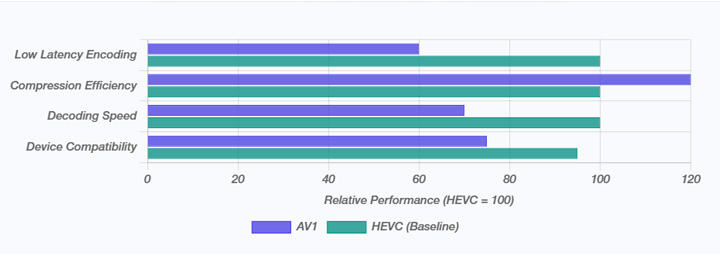
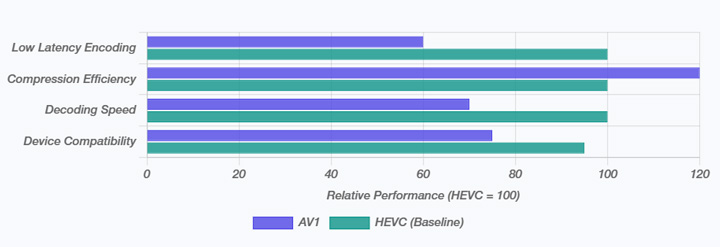
AV1 generally saves more bandwidth, while HEVC remains faster and more practical for real-time use. The trade-off comes down to efficiency vs. speed, depending on the context. This section breaks down how the trade-offs shift across different contexts.
Average Use Cases
On average, AV1 delivers ~30% better compression efficiency than HEVC, meaning the same quality at lower bitrates. This translates to major bandwidth savings for high-volume streaming platforms. The downside is speed: AV1 encoding is typically about 3× slower than HEVC, which makes it more practical for on-demand content that's encoded once but streamed many times.
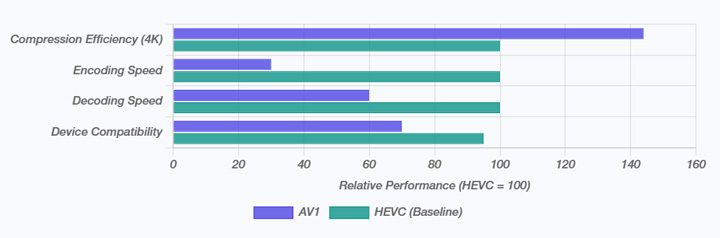
4K Ultra HD
At higher resolutions, AV1's advantage grows, achieving over 40% bitrate savings compared to HEVC. This is especially valuable for delivering 4K streams over limited connections. However, the computational complexity of encoding 4K exacerbates AV1's slower speed, leading to much longer processing times.
Live Streaming
For real-time applications, HEVC still has the edge thanks to its mature encoders and lower latency. This makes it more reliable for live streaming today. That said, optimized AV1 encoders are catching up quickly—Microsoft, for example, already deploys AV1 in video conferencing to cut bandwidth use.
AV1 vs HEVC: The Real-World Results
While aggregated benchmarks show the general trends, we also conducted our own controlled test to see how AV1 and HEVC perform on real-world content. For this, we used a ProRes video as the source, since its near-lossless quality makes it ideal for a fair comparison between codecs. The transcoding was done with VideoProc Converter AI, which supports over 370 input formats and more than 420 output options, making it a versatile tool for such evaluations.
Test Setup:
- Source: ProRes 444, 4K landscape footage
- Resolutions: 1080p and 4K
- Encoders: AOM AV1, Apple VT HEVC Encoder
- Bitrates: 3500 kbps (1080p), 4000 kbps (1080p) , 13,000kbps(4K), and 15,000 kbps (4K)
- Rate Control: Constant Bitrate (CBR)
Metrics Evaluated:
- Visual Quality: VMAF scores and side-by-side subjective assessment
- File Size: Comparison of final output files
- Encoding Time: CPU/GPU time required for each codec
Test Results:
| Codec | Resolution | Bitrate | Video Quality | Artifacts | Notes |
|---|---|---|---|---|---|
AV1 |
1080p |
4000 |
Excellent |
Minimal blocking or banding |
Handles content well at high-quality streaming. |
HEVC |
1080p |
4000 |
Very Good |
Slight blocking in textured areas |
Reliable for wide device compatibility. |
AV1 |
1080p |
3500 |
Very Good |
Minimal blocking |
Shows compression advantage with smaller size. |
HEVC |
1080p |
3500 |
Good |
Noticeable blocking |
Quality drops at lower bitrate. |
AV1 |
4K |
13,000 |
Very Good |
Minimal blocking |
Demonstrates AV1's efficiency at lower bitrate. |
HEVC |
4K |
13,000 |
Good |
Slightly blurred textures |
Quality noticeably drops at lower bitrate. |
AV1 |
4K |
15,000 |
Excellent |
Minimal blocking, minimal banding |
Maintains superior quality for high-resolution streaming. |
HEVC |
4K |
15,000 |
Very Good |
Slightly softer details |
Still good for 4K, but needs higher bitrate for parity. |
📌 Key Observations:
- Compression Efficiency: AV1 produced smaller files with equal or better visual quality.
- Detail Preservation: Fine textures and subtle gradients were better kept in AV1 outputs.
- Encoding Time: AV1 needs more processing time. HEVC benefited from faster GPU accelerated encoding.
Compatibility & Hardware Support
Neither HEVC (H.265) nor AV1 matches H.264's widespread compatibility, but each has its own strengths and limitations.
HEVC (H.265) is more widely used. However, devices like Windows 10/11 require additional extensions for playback, and lower-end hardware may struggle to handle it. AV1 is rapidly gaining support across modern devices and major platforms. However, older devices may still face challenges with decoding, making hardware limitations a key factor for both codecs.
| Platform / Device | HEVC (H.265) | AV1 |
|---|---|---|
OS |
|
|
Browser |
|
|
GPU Support |
|
|
Smart TVs |
Supported on newer models |
Supported on recent Samsung, LG, Sony TVs |
Streaming |
Apple TV, Netflix, Amazon Prime Video |
YouTube, Netflix, Apple TV, Amazon Prime Video... |
Licensing & Cost Considerations
Licensing has been a major factor in the adoption of these codecs. HEVC operates under a proprietary framework, requiring royalties to multiple patent pools, including MPEG LA, HEVC Advance, and Velos Media. The total cost can be unpredictable, and negotiating licenses is complex, creating a barrier for companies, particularly in open-source projects and web-based streaming.
AV1, in contrast, was designed as royalty-free. No fees are required to encode, decode, or distribute AV1 content, making it highly attractive for web browsers, open-source projects, and large-scale streaming services. Backing from Google, Netflix, Amazon, Apple, Microsoft, and Meta ensures wide support and predictable adoption without legal or financial hurdles. This royalty-free model simplifies development, encourages innovation, and lowers costs, accelerating adoption across platforms.
| Aspect | HEVC (H.265) | AV1 |
|---|---|---|
Licensing Model |
Proprietary, multiple patent pools |
Royalty-free |
Cost Impact |
Potentially high, unpredictable |
Free, predictable |
Adoption Effect |
Slower in open-source/web platforms |
Encourages widespread adoption |
Use Cases & Recommendations
After examining performance benchmarks and device support, it's clear that neither HEVC nor AV1 is universally superior. Choosing the right codec depends on your priorities—whether that's compatibility, streaming efficiency, cost, or workflow requirements. The following sections break down where each codec shines and the scenarios where they are most effective.
✔️ Targeting Legacy Devices: HEVC works best when you need broad hardware support and smooth playback on older devices. Its mature acceleration and established ecosystem make it reliable for professional workflows that prioritize speed and compatibility.
✔️ Streaming Efficiency & High-Resolution Content: AV1 excels in reducing file sizes while maintaining high quality, which is ideal for 4K/8K streaming or large libraries. Its royalty-free model also avoids licensing hurdles, making it attractive for cost-sensitive projects.
✔️ Live Streaming & Real-Time Use: HEVC still leads in scenarios requiring low-latency encoding, such as live broadcasts or video conferencing. AV1 is improving quickly, but optimized encoders are still catching up for real-time applications.
How to Convert Your Video to AV1 or HEVC
Now, you may already know which codec fits your needs. If you want to take advantage of AV1's efficient compression or HEVC's hardware-accelerated playback, VideoProc Converter AI makes the process simple. This best video converter supports a wide range of formats and allows you to adjust output resolution, bitrate, and codec settings in just a few clicks. Whether you're preparing high-resolution content for streaming, archiving videos, or optimizing files for mobile devices, it lets you convert to AV1 or HEVC quickly, maintaining high quality while controlling file size. Plus, it comes loaded with powerful extra tools, letting you effortlessly upscale and enhance videos and images with AI, make quick edits, download online videos, and much more!

Future Outlook
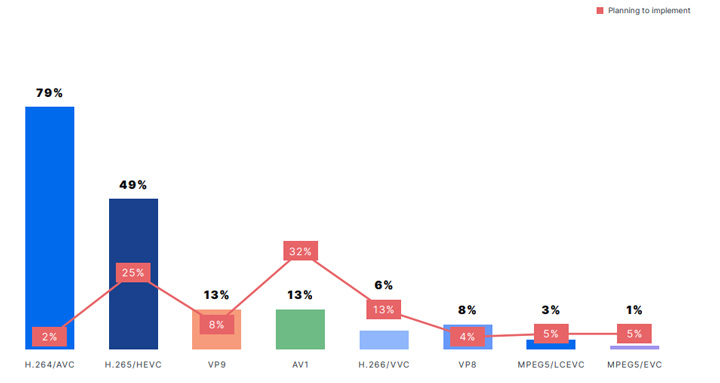
Looking ahead, AV1 is positioned as the future-proof codec for digital video. Its royalty-free model, superior compression, and strong backing from AOMedia members make continued development and adoption likely. AV1 is expected to become the standard for online video, especially for 4K, 8K, and emerging VR/AR applications where bandwidth and latency are critical. Ongoing encoder optimizations and expanding hardware support will further strengthen its position. AOMedia is also working on future iterations like AV2, ensuring continuous innovation in the open-source space.
HEVC will remain relevant, mainly for legacy systems, broadcast, and physical media, or where existing hardware requires it. However, its growth is plateauing, as the industry increasingly favors royalty-free codecs for cost predictability and open innovation. While HEVC won't disappear soon, AV1 is steadily becoming the leading choice for new deployments.
FAQs
1. What are the key differences between AV1 and HEVC?
AV1 offers superior compression efficiency (around 30% better) and is royalty-free, making it ideal for future-proofing and cost-sensitive projects. HEVC provides excellent compression but is less efficient than AV1 and operates under a proprietary licensing model with associated costs. HEVC also has more mature and widespread hardware acceleration currently, while AV1's hardware support is rapidly growing on newer devices.
2. Which codec is better for my needs, AV1 or HEVC?
The "better" codec depends on your priorities. Choose AV1 for maximum compression efficiency, future-proofing, and avoiding licensing fees, especially for high-resolution streaming and large content libraries. Choose HEVC if you need broad compatibility with older devices, mature hardware acceleration, or for low-latency live streaming where its encoders are currently more optimized.
3. Do I need to pay for AV1 or HEVC codecs?
AV1 is designed to be royalty-free, meaning you generally don't need to pay licensing fees to encode, decode, or distribute AV1 content. For HEVC, on Windows, you might encounter prompts to purchase the "HEVC Video Extensions" from the Microsoft Store for $0.99. However, you can often find free alternatives like third-party media players (e.g., VLC) or free codec packs that include HEVC support.
4. How can I play AV1 or HEVC videos on Windows 10/11?
To play AV1 or HEVC videos on Windows, you have several options:
- Install a third-party media player: Players like VLC Media Player or 5KPlayer often have built-in support for both AV1 and HEVC, allowing playback without additional system codecs.
- Install official extensions (for HEVC): For HEVC, you need to install the "HEVC Video Extensions" from the Microsoft Store (sometimes free from device manufacturer, sometimes $0.99). AV1 support is increasingly integrated into modern browsers and some system components.
- Install codec packs: Comprehensive codec packs like K-Lite Codec Pack or Media Player Codec Pack can add system-wide support for both AV1 and HEVC.
- Convert the video: If you encounter persistent playback issues, consider converting your AV1 or HEVC video to a more widely supported format like H.264 using VideoProc Converter AI. Simply click the download button below to install it on your Windows or Mac.
5. How do I know if AV1 or HEVC support is installed on my system?
The easiest way to check is to try playing an AV1 or HEVC video file using your preferred media player (e.g., Windows Media Player, Movies & TV app). If it plays smoothly, the necessary codecs are likely installed or natively supported. For a more technical check, some media players (like VLC) can show codec information for the playing file. You can also check the "Technical Support Information" in Windows Media Player (Help > About Windows Media Player) to see a list of installed codecs, though this might not explicitly list "AV1" or "HEVC" as separate entries but rather as part of a codec pack.




