
 Download Online Videos & AI Upscale to HD/4K!
If you ever needed to save a video from YouTube or another streaming site, you've probably heard of YouTube-dl. For years it was the go-to tool for grabbing a video or playlist for offline viewing. But a lot has changed since its heyday. Development on the original project has slowed dramatically, while a newer fork called yt-dlp has taken off.
So what are the differences between yt-dlp vs YouTube-dl, and which one should you use? We tested both programs so you don't have to try them out yourself. Here's what you need to know when deciding which tool to use.
What Do These Programs Do
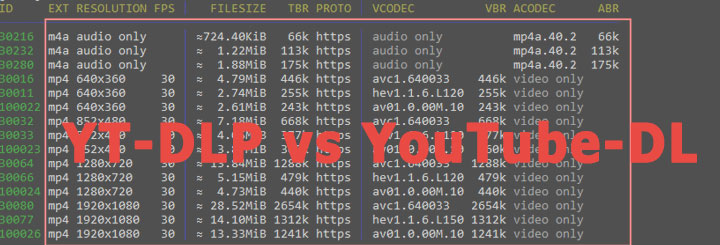
Both YouTube-dl and yt-dlp are command-line tools that download videos and audio from YouTube and hundreds of other sites. The newer yt-dlp project began in 2021 to modernize YouTube-dl and introduce new features. They are both free, open source and available on Windows, macOS and Linux.
Differences in Feature Sets
Both YouTube-dl and yt-dlp are similarly easy, or tricky, to use depending on your comfort with terminal tools. There is no significant difference in ease-of-use. If you can use one, you can use the other. In terms of functionality, however, yt-dlp preserves everything YouTube-dl does while offering a suite of modern conveniences.
I've tried both programs, and here's what I found. If you are new to this, here's our simple guide on how to use yt-dlp.
1. Format Selection
When I used YouTube-dl with its default settings, it sometimes grabbed lower-resolution files because it chooses based on the highest bitrate. Switching to yt-dlp, I saw it automatically selected higher resolutions and better codecs like VP9 or AV1 for me. I didn't have to remember extra flags. Yet if I preferred the old behavior, I could still override the defaults. It was a subtle change, but the resulting files looked noticeably sharper on a large screen.
2. Download Speed
Download speed turned out to be another area where the tools diverged. YouTube-dl downloads video segments one after another, which worked fine until certain streaming sites began throttling connections. When I downloaded a long playlist with YouTube-dl, speeds sometimes dropped to tens of kilobytes per second.
Running the same command with yt-dlp was dramatically different. yt-dlp can download video fragments in parallel using multiple threads. I didn't expect such a noticeable difference, and if you are on a slower connection, this feature alone can be a deciding factor.
3. Post-Processing
Beyond downloading, both tools can merge separate audio and video streams using FFmpeg. In YouTube-dl, adding subtitles or thumbnails requires additional steps, and there is no built-in way to split a video by chapter.
yt-dlp wraps these actions into single commands: you can embed subtitles and thumbnails or split chapters into individual files with a flag. For someone archiving long lectures or concerts, this automation is a time saver.
4. SponsorBlock Integration
YouTube-dl has no integration with SponsorBlock, so sponsored segments in YouTube videos are played back in full. To remove them I had to edit the file manually.
Things are different with yt-dlp. yt-dlp has an optional SponsorBlock support. With a single flag the program marked or skipped sponsored segments, saving me the trouble of trimming them by hand.
5. Plugin Support
With yt-dlp, you can drop external extractors or post-processors into a folder and extend the tool's capabilities. YouTube-dl doesn't offer an official plugin mechanism, so you are limited to built-in site support. For most people the difference may not matter, but power users appreciate the freedom to add custom modules.
6. Additional Features
yt-dlp also includes support for newer YouTube features that YouTube-dl hasn't caught up with: downloading shorts, stories, channel mixes, or searching YouTube directly from the command line. It even extracts cookies from your browser to access age-restricted or logged-in content and lets you download specific time ranges or chapters. These conveniences do not exist in the original tool.
Community and Development
The health of an open-source project is often reflected in its update activity. YouTube-dl has seen little movement since its last release in December 2021. Pull requests and bug reports can linger for months without attention. Add to that the increasingly frequent platform changes, and users are forced to seek out more stable and up-to-date YouTube-dl alternatives.
yt-dlp, in contrast, thrives on active development. Contributors quickly accept pull requests, fix bugs and roll out new releases. By 2025 the project had over 130k stars on GitHub and a vibrant Discord and Reddit community. For everyday reliability, yt-dlp is the safer bet.
Graphical Interface Alternative
While yt-dlp and YouTube-dl are powerful, they are purely command-line tools. Not everyone is comfortable typing commands or tweaking flags. If you'd rather click through a graphical interface, VideoProc Converter AI is a commercial program that features equally powerful download capabilities.
VideoProc Converter AI has a built-in downloader that can grab media files from about 1000 platforms and save them in various resolutions and formats. The downloader supports batch downloads from different sites and can grab videos in the best available quality, up to 8K if supported.
VideoProc Converter AI - GUI Media Downloader Alternative
- Support 1000+ sites, YouTube, Facebook, Vimeo, TikTok, etc.
- List all available formats and quality, audio-only, 1080p, 4K, up to 8K
- Batch download video streams, live videos, playlists, channels and audio
- Convert downloaded content to 420+ codecs and formats in one go
- More frequent updates and maintenance for smooth downloads
- Additional utilities: AI tools, video conversion, compression, DVD backup, etc.

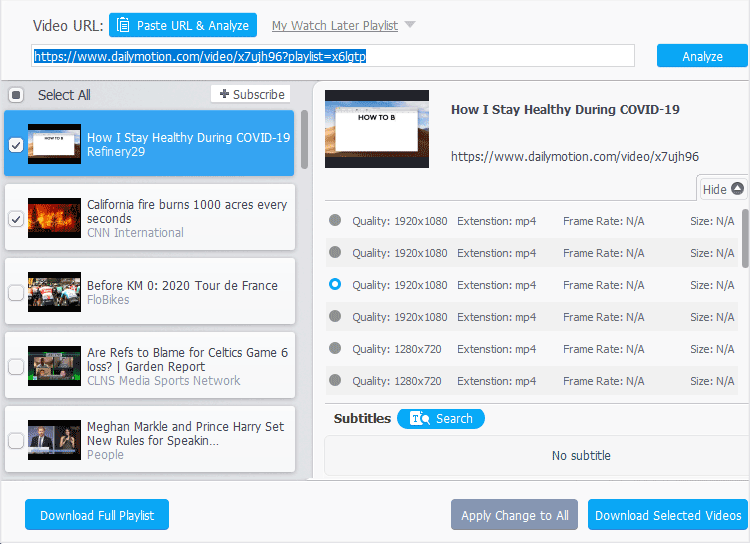
It's quite easy to use. After you paste the link, the program analyzes it and returns all available formats. Instead of entering format codes, you choose options from dropdown menus and buttons, which makes the process approachable for beginners. The program's emphasis on hardware acceleration means downloads and processing can happen quickly.
Bottom Line
That's all for yt-dlp vs YouTube-dl. The two programs share the same foundation and can coexist comfortably on your computer. The main difference is that yt-dlp is a fork of YouTube-dl, more actively maintained, faster, and more feature-rich, while the original YouTube-dl project is largely unmaintained. For users comfortable with terminals, yt-dlp is the recommended choice.
For the average user, we believe VideoProc Converter AI is a good alternative with almost equally powerful features and a user-friendly GUI. Its built-in media downloader can batch and quickly save videos, music, or playlists from approximately 1000 sites. The program has been running stably since 2018 with active, fast-paced development, and frequent updates.




